Windows 7 limited access

Panda4cash

New member
Local time
7:14 PM
Messages
29
I have a problem with my computer and its connectivity to the Internet. This is only my computer in the house that has this problem. So the monitor icon on the bottom right of the screen has a red x on it. When I click on it, it shows the Internet I'm connected to but says "limited access" on it. I didn't have this problem before but this has been happening for a while. Internet browsing has been a lot slower. I tried troubleshooting, updating drivers, disconnecting and reconnecting, deleting some unneeded networks, but nothing works. Problem still persists. I am running wireless connection. Please help and thank you all
 

My Computer

Computer type
PC/Desktop
Computer Manufacturer/Model Number
Gigabyte
OS
Windows 7 Ultimate 64bit
CPU
AMD FX 6300 3.5GHz
Motherboard
Gigabyte GA-78LMT-USB3 (rev. 5.0)
Memory
12GB
Graphics Card(s)
GIGABYTE RADEON HD 6670
Monitor(s) Displays
1
Screen Resolution
1920x1080
Hard Drives
Western Digital 1TB 5400RPM
PSU
Thermaltake 600W
Case
Thermaltake commander MS-I
Cooling
120mm back fan and stock CPU cooler
Keyboard
Microsoft comfort desktop 5000
Mouse
Logitech G700 Wireless Gaming mouse
Internet Speed
15/5 Verizon FIOS
Antivirus
Microsoft Security Essentials
Browser
Google Chrome
This usually means that your Wireless card sees the signal and attempts to connect but cannot obtain a valid IP


Open command prompt, (click start, Type cmd in the search box and press enter)
then type ipconfig and press enter.
What is your IP address? / default gatway.

Has the wireless password changed recently?.
Have you tried removing the network completely and then re-connect?.
Go to Control Panel - Network and sharing Centre - Manage Wireless Networks, Remove yours from the list and close. Then bottom right, right click on the wireless Icon, then select "connect to a Network"
Enter your Wireless code. Then Test.
 

My Computer

Computer Manufacturer/Model Number
Cooler Master
OS
Windows 7 Home Premium 64 Bit
CPU
Core I7 1155 3.4GHZ
Memory
8GB DDR 1600
Hard Drives
64 GB SSD - OS
1TB - DATA
PSU
340 Watt Corsair
Case
Cooler Master
Cooling
Cooler Master
I have a problem with my computer and its connectivity to the Internet. This is only my computer in the house that has this problem. So the monitor icon on the bottom right of the screen has a red x on it. When I click on it, it shows the Internet I'm connected to but says "limited access" on it. I didn't have this problem before but this has been happening for a while. Internet browsing has been a lot slower. I tried troubleshooting, updating drivers, disconnecting and reconnecting, deleting some unneeded networks, but nothing works. Problem still persists. I am running wireless connection. Please help and thank you all

The monitor icon usually relates to a disconnected Ethernet device. What is the wireless icon showing?

It sounds like this network needs a reset, possibly winsock or TCP/IP has something wrong with it.

Please unzip and run the file IPresetAll , let it run until your machine reboots.

After that please post a screen shot of the ipconfig/all from this machine.

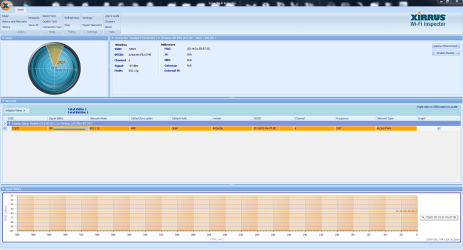
Posting a screen shot of Xirrus would also be helpful because it shows the type of security and encryption you are using and also shows the wireless channels in your area. :)

Wi-Fi Inspector | Xirrus
 

Attachments

Last edited:

My Computer

Computer type
PC/Desktop
Computer Manufacturer/Model Number
Home built
OS
Windows 7 Ult, Windows 8.1 Pro,
CPU
Q9650-4.275GHz, E8600 4.5GHz, E6750-3.8GHz
Motherboard
Evga 780i FTW
Memory
G.Skill PC2 9600 1200Mhz 5 5 5 15 2T
Graphics Card(s)
GTX480
Sound Card
Asus Xonar D2
Monitor(s) Displays
HannsG
Screen Resolution
1680X1050
Hard Drives
GSkill Phoenix Pro 120GB SSD
PSU
ThermalTake Toughpower 1000Watt modular
Case
ThermalTake XaserV
Cooling
Xigmatek S1283
Keyboard
Logitech G15
Mouse
Logitech G9
Internet Speed
T1
CMD.PNG
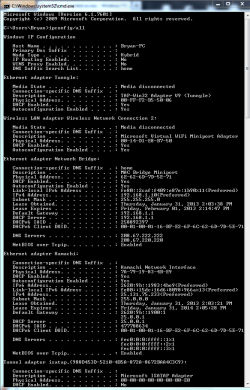
Here is the CMD properties from ipconfig/all
I did try the step above saying remove my network and recnnecting with WEP Key. It still has limited connectivity. I forgot to mention that i have a network bridge from my Xbox 360 to this computer. SO to play on Xbox Live, the computer must be on and connected to the Internet for Xbox Live to work. This is wired connectivity for my Xbox. I did try unbridging the connection and also deleting it. This still did not solve the problem, so i just recovered the bridge.
 

My Computer

Computer type
PC/Desktop
Computer Manufacturer/Model Number
Gigabyte
OS
Windows 7 Ultimate 64bit
CPU
AMD FX 6300 3.5GHz
Motherboard
Gigabyte GA-78LMT-USB3 (rev. 5.0)
Memory
12GB
Graphics Card(s)
GIGABYTE RADEON HD 6670
Monitor(s) Displays
1
Screen Resolution
1920x1080
Hard Drives
Western Digital 1TB 5400RPM
PSU
Thermaltake 600W
Case
Thermaltake commander MS-I
Cooling
120mm back fan and stock CPU cooler
Keyboard
Microsoft comfort desktop 5000
Mouse
Logitech G700 Wireless Gaming mouse
Internet Speed
15/5 Verizon FIOS
Antivirus
Microsoft Security Essentials
Browser
Google Chrome
I can't see the entire ipconfig/all but the Hamachi interface can sometimes cause problems with connections.

Using WEP security for the wireless might also cause problems. This is why I need to see the Xirrus screen shot.

I would think that using ICS would be better than using a network bridge.

I'm not sure what you are using Hamachi for, is this the bridge you are referring to because that isn't really what it's made for.

The Hamachi interface needs to be disabled in order to see if it's causing the problem or not.
 

My Computer

Computer type
PC/Desktop
Computer Manufacturer/Model Number
Home built
OS
Windows 7 Ult, Windows 8.1 Pro,
CPU
Q9650-4.275GHz, E8600 4.5GHz, E6750-3.8GHz
Motherboard
Evga 780i FTW
Memory
G.Skill PC2 9600 1200Mhz 5 5 5 15 2T
Graphics Card(s)
GTX480
Sound Card
Asus Xonar D2
Monitor(s) Displays
HannsG
Screen Resolution
1680X1050
Hard Drives
GSkill Phoenix Pro 120GB SSD
PSU
ThermalTake Toughpower 1000Watt modular
Case
ThermalTake XaserV
Cooling
Xigmatek S1283
Keyboard
Logitech G15
Mouse
Logitech G9
Internet Speed
T1
I use hamachi for minecraft servers that might need hamachi since the host doesn't use prot forwarding. Like i said, i use the brisge for Xbox since i use wired connectivity for Xbox Live. I did try disabling hamachi with no effect. I downloaded Xirrus but idk what to do from this point:
Capture.PNG
 

My Computer

Computer type
PC/Desktop
Computer Manufacturer/Model Number
Gigabyte
OS
Windows 7 Ultimate 64bit
CPU
AMD FX 6300 3.5GHz
Motherboard
Gigabyte GA-78LMT-USB3 (rev. 5.0)
Memory
12GB
Graphics Card(s)
GIGABYTE RADEON HD 6670
Monitor(s) Displays
1
Screen Resolution
1920x1080
Hard Drives
Western Digital 1TB 5400RPM
PSU
Thermaltake 600W
Case
Thermaltake commander MS-I
Cooling
120mm back fan and stock CPU cooler
Keyboard
Microsoft comfort desktop 5000
Mouse
Logitech G700 Wireless Gaming mouse
Internet Speed
15/5 Verizon FIOS
Antivirus
Microsoft Security Essentials
Browser
Google Chrome
I'd say that most likely one of those network interfaces, Hamachi, or the bridge is causing this problem.

I can't see the rest of the ipconfig, in fact I can't even see the Realtek wireless NIC, but Hamachi or the bridge are the most likely causes.

I'm sure you tried deleting the wireless profile for this connection and making a new one.

Xirrus looks ok but using an unsecure wireless G network with WEP isn't ideal, though the connection strength looks ok.

You might try running the IPresetAll file in the first post, this will fix any winsock or TCP/IP problems among other things.
 

My Computer

Computer type
PC/Desktop
Computer Manufacturer/Model Number
Home built
OS
Windows 7 Ult, Windows 8.1 Pro,
CPU
Q9650-4.275GHz, E8600 4.5GHz, E6750-3.8GHz
Motherboard
Evga 780i FTW
Memory
G.Skill PC2 9600 1200Mhz 5 5 5 15 2T
Graphics Card(s)
GTX480
Sound Card
Asus Xonar D2
Monitor(s) Displays
HannsG
Screen Resolution
1680X1050
Hard Drives
GSkill Phoenix Pro 120GB SSD
PSU
ThermalTake Toughpower 1000Watt modular
Case
ThermalTake XaserV
Cooling
Xigmatek S1283
Keyboard
Logitech G15
Mouse
Logitech G9
Internet Speed
T1
Yeah, i apologize that cmd couldnt fit on the whole screen. But the rest of the contents that you couldn't view were just Tuungle. I already uninstalled Tuungle and restarted my computer and didn't do anything. So tuungle shouldn't be a problem. I did try running IPresetAll put it just opens CMD and processes things for a while then restarts my computer and doesn't do anything on startup. I tried the program several times. The last step im willing to take is uninstalling hamachi which im doing now. I will update the results soon and we will figure out about the Network Bridge. Thanks for the help.
 

My Computer

Computer type
PC/Desktop
Computer Manufacturer/Model Number
Gigabyte
OS
Windows 7 Ultimate 64bit
CPU
AMD FX 6300 3.5GHz
Motherboard
Gigabyte GA-78LMT-USB3 (rev. 5.0)
Memory
12GB
Graphics Card(s)
GIGABYTE RADEON HD 6670
Monitor(s) Displays
1
Screen Resolution
1920x1080
Hard Drives
Western Digital 1TB 5400RPM
PSU
Thermaltake 600W
Case
Thermaltake commander MS-I
Cooling
120mm back fan and stock CPU cooler
Keyboard
Microsoft comfort desktop 5000
Mouse
Logitech G700 Wireless Gaming mouse
Internet Speed
15/5 Verizon FIOS
Antivirus
Microsoft Security Essentials
Browser
Google Chrome
Yeah, i apologize that cmd couldnt fit on the whole screen. But the rest of the contents that you couldn't view were just Tuungle. I already uninstalled Tuungle and restarted my computer and didn't do anything. So tuungle shouldn't be a problem. I did try running IPresetAll put it just opens CMD and processes things for a while then restarts my computer and doesn't do anything on startup. I tried the program several times. The last step im willing to take is uninstalling hamachi which im doing now. I will update the results soon and we will figure out about the Network Bridge. Thanks for the help.

Yes it seems on quite a few occasions people have had to uninstall Hamachi, I think some of them got it working again by using a newer version of Hamachi.
 

My Computer

Computer type
PC/Desktop
Computer Manufacturer/Model Number
Home built
OS
Windows 7 Ult, Windows 8.1 Pro,
CPU
Q9650-4.275GHz, E8600 4.5GHz, E6750-3.8GHz
Motherboard
Evga 780i FTW
Memory
G.Skill PC2 9600 1200Mhz 5 5 5 15 2T
Graphics Card(s)
GTX480
Sound Card
Asus Xonar D2
Monitor(s) Displays
HannsG
Screen Resolution
1680X1050
Hard Drives
GSkill Phoenix Pro 120GB SSD
PSU
ThermalTake Toughpower 1000Watt modular
Case
ThermalTake XaserV
Cooling
Xigmatek S1283
Keyboard
Logitech G15
Mouse
Logitech G9
Internet Speed
T1
The only things in my adapter settings right now is Local Area COnnection, Wireless Network Connection, and Network Bridge. The Network Bridge is using "Mac Bridge Miniport" just in case you are wondering.
 

My Computer

Computer type
PC/Desktop
Computer Manufacturer/Model Number
Gigabyte
OS
Windows 7 Ultimate 64bit
CPU
AMD FX 6300 3.5GHz
Motherboard
Gigabyte GA-78LMT-USB3 (rev. 5.0)
Memory
12GB
Graphics Card(s)
GIGABYTE RADEON HD 6670
Monitor(s) Displays
1
Screen Resolution
1920x1080
Hard Drives
Western Digital 1TB 5400RPM
PSU
Thermaltake 600W
Case
Thermaltake commander MS-I
Cooling
120mm back fan and stock CPU cooler
Keyboard
Microsoft comfort desktop 5000
Mouse
Logitech G700 Wireless Gaming mouse
Internet Speed
15/5 Verizon FIOS
Antivirus
Microsoft Security Essentials
Browser
Google Chrome
The only things in my adapter settings right now is Local Area COnnection, Wireless Network Connection, and Network Bridge. The Network Bridge is using "Mac Bridge Miniport" just in case you are wondering.

You might also try disabling the Msoft Virtual WiFi miniport adaptor, it's been known to cause connection problem on occasion. It should show up there in Device Manager>Network adaptors

It's only used for setting up hosted wireless networks.

Which A/V software is installed on this system?
 

My Computer

Computer type
PC/Desktop
Computer Manufacturer/Model Number
Home built
OS
Windows 7 Ult, Windows 8.1 Pro,
CPU
Q9650-4.275GHz, E8600 4.5GHz, E6750-3.8GHz
Motherboard
Evga 780i FTW
Memory
G.Skill PC2 9600 1200Mhz 5 5 5 15 2T
Graphics Card(s)
GTX480
Sound Card
Asus Xonar D2
Monitor(s) Displays
HannsG
Screen Resolution
1680X1050
Hard Drives
GSkill Phoenix Pro 120GB SSD
PSU
ThermalTake Toughpower 1000Watt modular
Case
ThermalTake XaserV
Cooling
Xigmatek S1283
Keyboard
Logitech G15
Mouse
Logitech G9
Internet Speed
T1
Back
Top