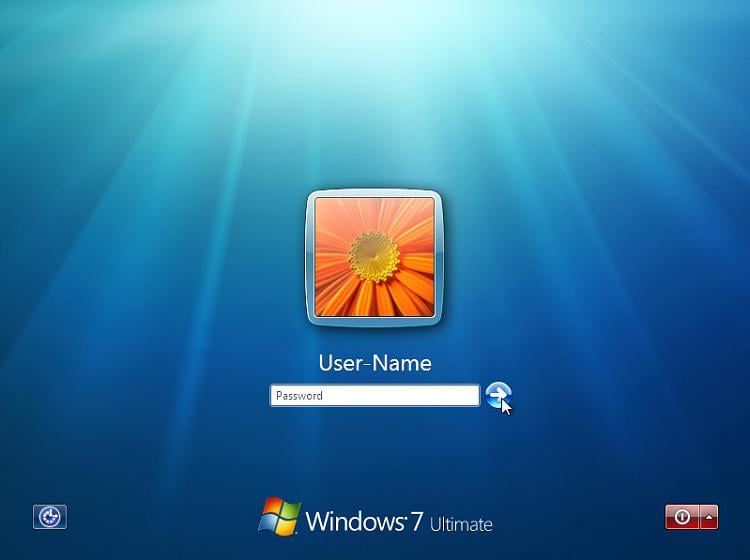
Windows 7 Login Screen

cclove

New member
Local time
9:06 AM
Messages
3
Sorry if this is the wrong place

I just recently installed Windows 7 Professional on a new hard drive and when I turn on the computer to login, it doesn't choose my account by default. Usually if you have a password protected account, all you have to do is type your password after starting up, but in my case I need to click my small account icon before I can type my password. I don't have any other users on this computer so it should jump to my account by default.

To clarify I want to still be able to just type my password but just without clicking my icon.

Although this is a small problem, it still kind of bugs me. Is there anyone out there who knows how to fix this?
 

My Computer

OS
windows 7 professional 64 bit
What AV are you using?
I've seen and read where certain AV has caused problems logging in and check UAC and how it is set up! IMHO
 

My Computer

Computer Manufacturer/Model Number
HP M9077c
OS
Windows 7 Home Premium 64bit
CPU
Intel(R)Core(TM)2 quad [email protected] 2.39GHz
Motherboard
ASUSeK
Memory
6GB DDR2 6400
Graphics Card(s)
GeForce 8500/512MB
Sound Card
Realtek High Def Audio
Monitor(s) Displays
HP w2408 LCD 24" widescreen
Screen Resolution
1920x1200
Cooling
6 pack of Bud
Keyboard
MS wireless Inteli
Mouse
MS wireless Inteli
Thanks for the response, the AV I use is McAfee, and I'm not quite sure what I should be looking at in the UAC. I have it set on default where it says "Notify me only when programs try to make changes to my computer"
 

My Computer

OS
windows 7 professional 64 bit
When I istalled my , in one page in the installation ask me who else will be using this PC, a list of 4 or 5 names to enter, I enter only my name, and all the time starts with my name only and ask for PW.
 

My Computer

OS
Windows 7, 32 bit
Try going to : Control Panel , User Accounts and Family Safety , User Accounts and change to Admin PW protected.
 

My Computer

OS
Windows 7, 32 bit
Having a similar problem, and yet to see a solution. Anyone???
 

My Computer

OS
windows 7
Hmm, that's odd. When I created another account, yes I had to click to select which one to log into. But when I deleted that new account, Win7 went back to directly waiting for the password to the only account left.

truckman, try creating a new account then logging in to it, before logging back to your original account and removing the new one. Hope that helps.

Edit: Seen this on both 7Pro and 7HomePrem.
 
Last edited:

My Computer

Computer Manufacturer/Model Number
Self-built rig
OS
Win7 Pro x64
CPU
Koa i5-2550K
Memory
8 GB
Graphics Card(s)
Sapphire ATI 6870 1GB GDDR5
Sound Card
RealTek HD Audio / ATI HDMI Audio
Monitor(s) Displays
Samsung HDTV Monitor T23A350
Screen Resolution
1920 x 1080
Hard Drives
- SSD (C:)
- HDD (D:)
- BD-ROM (E:)
Keyboard
Logitech G110
Internet Speed
Unifi home (5mbps)
Actually, you need to do a registry hack which you want to not display last user... You will only be able to have it show like that as the default method is to show the last few users UNLESS your Windows 7 Pro is joined to a domain/Workgroup that will then allow it to keep the last known user but not show all the user icons except the last user and 'other user' login icon.

This is a default in Windows 7 at this time unless you do the do not display last user registry change.
 

My Computer

Computer Manufacturer/Model Number
Alienware Area 51 Desktop and Dell Inspirion 17R (N7010)
OS
Windows 7 Ultimate x64 and Home Premium x64
CPU
Intel i7 960 (3.2 GHz Quad Core)
Motherboard
Alienware Intel based X58
Memory
12 Gigs (Triple Channel)
Graphics Card(s)
Alienware OEM nVidia GTX 560 Ti (1.25 Gig)
Sound Card
Creative Labs X-Fi Titanium
Monitor(s) Displays
Samsung PX2370 LED 23" Monitor
Screen Resolution
1920x1080
Hard Drives
2 320 Gig SATA in Raid 1 Configuration (System/App)
1 1 Tera SATA (Games)
1 1 Tera SATA (Data/Music/Videos)
PSU
750 Watt Power Supply
Case
Alienware Area 51 Desktop
Cooling
Liquid Cooled
Keyboard
Logitech G510
Mouse
Microsoft Trackball Explorer
Internet Speed
Cable
not sure if this will help, deactivae the guest user so the pc only see's the 1 account
 

My Computer

Computer Manufacturer/Model Number
Mesh Q4
OS
Win 7 Pro 32bit
CPU
Intel Quad Core 6600
Motherboard
Asus P5N-E SLI
Memory
4 GB
Graphics Card(s)
nVidia 8800GT
Sound Card
Onboard
Hard Drives
1TB Samsung Spinpoint,
1TB WD Eco Green
i only get the behaviour you describe when i have my fingerprint sensor enabled. Do you have anything like that maybe?
 

My Computer

Computer Manufacturer/Model Number
HP dv6519tx
OS
Windows 7 Ultimate x64
CPU
1.80 GHz Intel Core 2 Duo processor T7100
Memory
3 gig ddr2
Graphics Card(s)
NVIDIA GeForce 8400M GS
Sound Card
Realtek High Definition Audio
Monitor(s) Displays
15.4” WXGA High Definition BrightView Widescreen
Screen Resolution
1280 x 800
Hard Drives
Hitachi 320 GB (5400 rpm)
PSU
90 W AC Power Adapter
Cooling
Kitchen plate under the lappy
Keyboard
101 key compatible
Mouse
Touch Pad with On/Off button and dedicated vertical Scroll
Internet Speed
Three Wireless internet prepaid using E160G USB dongle
Hello.

I've the same problem. I've register here to explain something more and trying to have some help.

I had the Windows 7 x64 Home Premium before (it came with computer). Some time ago I bought the Windows 7 Ultimate x64 to take all from my Asus!

In the Win 7 Home Premium, I only had 1 account and when the login screen appears, my account appeared in a big icon, where I only had to write the password.

Now with the 7 Ultimate I had to click in the small icon, to make it bigger and then finally write the pass. It's not that hard, but it's annoying! Hopefully, I checked that if I click the space bar, it turns bigger too, so I don't need to move the mouse.

Anyway, this is something here. The guest account is deactivated, there is no domain problems, at least I'm not working with a different environment from the what I had with the Home Premium.

Thanks
 

My Computer

OS
Windows 7 Ultimate x64
Back
Top