windows 7 lost after duo installation

lucasko

New member
Local time
12:01 PM
Messages
17
I've had Windows 7 OS 64 Bit pre installed on my HP desktop, with one HD.

I created the new partition on HD. And reboot from my Server 2003 and installed it.
Installation was perfect until I discovered that my PC reboot and only server 2003 load up.

Win Server 2003 is limited edition for 120 days for study. I am screwed big time!!

I installed windows server on different partition, on G as I have only one HD. Original partition for windows 7 is still there but i can't access from my server OS.

I want my windows 7 back, how can I do this without windows 7 installation cd because it's pre installed???

Please help, I can not afford to buy Win 7 CD...:cry:

I've tried

1..rebuild boot.ini and scan (in recovery mode with server cd, bootcfg cmd)- no luck,

2..when i re write on Boot.ini (on server windows)with different partition(3)example then reboot again
there is boot menu option which I edited, then choose on win 7
asking for NTOSKRNL.exe file , so I copied the file and placed under the c:\windows\system32 - not working either

that's all I have, please help me:cry:
 
Last edited:

My Computer

Computer Manufacturer/Model Number
HP,
OS
windows 7
CPU
interl R, celeron r CPU e3200 2.4 ghz
Memory
2.96 ghz
Windows 7 doesn't use boot.ini.

Can you tell if the Win 7 partition is active?

Do you have a Win 7 recovery CD or anything you can boot to? It sounds like the Server 2003 overwrote your Win 7 boot priority and you need to change it back. Probably running bootsect.exe will fix it, but you need access to that utility.

If you hit F8 during boot, what happens.
 

My Computer

Computer Manufacturer/Model Number
Homebuilt
OS
Windows 7 x64
CPU
i7-2600K
Motherboard
Asus P8Z77-v Pro
Memory
8 G
Graphics Card(s)
GTX 480
Sound Card
Onboard
Monitor(s) Displays
LG W2753V
Screen Resolution
1920x1080
Hard Drives
Crucial M4 128 G SSD
thanks for the responses, appreciate it!

I don't have Win7 cd coz of pre installed..I am not sure how to i get into start up repair and create system repair disc on Windows server..

Yes, I can tell the partition on win 7 is still there.. please show me how to used bootsect.exe
if I press f8 I can see the menu such as last know good configuration and safe mode ,etc

***but there is no repair you computer **

thanks in millions
 

My Computer

Computer Manufacturer/Model Number
HP,
OS
windows 7
CPU
interl R, celeron r CPU e3200 2.4 ghz
Memory
2.96 ghz

My Computer

Computer Manufacturer/Model Number
Homebuilt
OS
Windows 7 x64
CPU
i7-2600K
Motherboard
Asus P8Z77-v Pro
Memory
8 G
Graphics Card(s)
GTX 480
Sound Card
Onboard
Monitor(s) Displays
LG W2753V
Screen Resolution
1920x1080
Hard Drives
Crucial M4 128 G SSD
i have vista sp 2 cd, does it contain bootsect.exe utility u mentioned?

i am reading on the link, are they same solution to the bootsect.exe?..

anyway, I'm gonna try on both and see what's come...

thank you ... but pls still in touch:o
 

My Computer

Computer Manufacturer/Model Number
HP,
OS
windows 7
CPU
interl R, celeron r CPU e3200 2.4 ghz
Memory
2.96 ghz
Download and burn to CD the Win7 Repair disk from here: Download Windows 7 System Recovery Discs — The NeoSmart Files

Burn to CD using ImgBurn at 4x speed with Verify. View attachment 53260

Now boot the CD, click through to Recovery Tools list to run Startup Repair at least 3 separate times with reboots.

The only reason this will not work to restart Win7 is if it is no longer marked active. To make sure Win7 is marked active, boot back into Win7 Repair CD, choose Command Line from recovery tools list, type:

DISKPART
LIST DISK
SELECT DISK # (replace # with Win7 HD #)
LIST PARTITION
SELECT PARTITION # (replace # with Win7 partition #)
ACTIVE
EXIT

Now return to Startup Repair to run up to 3 separate times with reboots.

You should also have a recovery partition on there. Look on the first bootup screen for what key(s) are to be pressed to trigger recovery. But it may have been disabled by Server2003 install. If so, you may need to order Recovery disks from your maker's tech support.

You can also use any Win7 installer to reinstall Win7 using the key on the license sticker. If you can find a Win7 installer we can show you how to unlock all versions so you can reinstall yours without the factory bloatware. Favorite apps or any missing drivers can be found on your maker's Support Downloads webpage for your model.
 
thank theog... that's being me ... never check till the end!!:o

i'll try that too

thank you
 

My Computer

Computer Manufacturer/Model Number
HP,
OS
windows 7
CPU
interl R, celeron r CPU e3200 2.4 ghz
Memory
2.96 ghz
wow, thanks gregrocker, i think its active coz i have vista sp 2 cd, when i run it for recovery it recognize the win 7 being there .. but dont let me go forward saying not win 7..

i am gonna burn cd on my laptop and try that on my trouble pc

thanks again

you guys are angels:)
 

My Computer

Computer Manufacturer/Model Number
HP,
OS
windows 7
CPU
interl R, celeron r CPU e3200 2.4 ghz
Memory
2.96 ghz
thanks guys!! a few screams & tears.:mad:.. at last paid off...:D Now I reunite with My Win 7 Desktop Screen..exchange hugs..etc..etc:p.. huge amount of credits to you... you make me determine to learn more and more!!:)

one little help, for final , I promise for this case...:o

What can I do to use two of the OS(win7 and server 2003) peacefully as duo boot..for my study.. I can still see my server 2003 partition on my HD.. but no option on the boot menu to load my server 2003. Or this is impossible??
Please!!
 

My Computer

Computer Manufacturer/Model Number
HP,
OS
windows 7
CPU
interl R, celeron r CPU e3200 2.4 ghz
Memory
2.96 ghz
I've had Windows 7 OS 64 Bit pre installed on my HP desktop, with one HD.

I created the new partition on HD. And reboot from my Server 2003 and installed it.
Installation was perfect until I discovered that my PC reboot and only server 2003 load up.

Win Server 2003 is limited edition for 120 days for study. I am screwed big time!!

I installed windows server on different partition, on G as I have only one HD. Original partition for windows 7 is still there but i can't access from my server OS.

I want my windows 7 back, how can I do this without windows 7 installation cd because it's pre installed???

Please help, I can not afford to buy Win 7 CD...:cry:

I've tried

1..rebuild boot.ini and scan (in recovery mode with server cd, bootcfg cmd)- no luck,

2..when i re write on Boot.ini (on server windows)with different partition(3)example then reboot again
there is boot menu option which I edited, then choose on win 7
asking for NTOSKRNL.exe file , so I copied the file and placed under the c:\windows\system32 - not working either

that's all I have, please help me:cry:
Do you mean you want to Dual Boot so you can choose which OS to load???
 

My Computer

Computer type
PC/Desktop
OS
Windows 7 X64 Bit
CPU
Intel(R) Core(TM)i7-4771 CPU @ 3.50GH
Motherboard
Asus Sabertooth Z87
Memory
Corsair 4x8 Vengeance (32GB)
Graphics Card(s)
NVIDIA GeForce GTX780
Monitor(s) Displays
LG
Screen Resolution
1920x1080
PSU
Corsair CX750
Case
Corsair 200 series
Cooling
H80i Liquid Cooler
Keyboard
Microsoft
Mouse
Microsoft
Internet Speed
good times-500-850 kbs bad times-50-100 kbs
yes, gaz, I want duo boot...

I have pre installed win 7 pc and last two days ago I installed win server 2003 to study and which over write my win 7. I was seeking help here to get my Win 7 Back and now I get it with help from here.. Now I want my Server 2003 for study too, like duo boot..

I don't want to repeat same mistake again (over write my win 7 after server 2003 installation), thanks for your help..
 

My Computer

Computer Manufacturer/Model Number
HP,
OS
windows 7
CPU
interl R, celeron r CPU e3200 2.4 ghz
Memory
2.96 ghz
Use this tutorial:http://www.sevenforums.com/tutorials/8057-dual-boot-installation-windows-7-xp.html

It is the same for XP as 2003. Win7 should configure the dual boot when it is correctly installed last in order.

You will need to obtain a Win7 DVD to reinstall. What version of Win7 do you have?

Otherwise you will have to order the Recovery Disks from your computer maker, reinstall then use Method Two in tutorial above to install 2003 last as the Recov Disks may overwrite your current 2003 installation.
 
i have win 7 home edition and pre installed on my computer..


Right, In method two ,.. it has to be Primary Partition to install xp? Because my HD already have 3 primary partitions..1. System, 2. C: and 3. factory image .. Don't allow me to delete the 3 one.. I'm not sure to delete 1 one either ...:rolleyes:

what i did in first place before ..is.. Install server 2003 on logical simple volume ..and installation completed ..I lost my win 7 ..

help me, and thank you for your response:)
 

My Computer

Computer Manufacturer/Model Number
HP,
OS
windows 7
CPU
interl R, celeron r CPU e3200 2.4 ghz
Memory
2.96 ghz
You can have 4 primary partitions.

I am not sure why Win7 would be lost if you installed 2003 to another logical partition. Where did Win7 go? Is it possibly still there?

Download and burn to CD the Win7 Repair CD, boot and run Repair. If necessary run Startup Repair up to 3 separate times to recover the MBR to Win7.

Did you make the Recovery Disks before installing 2003? See if your Recovery partition can be triggered now by using the key given on first bootup screen to Start Recovery. It may let you recover Win7 to one partition, or require you to overwrite the HD. Then you can reinstall 2003 correctly using tutorial.

If your Recov partition won't start up using key combo given, then unhide System and Hidden files in Control Panel>Folder options and look for an image file in partition which can be mounted to recover your Win7.

Please post back a screenshot of your full Disk management drive map, and the contents of your Recovery Partition. http://www.sevenforums.com/tutorials/9733-how-post-screenshot-seven-forums.html
 
sorry for my late late reply because I had to be somewhere else.. thanks for your help and here my screen shot..I have 1 HD, 3 primary partitions - system F:, C:, factoryimage D:, and 3 logicals -lucas L: for documents, win xp J: for Documents for now, M: for win server 2003.. 1 unallocated space ..

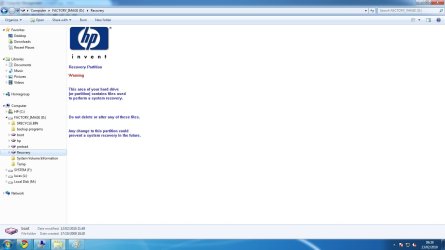
Contents of my Recovery partition (primary D: ) are on attached screenshot please view.. Can't let me create another primary partition. so if i have to delete which one you reckon? System F or Facotry D ??

Win 7 was still on that partition which already installed with pc till when I installed win server 2003. There problem was when I reboot the pc..there was only win server 2003 to load up on boot menu. There was no option to choose win 7. So, I urged for help in here and got Win 7 Back to load. Another problem unfortunately there is no win server 2003 to load up again on boot menu. The system files of server 2003 are still there on that partition which I've installed.

Right now I can only have one! Win 7!! This is where I am now..:o

I have win 7 Repair CD from the link provided by one of the genius here and burn it on cd. By doing what they've told me as you're telling me now to run several time, this is how I got my win 7 back.

Now I want to do the perfect duo boot for win 7 and server 2003. Look like I have to delete the server 2003 partition and reinstall it. Then try to run EASYBcd according to the tutorial..

Please guide me if is the right way or not... and thanks for your time and truly appreciate it!
 

Attachments

  • screenshot.jpg
    screenshot.jpg
    25.4 KB · Views: 21
  • factory image Drive D.png
    factory image Drive D.png
    61.7 KB · Views: 18

My Computer

Computer Manufacturer/Model Number
HP,
OS
windows 7
CPU
interl R, celeron r CPU e3200 2.4 ghz
Memory
2.96 ghz
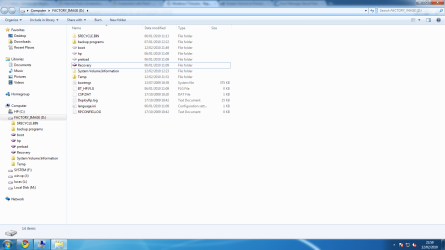
Need to see the full contents of that Recovery Folder and Programs folder in Factory Image Partition which holds the System MBR for Win7 - even though there is a 100mb System Reserved partition which should hold the MBR. Have you previously run the Recovery Partition which would set it Active?

Since the 100mb System Reserved partition is not holding the MBR as normal, it really isn't needed. It's only other function is to make Repair My Computer tools available by tapping F8 at bootup. Check to see if it does so.

I am hesitant to advise you to delete the Factory Image partition since it may still be usable to recover Windows 7. Others may have another idea, but I am leaning toward advising you to delete the factory Image partition so you can reclaim a Primary Partition which will be needed to properly install Server2003 in a dual boot.

Let us see the screenshots of more of the contents of the Recov partition and see what others advise as welll
 
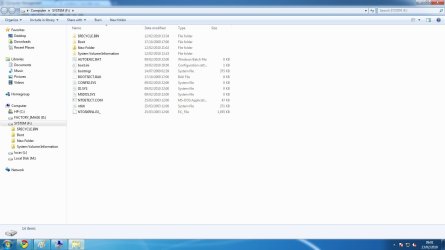
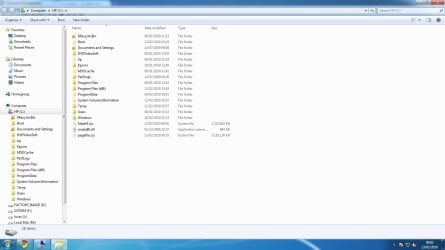
here are my recovery contents (F: preinstalled partition ) and C: Contents, please have a look.

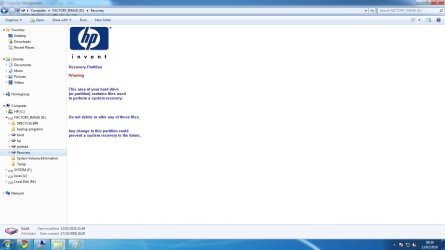
Recovery Folder in Factory image D is not allowed me to see anything.. Can not take the permission either.. :huh: same to all boot,hp, preload folder with Disk Image Icons on it..
In Backup programs only contains one set up file "FreeStudio.exe"


There's no rush so I rather wait what you gonna suggest.. thanks for the help...:)
 

Attachments

  • systemcontents.jpg
    systemcontents.jpg
    72.4 KB · Views: 14
  • c drive contents.jpg
    c drive contents.jpg
    82.5 KB · Views: 15
  • recovery folder in factory image D.jpg
    recovery folder in factory image D.jpg
    69.4 KB · Views: 20
  • recovery folder in factory image D.jpg
    recovery folder in factory image D.jpg
    69.4 KB · Views: 10
Last edited:

My Computer

Computer Manufacturer/Model Number
HP,
OS
windows 7
CPU
interl R, celeron r CPU e3200 2.4 ghz
Memory
2.96 ghz
here is my system F contents -
 

Attachments

  • systemcontents.jpg
    systemcontents.jpg
    72.4 KB · Views: 11

My Computer

Computer Manufacturer/Model Number
HP,
OS
windows 7
CPU
interl R, celeron r CPU e3200 2.4 ghz
Memory
2.96 ghz
Back
Top