Solved Windows 7 Navigation Pane Issue

Brian52682

New member
Local time
4:29 PM
Messages
4
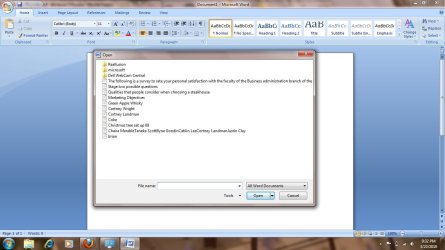
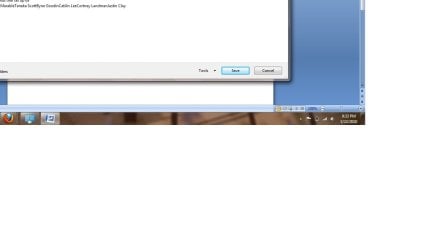
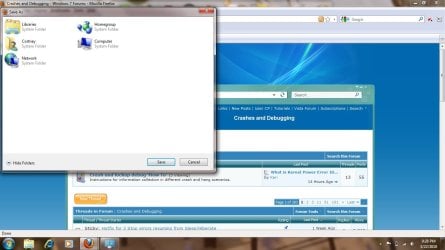
So I have an issue with my Windows 7 Navigation Pane only for save as or open in Word, Excel, and Firefox. My Windows Explorer Navigation Pane is functioning just fine and folders are displayed on the left but if I want to save or open something I am receiving the following screens: (I have included a save page as firefox SS, Word Open SS and Save As Open SS). The kicker is I can't enter what to save the file as in word and it is a rather strange issue. I have checked the registry and am unsure about where this is located and have googled everywhere with no luck. Any help is GREATLY appreciated in resolving this issue.

Sorry that the 3rd SS is cropped, did that accidentally. It basically looks just like the Open SS without the text box. Clicking on the Tools area and the Show Folders area (on save as) does absolutely nothing.
 

Attachments
  • issuefirefox.jpg
    issuefirefox.jpg
    90.7 KB · Views: 70
  • wordopen.jpg
    wordopen.jpg
    91.6 KB · Views: 67
  • wordsaveas.jpg
    wordsaveas.jpg
    25.5 KB · Views: 40
Last edited by a moderator:

My Computer

OS
Windows 7
Hello Brian52682, welcome to Seven Forums!


One quick question; what type account are you using, the default admin or a standard user account?
 

My Computer

Computer Manufacturer/Model Number
* BFK Customs *
OS
W 7 64-bit Ultimate
CPU
Intel Q9550 Yorkfield
Motherboard
ASUS P5Q Pro
Memory
8GB Dominator 8500C5D
Graphics Card(s)
ATI : XFX 5870
Sound Card
Realtek HD Audio 7-1
Monitor(s) Displays
1x 47" LCD HDMI & 3x 26" LCD HDMI
Screen Resolution
1920x1080P & 1920x1200
Hard Drives
1x 80GB Intel X25-M G2 SSD : 1x 500GB & 1x 640GB WD Caviar Black(s)
PSU
Corsair 620HX
Case
Cooler Master RC-690
Cooling
Tuniq Tower 120, 2x 140mm and 3x 120mm case fans
Keyboard
Microsoft 500
Mouse
Razer Diamondback 3G
Internet Speed
14 Mb/s
Other Info
1x Koutech 3Gb/s SATA HDD Hot Swap Rack
I have logged in on two separate accounts and it is the same for both. These screen shots were taken with the admin account, I believe it is somewhere in the registry but just not sure where.
 

My Computer

OS
Windows 7
Uninstall any MS.Net updates/patches/mods.

Re-install same via Windows Update.
 

My Computer

Computer Manufacturer/Model Number
Asus P5B
OS
Windows 7 Ultimate
CPU
Intel Q9550
Motherboard
Asus P5B
Memory
4x2GB HyperX
Graphics Card(s)
ATI HD3850 512
Sound Card
Creative X-Fi Platinum
Monitor(s) Displays
Samsung 50 / Samsung 24
Screen Resolution
1920*1080 / 1920*1200
Hard Drives
Multiple RAID volumes
PSU
ThermalTake ToughPower
Case
Armor
Cooling
Liquid
Keyboard
$6 2.4 gHz desktop
Internet Speed
Just this side of fast enough.
I uninstalled all updates/patches then re-installed them and it is still not working :(. Thanks for the help by the way, any other ideas?
 

My Computer

OS
Windows 7
One of your common dialog dll's is corrupt.

Try elevated command prompt - sfc /scannow
 

My Computer

Computer Manufacturer/Model Number
Asus P5B
OS
Windows 7 Ultimate
CPU
Intel Q9550
Motherboard
Asus P5B
Memory
4x2GB HyperX
Graphics Card(s)
ATI HD3850 512
Sound Card
Creative X-Fi Platinum
Monitor(s) Displays
Samsung 50 / Samsung 24
Screen Resolution
1920*1080 / 1920*1200
Hard Drives
Multiple RAID volumes
PSU
ThermalTake ToughPower
Case
Armor
Cooling
Liquid
Keyboard
$6 2.4 gHz desktop
Internet Speed
Just this side of fast enough.
One of your common dialog dll's is corrupt.

Try elevated command prompt - sfc /scannow

That worked, THANKS A MILLION! What could have caused a corrupt DLL so I can tell my wife to prevent it from happening in the future.
 

My Computer

OS
Windows 7
One of your common dialog dll's is corrupt.

Try elevated command prompt - sfc /scannow

That worked, THANKS A MILLION! What could have caused a corrupt DLL so I can tell my wife to prevent it from happening in the future.


Glad you found a solution, thanks for the update.
 

My Computer

Computer Manufacturer/Model Number
* BFK Customs *
OS
W 7 64-bit Ultimate
CPU
Intel Q9550 Yorkfield
Motherboard
ASUS P5Q Pro
Memory
8GB Dominator 8500C5D
Graphics Card(s)
ATI : XFX 5870
Sound Card
Realtek HD Audio 7-1
Monitor(s) Displays
1x 47" LCD HDMI & 3x 26" LCD HDMI
Screen Resolution
1920x1080P & 1920x1200
Hard Drives
1x 80GB Intel X25-M G2 SSD : 1x 500GB & 1x 640GB WD Caviar Black(s)
PSU
Corsair 620HX
Case
Cooler Master RC-690
Cooling
Tuniq Tower 120, 2x 140mm and 3x 120mm case fans
Keyboard
Microsoft 500
Mouse
Razer Diamondback 3G
Internet Speed
14 Mb/s
Other Info
1x Koutech 3Gb/s SATA HDD Hot Swap Rack
What could have caused a corrupt DLL so I can tell my wife to prevent it from happening in the future.
Normal daily computer usage by persons other than geeks.
 

My Computer

Computer Manufacturer/Model Number
Asus P5B
OS
Windows 7 Ultimate
CPU
Intel Q9550
Motherboard
Asus P5B
Memory
4x2GB HyperX
Graphics Card(s)
ATI HD3850 512
Sound Card
Creative X-Fi Platinum
Monitor(s) Displays
Samsung 50 / Samsung 24
Screen Resolution
1920*1080 / 1920*1200
Hard Drives
Multiple RAID volumes
PSU
ThermalTake ToughPower
Case
Armor
Cooling
Liquid
Keyboard
$6 2.4 gHz desktop
Internet Speed
Just this side of fast enough.
Back
Top