Hi,
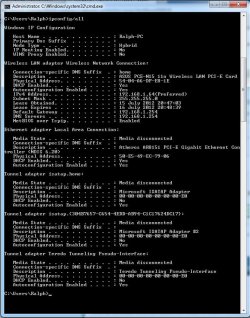
I’m hoping someone smarter than me can help me out with this. I have recently built a Windows 7 system. All of the relevant system information is included in my profile. The system was set-up and working perfectly until yesterday when the internet decided it didn’t want to work anymore. The connection started intermittently dropping out and I had to repair the connection. Once the adapter was reset it seemed ok. As of last night however the connection would not reset properly. I was getting all sorts of errors, sometimes it would say that it could not repair the connection, sometimes i would get a message saying the local adapter was having driver or hardware issues sometimes it was saying that my Network Key was wrong despite the fact it’s the same key it has been using to connect to the network before. I have done a hard reset on the router (i don’t think this is the problem as i am sat on a laptop next to the PC using the same connection with no issues.). I have made sure all my drivers are up to date for the wireless adapter and then uninstalled and re-installed the drivers but still having issues. Sometimes the connection seems to be working but only for short periods of time. I am using MSE and windows firewall and have tryed disabling both with no change. Today it has thrown a new one at me. It now says its connected in the system tray with good signal but if i open a browser i get nothing... I am running out of ideas now any suggestions would be greatly appreciated! Oh, i did try pinging google.com from the command line and got a “connection timed out” message.
I’m hoping someone smarter than me can help me out with this. I have recently built a Windows 7 system. All of the relevant system information is included in my profile. The system was set-up and working perfectly until yesterday when the internet decided it didn’t want to work anymore. The connection started intermittently dropping out and I had to repair the connection. Once the adapter was reset it seemed ok. As of last night however the connection would not reset properly. I was getting all sorts of errors, sometimes it would say that it could not repair the connection, sometimes i would get a message saying the local adapter was having driver or hardware issues sometimes it was saying that my Network Key was wrong despite the fact it’s the same key it has been using to connect to the network before. I have done a hard reset on the router (i don’t think this is the problem as i am sat on a laptop next to the PC using the same connection with no issues.). I have made sure all my drivers are up to date for the wireless adapter and then uninstalled and re-installed the drivers but still having issues. Sometimes the connection seems to be working but only for short periods of time. I am using MSE and windows firewall and have tryed disabling both with no change. Today it has thrown a new one at me. It now says its connected in the system tray with good signal but if i open a browser i get nothing... I am running out of ideas now any suggestions would be greatly appreciated! Oh, i did try pinging google.com from the command line and got a “connection timed out” message.
My Computer
- Computer Manufacturer/Model Number
- Home Build
- OS
- Windows 7 Home Premium 64bit SP1
- CPU
- Intel Core i5 3450,1155, Ivy Bridge, Quad Core, 3.1GHz
- Motherboard
- Gigabyte Z77X-D3H
- Memory
- Corsair DDR3 XMS3, PC3-12800 (1600) 8GB (2x4GB)
- Graphics Card(s)
- OcUK GeForce GTX 670 2048MB GDDR5 PCI-E
- Sound Card
- N/A
- Hard Drives
- OCZ Agility 3 120GB 2.5" SATA-3 Solid State Hard Drive
Seagate Barracuda 7200RPM 1TB SATA 6Gb/s 64MB Cache x2 in RAID1 configuration
- PSU
- OCZ Fatal1ty Modular Power Supply PSU - 750W
- Case
- Cooler Master CM-690 II Nvidia Edition Advanced USB3.0 Domin
- Cooling
- Stock Fans - 2x 140mm 1x120
- Other Info
- Asus PCE-N15 300Mbps 802.11B/G/N Wireless PCI-E Network Adapter