
Windows 7 no "Valid IP Configuration" problem

Onions

New member
Local time
4:36 PM
Messages
2
I just got an ASUS Eee 1005HA netbook a couple of months ago. I installed Windows 7 and everything was going great until today.

I can still see and connect to my wireless network but I am not getting any internet access and I keep getting the little yellow triangle warning on the network connection icon. When I troubleshoot it says "Wireless Network Connection" doesn't have valid IP configuration. I spent several hours on here and other sites trying to fix this, but nothing has worked thus far. I have tried resetting my IP configuration multiple times, installing the updated wireless drivers off the Asus sight, and resetting my network adapters several times.

I can't really access the router settings because I am at college right now and use the college's wireless internet. I have been using the internet just fine on my netbook until just today, and I really can't imagine what happened. It just all of a sudden stopped working and I can't figure out how to fix it. I think in trying to fix the issue I might have messed things up even more. Help?

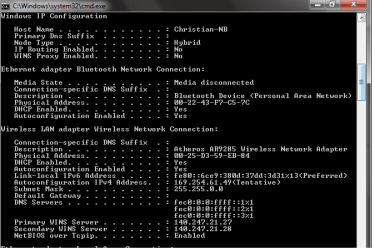
Here is a picture of my IPConfig settings right now
 

Attachments
  • IP.png
    IP.png
    12.6 KB · Views: 894

My Computer

OS
Windows 7
Have you made any updates to your system that may have caused this?

I trust that you have already done.

ipconfig /release
ipconfig /renew
ipconfig /flushdns

I don't know if these can help cos from your details, you don't even have ipv4 listed. It could be your colledge's network changes. Do you have a mate that can very that their is ok?
 

My Computer

Computer Manufacturer/Model Number
Lenovo ThinkPad T60
OS
Windows 7 Ultimate 64Bit
CPU
GenuineIntel Intel(R) Core(TM) DuoCore T2400 @ 1.83GHz
Motherboard
Intel(R) 82801G (ICH7 Family)
Memory
2.00 GB
Graphics Card(s)
Mobile Intel(R) 945 Express Chipset
Sound Card
SoundMAX Integrated Digital HD Audio
Monitor(s) Displays
ThinkPad Display
Screen Resolution
1400x1050
Hard Drives
100Gb SATA
Keyboard
Standard Keyboard
Mouse
HID-compliant Mouse
Internet Speed
Cable Broadband - 54Mbps
Other Info
Intel(R) PRO/1000 PL Network Connection
11a/b/g Wireless LAN Mini PCI Express Adapter
Yeah i would try what the above user said. with the 3 commands. try to repair the connection.

Also i suggest shutting off the NIC and turning it back on. if you have a place to plug in a wired connection try that as well.. i would hate to say bad NIC but then again these things happen.

Lets see, did you try to update the driver to the card?

Now i found this on the microsoft answers site. But try this: Start > Control Panel ( Large Icons ) > Windows Firewall > Allow a program or feature > Allow another program > Right click on Bonjour Sevices and delete .
Close and reboot .

Just a few to try. i hope one of these helps..
 

My Computer

Computer Manufacturer/Model Number
Alienware/Area51 7500
OS
Windows 7 Ultimate x64
CPU
Intel(R) Core(TM) 2 Duo CPU E6750 @ 2.66GHz (2 CPUs), ~2.7
Memory
3072MB RAM
Graphics Card(s)
3 - NVIDIA GeForce 9800 GT (3 gig VRAM) SLI
Sound Card
Speakers (Creative SB Audigy)
Monitor(s) Displays
22 Inch Westinghouse LCD
Hard Drives
250 GB
Case
Green Alienware Case Full Lights (random changing colors)
Keyboard
Alienware Custom Keyboard
Mouse
Alienware Custom Mouse
Internet Speed
10MB
I already did those three commands earlier but I just did them again and deleted Bonjour and it seems to be working great!

Thanks very much
 

My Computer

OS
Windows 7
Solved it is, however i have never had issue with Bonjour...mine is relating itunes what is your's relating to?
 

My Computer

Computer Manufacturer/Model Number
Lenovo ThinkPad T60
OS
Windows 7 Ultimate 64Bit
CPU
GenuineIntel Intel(R) Core(TM) DuoCore T2400 @ 1.83GHz
Motherboard
Intel(R) 82801G (ICH7 Family)
Memory
2.00 GB
Graphics Card(s)
Mobile Intel(R) 945 Express Chipset
Sound Card
SoundMAX Integrated Digital HD Audio
Monitor(s) Displays
ThinkPad Display
Screen Resolution
1400x1050
Hard Drives
100Gb SATA
Keyboard
Standard Keyboard
Mouse
HID-compliant Mouse
Internet Speed
Cable Broadband - 54Mbps
Other Info
Intel(R) PRO/1000 PL Network Connection
11a/b/g Wireless LAN Mini PCI Express Adapter
Bonjour gets installed when u install iTunes. I have no issues too.
 

My Computer

Computer Manufacturer/Model Number
MacBook Pro
OS
Lion
CPU
i5
Memory
4GB
Graphics Card(s)
Intel
Screen Resolution
1200x800
Hard Drives
Seagate FreeAgent GO 250GB Ext. HDD
Seems like alot of advises given about Bonjour and how they effect/kill internet connections. How?
 

My Computer

Computer Manufacturer/Model Number
Lenovo ThinkPad T60
OS
Windows 7 Ultimate 64Bit
CPU
GenuineIntel Intel(R) Core(TM) DuoCore T2400 @ 1.83GHz
Motherboard
Intel(R) 82801G (ICH7 Family)
Memory
2.00 GB
Graphics Card(s)
Mobile Intel(R) 945 Express Chipset
Sound Card
SoundMAX Integrated Digital HD Audio
Monitor(s) Displays
ThinkPad Display
Screen Resolution
1400x1050
Hard Drives
100Gb SATA
Keyboard
Standard Keyboard
Mouse
HID-compliant Mouse
Internet Speed
Cable Broadband - 54Mbps
Other Info
Intel(R) PRO/1000 PL Network Connection
11a/b/g Wireless LAN Mini PCI Express Adapter
Clueless and strange. Thankfully I am not a victim :D
 

My Computer

Computer Manufacturer/Model Number
MacBook Pro
OS
Lion
CPU
i5
Memory
4GB
Graphics Card(s)
Intel
Screen Resolution
1200x800
Hard Drives
Seagate FreeAgent GO 250GB Ext. HDD
Back
Top