Windows 7 Not Booting - 0x0000007B

RobMls

New member
Local time
5:01 PM
Messages
6
Hi all,

A couple of weeks ago my laptop started to get stuck in a restart loop, with a blue screen appearing (Error 0x0000007B) during the Windows 7 loading process. I suspect it may have been caused by a dodgy update, as the hard drive was close to full, which often happens when there are a couple of big updates. However this is just guess work!
I have tried a number of things that I have found on various forums, but nothing seems to be working.

I have tried:
Booting with 'Last Known Good Configuration'
Using a Windows 7 Installation disk to automatically repair
Chkdsk (from Windows 7 Installation disk)
Free'd up some space on the hard drive through Command Prompt
Have run numerous bootable antivirus programs (nothing found)
Used Bootrec /Fixboot /Fixmbr
Tried booting into safe mode (gets to the same point as regular windows before blue screen)

Kind of getting to the end of my tether, does anyone any additional suggestions?
I have a lot of things installed on the laptop I don't want to lose.

Thank you,
 

My Computer

Computer type
PC/Desktop
Computer Manufacturer/Model Number
Dell Inspiron 1370
OS
64 Bit Home Premium
Antivirus
Avast
Might be the hard drive or/and storage controller not properly set in bios, something have been swap in there...check in if it's set AHCI or IDE.
 

My Computer

Computer type
PC/Desktop
Computer Manufacturer/Model Number
Custom Build
OS
Windows 7 Professional SP1 - x64 [Non-UEFI Boot]
CPU
Ivy Bridge Core i5 3570K (Delidded)
Motherboard
Asus P8Z77-V LE PLUS
Memory
G.Skill "Ares" DDR3 PC3-12800 - 1600MHz (16Gb)
Graphics Card(s)
Asus Dual-RX480-O4G
Sound Card
Creative Sound Blaster Z w/5.1 sound system
Monitor(s) Displays
Asus IPS 23"
Screen Resolution
16/9
Hard Drives
Internal:
500Go Sata 6Gb/s (x2)
500Go Sata 3Gb/s (x2)
SSD 60Go Sata 6Gb/s
PSU
In Win C 900W Series 80+ Platinum
Case
Thermaltake Chaser A71
Cooling
Custom Water Cooling Loop
Keyboard
Cooler Master QuickFire XTi
Mouse
Razer Imperator 2012 (4G)
Antivirus
MSE
Browser
IE 11.0.xxx Rtm
Other Info
"Raid0" with Intel Smart Response Technology (HDD/SSD)
Might be the hard drive or/and storage controller not properly set in bios, something have been swap in there...check in if it's set AHCI or IDE.
Thank you for the reply.
Sorry, I've tried so many things the last couple of weeks, I couldn't remember everything for my list.
I already looked into that it's set to AHCI (other option is ATA). I have tried both and they both blue screen.
Any other ideas?
 

My Computer

Computer type
PC/Desktop
Computer Manufacturer/Model Number
Dell Inspiron 1370
OS
64 Bit Home Premium
Antivirus
Avast

My Computer

Computer type
PC/Desktop
Computer Manufacturer/Model Number
Custom Build
OS
Windows 7 Professional SP1 - x64 [Non-UEFI Boot]
CPU
Ivy Bridge Core i5 3570K (Delidded)
Motherboard
Asus P8Z77-V LE PLUS
Memory
G.Skill "Ares" DDR3 PC3-12800 - 1600MHz (16Gb)
Graphics Card(s)
Asus Dual-RX480-O4G
Sound Card
Creative Sound Blaster Z w/5.1 sound system
Monitor(s) Displays
Asus IPS 23"
Screen Resolution
16/9
Hard Drives
Internal:
500Go Sata 6Gb/s (x2)
500Go Sata 3Gb/s (x2)
SSD 60Go Sata 6Gb/s
PSU
In Win C 900W Series 80+ Platinum
Case
Thermaltake Chaser A71
Cooling
Custom Water Cooling Loop
Keyboard
Cooler Master QuickFire XTi
Mouse
Razer Imperator 2012 (4G)
Antivirus
MSE
Browser
IE 11.0.xxx Rtm
Other Info
"Raid0" with Intel Smart Response Technology (HDD/SSD)
Can you still access time to time onto the desktop?

Check those registry keys:

Error message occurs after you change the SATA mode of the boot drive

Otherwise you'll have to access in System Recovery Options with command prompt (REGEDT32) to load the registry hive.

Windows 7 No Boot - STOP: 0x0000007B

It's tried to boot more than 50 times, and not once made it to the desktop.
I've checked those registrys (https://support.microsoft.com/en-us/kb/922976), they are all set to 0 already.
 

My Computer

Computer type
PC/Desktop
Computer Manufacturer/Model Number
Dell Inspiron 1370
OS
64 Bit Home Premium
Antivirus
Avast
Hi Rob,

I think you provided the right info

suspect it may have been caused by a dodgy update, as the hard drive was >>>close to full<<<,

Your going to have to clean up your disk a bit, windows needs and uses the empty space.
Once it gets to less than 10%, (i think) you should have got a pop-up warning??.
You could try the inbuilt MS disc cleaner run both options seperately

Transfer any private data to an external source, Remove any redundant programmes.

Because of this type of error you might only be able to do it bit by bit

Roy
 

My Computer

Computer type
PC/Desktop
Computer Manufacturer/Model Number
medionl/Aspire 6930G/acer x55a
OS
W7 home premium 32bit/W7HP 64bit/w10 tp insider ring
CPU
E5300 dual core
Motherboard
medion MS7366
Memory
3gb
Graphics Card(s)
Nvidia Geforce 7100 Nforce 630i
Monitor(s) Displays
avixc
Internet Speed
n (isp resticted to 72)
Antivirus
mse/pands
Browser
palemoon
Other Info
Belkin Fd7050 n USB using Railink RT2870 drivers, more upto date
Hi Rob,

I think you provided the right info

suspect it may have been caused by a dodgy update, as the hard drive was >>>close to full<<<,

Your going to have to clean up your disk a bit, windows needs and uses the empty space.
Once it gets to less than 10%, (i think) you should have got a pop-up warning??.
You could try the inbuilt MS disc cleaner run both options seperately

Transfer any private data to an external source, Remove any redundant programmes.

Because of this type of error you might only be able to do it bit by bit

Roy
I cleared a bunch of files using one of the antivirus tools that used a linux distro. There is over a gb free now, but the problem didn't go away.
Does it make a difference that the files were not moved from the Windows OS?

Thank you.
 

My Computer

Computer type
PC/Desktop
Computer Manufacturer/Model Number
Dell Inspiron 1370
OS
64 Bit Home Premium
Antivirus
Avast
Depends on how big that update was (If W10 its a lot bigger than that)
did you use diskcleanup as i suggested??,

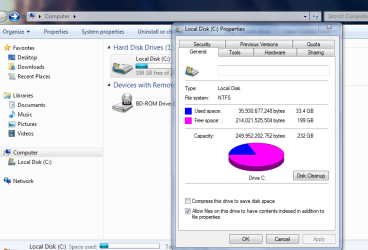
You could also compress the files, see attached screenshot.

Roy
 

Attachments

  • useddata.PNG
    useddata.PNG
    37.9 KB · Views: 0

My Computer

Computer type
PC/Desktop
Computer Manufacturer/Model Number
medionl/Aspire 6930G/acer x55a
OS
W7 home premium 32bit/W7HP 64bit/w10 tp insider ring
CPU
E5300 dual core
Motherboard
medion MS7366
Memory
3gb
Graphics Card(s)
Nvidia Geforce 7100 Nforce 630i
Monitor(s) Displays
avixc
Internet Speed
n (isp resticted to 72)
Antivirus
mse/pands
Browser
palemoon
Other Info
Belkin Fd7050 n USB using Railink RT2870 drivers, more upto date
Depends on how big that update was (If W10 its a lot bigger than that)
did you use diskcleanup as i suggested??,

You could also compress the files, see attached screenshot.

Roy

I can't get to the desktop, I tried to run cleanup from command line from rescue cd, but the only thing it lists is Recycle bin, which it says is empty.

It wasn't W10, so shouldn't be bigger than a gb, so there should be enough space.
 

My Computer

Computer type
PC/Desktop
Computer Manufacturer/Model Number
Dell Inspiron 1370
OS
64 Bit Home Premium
Antivirus
Avast
Try via safe Mode.

Roy
 

My Computer

Computer type
PC/Desktop
Computer Manufacturer/Model Number
medionl/Aspire 6930G/acer x55a
OS
W7 home premium 32bit/W7HP 64bit/w10 tp insider ring
CPU
E5300 dual core
Motherboard
medion MS7366
Memory
3gb
Graphics Card(s)
Nvidia Geforce 7100 Nforce 630i
Monitor(s) Displays
avixc
Internet Speed
n (isp resticted to 72)
Antivirus
mse/pands
Browser
palemoon
Other Info
Belkin Fd7050 n USB using Railink RT2870 drivers, more upto date

My Computer

Computer type
PC/Desktop
Computer Manufacturer/Model Number
Custom Build
OS
Windows 7 Ultimate x64 SP1
CPU
AMD Phenom 2 1090T
Motherboard
Gigabyte GA-890FXA-UD5
Memory
2x8GB Kingston HyperX Fury Black 1600Mhz Unganged
Graphics Card(s)
MSI GTX 970 Gaming 4G
Sound Card
Realtek On-Board HD 7.1 Audio / Logitech G35
Monitor(s) Displays
3xAcer GD245HQ
Screen Resolution
1920x1080
Hard Drives
Samsung 850 Pro 512GB SSD - OS /
WD Caviar Black SATA 3 - 1 TBx2 - Dynamic RAID 0 /
WD Caviar Green SATA 2 - 640GBx2 - Dynamic RAID 0 /
WD Caviar Green SATA 2 - 640GB - Internal Backup /
Seagate Barracude SATA 3 - 3TB - External Backup/ Sync
PSU
HighPower 1000W
Case
Cooler Master HAF 932
Cooling
Noctua NH-D14
Keyboard
Logitech G19
Mouse
Logitech G500
Internet Speed
100/4 Mbit Cable (100GB quota)
Antivirus
ZoneAlarm Extreme Security / MBAM Pro / MBAE Free / SAS Free
Browser
IE 11 - Firefox - Chrome
Other Info
Logitech F710/ G27/ G940/ Z5500 // TrackIR 5 // Nvidia 3D Surround Vision
Cant get into safe mode. Same issue as trying to load normally.
 

My Computer

Computer type
PC/Desktop
Computer Manufacturer/Model Number
Dell Inspiron 1370
OS
64 Bit Home Premium
Antivirus
Avast
Back
Top