Windows 7 Not Fullscreen!

NoGoodNamesLeft

IE9 Supporter
Power User
Local time
10:05 PM
Messages
185
Location
Missouri
Hey,
I know this has already been posted before, but i tired the suggestions and none of them worked. When i play a game that should be fullscreen such as Crossfire or Combat Arms its not. On the left and right side its black and its not fullscreen even though fullscreen is checked in options. Any one know how to fix this? Its driving me insane!:mad:

-Thanks
:cool:

Sorry the title is wrong, suppose to be "Windows 7 Games not fullscreen"
 

My Computer

Computer Manufacturer/Model Number
HP Pavillion P7-1054
OS
Windows 7 Home Premium 64bit
CPU
AMD Athlon 645 II Quad Core 3.2MHz
Motherboard
Foxconn 2AB1
Memory
6GB DDR3 1333MHz
Graphics Card(s)
Radeon HD 4200
Sound Card
Realtek HD Audio
Monitor(s) Displays
HP S2031 20'
Screen Resolution
1600 x 900
Hard Drives
1TB
Internet Speed
18mb/s Down 2mb/s Up
Hey,
I know this has already been posted before, but i tired the suggestions and none of them worked. When i play a game that should be fullscreen such as Crossfire or Combat Arms its not. On the left and right side its black and its not fullscreen even though fullscreen is checked in options. Any one know how to fix this? Its driving me insane!:mad:

-Thanks
:cool:

Sorry the title is wrong, suppose to be "Windows 7 Games not fullscreen"

Nogoodnamesleft hi and welcome

we need more information before we can help you.

What is the monitor and its native resolution?

What is the video card and have you updated the driver?

When upgrading your graphic driver you MUST remove all traces of the current driver. In order to do that we recommend using Guru3D - Driver Sweeper

When it is removed then download and install the fresh copy.

Let us know the answers

Jan
 

My Computer

Computer Manufacturer/Model Number
LAPTOP. HP Pavilion dv7-4010TX .
OS
Win 7 Ultimate 64-bit. SP1.
CPU
Intel i7 -720QM.[1.6GHz Turbo Boost 2.8GHz. 6MB Cache.]
Memory
8 DDR 3 RAM. 1066MHZ
Graphics Card(s)
ATI 1024 MB. DDR3. Radeon HD5650
Monitor(s) Displays
17.3" High Definition Brightview LCD. LED Backlit.
Screen Resolution
1600 x 900.
Hard Drives
640GB
Case
Laptop / notebook.
Mouse
Logitech Anywhere mouse. MX.
Internet Speed
ADSL [ but too slow ]
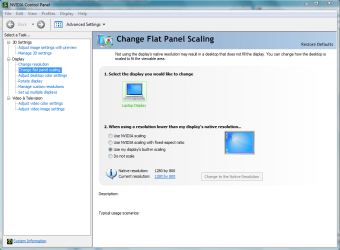
i fixed mine by changing the stretch options in the graphics card options for flat panel scaling
 

Attachments

  • Capture.PNG
    Capture.PNG
    44.1 KB · Views: 625

My Computer

Computer Manufacturer/Model Number
HP dv6519tx
OS
Windows 7 Ultimate x64
CPU
1.80 GHz Intel Core 2 Duo processor T7100
Memory
3 gig ddr2
Graphics Card(s)
NVIDIA GeForce 8400M GS
Sound Card
Realtek High Definition Audio
Monitor(s) Displays
15.4” WXGA High Definition BrightView Widescreen
Screen Resolution
1280 x 800
Hard Drives
Hitachi 320 GB (5400 rpm)
PSU
90 W AC Power Adapter
Cooling
Kitchen plate under the lappy
Keyboard
101 key compatible
Mouse
Touch Pad with On/Off button and dedicated vertical Scroll
Internet Speed
Three Wireless internet prepaid using E160G USB dongle
Ok sorry it took me so long to respond.
I have a Intel GMA 4500M and im guessing it is updated because windows update says theres no update for it.
Native resolution is 1366 x 768
Its a laptop so no monitor.
And how do you change it to stretch if you dont have nvida?
 

My Computer

Computer Manufacturer/Model Number
HP Pavillion P7-1054
OS
Windows 7 Home Premium 64bit
CPU
AMD Athlon 645 II Quad Core 3.2MHz
Motherboard
Foxconn 2AB1
Memory
6GB DDR3 1333MHz
Graphics Card(s)
Radeon HD 4200
Sound Card
Realtek HD Audio
Monitor(s) Displays
HP S2031 20'
Screen Resolution
1600 x 900
Hard Drives
1TB
Internet Speed
18mb/s Down 2mb/s Up
you can try this tutorial: Screen Resolution - Display Settings and try to set your resolution to the native 1366x768

I'm not too sure about stretch or fill the screen options for the GMA 4500M though since I have never used or owned a laptop with Intel onboard graphics
 

My Computer

OS
Windows 8 Professional x64
CPU
Intel Core i7-3770K @4.5 GHz
Motherboard
Asus Sabertooth Z77
Memory
16GB G.Skill Ripjaws DDR3-1600
Graphics Card(s)
Gigabyte GeForce GTX 670 OC
Sound Card
Realtek
Monitor(s) Displays
HP 2711x 27" LED
Screen Resolution
1920 X 1080p
Hard Drives
Crucial m4 256GB SSD (system)
Seagate Barracuda XT 2TB 7200 RPM (storage)
PSU
Strider Gold Evolution ST1000-G
Case
Raven RV01
Cooling
Noctua NH-D14
Keyboard
Logitech K800
Mouse
Logitech Performance Mouse MX
Internet Speed
FIOS - 75/35 Mbps
Other Info
Pioneer black internal CD/DVD/BD read/write
Logitech Z506 5.1 speakers
--------------------------------------------------
Alienware X51/i7-3770/EVGA GTX 660ti FTW/16GB 1600/Blu-ray/2TB SATA III HD
  • Like
Reactions: JMH
Back
Top