Hello all, first poster here. I am sorry if this has been posted before but I took a quick scan through various threads and couldn't find a solution for my problem. I recently upgraded from windows XP to windows 7. While in XP I had 2.4 gigs of RAM shown, I have 4 gigs. After I upgraded to windows 7 to maximize my full 4 gigs it seems as if it still only recognizes 2.4 gigs. I tried going through all the various options and couldn't find a legit way to fix my problem, so I came here. Is there anyone who can tell me how exactly to fix this?
You likely are running the 32bit 7 there which will drop some 450mb of usable ram right from the start out of the 4gb total. That is mapped out to hardwares due to the 32bit kernel. So you have to expect that.
Depending on what you are looking at like the taskmanager you then have to take into account the OS background services and all startup items that grab some more. That can chew up another 800mb plus. That brings you down to at least 2.8gb of ram available maybe less.
Hope you are following that so far! For the remaining a look at the startups should show one or more using more ram then the rest to see where the rest is being taken up since 2.4gb is still a little on the low side.
W7 Ultimate x64/W10 Pro x64/W11 Pro Triple Boot - Main PC W7 Remote PC Micro ATX W7 Pro x64/W11 Pro
CPU
AMD Phenom II X4 975 Deneb 3.6ghz - 965 2nd remote pc
Motherboard
Gigabyte GA-790XTA-UD4-Gigabyte GA-880GM-D2H remote pc
Memory
Kingston Hyper X DDR3 1600 1.5v 16gb - Hyper X Fury 8gb 2nd
Graphics Card(s)
MSI HD Radeon 5750 1gb - MSI HD Radeon 6450 on mini tower
Sound Card
Creative Labs X-Fi Xtreme Audio P - Realtek onooard 2nd case
Monitor(s) Displays
ASUS VW199T-P 19" HP 2082a Main-HP 2082a 20" remote pc
Screen Resolution
Asus 1440x900 - HP 1600x900
Hard Drives
WD Black 1TB HD per OS W7, W10, and pending W11 presently on 500gb OS Drive - Pending Triple 1TB HDs for Spanned Storage/backup volume
Single 2TB external USB enclosure, single 1TB System 7 Host/Boot drive, Pending 8TB external HD for system image b
PSU
Corsair 750TX - primary / Corsair CX600 - second
Case
Antec 900-2 - SSD compatible / NZXT Vulcan mini tower
Just guessing that you are running 32 bit windows. If your not sure, look here: Control Panel\All Control Panel Items\System. 32 bit has address space for 4 gigs total ram and some of that space is used by hardware. The ram from the dual 8800's for instance if they're 512MB each your down to 3 gigs and still all the other hardware to go. The only way to utilize all 4 gigs is to go to 64 bit.
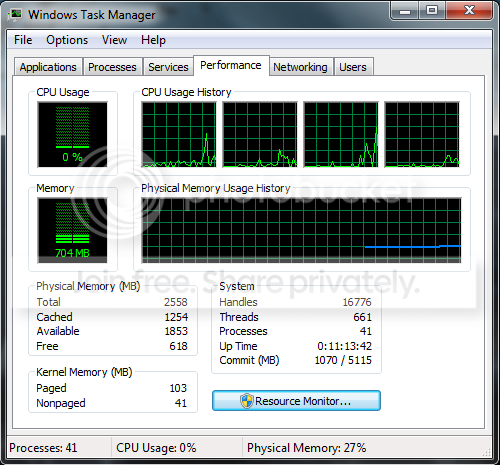
Thanks for the quick replies! It seems like my available memory usually varies between 1800-1900 in total. My main reason for posting is because of the total memory it says is given, which is 2500. I posted a screenshot of my Task Manager below.
Edit - Using 32-bit. Thanks Gary!
Edit #2 - So because of my dual graphics cards its eating up a full 1gig of ram? Would buying more sticks of ram help? I mean the obvious answer is yes, but from a technical standpoint would it be worth it? I still have two slots on my motherboard for 4 more gigs if I wanted to.
Is there a way to upgrade to 64-bit without having to pay for it? It seems like the only option is to upgrade, although I can't figure out how. I thought I was computer savvy, but this OS has stumped me. lol
I could tell right off you are in the 32bit Windows since the 64bit 7 here shows 4094mb when looking at the performance tab! You simply have to remember the deductions seen with the 32bit kernel to understand why that shows a lesser amount.
With the 32bit 7 here I end usually seeing about 3.58gb before the remaining deductions of system processes, startup programs, etc. presently show some 2448-2476mb available out of the 4bg total seen by the 64bit kernel depending on what I am doing at the time before loading anything other then IE for example.
If you bought the retail package that would include the 64bit disk along with the 32bit there. Otherwise you would need to buy the 64bit separately now.
W7 Ultimate x64/W10 Pro x64/W11 Pro Triple Boot - Main PC W7 Remote PC Micro ATX W7 Pro x64/W11 Pro
CPU
AMD Phenom II X4 975 Deneb 3.6ghz - 965 2nd remote pc
Motherboard
Gigabyte GA-790XTA-UD4-Gigabyte GA-880GM-D2H remote pc
Memory
Kingston Hyper X DDR3 1600 1.5v 16gb - Hyper X Fury 8gb 2nd
Graphics Card(s)
MSI HD Radeon 5750 1gb - MSI HD Radeon 6450 on mini tower
Sound Card
Creative Labs X-Fi Xtreme Audio P - Realtek onooard 2nd case
Monitor(s) Displays
ASUS VW199T-P 19" HP 2082a Main-HP 2082a 20" remote pc
Screen Resolution
Asus 1440x900 - HP 1600x900
Hard Drives
WD Black 1TB HD per OS W7, W10, and pending W11 presently on 500gb OS Drive - Pending Triple 1TB HDs for Spanned Storage/backup volume
Single 2TB external USB enclosure, single 1TB System 7 Host/Boot drive, Pending 8TB external HD for system image b
PSU
Corsair 750TX - primary / Corsair CX600 - second
Case
Antec 900-2 - SSD compatible / NZXT Vulcan mini tower


 For the remaining a look at the startups should show one or more using more ram then the rest to see where the rest is being taken up since 2.4gb is still a little on the low side.