Windows 7 not recognizing Hard disk (Promise 378)

Accipiter

New member
Local time
8:07 AM
Messages
23
OK, I'm currently using Windows XP Pro 32 bit. I have an Asus A8v-Deluxe mobo. My hard drive is a samsung, SATA. I have it set in my bios to IDE.

I go to install Windows 7 Professional, x64. When it gets to the screen where my hard-drives / partitions should be located so I can select one to install on, on, nothing shows up. I had a disk of Promise SATA378 drivers for XP, but I tried that with windows 7 and that did not work. I also tried going into my bios and changing the hard-drive setting from IDE to RAID, but that made no difference.

I guess I need Promise drivers for Windows 7, (or vista apparently), but can not find either. Can someone here help?
 

My Computer My Computer

OS
Windows 7 x64
CPU
AMD Phenom X4 955
Motherboard
Asus
Graphics Card(s)
Radeon HD 4850
OK, I'm currently using Windows XP Pro 32 bit. I have an Asus A8v-Deluxe mobo. My hard drive is a samsung, SATA. I have it set in my bios to IDE.

I go to install Windows 7 Professional, x64. When it gets to the screen where my hard-drives / partitions should be located so I can select one to install on, on, nothing shows up. I had a disk of Promise SATA378 drivers for XP, but I tried that with windows 7 and that did not work. I also tried going into my bios and changing the hard-drive setting from IDE to RAID, but that made no difference.

I guess I need Promise drivers for Windows 7, (or vista apparently), but can not find either. Can someone here help?

not sure if you have a raid or not but drivers can be found here. If they are not available for win 7 then use vista in compatability mode. As a last resort use the xp driver in compatability mode

D850GB FAQ

Ken
 

My Computer My Computer

Computer Manufacturer/Model Number
HP Pavillion dv-7 1005 Tx
OS
Win 8 Release candidate 8400
CPU
[email protected]
Memory
4 gigs
Graphics Card(s)
Nvidia 9600M
Sound Card
HD built-in
Monitor(s) Displays
17" Wxga
Screen Resolution
1440x900
Cooling
none
Internet Speed
45Mb down 5Mb up
Sorry, I'm confused.

That link posted gave me drivers that cover up to Windows 2003, there's nothing for Windows 7 or Vista listed. Also, what do you mean by use vista in compatability mode? I don't have vista, and it doesn't look like there are vista drivers on that link you posted.


also, I don't actually have a Raid, I just have one hard drive.
 

My Computer My Computer

OS
Windows 7 x64
CPU
AMD Phenom X4 955
Motherboard
Asus
Graphics Card(s)
Radeon HD 4850
Sorry, I'm confused.

That link posted gave me drivers that cover up to Windows 2003, there's nothing for Windows 7 or Vista listed. Also, what do you mean by use vista in compatability mode? I don't have vista, and it doesn't look like there are vista drivers on that link you posted.


also, I don't actually have a Raid, I just have one hard drive.


No they are up to windows XP. if you cant find anything newer you may have to try them in compatibility mode.

Instructions for installing in cmpatibility mode can be found here http://www.sevenforums.com/tutorials/316-compatibility-mode.html

Let me know if you need help with insstalling them.
 

My Computer My Computer

Computer Manufacturer/Model Number
HP Pavillion dv-7 1005 Tx
OS
Win 8 Release candidate 8400
CPU
[email protected]
Memory
4 gigs
Graphics Card(s)
Nvidia 9600M
Sound Card
HD built-in
Monitor(s) Displays
17" Wxga
Screen Resolution
1440x900
Cooling
none
Internet Speed
45Mb down 5Mb up
Sorry, I'm confused.

That link posted gave me drivers that cover up to Windows 2003, there's nothing for Windows 7 or Vista listed. Also, what do you mean by use vista in compatability mode? I don't have vista, and it doesn't look like there are vista drivers on that link you posted.


also, I don't actually have a Raid, I just have one hard drive.


No they are up to windows XP. if you cant find anything newer you may have to try them in compatibility mode.

Instructions for installing in cmpatibility mode can be found here http://www.sevenforums.com/tutorials/316-compatibility-mode.html

Let me know if you need help with insstalling them.


ooooh I see....Yeah I can't find anything newer. I'm going to have to try running this in compatibility mode....So I run the makedisk.exe program in compatability mode? Or the drivers? I have NO idea what I'm doing now.. lol
 

My Computer My Computer

OS
Windows 7 x64
CPU
AMD Phenom X4 955
Motherboard
Asus
Graphics Card(s)
Radeon HD 4850
The makedisk.exe doesn't even have an entry for vista or Windows 7 under compatibility mode.


Looks like I have to buy a new processor, video card, and motherboard if I want to run windows 7. What a crock... lol
 

My Computer My Computer

OS
Windows 7 x64
CPU
AMD Phenom X4 955
Motherboard
Asus
Graphics Card(s)
Radeon HD 4850
Timeout

you downloaded the driver, did you read the tutorial about compatibility mode?

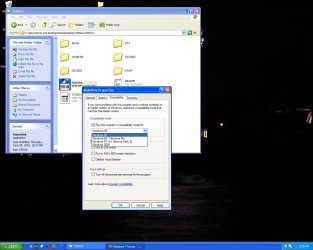
Right click makedisk.exe go to compatibility and check the box that says xp sp2.

See picture

Ken
 
Last edited:

My Computer My Computer

Computer Manufacturer/Model Number
HP Pavillion dv-7 1005 Tx
OS
Win 8 Release candidate 8400
CPU
[email protected]
Memory
4 gigs
Graphics Card(s)
Nvidia 9600M
Sound Card
HD built-in
Monitor(s) Displays
17" Wxga
Screen Resolution
1440x900
Cooling
none
Internet Speed
45Mb down 5Mb up
hang on...I just realized I don't have SP3. I just reformatted a few weeks ago and must have never installed it. Let's see if that changes what I see on that compatibility box.
 

My Computer My Computer

OS
Windows 7 x64
CPU
AMD Phenom X4 955
Motherboard
Asus
Graphics Card(s)
Radeon HD 4850
hi guy, my pal ran across this problme. and I suggested he copy the raid driver in you flash disk or hard disk before installing win7 pro. After loading raid driver, the disk volume list will come back. hopefully my reply makes sense for you
 

My Computer My Computer

OS
windows 7
UUUUGH I can't even do the compatibility mode thing. Vista doesn't show up, nor does XP...here's how my dropdown list looks, this is in XP sp3:
 

Attachments

  • ugh.jpg
    ugh.jpg
    126.2 KB · Views: 674

My Computer My Computer

OS
Windows 7 x64
CPU
AMD Phenom X4 955
Motherboard
Asus
Graphics Card(s)
Radeon HD 4850
hi guy, my pal ran across this problme. and I suggested he copy the raid driver in you flash disk or hard disk before installing win7 pro. After loading raid driver, the disk volume list will come back. hopefully my reply makes sense for you

I'm not sure what you mean? I can't find a driver that works for windows 7
 

My Computer My Computer

OS
Windows 7 x64
CPU
AMD Phenom X4 955
Motherboard
Asus
Graphics Card(s)
Radeon HD 4850
UUUUGH I can't even do the compatibility mode thing. Vista doesn't show up, nor does XP...here's how my dropdown list looks, this is in XP sp3:


My apologies. I forgot Im working on a win 7 machine now so of course yours is going to look different.

You can and should if you are using the XP driver, the XP sp3 box.

Sorry about the different look

Ken
 

My Computer My Computer

Computer Manufacturer/Model Number
HP Pavillion dv-7 1005 Tx
OS
Win 8 Release candidate 8400
CPU
[email protected]
Memory
4 gigs
Graphics Card(s)
Nvidia 9600M
Sound Card
HD built-in
Monitor(s) Displays
17" Wxga
Screen Resolution
1440x900
Cooling
none
Internet Speed
45Mb down 5Mb up
UUUUGH I can't even do the compatibility mode thing. Vista doesn't show up, nor does XP...here's how my dropdown list looks, this is in XP sp3:


My apologies. I forgot Im working on a win 7 machine now so of course yours is going to look different.

You can and should if you are using the XP driver, the XP sp3 box.

Sorry about the different look

Ken


Can and should what the sp3 box? I think you missed a word there~! lol


so basically I'm up a creek?
 

My Computer My Computer

OS
Windows 7 x64
CPU
AMD Phenom X4 955
Motherboard
Asus
Graphics Card(s)
Radeon HD 4850
yeah, looks like I'm boned. lol
 

My Computer My Computer

OS
Windows 7 x64
CPU
AMD Phenom X4 955
Motherboard
Asus
Graphics Card(s)
Radeon HD 4850
Look at it as a good excuse to make a upgrade of your hardware.
It always works with my wife *grin*
 

My Computer My Computer

OS
Windows 7 x64 Ultimate
CPU
i7-950 x 2
Motherboard
ASUS Z8NA-D6 Intel 5500
Memory
OCZ Blade Series DDR3 2133MHz 6GB x 2
Graphics Card(s)
Gainward GeForce GTX 295 1792MB
Sound Card
Creative X-FI Titanium FATAL1TY Champion
Monitor(s) Displays
Eizo 24" LCD FlexScan S2432WSEK x 2
PSU
Tagan PipeRock Series TG1300-BZ
Case
Lian Li Cube
Sorry, I'm confused.

That link posted gave me drivers that cover up to Windows 2003, there's nothing for Windows 7 or Vista listed. Also, what do you mean by use vista in compatability mode? I don't have vista, and it doesn't look like there are vista drivers on that link you posted.


also, I don't actually have a Raid, I just have one hard drive.


No they are up to windows XP. if you cant find anything newer you may have to try them in compatibility mode.

Instructions for installing in cmpatibility mode can be found here http://www.sevenforums.com/tutorials/316-compatibility-mode.html

Let me know if you need help with insstalling them.


Use the win 2003 drivers, I have the same mobo with the promise 378 sata. They work perfectly.
 

My Computer My Computer

OS
Windows 7
CPU
AMD FX-55
Motherboard
Asus A8V Deluxe
Memory
2G Corsair
Graphics Card(s)
nVidia 6800gt Ultra
Sound Card
Audigy 4 Pro
Monitor(s) Displays
LG 23
Hard Drives
Maxtor Diamondmax
Cooling
Koolance Exos 2 liquid
I'm having the same problem while installing windows 7 on my comp, I've tried using the xp and 2003 drivers, but it won't let me, I don't have any operating system on either of my drives, and its an asus A8V deluxe motherboard with the promise 20378 raid. I don't know what you're talkinng about run in compatability mode if the os won't install.
 

My Computer My Computer

OS
windows 7
Motherboard
asus A8V deluxe
Memory
4GB
Graphics Card(s)
Ati X1600
Monitor(s) Displays
23 in
Hard Drives
1 1.5 tb and one 300 gb
I'm having the same problem while installing windows 7 on my comp, I've tried using the xp and 2003 drivers, but it won't let me, I don't have any operating system on either of my drives, and its an asus A8V deluxe motherboard with the promise 20378 raid. I don't know what you're talkinng about run in compatability mode if the os won't install.

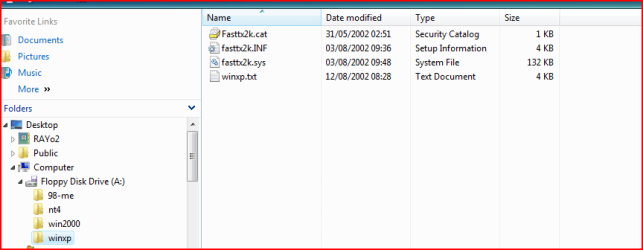
Try this:

Open winxp folder, click on fasttx2k.INF
 

Attachments

  • Capture.PNG
    Capture.PNG
    12.1 KB · Views: 258

My Computer My Computer

OS
ME/XP/Vista/Win7
The W7 install will only let me select the folder where the driver is, not the specific file.
 

My Computer My Computer

OS
windows 7
Motherboard
asus A8V deluxe
Memory
4GB
Graphics Card(s)
Ati X1600
Monitor(s) Displays
23 in
Hard Drives
1 1.5 tb and one 300 gb
The W7 install will only let me select the folder where the driver is, not the specific file.

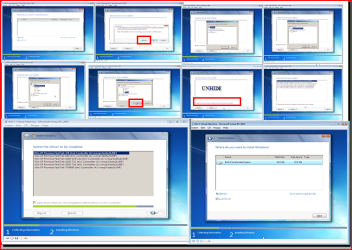
Try this:

NOTE: for this example, I am using Promise Fastrak 376.
 

Attachments

  • Capture.PNG
    Capture.PNG
    87.1 KB · Views: 814

My Computer My Computer

OS
ME/XP/Vista/Win7
Back
Top