Solved Windows 7 not recognizing second hard drive

grieralexander

New member
Local time
5:25 AM
Messages
8
Location
Brazil
user_offline.gif


Internal hard drive keeps disappearing
Windows 7 Ultimate SP1 64 bit For some reason my secondary internal drive, a Samsung HD203 WI drive (2Tera), keeps disappearing randomly while windows is running.

The drive comes back fine and dandy if I completely shut down the machine and then boot it back up. The drive stays until some random moment when Windows doesn't see it anymore. Now, if I do a simple Restart the drive doesn't show up, ONLY after I shut down completely, and push the power button back on, does this work. There is nothing in the System logs, no error messages, nothing, it just vanishes and is completely random.

I've checked the hard drive with windows and other programs and it never reports any problems, the BIOS detects no problems, even Windows recognizes it for a while, then nothing. I read and old post about a year ago and the OP was told to update the drivers. Ok, I went into Management tools and have click on every single item to update the driver. All has come back that the Drivers are up to date.
Things I have checked and done thus far:
1. Checked energy cables, Mother board ATA connection cables.
2. Went into Disk management changed path and letter of the drive.
3. Downloaded SeaTools and scanned the drives (no error found)
4. Change the port for the ATA cable
5. Just now I disconnected my second DVD drive to see what happens
The problem is that it happens at random times and sometimes it will be three or four days without an episode.
Also read that it was a problem with Windows 7 follow the thread to a Hot Fix; well I've downloaded the 64bit and the 32bit versions; upon installation I get the message this update can not be installed in your system.
I have run out of ideas on what to do. I am not computer savvy, so there is not much I know how to fiddle with. I hope you may be able to help.
 

My Computer

OS
Windows 7 Ultimate 64 bits
I went through the hot fixes also with a TB in size HD I have. Finally since I just built a new system, I thought I'd try it in the external docking port. Lo and behold it was recognized. The joy was short lived though as after about the 3d time of this it made loud clunking noises and just completely died. I am glad I got the few files off of it I truly wanted.

This is a long way of saying just because various tests say a drive is good does not mean it's not on its last gasp.

My drive was a Samsung SJ103 which had great reviews initially but then I think was found to have "issues". It was the newest and largest and even most infrequently used of my drives which is the head-scratcher.

Not sure which hot fixes you've tried but google around and you will see something about certain drives not spinning up fast enough when the computers been in hibernation... worth checking into perhaps.
 

My Computer

Computer Manufacturer/Model Number
Custom build; parts from the Egg
OS
windows 7 Professional 64 Bit
CPU
I7-3930
Motherboard
Asus P9X79 PRO
Memory
G.Skill 4X 4 GB DR3 240 pin 16GB total
Graphics Card(s)
EVGA 670
Sound Card
Energy Take 5, Sennheiser HD 205 phones, X-FI
Monitor(s) Displays
Hanns G 21.5" HH221 and Samsung 19" 940BW and Hannspree
Screen Resolution
2X 1920X1080 and 1X 1440X900
Hard Drives
3-- internal 250 GB WD; 1-- internal 1 TB Samsung ---plus 3 WD external HDs (sizes vary to 1.5 TB); Crucial M4 128GB SSD, 1 Pioneer BDR-207 Bluray writer;
and 1--LG Lightscribe DVD drive
PSU
1000 Watt XFX Pro Series
Case
Thermaltake Chaser
Cooling
Corsair H80
Keyboard
Logitech Wireless and backlit
Mouse
Logitech Rollerball
Other Info
79 " long desk from Ikea. Sauder 71 inch long "speaker" shelf.

Optical and analog outs to a Yamaha RX-V 650 driving Energy Take 5.1 speaker system. Technics TT. Realistic mixer. Senns cans.
Make sure the BIOS is set to monitor SMART. You can also install to your desktop CrystalDiskInfo - Software - Crystal Dew World to do this.

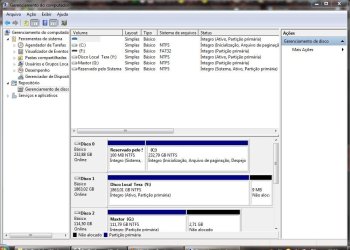
Sometimes this can be due to incorrect or changes in system configuration so if you'll post back a screenshot of your maximized Disk Management drive map we can look it over for you.

If there was ever an OS on the HD and it wasn't wiped sometimes boot code can also interfere.
 
Make sure the BIOS is set to monitor SMART. You can also install to your desktop CrystalDiskInfo - Software - Crystal Dew World to do this.

Sometimes this can be due to incorrect or changes in system configuration so if you'll post back a screenshot of your maximized Disk Management drive map we can look it over for you.

If there was ever an OS on the HD and it wasn't wiped sometimes boot code can also interfere.
Ok, I am downloading the tool you suggested and I am trying to find out exactly where on this PC is my disk management drive. I am living in Brazil at the moment and this PC is all in Portuguese, which at times posses a problem for me.
Thanks!
 

My Computer

OS
Windows 7 Ultimate 64 bits
Hard Disk Sentinel is a great tool.

How old is the drive ? Have you contacted Samsung about the issue ?

Disk Management: Start>Right Click Computer>Manage, wait a few seconds. Left hand pane click
Disk Management.
 

My Computer

Computer type
PC/Desktop
Computer Manufacturer/Model Number
Skylake Special #666
OS
Windows 10 Pro x64
CPU
Intel Core i7 6700K
Motherboard
Asus Sabertooth Z170 Mark 1
Memory
GSkill TridentZ RGB 16GB 3600 16-16-16-36
Graphics Card(s)
EVGA GTX 980 Ti SC x2
Sound Card
Realtek High Definition
Monitor(s) Displays
AOC G2460PG
Screen Resolution
1920 x 1080 144Hz
Hard Drives
Samsung 860 Pro 256GB, Seagate Barracuda 4TB x2
PSU
EVGA 1000 P2, EVGA White Custom Braided Cables
Case
Corsair Vengeance C70 Gunmetal Black
Cooling
Corsair H100i v2, Corsair ML120 x2, Thermal Grizzly Kryonaut
Keyboard
Logitech G910 Orion Spectrum
Mouse
Logitech G700s
Internet Speed
Verizon Fios Quantum Gateway 75/75
Antivirus
Windows Defender, Malwarebytes Free 3.8.3
Browser
Chrome
Other Info
Corsair SP120 x4, LG Blu-ray Drive, Durabrand HT-395 100 Watt Dolby Digital Amp, Corsair H2100 Wireless 7.1 Headset
Disk Management.JPG

Ok Here is the screenshot you'll requested. I am still working on the Bios stuff. Give me some leadway here since is the first time that I'm actually messing with this computer other than installing or uninstalling programs.
 

My Computer

OS
Windows 7 Ultimate 64 bits
Y is marked Active which a data drive should not be, only an OS drive. I would mark it Inactive using this method: Partition - Mark as Inactive - Windows 7 Forums.

If you want a picture of what you're doing, download free Partition Wizard bootable CD ISO, burn to CD using Windows Image Burner, boot CD, rightclick on Y to Modify>Set to Inactive, OK, Apply.

There is another drive appearing first in the list which doesn't have a letter that is also marked Active and could be causing problems. Unfortunately we cannot see it on the drive map below which needs scrolling, nor can we see its used space because you didn't Maximize the window as requested before capturing it. Can you determine what this drive is and why it has no letter and is marked Active?
 
Give Gregs suggestion a try. If that doesn`t work you should get your data off the drive then look into returning it if you can.
 

My Computer

Computer type
PC/Desktop
Computer Manufacturer/Model Number
Skylake Special #666
OS
Windows 10 Pro x64
CPU
Intel Core i7 6700K
Motherboard
Asus Sabertooth Z170 Mark 1
Memory
GSkill TridentZ RGB 16GB 3600 16-16-16-36
Graphics Card(s)
EVGA GTX 980 Ti SC x2
Sound Card
Realtek High Definition
Monitor(s) Displays
AOC G2460PG
Screen Resolution
1920 x 1080 144Hz
Hard Drives
Samsung 860 Pro 256GB, Seagate Barracuda 4TB x2
PSU
EVGA 1000 P2, EVGA White Custom Braided Cables
Case
Corsair Vengeance C70 Gunmetal Black
Cooling
Corsair H100i v2, Corsair ML120 x2, Thermal Grizzly Kryonaut
Keyboard
Logitech G910 Orion Spectrum
Mouse
Logitech G700s
Internet Speed
Verizon Fios Quantum Gateway 75/75
Antivirus
Windows Defender, Malwarebytes Free 3.8.3
Browser
Chrome
Other Info
Corsair SP120 x4, LG Blu-ray Drive, Durabrand HT-395 100 Watt Dolby Digital Amp, Corsair H2100 Wireless 7.1 Headset
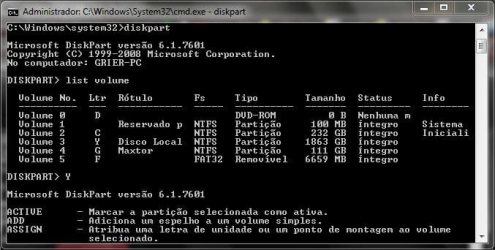
Ok, going to check on that right now.Elevated command propmt.JPG

Ok did the command prompt is not active any more, also I do believe that first disk is a DVD/CD rom drive.

Been checking on that one drive that has no letter assigment and I have no idea of what it is. It says that is 996MB and there are 996MB free. I only have one external drive, a pen drive I use as readyboot. There is also another DVD drive I unistalled today, basically unplugit, was what I did.
 
Last edited:

My Computer

OS
Windows 7 Ultimate 64 bits
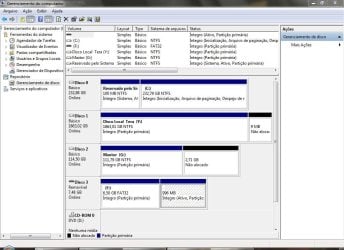
Disk management after.JPG
Ok you guys, this is what the disk management looks after following Greg's instructions
 

My Computer

OS
Windows 7 Ultimate 64 bits
Again the window is not maximized so we cannot see the full listings. Is there a problem with comprehension?

There is a removable device which looks like an 8gb flash stick that has an unlettered partition marked Active. Why?
 
Again the window is not maximized so we cannot see the full listings. Is there a problem with comprehension?

There is a removable device which looks like an 8gb flash stick that has an unlettered partition marked Active. Why?
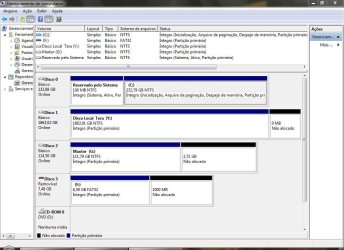
Disk Management After 2.JPG

I did maximazed the window, I have no problem comprehending; however there is no need to be rude. I moved the other two columns to the side and see if it shows better this time. As I mentioned before that is a flash stick that I use as readyboot, suposely it helps improve the speed of the PC. As of our last posting I also removed the extra unmarked partition that was empty; I guess that it was left there by the Tech that put the PC together.
Thanks for your help.
 

My Computer

OS
Windows 7 Ultimate 64 bits
Didn't mean to be rude, just asking.

Your configuration is correct although there could be boot code remaining on one of the data disks if they once had an OS, which can sometimes interfere. For this reason if other ideas do not work I would move it's data off and wipe it with Diskpart Clean Command, then Create and format several smaller data partitions.

First check your computer or mobo maker's Support Downloads webpage to see if there is a newer BIOS version which might be required to handle such a large data drive, as is common.
 
Didn't mean to be rude, just asking.

Your configuration is correct although there could be boot code remaining on one of the data disks if they once had an OS, which can sometimes interfere. For this reason if other ideas do not work I would move it's data off and wipe it with Diskpart Clean Command, then Create and format several smaller data partitions.

First check your computer or mobo maker's Support Downloads webpage to see if there is a newer BIOS version which might be required to handle such a large data drive, as is common.

OK, so far it has not gone missing, but then again, it stayed on for 2 days before. I ran the other tool you suggested and did the SMART. That also came back ok, after doing the diskpart. I already was contemplating have a friend hotwire my data off the disk and doing smaller partitions. I will check on the bios for the mother board. I need to ask the tech, since I have no idea which brand it is. Thanks for all your help and trouble. I really appreciated it!
 

My Computer

OS
Windows 7 Ultimate 64 bits
I had a similar problem before and the problem was a bad data cable. You can try replacing the ATA cable with a new one.

Also try swapping the power cable to HDD to another spare one.
 

My Computer

Computer Manufacturer/Model Number
Toshiba Satellite P775-S7232
OS
MS Windows 7 Ultimate 64-bit SP1
CPU
i5-2410M 2.3GHz (2.9GHz Turbo-Boost) Sandy Bridge 32nm
Motherboard
Toshiba PHRAA ver. PSBY1U-00F003
Memory
4GB+4GB Samsung DDR3 PC3-10700 (1333 MHz)
Graphics Card(s)
Video Intel(R) HD Graphics Family, 1696MB available memory
Sound Card
Realtek High Definition Audio version=6.0.1.6323
Monitor(s) Displays
17.3 " Trubrite TFT LCD, LED Backlit
Screen Resolution
1600x900 32 bit, Native support for 720P content
Hard Drives
TOSHIBA MK6476GSXN
580.614 [GB] partitioned C: 80GB and D: 500GB with hidden recovery partitons.

Spare bay for 2nd HDD but no SATA connector :-(
PSU
Toshiba AC/DC Adapter
Case
Notebook
Cooling
Built-in Fan
Keyboard
Premium Raised Tile keyboard
Mouse
Logitech M215 wireless mouse
Internet Speed
Not fast enough
Other Info
Built-in Harman Kardon speakers with Dolby Advanced Audio, Waves MaxxAudio® 3. HDMI, 1xUSB3+3xUSB2 ports, WebCam, Battery life 4hrs 11mins, 4GB Readyboost SDHC card, WD My Book Essential Ext HDDs 2 TB, 2x1TB, My Passport SE 1TB and WDTV 1st Gen for Multimedia playing on a Sony Wega 32" LCD.
Recent addition to my toys are Asus Transformer Pad TF300T with 32GB onboard sd card + 32GB microsd card.
I had a similar problem before and the problem was a bad data cable. You can try replacing the ATA cable with a new one.

Also try swapping the power cable to HDD to another spare one.
Thanks! will do that tomorrow also, anything to be sure. Thank you'll for the help really appreciated!
 

My Computer

OS
Windows 7 Ultimate 64 bits
Back
Top