Windows 7 OEM

adriansam

New member
Member
Local time
6:56 PM
Messages
69
Location
Tanza, Cavite
Guys
I have a Lenovo laptop running Windows 7 Home Basic 64 bit
Then I want to upgrade it to ultimate so
I install Windows 7 Ultimate 64 bit , when installing I see a drive namely "OEM Reserved" I can't remember the other details
I just want to know what it is?? What's its function??
Does it have a connection to my previous OS??
Does it
affect the performance of my laptop running with the new OS?

I have noticed that my log on screen before is

lenovo.jpg
But now in my new OS the word "Lenovo" from log on screen has gone. .

I wonder that the OEM has a connection to OS and I guess my OEM is useless that's why I'm asking for your help . .

Thanks for reading
Thanks in advanced to all of you. .


My Computer

Computer type
Laptop
Computer Manufacturer/Model Number
Lenovo
OS
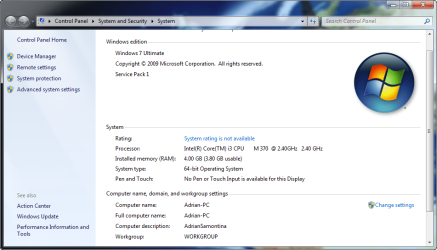
Microsoft Windows 7 Ultimate 64-bit
CPU
Intel(R) Core(TM) i3 CPU M 370 @ 2.40GHz
Motherboard
LENOVO Base Board Product Name
Memory
465.76 GB
Graphics Card(s)
Intel(R) HD Graphics
Sound Card
(1) High Definition Audio Device (2) High Definition Audio
Hard Drives
(1) ST9500325AS
I've read everything about OEM I understand it..But how to use it again after installing a new OS??
 

My Computer

Computer type
Laptop
Computer Manufacturer/Model Number
Lenovo
OS
Microsoft Windows 7 Ultimate 64-bit
CPU
Intel(R) Core(TM) i3 CPU M 370 @ 2.40GHz
Motherboard
LENOVO Base Board Product Name
Memory
465.76 GB
Graphics Card(s)
Intel(R) HD Graphics
Sound Card
(1) High Definition Audio Device (2) High Definition Audio
Hard Drives
(1) ST9500325AS
Are saying that this "OEM Reserved" appeared after you upgraded to Ultimate? Just to be sure, upload a copy of your Disk Management. Click on your Start button in the lower left of your screen. Above the button type "Disk Management" without the quotes and hit enter. The Disk Management will popup. Expand all of the columns so we can read the print. Use this tutorial to post a screenshot of the Disk Management using your Snipping Tool.http://www.sevenforums.com/tutorials/9733-screenshots-files-upload-post-seven-forums.html Thanks,
 

My Computer

Computer type
PC/Desktop
Computer Manufacturer/Model Number
Custom Build
OS
Windows 7 Home Premium 32-Bit - Build 7600 SP1
CPU
Intel Core i3-2120 3.30Ghz
Motherboard
Asus P8Z68-V LX Intel Z68 Socket H2 ATX
Memory
Kingston 4 GB DDR3 1333 mhz
Graphics Card(s)
AMD Radeon HD6670
Sound Card
Sound Blaster Audigy SE 24-Bit
Monitor(s) Displays
Asus VE228
Screen Resolution
1440 X 900
Hard Drives
OCZ Vertex 3 120 GB Sata 3 SSD ==
Kingston SH103/S3 120 G Hyper X 120 GB SSD ==
Western Digital 500 GB Caviar Green 7200 RPM ==
PSU
Corsair CX600M == 600 Watt
Case
NZXT Apollo - Silver with Clear Side Panel
Cooling
Three 120 mm Fans
Keyboard
Microsoft Natural 4000
Mouse
Microsoft Custom Optical 3000
Internet Speed
AT&T Fiber Optic Wireless Network
Antivirus
Microsoft Security Essentials
Browser
Chrome
Other Info
120 mm Blue LED Fan -- Three Blue LED Lazer Light Sticks
Everything you need is here to get a perfect Clean Reinstall - Factory OEM Windows 7 including how to deal with the OEM partitions. If you varied your own install much from that then I would do it over to use the tools and methods which get and keep perfect Win7 install.

Please post back a screenshot of your maximized Disk Management drive map and listings:

1. Type Disk Management in Start Search box.
2. Open Disk Mgmt. window and maximize it.
3. Type Snipping Tool in Start Search box.
4. Open Snipping Tool, choose Rectangular Snip, click New, draw a box around full drive map and all listings.
5, Save Snip, attach using paper clip in Reply Box.

Tell us what is on each partition and we'll advise you how to best adjust them.
 
Lenova inserted their own login screen rather then you seeing the default that comes with 7. That cam be done again if you want the same screen using the Windows 7 Logon Background Changer program where you can select any wallpaper(bmp, jpeg, png) or even a photo. You can also refer to one of the guides right here on SF for seeing that done. http://www.sevenforums.com/tutorials/5382-log-screen-change.html

The OEM Reserved partition or better known as hidden recovery partition is placed there by the manufacturer and contains the device driver base as well as any preinstalled "Bloatwares" as they are usually labeled by Lenova. When going to use a recovery disk if you made up a set using the manufacturer's disk creation tool prepackaged or downloaded from their support the installer grabs and installs those same drivers and apps all over again.

With the clean install of the Ulitmate edition to replace the preinstall Home Basic checking to be sure you have updates from their support site as well as rechecking on them is a good idea. If you are never planning to restore the preinstalled Windows at any time most may decide to simply wipe the main drive completely eliminating the recovery partition in the process in order to use the full capacity of the drive as the main C primary.

A look at the Disk Management tool's view of the drive that has been requested will show if the recovery partition is at the front of the drive followed by the C primary or at the rear following C. If at the rear of the drive and no longer needed you can toss that even and expand C to fill in the void of unallocated drive space left behind. For ever going back to the preinstalled HB edition however leaving that intact would now require ordering a recovery disk from Lenova since the Home Basic isn't one of the editions available for use with the guide there.
 

My Computers

System One System Two

  • Computer type
    PC/Desktop
    Computer Manufacturer/Model Number
    Custom builds = 2
    OS
    W7 Ultimate x64/W10 Pro x64/W11 Pro Triple Boot - Main PC W7 Remote PC Micro ATX W7 Pro x64/W11 Pro
    CPU
    AMD Phenom II X4 975 Deneb 3.6ghz - 965 2nd remote pc
    Motherboard
    Gigabyte GA-790XTA-UD4-Gigabyte GA-880GM-D2H remote pc
    Memory
    Kingston Hyper X DDR3 1600 1.5v 16gb - Hyper X Fury 8gb 2nd
    Graphics Card(s)
    MSI HD Radeon 5750 1gb - MSI HD Radeon 6450 on mini tower
    Sound Card
    Creative Labs X-Fi Xtreme Audio P - Realtek onooard 2nd case
    Monitor(s) Displays
    ASUS VW199T-P 19" HP 2082a Main-HP 2082a 20" remote pc
    Screen Resolution
    Asus 1440x900 - HP 1600x900
    Hard Drives
    WD Black 1TB HD per OS W7, W10, and pending W11 presently on 500gb OS Drive - Pending Triple 1TB HDs for Spanned Storage/backup volume
    Single 2TB external USB enclosure, single 1TB System 7 Host/Boot drive, Pending 8TB external HD for system image b
    PSU
    Corsair 750TX - primary / Corsair CX600 - second
    Case
    Antec 900-2 - SSD compatible / NZXT Vulcan mini tower
    Cooling
    Zalman CNPS9900A
    Keyboard
    AZIO L70 Backlit Letters Gaming - ONN Cordless/USB
    Mouse
    MSI DS200 Programmable, Logitech Cordless
    Internet Speed
    30mbps upgrade - primary hard wired - mini tower usb WiFi
    Antivirus
    GFI VIPRE Internet Security 2014 on W7 2016 beta on W10,
    Browser
    Cyberfox, WaterFox 64bit FF variants, FireFox x64, Pale Moon
    Other Info
    Accomdata fan cooled usb 2.0 PIDE/Sata II, III external enclosure.
    Sambient usb/eSata PATA/Sata II, III external enclosure.
  • Computer type
    PC/Desktop
    System Manufacturer/Model Number
    CUSTOM ASSEMBLY
    OS
    W7 Pro x64/W11 Pro
    CPU
    AMD Deneb 3.6ghz - 965
    Motherboard
    Gigabyte GA-880GM-D2H remote pc
    Memory
    Kingston Hyper X Fury 8gb
    Graphics Card(s)
    MSI HD Radeon 6450 DVI Output
    Sound Card
    Realtek onooard Creative or Other separate PENDING
    Monitor(s) Displays
    VIZIO 32" LCD TV Separate LCD Pending
    Screen Resolution
    1600x1080
    Hard Drives
    WD 500GB OS Host/Boot WD Green 1TB Storage/Backup
    PSU
    Corsair 600W - THERMALTAKE 600W spare case
    Case
    NZXT Vulcan mini tower
    Cooling
    Twin 120mm Top Fans - 240mm Side Cover
    Keyboard
    ONN Cordless/USB Logitech Cordless
    Mouse
    ONN USB/Cordless - Logitech Cordless
    Internet Speed
    DSL 5G
    Browser
    MS Edge, FireFox, WaterFox x64, FireFox Nightly
    Other Info
    OS Testing-Remote Access to Main TeamViewer
2012-10-23_020056.png

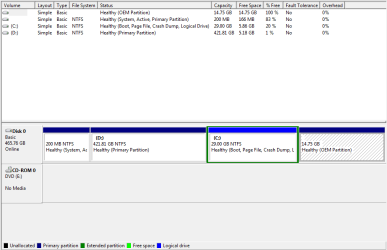
is this what you need??
 

My Computer

Computer type
Laptop
Computer Manufacturer/Model Number
Lenovo
OS
Microsoft Windows 7 Ultimate 64-bit
CPU
Intel(R) Core(TM) i3 CPU M 370 @ 2.40GHz
Motherboard
LENOVO Base Board Product Name
Memory
465.76 GB
Graphics Card(s)
Intel(R) HD Graphics
Sound Card
(1) High Definition Audio Device (2) High Definition Audio
Hard Drives
(1) ST9500325AS
Looks normal. The OEM partition is probably your original recovery partition. Your C partition is a bit tight unless you put all your data on D.
 

My Computer

Computer Manufacturer/Model Number
HP, Dell, Gateway, Toshiba - 4 laptops and 2 desktops
OS
Vista, Windows7, Mint Mate, Zorin, Windows 8
CPU
from 1.6GHz Duo to i7
Monitor(s) Displays
2x HP w2207
Hard Drives
5x HDD, 7x SSD, 12x Externals
Keyboard
with trackball - no mices
Mouse
Trackball mice
Internet Speed
DSL 6000
WHat i mean is how to use that partition??? Why I cant browse OEM Drive?

And why theres no used space on OEM Drive? I remember when i do format I see thats theres used space in OEM Reserved but why 0% is used from this drive???
 

My Computer

Computer type
Laptop
Computer Manufacturer/Model Number
Lenovo
OS
Microsoft Windows 7 Ultimate 64-bit
CPU
Intel(R) Core(TM) i3 CPU M 370 @ 2.40GHz
Motherboard
LENOVO Base Board Product Name
Memory
465.76 GB
Graphics Card(s)
Intel(R) HD Graphics
Sound Card
(1) High Definition Audio Device (2) High Definition Audio
Hard Drives
(1) ST9500325AS
It is a hidden drive. Assign a drive letter and open it - you'll see that it has data.
 

My Computer

Computer Manufacturer/Model Number
HP, Dell, Gateway, Toshiba - 4 laptops and 2 desktops
OS
Vista, Windows7, Mint Mate, Zorin, Windows 8
CPU
from 1.6GHz Duo to i7
Monitor(s) Displays
2x HP w2207
Hard Drives
5x HDD, 7x SSD, 12x Externals
Keyboard
with trackball - no mices
Mouse
Trackball mice
Internet Speed
DSL 6000
how to do that???
 

My Computer

Computer type
Laptop
Computer Manufacturer/Model Number
Lenovo
OS
Microsoft Windows 7 Ultimate 64-bit
CPU
Intel(R) Core(TM) i3 CPU M 370 @ 2.40GHz
Motherboard
LENOVO Base Board Product Name
Memory
465.76 GB
Graphics Card(s)
Intel(R) HD Graphics
Sound Card
(1) High Definition Audio Device (2) High Definition Audio
Hard Drives
(1) ST9500325AS
There's no reason to browse the REcovery partition. Just test if it runs by attempting to run Factory Recovery from boot: How do I recover my system using ThinkVantage Rescue and Recovery

Hopefully you made your Recovery disks when you set up the PC. If not you can order them from Lenovo if ever needed.

If it won't run then you can delete the partition and recover it into C drive.

I'm not sure why your C drive is way over to the right away from the disk reader. Did you reinstall to the former data partition? Do you still have the old OS on D? I would want my OS on the first partition.

If you didn't follow the steps to get a perfect Clean Reinstall - Factory OEM Windows 7
then I'd start over and delete all partitions during reinstall.

You could have inserted the Ultimate Product Key into Anytime Upgrade from Home Basic and it would have unlocked the few extra expensive features in Ultimate without having to reinstall: Windows Anytime Upgrade - How to - Windows 7 Forums.
If Recovery will run you might want to restore to factory condition and try that method.
http://www.sevenforums.com/tutorials/95744-windows-anytime-upgrade-how.html
 
Oh no!! The word "Lenovo" is missing. . .
dfdsfdsfds.png
 

My Computer

Computer type
Laptop
Computer Manufacturer/Model Number
Lenovo
OS
Microsoft Windows 7 Ultimate 64-bit
CPU
Intel(R) Core(TM) i3 CPU M 370 @ 2.40GHz
Motherboard
LENOVO Base Board Product Name
Memory
465.76 GB
Graphics Card(s)
Intel(R) HD Graphics
Sound Card
(1) High Definition Audio Device (2) High Definition Audio
Hard Drives
(1) ST9500325AS
You have a Clean Reinstall which ditches all of the Lenovo crapware, duplicate utilities, branding and other useless junk.

If you want help for what really matters now then reply to my earlier post in full.
 
i already install win7 ultimate but i dont know if its a clean installing??? what is the difference between clean and normal installing??
 

My Computer

Computer type
Laptop
Computer Manufacturer/Model Number
Lenovo
OS
Microsoft Windows 7 Ultimate 64-bit
CPU
Intel(R) Core(TM) i3 CPU M 370 @ 2.40GHz
Motherboard
LENOVO Base Board Product Name
Memory
465.76 GB
Graphics Card(s)
Intel(R) HD Graphics
Sound Card
(1) High Definition Audio Device (2) High Definition Audio
Hard Drives
(1) ST9500325AS
You should have done some research on your own before attempting such a task.

Google is your friend.

You should do a factory restore. Look for what key to push to start the process when you first turn on the pc. Hopefully you didn`t muck that up.
 

My Computer

Computer type
PC/Desktop
Computer Manufacturer/Model Number
Skylake Special #666
OS
Windows 10 Pro x64
CPU
Intel Core i7 6700K
Motherboard
Asus Sabertooth Z170 Mark 1
Memory
GSkill TridentZ RGB 16GB 3600 16-16-16-36
Graphics Card(s)
EVGA GTX 980 Ti SC x2
Sound Card
Realtek High Definition
Monitor(s) Displays
AOC G2460PG
Screen Resolution
1920 x 1080 144Hz
Hard Drives
Samsung 860 Pro 256GB, Seagate Barracuda 4TB x2
PSU
EVGA 1000 P2, EVGA White Custom Braided Cables
Case
Corsair Vengeance C70 Gunmetal Black
Cooling
Corsair H100i v2, Corsair ML120 x2, Thermal Grizzly Kryonaut
Keyboard
Logitech G910 Orion Spectrum
Mouse
Logitech G700s
Internet Speed
Verizon Fios Quantum Gateway 75/75
Antivirus
Windows Defender, Malwarebytes Free 3.8.3
Browser
Chrome
Other Info
Corsair SP120 x4, LG Blu-ray Drive, Durabrand HT-395 100 Watt Dolby Digital Amp, Corsair H2100 Wireless 7.1 Headset
Did you try running Lenovo Factory Recovery? That will reinstall all of the preinstalled software that came with the PC and is NOT a clean install. You can also insert your Ultimate Product Key in Anytime Upgrade to unlock the extra features in Ultimate from the Basic desktop.

A Clean Reinstall is using the Win7 installation DVD to reinstall without all of the factory bloatware, what you apparently did. Follow these steps to get a perfect Clean Reinstall - Factory OEM Windows 7

Where did you get Win7 Ultimate? How is it being activated?
 
You should do some research on your own before asking a bunch of questions.

Google is your friend.
Sorry sir, my windows is updating so my net is too slow. .
 

My Computer

Computer type
Laptop
Computer Manufacturer/Model Number
Lenovo
OS
Microsoft Windows 7 Ultimate 64-bit
CPU
Intel(R) Core(TM) i3 CPU M 370 @ 2.40GHz
Motherboard
LENOVO Base Board Product Name
Memory
465.76 GB
Graphics Card(s)
Intel(R) HD Graphics
Sound Card
(1) High Definition Audio Device (2) High Definition Audio
Hard Drives
(1) ST9500325AS
do i need to activate my windows if i upgrade it from win 7 home basic to win 7 ultimate???
 

My Computer

Computer type
Laptop
Computer Manufacturer/Model Number
Lenovo
OS
Microsoft Windows 7 Ultimate 64-bit
CPU
Intel(R) Core(TM) i3 CPU M 370 @ 2.40GHz
Motherboard
LENOVO Base Board Product Name
Memory
465.76 GB
Graphics Card(s)
Intel(R) HD Graphics
Sound Card
(1) High Definition Audio Device (2) High Definition Audio
Hard Drives
(1) ST9500325AS
is Windows Anytime Upgrade is not available on philippines??
 

My Computer

Computer type
Laptop
Computer Manufacturer/Model Number
Lenovo
OS
Microsoft Windows 7 Ultimate 64-bit
CPU
Intel(R) Core(TM) i3 CPU M 370 @ 2.40GHz
Motherboard
LENOVO Base Board Product Name
Memory
465.76 GB
Graphics Card(s)
Intel(R) HD Graphics
Sound Card
(1) High Definition Audio Device (2) High Definition Audio
Hard Drives
(1) ST9500325AS
Back
Top