
Windows 7 on Dell Inspiron 700M

I use the Simplified Chinese version of windows7. I believe the following steps are the same for all language versions.

Step 1. Download the "6.14.10.3722"driver from this address
Windows Live SkyDrive
Step 2. Just unzip the downloaded driver package to your non-system disk, such as D:\3722-intel\, do not run any exe files.
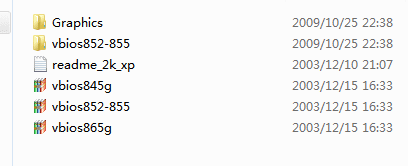
0.PNG
Step3. Reinstall you windows 7 RTM 32-bit version on your dell 700m to ensure clean. There is an exclamation mark on the "video controller". Right-click to upgrade your d:\3722-intel\ drivers into your system (don not use any "setup.exe"). After the reboot ,there are two exclamation marks with two 82852/82855.
Step4. Right-click your first 82852/82855 device to upgrade the driver with your windows 7 native driver "Intel corporation- mobile Intel 945". Then the system asks you to reboot , choose "no ". Upgrade your second 82852/82855 device in the same way. Reboot your windows 7.
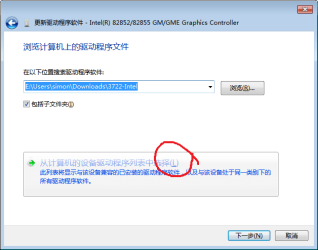
2.png
3.png
Step5. Now you got an exclamation mark with one Intel 945 device. Right-click , upgrade the driver with your windows 7 native driver "Intel corporation- Intel 82852/82855".
4.png
Reboot your windows 7.

Screen resolution has been returned to normal 1280*800.
 

My Computer My Computer

At a glance

Windows7
Computer Manufacturer/Model Number
Dell Inspiron 700m
OS
Windows7
I recently added win7 to my 700m. I got on google and did some extensive searching and found another forum similar to this one and someone had posted a solution to tis problem. it was real simple and works great. two problems, I cant find the forum now, and when the system boots up instead of the pretty blue screen you see all the files being loaded. This does not bother me as the graphics are awesome. I will keep looking and post the link as soon as i find it. But at least you know there is a solution out there now!!!
 

My Computer My Computer

At a glance

windows 7120 gb
Computer Manufacturer/Model Number
Dell 700m
OS
windows 7
Memory
120 gb
I believe you can make the 855gm XP driver work by installing it in XP SP2 compatibility mode. It won't even install otherwise.

Right click the downloaded .exe, select Properties>Compatibility tab, set to XP SP2 compatiblity mode, tick Run As Admin, Save. Now double click .exe and install driver.

Watch Windows Update closely as it will have newer drivers in Optional choices.
 
This method here works without disabling driver signing like at distractshun.com. It's my preferred method and the animation on boot is not disabled.

I use the Simplified Chinese version of windows7. I believe the following steps are the same for all language versions.

Step 1. Download the "6.14.10.3722"driver from this address
Windows Live SkyDrive
Step 2. Just unzip the downloaded driver package to your non-system disk, such as D:\3722-intel\, do not run any exe files.
View attachment 33254
Step3. Reinstall you windows 7 RTM 32-bit version on your dell 700m to ensure clean. There is an exclamation mark on the "video controller". Right-click to upgrade your d:\3722-intel\ drivers into your system (don not use any "setup.exe"). After the reboot ,there are two exclamation marks with two 82852/82855.
Step4. Right-click your first 82852/82855 device to upgrade the driver with your windows 7 native driver "Intel corporation- mobile Intel 945". Then the system asks you to reboot , choose "no ". Upgrade your second 82852/82855 device in the same way. Reboot your windows 7.
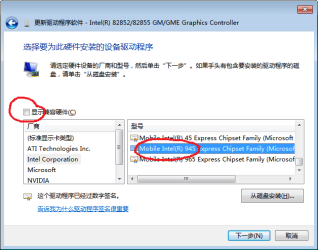
View attachment 33255
View attachment 33256
Step5. Now you got an exclamation mark with one Intel 945 device. Right-click , upgrade the driver with your windows 7 native driver "Intel corporation- Intel 82852/82855".

View attachment 33257
Reboot your windows 7.

Screen resolution has been returned to normal 1280*800.
 

My Computer My Computer

At a glance

Windows Vista
OS
Windows Vista
This worked perfectly for me! Had to restart into safemode after step 3. Thank you so much!

I use the Simplified Chinese version of windows7. I believe the following steps are the same for all language versions.

Step 1. Download the "6.14.10.3722"driver from this address
Windows Live SkyDrive
Step 2. Just unzip the downloaded driver package to your non-system disk, such as D:\3722-intel\, do not run any exe files.
View attachment 33254
Step3. Reinstall you windows 7 RTM 32-bit version on your dell 700m to ensure clean. There is an exclamation mark on the "video controller". Right-click to upgrade your d:\3722-intel\ drivers into your system (don not use any "setup.exe"). After the reboot ,there are two exclamation marks with two 82852/82855.
Step4. Right-click your first 82852/82855 device to upgrade the driver with your windows 7 native driver "Intel corporation- mobile Intel 945". Then the system asks you to reboot , choose "no ". Upgrade your second 82852/82855 device in the same way. Reboot your windows 7.
View attachment 33255
View attachment 33256
Step5. Now you got an exclamation mark with one Intel 945 device. Right-click , upgrade the driver with your windows 7 native driver "Intel corporation- Intel 82852/82855".
View attachment 33257
Reboot your windows 7.

Screen resolution has been returned to normal 1280*800.
 

My Computer My Computer

At a glance

Windows 7 Professional 32Bit
Computer Manufacturer/Model Number
Dell/Inspiron 700m
OS
Windows 7 Professional 32Bit
I just installed windows 7 ultimate on my inspiron 700m but I don't find drivers to run the network adapter D: could you like that driver for me please? D:
 

My Computer My Computer

At a glance

windoes 7, 64 bith
Computer type
Laptop
Computer Manufacturer/Model Number
HP
OS
windoes 7, 64 bith
Antivirus
Norton 360
Browser
Internet Explorer
I use the Simplified Chinese version of windows7. I believe the following steps are the same for all language versions.

Step 1. Download the "6.14.10.3722"driver from this address
Windows Live SkyDrive
Step 2. Just unzip the downloaded driver package to your non-system disk, such as D:\3722-intel\, do not run any exe files.
Step3. Reinstall you windows 7 RTM 32-bit version on your dell 700m to ensure clean. There is an exclamation mark on the "video controller". Right-click to upgrade your d:\3722-intel\ drivers into your system (don not use any "setup.exe"). After the reboot ,there are two exclamation marks with two 82852/82855.
Step4. Right-click your first 82852/82855 device to upgrade the driver with your windows 7 native driver "Intel corporation- mobile Intel 945". Then the system asks you to reboot , choose "no ". Upgrade your second 82852/82855 device in the same way. Reboot your windows 7.
Step5. Now you got an exclamation mark with one Intel 945 device. Right-click , upgrade the driver with your windows 7 native driver "Intel corporation- Intel 82852/82855".
Reboot your windows 7.

Screen resolution has been returned to normal 1280*800.
Please forgive me for replying to an old thread on the topic, but am fighting this exact issue (video driver) with my Dell 700m (x86) & fresh Win7 Pro install - in particular, I'm stuck on Step 4.

Wondering if there have been any updates along these lines?

Thanks in advance from a new member,

-----

Edit: Actually, while fighting 'step 4' above, and:
- a 'hard lock'
- failed reboot
- reboot in safe mode
- reboot in normal mode
... it now works perfectly: two 82852/82855 graphics controllers are still listed in 'Display adaptors', but no exclamation points, and my nice 1280x800 display is /finally/ up and running.

-----

I have owned a substantial number of laptops (8?) ever since starting with an off-brand w/ Cyrix 4x86 33MHz processor, and this Dell 700m has given me more driver issues than all the others combined ... :-(
 
Last edited:

My Computer My Computer

At a glance

Windows 7 Pro x861.6 GHz2 GB DDR1 333MHzIntegrated / Intel
Computer type
Laptop
Computer Manufacturer/Model Number
Dell Inspiron 700m
OS
Windows 7 Pro x86
CPU
1.6 GHz
Memory
2 GB DDR1 333MHz
Graphics Card(s)
Integrated / Intel
Browser
IE
Allen, watching your thread to get some help with my Dell Inspiron too....
 

My Computer My Computer

At a glance

Windows 7 Home Premium 32bit
Computer type
PC/Desktop
OS
Windows 7 Home Premium 32bit
Back
Top