Solved Windows 7 on two disks

Morpheus NS

The One
Member
Local time
2:45 PM
Messages
26
Location
Serbia
Hello, everyone!

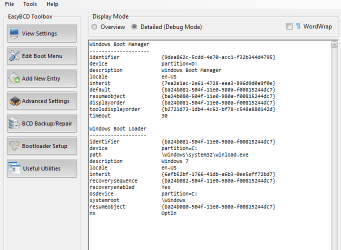
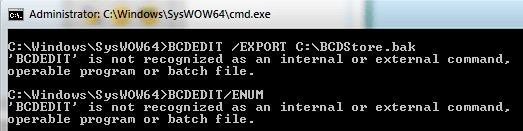
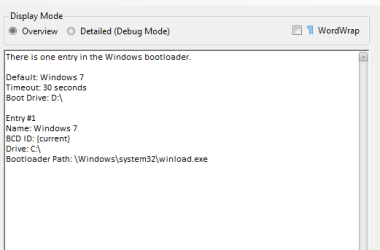
I accidentally installed Windows 7 Ultimate x64 on two disks. I want to get rid of Windows 7 on disk D. I learned that i have to edit BCD on C disk, but I don't know how exactly to do that. I found some commands on the internet, but it doesn't seem to work... Can you help me?

This is current situation:
 

Attachments
  • Capture01.PNG
    Capture01.PNG
    5 KB · Views: 11
  • Capture.PNG
    Capture.PNG
    18.7 KB · Views: 15
  • Capture2.PNG
    Capture2.PNG
    5.4 KB · Views: 9

My Computer

OS
Windows 7 Ultimate
CPU
AMD Phenom x4 9550 2.2 GHz
Motherboard
Asus M3N78 SE
Memory
3GB DDR II
Graphics Card(s)
ATI Radeon HD 4670
Monitor(s) Displays
LG FLATRON W2241S
Screen Resolution
1680x1050
Hard Drives
WD 320GB SATA II x2
Internet Speed
6/1 mbit/s
Hello mate.


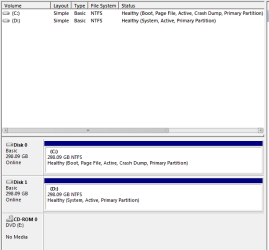
Before we make any specific recommendations will you please post a snip/screen-shot of the entire disk management drive map with a full description as to which drive/partition is which, so we can see what you have going on as there may be a fairly simple way to resolve the situation.

In the Windows start menu right click computer and click manage, in the left pane of the "Computer Management" window that opens click disk management and post a snip of that.


How to Upload and Post a Screenshot and File in Seven Forums
 

My Computer

Computer Manufacturer/Model Number
* BFK Customs *
OS
W 7 64-bit Ultimate
CPU
Intel Q9550 Yorkfield
Motherboard
ASUS P5Q Pro
Memory
8GB Dominator 8500C5D
Graphics Card(s)
ATI : XFX 5870
Sound Card
Realtek HD Audio 7-1
Monitor(s) Displays
1x 47" LCD HDMI & 3x 26" LCD HDMI
Screen Resolution
1920x1080P & 1920x1200
Hard Drives
1x 80GB Intel X25-M G2 SSD : 1x 500GB & 1x 640GB WD Caviar Black(s)
PSU
Corsair 620HX
Case
Cooler Master RC-690
Cooling
Tuniq Tower 120, 2x 140mm and 3x 120mm case fans
Keyboard
Microsoft 500
Mouse
Razer Diamondback 3G
Internet Speed
14 Mb/s
Other Info
1x Koutech 3Gb/s SATA HDD Hot Swap Rack
Thank you for quick answer. :)

This is the screenshot you were looking for:

I was trying to be smart, and now both partitions are marked as Active. I would like to keep the C partition (the one with boot loader on it) and remove D partition (which currently contains boot manager).
 

Attachments

  • Capture3.PNG
    Capture3.PNG
    8.4 KB · Views: 31

My Computer

OS
Windows 7 Ultimate
CPU
AMD Phenom x4 9550 2.2 GHz
Motherboard
Asus M3N78 SE
Memory
3GB DDR II
Graphics Card(s)
ATI Radeon HD 4670
Monitor(s) Displays
LG FLATRON W2241S
Screen Resolution
1680x1050
Hard Drives
WD 320GB SATA II x2
Internet Speed
6/1 mbit/s

My Computer

Computer Manufacturer/Model Number
* BFK Customs *
OS
W 7 64-bit Ultimate
CPU
Intel Q9550 Yorkfield
Motherboard
ASUS P5Q Pro
Memory
8GB Dominator 8500C5D
Graphics Card(s)
ATI : XFX 5870
Sound Card
Realtek HD Audio 7-1
Monitor(s) Displays
1x 47" LCD HDMI & 3x 26" LCD HDMI
Screen Resolution
1920x1080P & 1920x1200
Hard Drives
1x 80GB Intel X25-M G2 SSD : 1x 500GB & 1x 640GB WD Caviar Black(s)
PSU
Corsair 620HX
Case
Cooler Master RC-690
Cooling
Tuniq Tower 120, 2x 140mm and 3x 120mm case fans
Keyboard
Microsoft 500
Mouse
Razer Diamondback 3G
Internet Speed
14 Mb/s
Other Info
1x Koutech 3Gb/s SATA HDD Hot Swap Rack
I will try this tomorrow, and report the results. Thanks again!
 

My Computer

OS
Windows 7 Ultimate
CPU
AMD Phenom x4 9550 2.2 GHz
Motherboard
Asus M3N78 SE
Memory
3GB DDR II
Graphics Card(s)
ATI Radeon HD 4670
Monitor(s) Displays
LG FLATRON W2241S
Screen Resolution
1680x1050
Hard Drives
WD 320GB SATA II x2
Internet Speed
6/1 mbit/s
OK, be sure to post back here with an update.
 

My Computer

Computer Manufacturer/Model Number
* BFK Customs *
OS
W 7 64-bit Ultimate
CPU
Intel Q9550 Yorkfield
Motherboard
ASUS P5Q Pro
Memory
8GB Dominator 8500C5D
Graphics Card(s)
ATI : XFX 5870
Sound Card
Realtek HD Audio 7-1
Monitor(s) Displays
1x 47" LCD HDMI & 3x 26" LCD HDMI
Screen Resolution
1920x1080P & 1920x1200
Hard Drives
1x 80GB Intel X25-M G2 SSD : 1x 500GB & 1x 640GB WD Caviar Black(s)
PSU
Corsair 620HX
Case
Cooler Master RC-690
Cooling
Tuniq Tower 120, 2x 140mm and 3x 120mm case fans
Keyboard
Microsoft 500
Mouse
Razer Diamondback 3G
Internet Speed
14 Mb/s
Other Info
1x Koutech 3Gb/s SATA HDD Hot Swap Rack
I will try this tomorrow, and report the results. Thanks again!


Hello again mate, have you had a go at this yet and if so how did it sort out?
 

My Computer

Computer Manufacturer/Model Number
* BFK Customs *
OS
W 7 64-bit Ultimate
CPU
Intel Q9550 Yorkfield
Motherboard
ASUS P5Q Pro
Memory
8GB Dominator 8500C5D
Graphics Card(s)
ATI : XFX 5870
Sound Card
Realtek HD Audio 7-1
Monitor(s) Displays
1x 47" LCD HDMI & 3x 26" LCD HDMI
Screen Resolution
1920x1080P & 1920x1200
Hard Drives
1x 80GB Intel X25-M G2 SSD : 1x 500GB & 1x 640GB WD Caviar Black(s)
PSU
Corsair 620HX
Case
Cooler Master RC-690
Cooling
Tuniq Tower 120, 2x 140mm and 3x 120mm case fans
Keyboard
Microsoft 500
Mouse
Razer Diamondback 3G
Internet Speed
14 Mb/s
Other Info
1x Koutech 3Gb/s SATA HDD Hot Swap Rack
It worked! Thank you very much! I used system recovery disc, and it solved my problem immediately, didn't even have to run it three times. I got rid of the second Windows 7 installation, and now the only trouble is how to fill 320 GB of free space. :)
 

My Computer

OS
Windows 7 Ultimate
CPU
AMD Phenom x4 9550 2.2 GHz
Motherboard
Asus M3N78 SE
Memory
3GB DDR II
Graphics Card(s)
ATI Radeon HD 4670
Monitor(s) Displays
LG FLATRON W2241S
Screen Resolution
1680x1050
Hard Drives
WD 320GB SATA II x2
Internet Speed
6/1 mbit/s

My Computer

Computer type
PC/Desktop
Computer Manufacturer/Model Number
Custom built by me.
OS
Windows 10 Pro
CPU
Intel Core i7-4770K (3.5Ghz)
Motherboard
Gigabyte G1 Sniper 5 (F10 Bios)
Memory
32 gig Corsair Dominator Platinum (4x8Gig)
Graphics Card(s)
Sapphire Tri-X R9 Fury
Sound Card
Soundblaster ZXR
Monitor(s) Displays
NEC PA242W 24" LCD Monitor
Screen Resolution
1920 x 1200
Hard Drives
Primary - Samsung 850 Pro (512gig), Samsung 840 Pro (256gig), 2TB WD Caviar Black.
PSU
EVGA Supernova 1000 G2
Case
Cooler Master HAF X
Cooling
Corsair H100i with Corsair Air Series SP120 Quiet Fans
Keyboard
Logitech Wireless Wave
Mouse
Logitech Performance MX
Internet Speed
High Speed Cable
Antivirus
Norton Security
Browser
IE11
Other Info
Memory Timings - 1866MHz @ 9-9-9-27-1T @ 1.5 volts
Good to see you got it sorted and thanks for the update.
 

My Computer

Computer Manufacturer/Model Number
* BFK Customs *
OS
W 7 64-bit Ultimate
CPU
Intel Q9550 Yorkfield
Motherboard
ASUS P5Q Pro
Memory
8GB Dominator 8500C5D
Graphics Card(s)
ATI : XFX 5870
Sound Card
Realtek HD Audio 7-1
Monitor(s) Displays
1x 47" LCD HDMI & 3x 26" LCD HDMI
Screen Resolution
1920x1080P & 1920x1200
Hard Drives
1x 80GB Intel X25-M G2 SSD : 1x 500GB & 1x 640GB WD Caviar Black(s)
PSU
Corsair 620HX
Case
Cooler Master RC-690
Cooling
Tuniq Tower 120, 2x 140mm and 3x 120mm case fans
Keyboard
Microsoft 500
Mouse
Razer Diamondback 3G
Internet Speed
14 Mb/s
Other Info
1x Koutech 3Gb/s SATA HDD Hot Swap Rack
Back
Top