Windows 7 online validation help

deityofchaos

New member
Local time
9:42 AM
Messages
5
To start off, I am running a legitimate copy of windows 7 pro x64 and it recognizes that it is activated in the system settings. The problem arises when I tried to download win XP mode from the microsoft website. I keep getting a message saying that my copy of win 7 is not genuine and then brings me to a page that tried to sell me a key for win 7. I get this same problem in both Firefox and IE. Again, I am 100% certain this is a legitimate copy of win 7 that I purchased directly from microsoft around January 2010. I'm hoping that someone can help me figure out why my computer sees itself as valid but the microsoft website doesn't. I really need to get xp mode working, so I'd appreciate any speedy replies.
 

My Computer

OS
Windows 7 Professional 64 bit
CPU
AMD Phenom X4 9550
Motherboard
MSI K9A2 Platinum
Memory
8 GB DDR2
Graphics Card(s)
Radeon HD 4890
PSU
1200 w PC Power and Cooling
Case
Antec 900
Sounds like a virus or malware, wanting you to buy a key.
Run a full anti virus scan
Download and run malwarebytes. Run the full scan, after you update the definitions.

With things the way they are, today, we cant even be sure that the page trying to sell is actually MS.

If the tests prove to be negative, make sure if you right click on the computer, desktop, icon and then properties you can see the validated MS logo, in lower right.
 

My Computer

Computer type
PC/Desktop
Computer Manufacturer/Model Number
Dell XPS 420
OS
Windows 10, Home Clean Install
CPU
Intel Core2 processsor Q8200(2.33Ghz 1333FSB) Quad Core Tech
Motherboard
Dell
Memory
6 gb
Graphics Card(s)
ATI Radeon 256MB HD3650
Sound Card
Intergrated 7.1 Channel Audio
Monitor(s) Displays
Dell SP2009W 20"
Hard Drives
640 GB Serial ATA Hard drive
Cooling
Fan
Keyboard
Dell USB Keyboard
Mouse
Dell Premium Optical USB
Internet Speed
DSL 2.85
Sounds like a virus or malware, wanting you to buy a key.
Run a full anti virus scan
Download and run malwarebytes. Run the full scan, after you update the definitions.

With things the way they are, today, we cant even be sure that the page trying to sell is actually MS.

If the tests prove to be negative, make sure if you right click on the computer, desktop, icon and then properties you can see the validated MS logo, in lower right.
I appreciate the answer, but I am certain this is the microsoft website telling me that it isn't valid and wants me to purchase a key through microsoft. As far as the MS logo in the lower right of my system properties, it's there, it's as it should be, and it's still telling me that my copy of windows is activated. I doubt this is a virus, especially since I just did run a full scan with NOD32 two days ago without a single hit. I am also not experiencing any other side effects one would expect to see from any kind of malware.
 

My Computer

OS
Windows 7 Professional 64 bit
CPU
AMD Phenom X4 9550
Motherboard
MSI K9A2 Platinum
Memory
8 GB DDR2
Graphics Card(s)
Radeon HD 4890
PSU
1200 w PC Power and Cooling
Case
Antec 900
Well what I think now is this: A few months ago our friends at MS began a new program. One of the updates contained a new method of validiating that the computers were actually genuine. Initially, a lot of problems and questions, here. It has died down now. But maybe, your situation is caused by that update. Iwould call MS and get it straightened out. You are entitled, and paid for compatiblity mode, and should be able to use it.
 

My Computer

Computer type
PC/Desktop
Computer Manufacturer/Model Number
Dell XPS 420
OS
Windows 10, Home Clean Install
CPU
Intel Core2 processsor Q8200(2.33Ghz 1333FSB) Quad Core Tech
Motherboard
Dell
Memory
6 gb
Graphics Card(s)
ATI Radeon 256MB HD3650
Sound Card
Intergrated 7.1 Channel Audio
Monitor(s) Displays
Dell SP2009W 20"
Hard Drives
640 GB Serial ATA Hard drive
Cooling
Fan
Keyboard
Dell USB Keyboard
Mouse
Dell Premium Optical USB
Internet Speed
DSL 2.85
Well what I think now is this: A few months ago our friends at MS began a new program. One of the updates contained a new method of validiating that the computers were actually genuine. Initially, a lot of problems and questions, here. It has died down now. But maybe, your situation is caused by that update. Iwould call MS and get it straightened out. You are entitled, and paid for compatiblity mode, and should be able to use it.
Thanks, I was trying to avoid a call to support, but looks like that'll have to be what I do. I'll call tomorrow when I have time to be on hold and hopefully report back with a fix.
 

My Computer

OS
Windows 7 Professional 64 bit
CPU
AMD Phenom X4 9550
Motherboard
MSI K9A2 Platinum
Memory
8 GB DDR2
Graphics Card(s)
Radeon HD 4890
PSU
1200 w PC Power and Cooling
Case
Antec 900
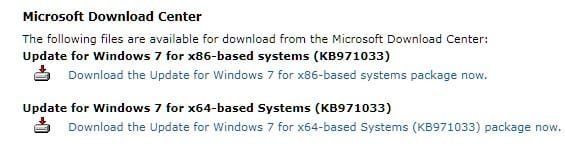
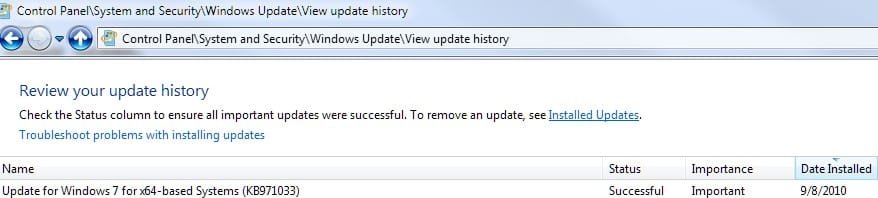
Before you do so, confirm you have the proper update (KB971033) installed.

Screenshot_7.jpg

Screenshot_1.jpg
 

My Computer

Computer Manufacturer/Model Number
Toshiba L355D
OS
Windows 7 Ultimate x64 SP1
CPU
Core2 Duo
Motherboard
Intel
Memory
4 GB
Graphics Card(s)
GM965 on-board
Sound Card
RealTek on-board
Monitor(s) Displays
19"+17"(laptop)
Screen Resolution
1440x900 (x 2)
Hard Drives
500GB Ext. 200GB Internal
PSU
N/A
Case
N/A
Cooling
N/A
chaos,

Despite how you see the matter,
do us foolish people with many,many years of experience a favor and download, install,and run malwarebytes.

Malwarebytes
 

My Computer

Computer Manufacturer/Model Number
Toshiba Satellite S875D-S7239 laptop
OS
MS Windows 7 Ultimate SP1 64-bit
CPU
AMD A10-4600M
Motherboard
AMD Pumori (Socket FT1)
Memory
6.00 GB Dual-Channel DDR3 @ 798MHz (11-11-12-28)
Graphics Card(s)
AMD Radeon HD 7660G
Sound Card
High Definition Audio Device
Monitor(s) Displays
Generic PnP Monitor (1600x900@60Hz)
Screen Resolution
1600x900@60Hz
Hard Drives
SSD 119GB Corsair CSSD-V128GB2 ATA Device
Keyboard
Standard PS/2 Keyboard
Mouse
HP Wireless Optical Mobile Mouse Model FHA-3410
Internet Speed
What the local pub, local coffee shop offers.
Other Info
Optical Drive:MATSHITA BD-CMB UJ160B ATA Device


Also have an Asus ha1002xp netbook with Win 7 Ultimate installed.
chaos,

Despite how you see the matter,
do us foolish people with many,many years of experience a favor and download, install,and run malwarebytes.

Malwarebytes
No detections on malwarebytes.
Here's a link to the page I keep getting redirected to and an included screenshot because said link doesn't bring anyone else to the same page.

Genuine Microsoft Software

http://imgur.com/d1BMC.png

(Note: When I hit preview, it converted the URL to a link, so you'll have to hover over it to see the URL like I wanted to show it, the link redirects you to a different page.)
 

My Computer

OS
Windows 7 Professional 64 bit
CPU
AMD Phenom X4 9550
Motherboard
MSI K9A2 Platinum
Memory
8 GB DDR2
Graphics Card(s)
Radeon HD 4890
PSU
1200 w PC Power and Cooling
Case
Antec 900
Even I experienced the same problem same error it could not be validated..I have MSE and my comp is free from all malware...Is it a MS server problem?
 

My Computer

Computer Manufacturer/Model Number
aspire 5920
OS
Windows 8 Professional x64
CPU
core 2 duo T5550
Memory
4 GB
Graphics Card(s)
GMA X3100
Hard Drives
160 GB + 320 GB
Internet Speed
2 mbps
:sleepy:
To start off, I am running a legitimate copy of windows 7 pro x64 and it recognizes that it is activated in the system settings. The problem arises when I tried to download win XP mode from the microsoft website. I keep getting a message saying that my copy of win 7 is not genuine and then brings me to a page that tried to sell me a key for win 7. I get this same problem in both Firefox and IE. Again, I am 100% certain this is a legitimate copy of win 7 that I purchased directly from microsoft around January 2010. I'm hoping that someone can help me figure out why my computer sees itself as valid but the microsoft website doesn't. I really need to get xp mode working, so I'd appreciate any speedy replies.
 

My Computer

OS
windows 7 Ultimate ☠64
Ramesh - please start a new thread of your own, if you are experiencing problems, and include an MGADiag report....

To properly analyse and solve problems with Activation and Validation, we need to see a full copy of the report produced by the MGADiag tool
(download and save to desktop - http://go.microsoft.com/fwlink/?linkid=52012 )
Once saved, run the tool.
Click on the Continue button, which will produce the report.
To copy the report to your response, click on the Copy button in the tool (ignore any error messages at this point), and then paste (using either r-click/Paste, or Ctrl+V ) into your response.
- **in your own thread**, please
Please also state the Version and Edition of Windows quoted on your COA sticker (if you have one) on the case of your machine (or inside the battery compartment), but do NOT quote the Key on the sticker!
How to Tell
 

My Computer

Computer type
Laptop
Computer Manufacturer/Model Number
Asus K52F or Lenovo B51-80
OS
Win 7 x64 Home Premium (and x86 VirtualBox VM)/Win10
CPU
i3 370M/i7 6500U
Motherboard
Asus/Lenovo
Memory
8GB - finally :)/8GB
Graphics Card(s)
it's an i3, dude!/dual Intel&nVidia
Sound Card
onboard
Monitor(s) Displays
15.6" built-in
Screen Resolution
1366x768/1920x1080
Hard Drives
750GB Seagate internal
Sundry external drives attached to other computers on the local network
1TB SSD on the Lenovo
PSU
n/a
Internet Speed
as much as I can get - usually on a dongle/phone, so <1MB/s
Antivirus
MSE/Defender
Browser
IE11/12/Edge/Chrome/FF(if I must)
Back
Top