Windows 7 - Only allow single click!

hamidazeez

New member
Local time
10:04 PM
Messages
1
Hi All, I have several Windows 7 Pro desktops in an 2003 Active Directory environment. I am also experiencing this exact problem with all the Win 7 desktop. We do have GPO set and all of our XP boxes works fine with the settings applied.

The issue here for me, although the "double-click" option is set in the folder option, domain users are still forced to single click to open, launch files and folders. This is annoying to some users since they sometimes click into a folder/drive to start a search and when doing this on Win 7, would actually go into a sub folder that was not intended to. Since the "single-click" option is greyed out, the settings cannot be changed.

This post talks about settings the "Classic Shell" to "Not configured"... I have looked at the local machine policy and the OU GPO and both are set as "Not Configured".

Just need to find out if anyone else have gone through this issue and if the have resolved.

Thanks id advance...
 

My Computer

OS
Windows 7
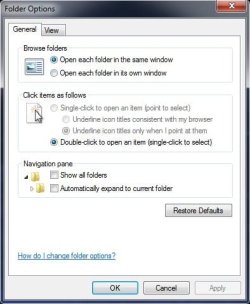
Go to Control Panel / Folder Options. Select the Double click to open an item (point to select) option.
Click Apply / OK.

http://www.sevenforums.com/tutorials/10117-single-click-double-click-open-item.html


52935b384f4256b5e4fa2ac9da78ca8a9c0f6ce.jpg
 
Last edited by a moderator:

My Computer

Computer Manufacturer/Model Number
DELL XPS Studio 435T
OS
Vista 64 Ultimate, Windows 7 64 Ultimate, Ubuntu 9.10
CPU
i7 975 3.3 GHz Extreme (Factory OC'd to 3.6 GHz)
Motherboard
DELL provided
Memory
18 Gb Tri-Channel 1066
Graphics Card(s)
ATI 5970 2048 Mb
Sound Card
X-Fi Extreme Gamer
Monitor(s) Displays
Vizio 37" HD-TV
Screen Resolution
1920 x 1080
Hard Drives
1.5 Tb HDD
1.5 Tb HDD
2.0 Tb Network Drive
512 Gb Crucial SSD
PSU
DELL Provided 475 watts
Case
DELL
Cooling
3 fans
Keyboard
Logitech Performance K350 Wireless
Mouse
Logitech Performance MX Wireless
Internet Speed
3 Mb up 750 Kb down
Other Info
Bamboo Fun Tablet, Belkin N+ Wireless router, Pioneer Dolby System Wireless Headphones, Bose 5.1 Dolby Surround Sound System, LifeCam VX 3000 Webcam, Blu-Ray/Hi Def DVD +RW combo and Blu-ray +RW,l 15 in 1 media card reader, Logitech Rumblepad 2, Hauppauge 2250 DTV Tuner with MS Media Center Remote

Laptop:Alienware M17x, Q9100 CPU, 8Gb RAM, 1920x1200 WUXGA LCD driven by 4870's in CrossFireX, Bl
I have exactly the same problem, and it is clear that fishnbanjo didn't read hamidazeez's question, because it's a stock answer that doesn't come close to addressing the question he actually asked.

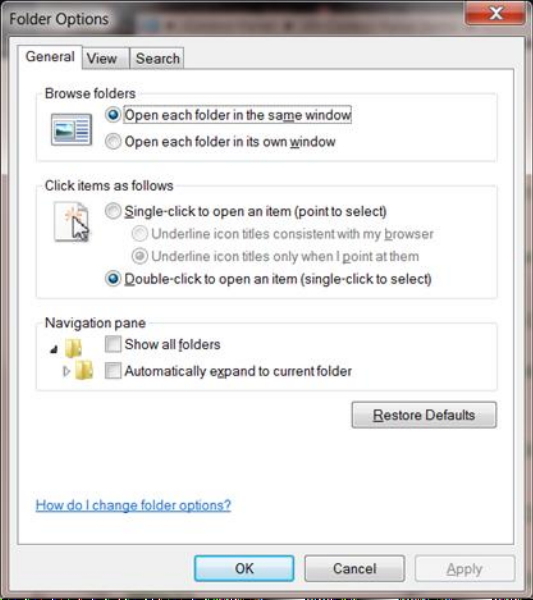
As you can see from the attached screen cap, the "Single-click to open an item" option is greyed out, so is supposedly not available. In spite of this, and that the "Double-click etc." option is (perforce) selected, the system behaves like the single-click option is selected, i.e. it will open files when I just single click on them, when all I'm trying to do is select them. This makes the usual trick of click + CTL-click to select multiple files impossible.

I'm also finding it automatically selects any file the cursor is hovering over, which is very dangerous. I've accidentally deleted the wrong file more than once because of that. This one smacks of a "feature" in the best MS tradition.

Can anyone tell me how to fix the first and disable the second?
 

Attachments

  • FolderOptions.jpg
    FolderOptions.jpg
    26.6 KB · Views: 35

My Computer

Computer type
PC/Desktop
Computer Manufacturer/Model Number
Asus
OS
Win7 64-bit Pro
CPU
i7 6700K 4GHz
Motherboard
ASUS Z170A
Memory
16GByte DDR4 3.4GHz
Graphics Card(s)
Native
Hard Drives
Seagate ST2000DX 001 2TB SSHD
Antivirus
Avast
Browser
Firefox
A bit of searching though another thread on this forum found the answer to the second. It's a registry tweak:

HKEY_CURRENT_USER / Control Panel / Mouse: set MouseHoverWidth and MouseHoverHeight to 0.

It's a sad and frustrating fact that, every time I update to a newer version of MS Windows, I have to spend a ridiculous amount of time and effort disabling features that MS have added which usually turn out to be maddening, dangerous or both. That's why I've only just invested in Windows 7. I was perfectly happy with WinXP (in spite of the fact that it was no longer supported), but was driven into the arms of Win7 because less and less hardware and software is compatible with XP. Come to that, I was perfectly happy with Win2K, but was driven to XP for the same reason, and with the same results. Hey-ho. Plus ça change...
 

My Computer

Computer type
PC/Desktop
Computer Manufacturer/Model Number
Asus
OS
Win7 64-bit Pro
CPU
i7 6700K 4GHz
Motherboard
ASUS Z170A
Memory
16GByte DDR4 3.4GHz
Graphics Card(s)
Native
Hard Drives
Seagate ST2000DX 001 2TB SSHD
Antivirus
Avast
Browser
Firefox

My Computer

Computer type
PC/Desktop
Computer Manufacturer/Model Number
Self built using existing case
OS
Windows 7 Home Premium 64 bit sp1
CPU
Intel i5 3570 3.4Ghz Ivy Bridge SKT 1155 quad core
Motherboard
Gigabyte Z77-HD3 SKT 1155 2xSata 3, 4x USB 3.0
Memory
G-Skill Rip Jaws 16Gb (8x2) DDR3 -1600 PC3 12800 CL 10 red
Graphics Card(s)
Gigabyte NVIDIA GT610 1Gb DDR3 810/1200 PCI-E 2.0 Silent
Sound Card
NVIDIA High Definition & Realtech High Definition Audio
Monitor(s) Displays
2 x Philips 226V4L 16:9 aspect ratio
Screen Resolution
1920 x 1080 HD
Hard Drives
Samsung 840 Pro 256gb SSD, SATA 3.
Hitachi Touro Portable 1tb, USB 3.0 HDD used for image b/ups.
PSU
Corsair VS450
Case
Codeng
Cooling
PSU fan & CPU fan
Keyboard
Logitech
Mouse
Logitech Wireless trackball M570
Internet Speed
Wireless 3G. 3mg down & 550kb up.
Antivirus
Bitdefender Internet Security 2020
Browser
Opera (Current Version) & Firefox
Other Info
MS Office 2013 Pro. Davis weather station software. MGE Nova 600 avr UPS.
My MouseHoverHeight and MouseHoverWidth are set to 4 and I have no problems.
So I'm not understanding the problem nor the fix.
 

My Computer

Computer type
PC/Desktop
Computer Manufacturer/Model Number
Dell
OS
Windows 10 x64
CPU
i7-7700K
Memory
16 GB 2400 MHz
Graphics Card(s)
GTX 1060
Sound Card
Integrated, plus external Presonus Audiobox USB
Monitor(s) Displays
2x AOC 27"
Screen Resolution
1920x1080
Hard Drives
512 GB M.2 SSD
2 TB 7200 RPM disk
Internet Speed
110 Mbps
Browser
Firefox
Hi Ranger4

Thanks for the quick comeback. Alas, your suggestion didn't help.

Of the six diagnostic methods suggested on https://support.microsoft.com/en-us/kb/266738:

Method 1: I slowed the double click speed right down to slowest with no improvement.
Method 2: The problem affects everything I tried, although not consistently. It also affects file selection even if no programs are running, and none have been started and then closed since last boot.
Method 3: The problem is exactly the same in safe mode.
Method 4: I could find no mention of Intellipoint on the page at https://support.microsoft.com/en-us/kb/266738, so got nowhere with this one.
Method 5: The problem applies to two different pointing devices (a standard mouse and a Wacom Intuos 3 graphics tablet)
Method 6: Both pointing devices worked fine under Windows XP running on a different motherboard

What none of this explains is why the Single-click option is apparently disabled.
 
Last edited:

My Computer

Computer type
PC/Desktop
Computer Manufacturer/Model Number
Asus
OS
Win7 64-bit Pro
CPU
i7 6700K 4GHz
Motherboard
ASUS Z170A
Memory
16GByte DDR4 3.4GHz
Graphics Card(s)
Native
Hard Drives
Seagate ST2000DX 001 2TB SSHD
Antivirus
Avast
Browser
Firefox
Hi Scarpia, thanks for getting back. Sorry the reference did not help.

I am not familiar with the Wacom tablet. Are you using the mouse that comes with it, if so, does the Wacom come with software & necessary drivers for it.

It would seem that as the Double Click in folder options is greyed out Wacom may have reset this. You could see if there are later drivers available for it that might suit Windows 7.
 

My Computer

Computer type
PC/Desktop
Computer Manufacturer/Model Number
Self built using existing case
OS
Windows 7 Home Premium 64 bit sp1
CPU
Intel i5 3570 3.4Ghz Ivy Bridge SKT 1155 quad core
Motherboard
Gigabyte Z77-HD3 SKT 1155 2xSata 3, 4x USB 3.0
Memory
G-Skill Rip Jaws 16Gb (8x2) DDR3 -1600 PC3 12800 CL 10 red
Graphics Card(s)
Gigabyte NVIDIA GT610 1Gb DDR3 810/1200 PCI-E 2.0 Silent
Sound Card
NVIDIA High Definition & Realtech High Definition Audio
Monitor(s) Displays
2 x Philips 226V4L 16:9 aspect ratio
Screen Resolution
1920 x 1080 HD
Hard Drives
Samsung 840 Pro 256gb SSD, SATA 3.
Hitachi Touro Portable 1tb, USB 3.0 HDD used for image b/ups.
PSU
Corsair VS450
Case
Codeng
Cooling
PSU fan & CPU fan
Keyboard
Logitech
Mouse
Logitech Wireless trackball M570
Internet Speed
Wireless 3G. 3mg down & 550kb up.
Antivirus
Bitdefender Internet Security 2020
Browser
Opera (Current Version) & Firefox
Other Info
MS Office 2013 Pro. Davis weather station software. MGE Nova 600 avr UPS.
Hi Ranger4

OK, I found the solution at https://support.microsoft.com/en-us/kb/555140. The problem was that a few days ago I enforced the Classic Shell (amongst other things) through the Group Policies editor, and the problem subsequently appeared. I did a web search for the symptoms, which brought up this bug in the Classic Shell, so I changed the Group Policy back to "Not Configured". What I hadn't clocked was that that is not enough, because it leaves the corresponding registry entry as it was (still set to '1' in this case). I could have gone back into GPedit to force it the other way, but it was easier to edit the registry directly following the procedure in KB555140, which did the trick.
 
Last edited:

My Computer

Computer type
PC/Desktop
Computer Manufacturer/Model Number
Asus
OS
Win7 64-bit Pro
CPU
i7 6700K 4GHz
Motherboard
ASUS Z170A
Memory
16GByte DDR4 3.4GHz
Graphics Card(s)
Native
Hard Drives
Seagate ST2000DX 001 2TB SSHD
Antivirus
Avast
Browser
Firefox
Thanks for getting back & glad to hear you have it fixed, well done.
 

My Computer

Computer type
PC/Desktop
Computer Manufacturer/Model Number
Self built using existing case
OS
Windows 7 Home Premium 64 bit sp1
CPU
Intel i5 3570 3.4Ghz Ivy Bridge SKT 1155 quad core
Motherboard
Gigabyte Z77-HD3 SKT 1155 2xSata 3, 4x USB 3.0
Memory
G-Skill Rip Jaws 16Gb (8x2) DDR3 -1600 PC3 12800 CL 10 red
Graphics Card(s)
Gigabyte NVIDIA GT610 1Gb DDR3 810/1200 PCI-E 2.0 Silent
Sound Card
NVIDIA High Definition & Realtech High Definition Audio
Monitor(s) Displays
2 x Philips 226V4L 16:9 aspect ratio
Screen Resolution
1920 x 1080 HD
Hard Drives
Samsung 840 Pro 256gb SSD, SATA 3.
Hitachi Touro Portable 1tb, USB 3.0 HDD used for image b/ups.
PSU
Corsair VS450
Case
Codeng
Cooling
PSU fan & CPU fan
Keyboard
Logitech
Mouse
Logitech Wireless trackball M570
Internet Speed
Wireless 3G. 3mg down & 550kb up.
Antivirus
Bitdefender Internet Security 2020
Browser
Opera (Current Version) & Firefox
Other Info
MS Office 2013 Pro. Davis weather station software. MGE Nova 600 avr UPS.
Back
Top