
Hello,
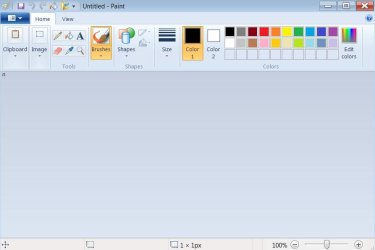
I am unable to select shapes in Windows Paint.
At the top left edge of the screen there is a small white square. The pixel icon at the bottom of the screen shows this as a very small pixel. Opening and closing Paint doesn't delete the "pixel"
Has anyone experience this problem before? Is there a solution?
Thanks
raiderfan
I am unable to select shapes in Windows Paint.
At the top left edge of the screen there is a small white square. The pixel icon at the bottom of the screen shows this as a very small pixel. Opening and closing Paint doesn't delete the "pixel"
Has anyone experience this problem before? Is there a solution?
Thanks
raiderfan
Attachments
My Computers
System One System Two
-
- Computer Manufacturer/Model Number
- Wydan Technologies
- OS
- Windows 7 Home Premium64 bit
- CPU
- AMD Phenom X4 965 3400 mhz 4 core
- Motherboard
- asus M4A88T-M
- Memory
- 4 GB ddr2 800 mhz
- Graphics Card(s)
- ATI Radeon 4520
- Sound Card
- On Board
- Monitor(s) Displays
- LG 2040W
- Hard Drives
- 500GB Western Digital SATA
- PSU
- Amd Phenom X4 965 3400 MHZ 4 core
- Case
- Logsys Cs305
- Cooling
- AMD Standard
- Keyboard
- Microsoft USB Office Keyboard
- Mouse
- Microsoft USB Mouse
-
- Computer type
- PC/Desktop
- System Manufacturer/Model Number
- Ironside Computers
- OS
- Windows 7 64 bit
- CPU
- AMD A10-7700K Radeon R7, 10 computer cores 4C+6G, 34+
- Motherboard
- ASRock FM2A78 Pro3+
- Memory
- 8 gigabytes
- Graphics Card(s)
- On motherboard
- Sound Card
- on motherboard
- Monitor(s) Displays
- LG W2040
- Screen Resolution
- 1280 x 1024
- Hard Drives
- Toshiba DT01ACA100 SATA Disc Device
- PSU
- UNK
- Case
- thorex
- Cooling
- UNK
- Keyboard
- Microsoft Office Keyboard
- Mouse
- Microdoft Comfort Mouse 4500
- Internet Speed
- 8.32 MBPS upload 12.75 download
- Browser
- Firefox


