Windows 7 PC to TV with HDMI setup.

eiger3970

New member
Member
Local time
9:25 PM
Messages
65
Hi Windows 7 forum, here's another tricky issue which may not be able to be resolved (like my no sound on another PC?).

I connected an HDMI cable into my PC's HDMI port and connected the other end of the HDMI cable into 3 different TVs (2 with HDMI input, one with an old RCA input connector).

I go to PC\Control Panel\All Control Panel Items\Display\Screen Resolution and the extra display (the TV) is not found. The 3 monitors 1, 2, and 3 are showing however. A 4th should show for the HDMI connected TV I think.

I do have a PC graphics card ATI Radeon HD 5700 Series which allows 3 monitors to work via VGA and DVI connection into the graphics card.

Any hints please let me know.

Thanks in advance.
 

My Computer My Computer

Computer Manufacturer/Model Number
Self built pc.
OS
Windows 7
CPU
Intel Pentium 4 @ 2400 MHz
Motherboard
Unspecified P4M266A-8237
Memory
1024 MB (1 x 1024 DDR-SDRAM)
Graphics Card(s)
NVIDIA GeForce 7600 GS (Microsoft Corporation - WDDM)
Sound Card
Onboard VT8233/A AC'97 Enhanced Audio Controller
Monitor(s) Displays
Samsung SyncMaster - 17 inches
Screen Resolution
1280x1024
Hard Drives
SAMSUNG (400 GB)
WDC (80 GB)
PSU
VIAP4X SLIC-MPC 450 Watt
Case
Unknown
Cooling
Processor fan 3750 rpm
Keyboard
Belkin ergonomic
Mouse
Logitech laser
Internet Speed
Cable up to 8Mbps
Other Info
PC runs at about 59.9 centigrade.
Provided there's an HDMI port on the HD 5700 series card, go to AMD and download the CCC package. The package contains the AMD HDMI driver.
After Installation, go to the Windows sound manager and change the output to AMD HDMI.
On your TV, select the appropriate HDMI input.
 

My Computer My Computer

Computer type
PC/Desktop
Computer Manufacturer/Model Number
Custom Build
OS
Windows 7 Home Premium 64 bit
CPU
Intel Core i7-4790
Motherboard
GA-Z87X-D3H
Memory
G.SKILL 8GB (2 x 4GB) DDR3 F3-10666CL9D-8GBNT
Graphics Card(s)
AMD Radeon R7 250
Sound Card
Realtek ALC892
Monitor(s) Displays
Samsung UN32EH5000, Dell 1703FPT
Screen Resolution
1920 x 1080, 1280 x 1024
Hard Drives
WD5003AZEX
WD10EZEX
Samsung HD103SJ
Samsung 128 GB 840 PRO
PSU
SeaSonic M12II SS-500GM
Case
Fractal Design Define R4
Cooling
Zalman CNPS9900ALED
Keyboard
Logitech K800
Mouse
Logitech M705
Internet Speed
16 Mbps
Antivirus
Avast
Browser
Firefox
Other Info
Bose Companion 2 Multimedia Speakers
Thanks for information Sardonicus.
I have done the steps above.
Unfortunately, the TVs (I have tried all 3) show no picture.
Also, the PC won't play sound in the local speakers either unless I change the Sound back from AMD HDMI Output to Speakers. Also, the AMD HDMI Output then shows an icon I haven't seen before. It looks like a green circle on the bottom right of the TV picture (left of the AMD HDMI Output title) with a white phone inside the circle?
Anyway, thank you for putting me on the right track and hopefully the final step can be worked out...so close.
Also, now 1 of the 3 monitors is not showing after downloading the AMD CCC (Catalyst Control Centre).
Haven't been able to get the 3 monitors back just yet.
 
Last edited:

My Computer My Computer

Computer Manufacturer/Model Number
Self built pc.
OS
Windows 7
CPU
Intel Pentium 4 @ 2400 MHz
Motherboard
Unspecified P4M266A-8237
Memory
1024 MB (1 x 1024 DDR-SDRAM)
Graphics Card(s)
NVIDIA GeForce 7600 GS (Microsoft Corporation - WDDM)
Sound Card
Onboard VT8233/A AC'97 Enhanced Audio Controller
Monitor(s) Displays
Samsung SyncMaster - 17 inches
Screen Resolution
1280x1024
Hard Drives
SAMSUNG (400 GB)
WDC (80 GB)
PSU
VIAP4X SLIC-MPC 450 Watt
Case
Unknown
Cooling
Processor fan 3750 rpm
Keyboard
Belkin ergonomic
Mouse
Logitech laser
Internet Speed
Cable up to 8Mbps
Other Info
PC runs at about 59.9 centigrade.
Ok, I have the 3 monitors back to the correct setup.
I uninstalled adm_catalyst_11.8_preview_driver_july_12.exe and installed what I think is the original graphics card driver 12-1_vista_win7_64_dd_ccc.exe.
The graphics card has all 3 DVI port connected with the 3 monitors and also has the HDMI port connected with the TV HDMI cable.
Windows 7 Control Panel\Display\Change display settings only shows 3 Displays which are the 3 monitors and doesn't find the 4th Display, the TV.

It seems perhaps another AMD driver may be needed. Any ideas please let me know.
 

My Computer My Computer

Computer Manufacturer/Model Number
Self built pc.
OS
Windows 7
CPU
Intel Pentium 4 @ 2400 MHz
Motherboard
Unspecified P4M266A-8237
Memory
1024 MB (1 x 1024 DDR-SDRAM)
Graphics Card(s)
NVIDIA GeForce 7600 GS (Microsoft Corporation - WDDM)
Sound Card
Onboard VT8233/A AC'97 Enhanced Audio Controller
Monitor(s) Displays
Samsung SyncMaster - 17 inches
Screen Resolution
1280x1024
Hard Drives
SAMSUNG (400 GB)
WDC (80 GB)
PSU
VIAP4X SLIC-MPC 450 Watt
Case
Unknown
Cooling
Processor fan 3750 rpm
Keyboard
Belkin ergonomic
Mouse
Logitech laser
Internet Speed
Cable up to 8Mbps
Other Info
PC runs at about 59.9 centigrade.
As far as i know AMD 5700 series does support multiple monitors as long as they are connected trough a Display port (DP).
Passive DP dont work for more than 2 monitors.

By the way your quite lucky i wish i had 3 monitors :)
 

My Computer My Computer

Computer type
PC/Desktop
Computer Manufacturer/Model Number
Gateway / Slight Modifications
OS
Windows 8 64 bit PRO
CPU
AMD Phenom X4 9100e
Motherboard
Gateway RS780
Memory
2GB X2 DDR2
Graphics Card(s)
Sapphire HD 6850
Sound Card
Integrated
Monitor(s) Displays
Gateway 19" + Dell 19"
Screen Resolution
1440X900 sometimes 2880 by 900
Hard Drives
WD 80GB
WD 640GB
WD 1,000GB
PSU
Antec BP 550watts
Case
Antec 300
Cooling
Stock Cooling
Keyboard
Saitek Eclipse II
Mouse
Gigabyte GM-M6800
Internet Speed
D: 30Mbps U:4Mbps
Antivirus
Avast version 8
Browser
Internet Explorer ver 10 64 bit
Other Info
This is my work computer.
I have another laptop running Windows 7 64 bit.
Another PC running Windows 8 64 bit pro.
Total of 3
As far as i know AMD 5700 series does support multiple monitors as long as they are connected trough a Display port (DP).
Passive DP dont work for more than 2 monitors.

iirc, a passive DP adapter will work for a 3rd display (extended), but not for Eyefinity.
 

My Computer My Computer

Computer type
PC/Desktop
Computer Manufacturer/Model Number
Systems by SmartEyeball
OS
8 Pro x64
CPU
i7 3770K 4.6GHz
Motherboard
ASUS P8Z77 WS
Memory
16GB G.Skill Trident X 2666mhz
Graphics Card(s)
x2 EVGA 780 Ti Superclocked SLI
Sound Card
SB X-FI Surround 5.1 PRO USB / ATH-AD900 Headphones
Monitor(s) Displays
x3 Dell U2410 / 58" Samsung
Screen Resolution
5760*1200/ 1920*1200
Hard Drives
2x Intel 520 240GB (RAID 0) * 2x WD Caviar Blacks 2TB (RAID 0) * 2TB WD Caviar Black * Sony Optirac DVD
PSU
Silverstone Strider Evolution 1200W
Case
Thermaltake Level 10 GT Snow Edition
Cooling
Noctua NH-D14
Keyboard
Topre Realforce // Ducky Shine MX Black // Filco Ninja TKL
Mouse
Thermaltake Theron (Highly Recommended) + Razer Imperator
Antivirus
MSE
Browser
IE, FF, WaterFox
Other Info
GT Extreme V2 Sim Racing Cockpit + 40" LCD and K/B Mouse stand ▼
Fanatec CSR Elite Wheel + Clubsport V1 Pedals + CSR shifter/7G-H ▼Saitek X52 Pro ▼ TrackIR 5 Pro
Buttkicker v2 Seat Rumbler with Dedicated 5.1 and Sub Woofer attached to frame ▼
=
Bloody Big Grin
Thanks chris1neji. It is nice having 3 monitors. I'd be happy to walk you through how to set it up. It's always a bit of effort doing it the 1st time, but now I know the little tweaks to get it working it's quite smooth sailing. (I bought to monitors at a good price which helped).
The display adaptor was one of the tricks.

I'm sorry, but I don't understand smarteyball's anacronyms?
Are you saying my PC to HDMI won't work?
 

My Computer My Computer

Computer Manufacturer/Model Number
Self built pc.
OS
Windows 7
CPU
Intel Pentium 4 @ 2400 MHz
Motherboard
Unspecified P4M266A-8237
Memory
1024 MB (1 x 1024 DDR-SDRAM)
Graphics Card(s)
NVIDIA GeForce 7600 GS (Microsoft Corporation - WDDM)
Sound Card
Onboard VT8233/A AC'97 Enhanced Audio Controller
Monitor(s) Displays
Samsung SyncMaster - 17 inches
Screen Resolution
1280x1024
Hard Drives
SAMSUNG (400 GB)
WDC (80 GB)
PSU
VIAP4X SLIC-MPC 450 Watt
Case
Unknown
Cooling
Processor fan 3750 rpm
Keyboard
Belkin ergonomic
Mouse
Logitech laser
Internet Speed
Cable up to 8Mbps
Other Info
PC runs at about 59.9 centigrade.
OK, I have just built a new PC on Windows 7:
1 ATI Radeon HD 5700 Series (1024MB)
2 ATI Radeon HD 5450 (1024MB)

The 1 ATI Radeon HD 5700 Series (1024MB) outputs to 3 monitors on the PC.
I can't get the 2 ATI Radeon HD 5450 (1024MB) to output to a TV each via the HDMI connection?

Not sure if Windows 7 Device Manager recognises the graphics cards as it shows:
IDE ATA/ATAPI controllers
ATA Channel 0
ATA Channel 0
ATA Channel 1
ATA Channel 1
Intel(R) 6 Series/C200 Series Chipset Family 2 port Serial ATA Storage Controller-1C08
Intel(R) 6 Series/C200 Series Chipset Family 4 port Serial ATA Storage Controller-1C00

The Sound, video and game controllers nothing for video, only audio.

Any help please?
 

My Computer My Computer

Computer Manufacturer/Model Number
Self built pc.
OS
Windows 7
CPU
Intel Pentium 4 @ 2400 MHz
Motherboard
Unspecified P4M266A-8237
Memory
1024 MB (1 x 1024 DDR-SDRAM)
Graphics Card(s)
NVIDIA GeForce 7600 GS (Microsoft Corporation - WDDM)
Sound Card
Onboard VT8233/A AC'97 Enhanced Audio Controller
Monitor(s) Displays
Samsung SyncMaster - 17 inches
Screen Resolution
1280x1024
Hard Drives
SAMSUNG (400 GB)
WDC (80 GB)
PSU
VIAP4X SLIC-MPC 450 Watt
Case
Unknown
Cooling
Processor fan 3750 rpm
Keyboard
Belkin ergonomic
Mouse
Logitech laser
Internet Speed
Cable up to 8Mbps
Other Info
PC runs at about 59.9 centigrade.
Can you please upload a screenshot i want to make sure what is going on. I am not an expert on graphics and dont do any crossfire/sli setups. Can HD5450 and hd 5700 run in sync together?
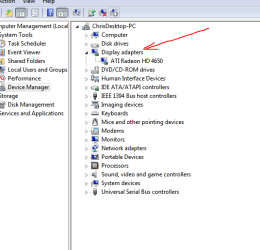
Please upload something similar to mine
Device manager> Expand Display Adapters
 

Attachments

  • DeviceManager.PNG
    DeviceManager.PNG
    14.8 KB · Views: 62

My Computer My Computer

Computer type
PC/Desktop
Computer Manufacturer/Model Number
Gateway / Slight Modifications
OS
Windows 8 64 bit PRO
CPU
AMD Phenom X4 9100e
Motherboard
Gateway RS780
Memory
2GB X2 DDR2
Graphics Card(s)
Sapphire HD 6850
Sound Card
Integrated
Monitor(s) Displays
Gateway 19" + Dell 19"
Screen Resolution
1440X900 sometimes 2880 by 900
Hard Drives
WD 80GB
WD 640GB
WD 1,000GB
PSU
Antec BP 550watts
Case
Antec 300
Cooling
Stock Cooling
Keyboard
Saitek Eclipse II
Mouse
Gigabyte GM-M6800
Internet Speed
D: 30Mbps U:4Mbps
Antivirus
Avast version 8
Browser
Internet Explorer ver 10 64 bit
Other Info
This is my work computer.
I have another laptop running Windows 7 64 bit.
Another PC running Windows 8 64 bit pro.
Total of 3
Thanks for the reply.
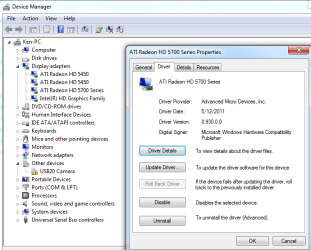
Sorry, I was told by another forum that I should look under Display adapters. The attachment shows the 3 graphics cards are recognised.
I have the latest drivers from the AMD website.
 

Attachments

  • Capture.PNG
    Capture.PNG
    28.4 KB · Views: 60

My Computer My Computer

Computer Manufacturer/Model Number
Self built pc.
OS
Windows 7
CPU
Intel Pentium 4 @ 2400 MHz
Motherboard
Unspecified P4M266A-8237
Memory
1024 MB (1 x 1024 DDR-SDRAM)
Graphics Card(s)
NVIDIA GeForce 7600 GS (Microsoft Corporation - WDDM)
Sound Card
Onboard VT8233/A AC'97 Enhanced Audio Controller
Monitor(s) Displays
Samsung SyncMaster - 17 inches
Screen Resolution
1280x1024
Hard Drives
SAMSUNG (400 GB)
WDC (80 GB)
PSU
VIAP4X SLIC-MPC 450 Watt
Case
Unknown
Cooling
Processor fan 3750 rpm
Keyboard
Belkin ergonomic
Mouse
Logitech laser
Internet Speed
Cable up to 8Mbps
Other Info
PC runs at about 59.9 centigrade.
OK, I removed the 3rd graphics card (HD 5450) and rebooted. Then inserted 3rd graphics card (HD 5450) back into MOBO.
Ran Catalyst Control Centre\Desktop Management\Creating and Arranging Desktops, clicked Detect Displays and shows 5 displays!
Unfortunately no output on the 2 TVs yet?
 
Last edited:

My Computer My Computer

Computer Manufacturer/Model Number
Self built pc.
OS
Windows 7
CPU
Intel Pentium 4 @ 2400 MHz
Motherboard
Unspecified P4M266A-8237
Memory
1024 MB (1 x 1024 DDR-SDRAM)
Graphics Card(s)
NVIDIA GeForce 7600 GS (Microsoft Corporation - WDDM)
Sound Card
Onboard VT8233/A AC'97 Enhanced Audio Controller
Monitor(s) Displays
Samsung SyncMaster - 17 inches
Screen Resolution
1280x1024
Hard Drives
SAMSUNG (400 GB)
WDC (80 GB)
PSU
VIAP4X SLIC-MPC 450 Watt
Case
Unknown
Cooling
Processor fan 3750 rpm
Keyboard
Belkin ergonomic
Mouse
Logitech laser
Internet Speed
Cable up to 8Mbps
Other Info
PC runs at about 59.9 centigrade.
So I took the 2 HD 5450's back to the shop and they tested and picture worked from the HD 5450 HDMI port to a VGA monitor.
All 5 displays are found, but no output on 4 and 5 (the 2 TVs)?
 

My Computer My Computer

Computer Manufacturer/Model Number
Self built pc.
OS
Windows 7
CPU
Intel Pentium 4 @ 2400 MHz
Motherboard
Unspecified P4M266A-8237
Memory
1024 MB (1 x 1024 DDR-SDRAM)
Graphics Card(s)
NVIDIA GeForce 7600 GS (Microsoft Corporation - WDDM)
Sound Card
Onboard VT8233/A AC'97 Enhanced Audio Controller
Monitor(s) Displays
Samsung SyncMaster - 17 inches
Screen Resolution
1280x1024
Hard Drives
SAMSUNG (400 GB)
WDC (80 GB)
PSU
VIAP4X SLIC-MPC 450 Watt
Case
Unknown
Cooling
Processor fan 3750 rpm
Keyboard
Belkin ergonomic
Mouse
Logitech laser
Internet Speed
Cable up to 8Mbps
Other Info
PC runs at about 59.9 centigrade.
Back
Top