Solved windows 7 ping cannot find host but ip address works

ron7000

New member
Power User
Local time
1:57 PM
Messages
90
this worked for me previously but i started from scratch and now it doesn't.
I have a single pc running windows 7 with a lan cable from it to a synology diskstation NAS.
my win7 pc is 192.168.0.10 and my nas box server name is 'data' with ip 192.168.0.20.

the other day within windows i was able to do \\data in an address bar and saw my file shares. I redid the NAS box today to make sure i understand how everything works, now doing \\data does not work from the win7 pc.

in a command prompt i type 'ping data' and it says could not find host.
but if i do ping 192.168.0.20 it pings successfully, and if i do \\192.168.0.20 in an address bar it shows my file shares and everything works fine

on the windows 7 pc, what causes this and how do i fix?
thanks.
 

My Computer My Computer

At a glance

Windows 7 x64, ultimate/pro/home, SLES x86 & ...intel & amdyesgtx970
Computer type
PC/Desktop
Computer Manufacturer/Model Number
homebuilt & dell & sgi
OS
Windows 7 x64, ultimate/pro/home, SLES x86 & ia64
CPU
intel & amd
Motherboard
yes
Memory
yes
Graphics Card(s)
gtx970
Sound Card
same as memory
Monitor(s) Displays
benq 27"
Screen Resolution
2560*1440
Hard Drives
many
Check Network discovery in Control Panel - Network and sharing center - Advanced sharing settings
 

My Computer My Computer

At a glance

Windows 7 Pro 32Intel(R) Core(TM) i5 CPU M 540 @ 2.53GHz4,00 GB (Usable 2,98)NVIDIA NVS 5100M
Computer type
Laptop
Computer Manufacturer/Model Number
HP Elitebook 8540p
OS
Windows 7 Pro 32
CPU
Intel(R) Core(TM) i5 CPU M 540 @ 2.53GHz
Motherboard
Hewlett-Packard 1521
Memory
4,00 GB (Usable 2,98)
Graphics Card(s)
NVIDIA NVS 5100M
Sound Card
NVIDIA High Definition Audio
Screen Resolution
1600x900
Hard Drives
INTEL SSDSA2CW120G3
Antivirus
F-Secure Internet Security
Browser
IE, Firefox, Opera
Other Info
Sandboxie,
SRP (Software Restriction Policy),
EMET (Enhanced Mitigation Experience Toolkit),
WFC (Windows Firewall Control by BiniSoft),
Malwarebytes Premium
When you say you "redid the NAS box" did you basically flatten it and start over again?

When you set it back up again did you definitely call it Data?
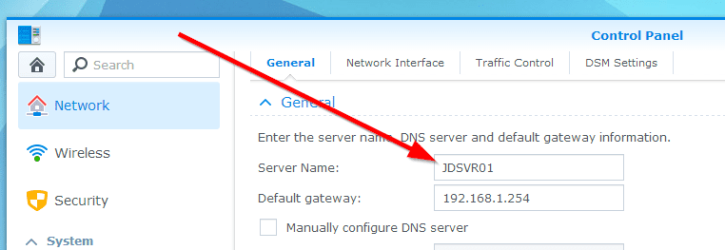
If you go to the Synology Control Panel and select Network, is the Server Name "Data"?

2014-08-27 21_50_49-Synology DiskStation - JDSVR01.png

The other thing to try is a flushdns
Click Start >> Type CMD >> Press Enter (or select CMD.exe form the search result)
In the black command window type:
Code:
ipconfig /flushdns

Now try pinging the name again

If that does't work try the following command in the command window you opened above
Code:
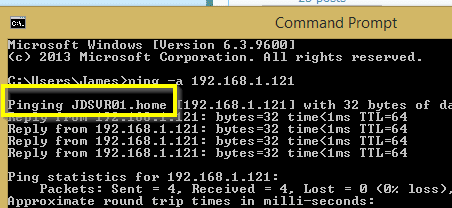
ping -a 192.168.0.20

What name (if any) does it reply with?

Example below shows mine is called JDSVR01:
2014-08-27 21_55_03-Command Prompt.png

Regards,
Jamie
 

My Computer My Computer

At a glance

Windows 8.1 Pro x64Intel Core i5-2500K @ 3.30GHz - S11558GB Corsair DDR3 XMS3, PC3-12800NVIDIA GeForce GTX 650
Computer type
PC/Desktop
Computer Manufacturer/Model Number
Self Built
OS
Windows 8.1 Pro x64
CPU
Intel Core i5-2500K @ 3.30GHz - S1155
Motherboard
Asus P8P67 LE Rev3, Intel P67, S115
Memory
8GB Corsair DDR3 XMS3, PC3-12800
Graphics Card(s)
NVIDIA GeForce GTX 650
Sound Card
On-Board
Monitor(s) Displays
3 x 24" {Extended Display}
Screen Resolution
1920 x 1080
Hard Drives
300GB Seagate Barracuda 7200
PSU
550W Coolermaster GX550
Case
Silverstone Precision PS04B
Cooling
Stock
Keyboard
Logitech K120
Mouse
World of Warcraft Cataclysm MMO Gaming Mouse
Internet Speed
80 MB
Antivirus
MSE / Windows Defender
Browser
Chrome
just checked and network discovery is off.
i try to turn it on, click save and no errors. I go back in to advanced sharing and it's off.
what causes this?

on the win7 pc, the firewall is all off.
i did flatten the nas box, took all original drives out and put in one new spare drive so someone could test drive it. i had server name specified as "rondata" originally, this time around i called it "data". I had the ip set as 192.168.0.50 but i did not have anything set for default gateway. i'm using one win7 pc, a cheap 8 port d-link switch, and the one nas box.
 

My Computer My Computer

At a glance

Windows 7 x64, ultimate/pro/home, SLES x86 & ...intel & amdyesgtx970
Computer type
PC/Desktop
Computer Manufacturer/Model Number
homebuilt & dell & sgi
OS
Windows 7 x64, ultimate/pro/home, SLES x86 & ia64
CPU
intel & amd
Motherboard
yes
Memory
yes
Graphics Card(s)
gtx970
Sound Card
same as memory
Monitor(s) Displays
benq 27"
Screen Resolution
2560*1440
Hard Drives
many
ok fixed network discovery, the upnp device host service was disabled so i enabled that along with restoring default settings on firewall. now network discovery is on for both public and private. I went back in and turned all firewalls off. rebooted. still no luck.
 

My Computer My Computer

At a glance

Windows 7 x64, ultimate/pro/home, SLES x86 & ...intel & amdyesgtx970
Computer type
PC/Desktop
Computer Manufacturer/Model Number
homebuilt & dell & sgi
OS
Windows 7 x64, ultimate/pro/home, SLES x86 & ia64
CPU
intel & amd
Motherboard
yes
Memory
yes
Graphics Card(s)
gtx970
Sound Card
same as memory
Monitor(s) Displays
benq 27"
Screen Resolution
2560*1440
Hard Drives
many
Did you try the 2 commands i posted above?
 

My Computer My Computer

At a glance

Windows 8.1 Pro x64Intel Core i5-2500K @ 3.30GHz - S11558GB Corsair DDR3 XMS3, PC3-12800NVIDIA GeForce GTX 650
Computer type
PC/Desktop
Computer Manufacturer/Model Number
Self Built
OS
Windows 8.1 Pro x64
CPU
Intel Core i5-2500K @ 3.30GHz - S1155
Motherboard
Asus P8P67 LE Rev3, Intel P67, S115
Memory
8GB Corsair DDR3 XMS3, PC3-12800
Graphics Card(s)
NVIDIA GeForce GTX 650
Sound Card
On-Board
Monitor(s) Displays
3 x 24" {Extended Display}
Screen Resolution
1920 x 1080
Hard Drives
300GB Seagate Barracuda 7200
PSU
550W Coolermaster GX550
Case
Silverstone Precision PS04B
Cooling
Stock
Keyboard
Logitech K120
Mouse
World of Warcraft Cataclysm MMO Gaming Mouse
Internet Speed
80 MB
Antivirus
MSE / Windows Defender
Browser
Chrome
Only turn on discovery for private. There are separate settings for public.
And you'd want the windows firewall to be on unless you have another firewall installed.
 

My Computer My Computer

At a glance

Windows 7 Pro 32Intel(R) Core(TM) i5 CPU M 540 @ 2.53GHz4,00 GB (Usable 2,98)NVIDIA NVS 5100M
Computer type
Laptop
Computer Manufacturer/Model Number
HP Elitebook 8540p
OS
Windows 7 Pro 32
CPU
Intel(R) Core(TM) i5 CPU M 540 @ 2.53GHz
Motherboard
Hewlett-Packard 1521
Memory
4,00 GB (Usable 2,98)
Graphics Card(s)
NVIDIA NVS 5100M
Sound Card
NVIDIA High Definition Audio
Screen Resolution
1600x900
Hard Drives
INTEL SSDSA2CW120G3
Antivirus
F-Secure Internet Security
Browser
IE, Firefox, Opera
Other Info
Sandboxie,
SRP (Software Restriction Policy),
EMET (Enhanced Mitigation Experience Toolkit),
WFC (Windows Firewall Control by BiniSoft),
Malwarebytes Premium
and ping -a 192.168.0.50 ==> pinging DATA [192.168.0.50] with 32 bytes.... successfull.

try ping DATA ==> could not find host.


my active network is public, and it says Unidentified network. I tried ping data.home and ping data.public, no luck.
 

My Computer My Computer

At a glance

Windows 7 x64, ultimate/pro/home, SLES x86 & ...intel & amdyesgtx970
Computer type
PC/Desktop
Computer Manufacturer/Model Number
homebuilt & dell & sgi
OS
Windows 7 x64, ultimate/pro/home, SLES x86 & ia64
CPU
intel & amd
Motherboard
yes
Memory
yes
Graphics Card(s)
gtx970
Sound Card
same as memory
Monitor(s) Displays
benq 27"
Screen Resolution
2560*1440
Hard Drives
many
So it does resolve the name when you do a ping -a...

Did you try the flushdns command before doing the ping?
If not give that a go.

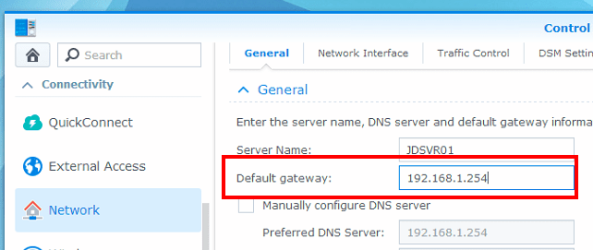
Do you have the default gateway set correctly?
2014-08-28 14_56_03-JDSVR03 (899 983 957) - TeamViewer.png

Regards,
Jamie
 

My Computer My Computer

At a glance

Windows 8.1 Pro x64Intel Core i5-2500K @ 3.30GHz - S11558GB Corsair DDR3 XMS3, PC3-12800NVIDIA GeForce GTX 650
Computer type
PC/Desktop
Computer Manufacturer/Model Number
Self Built
OS
Windows 8.1 Pro x64
CPU
Intel Core i5-2500K @ 3.30GHz - S1155
Motherboard
Asus P8P67 LE Rev3, Intel P67, S115
Memory
8GB Corsair DDR3 XMS3, PC3-12800
Graphics Card(s)
NVIDIA GeForce GTX 650
Sound Card
On-Board
Monitor(s) Displays
3 x 24" {Extended Display}
Screen Resolution
1920 x 1080
Hard Drives
300GB Seagate Barracuda 7200
PSU
550W Coolermaster GX550
Case
Silverstone Precision PS04B
Cooling
Stock
Keyboard
Logitech K120
Mouse
World of Warcraft Cataclysm MMO Gaming Mouse
Internet Speed
80 MB
Antivirus
MSE / Windows Defender
Browser
Chrome
these 2 things fixed it.

Windows 7 can't access UNC path - Spiceworks
UNC Drive Mapping Failures: Network name cannot be found - Rick Strahl's Web Log


first i deleted the network adapter and all hidden devices under it. most hidden devices could not be uninstalled. I rebooted, the network adapter reinstalled automatically. my ping data still did not work. then i modified the registry entry below, and then noticed my network adapter was set to dhcp so i then set my pc back to static 192.168.0.40.
now i can do ping data and it resolves the ip and works. so not sure if uninstalling network adapter and reinstalling, and setting my ip address back to static, would have fixed it. But my providerorder had some other thing first.

HKLM\SYSTEM\CurrentControlSet\Control\NetworkProvider\Order
ProviderOrder =
LanmanWorkstation,RDPNP,webclient
 

My Computer My Computer

At a glance

Windows 7 x64, ultimate/pro/home, SLES x86 & ...intel & amdyesgtx970
Computer type
PC/Desktop
Computer Manufacturer/Model Number
homebuilt & dell & sgi
OS
Windows 7 x64, ultimate/pro/home, SLES x86 & ia64
CPU
intel & amd
Motherboard
yes
Memory
yes
Graphics Card(s)
gtx970
Sound Card
same as memory
Monitor(s) Displays
benq 27"
Screen Resolution
2560*1440
Hard Drives
many
HKLM\SYSTEM\CurrentControlSet\Control\NetworkProvider\Order
ProviderOrder =
LanmanWorkstation,RDPNP,webclient

This rings a bell for some reason :D

Glad you fixed it :thumbsup:

Regards,
Jamie
 

My Computer My Computer

At a glance

Windows 8.1 Pro x64Intel Core i5-2500K @ 3.30GHz - S11558GB Corsair DDR3 XMS3, PC3-12800NVIDIA GeForce GTX 650
Computer type
PC/Desktop
Computer Manufacturer/Model Number
Self Built
OS
Windows 8.1 Pro x64
CPU
Intel Core i5-2500K @ 3.30GHz - S1155
Motherboard
Asus P8P67 LE Rev3, Intel P67, S115
Memory
8GB Corsair DDR3 XMS3, PC3-12800
Graphics Card(s)
NVIDIA GeForce GTX 650
Sound Card
On-Board
Monitor(s) Displays
3 x 24" {Extended Display}
Screen Resolution
1920 x 1080
Hard Drives
300GB Seagate Barracuda 7200
PSU
550W Coolermaster GX550
Case
Silverstone Precision PS04B
Cooling
Stock
Keyboard
Logitech K120
Mouse
World of Warcraft Cataclysm MMO Gaming Mouse
Internet Speed
80 MB
Antivirus
MSE / Windows Defender
Browser
Chrome
What rang bells for me was when you said it was set to Public and also said "Unidentified Network". This indicates that your computer failed to get an IP Address from your router and had the default 127.0.0.1 hence why you couldn't "ping DATA", setting your own IP and Subnet etc fixes that which is why you could then "ping DATA".

Remember if you connect to a different network you'll probably have to change that static IP address, so I would start diagnosing why your DHCP wasn't working, perhaps the service wasn't running properly if UPNP Device Host was also not running?
 

My Computer My Computer

At a glance

Windows 7 Ultimate x64Intil i7-86016Gb Corsair XMS3 1600MHzMSI N470GTXTwin FrozR II
Computer type
PC/Desktop
Computer Manufacturer/Model Number
Self Built
OS
Windows 7 Ultimate x64
CPU
Intil i7-860
Motherboard
Gigabyte GA-P55a-UD6
Memory
16Gb Corsair XMS3 1600MHz
Graphics Card(s)
MSI N470GTXTwin FrozR II
Monitor(s) Displays
Samsung S23A700D
Hard Drives
1x Samsung 840Pro SSD 256Gb for Windows
2x WD Green 2Tb (for Storage)
1x Western Digital Caviar Black 2 TB 7200 RPM (also for storage)
1x Samsung HD501LJ 500Gb for Ubuntu
PSU
Antec TruePower New Blue Modular 750W
Case
Antec 300
Cooling
Cosair H70
Internet Speed
60Mb/s DL, 3Mb/s UL
Antivirus
Norton Internet Security
Browser
IE, FF, Chrome
Back
Top