JavaScript is disabled. For a better experience, please enable JavaScript in your browser before proceeding.
You are using an out of date browser. It may not display this or other websites correctly.
You should upgrade or use an
alternative browser .
Windows 7 Pro 64bit, taskbar keeps refreshing
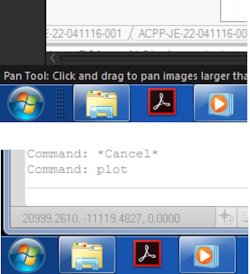
I have recently upgraded Windows 7 Home to Professional (both 64 bit), and i have sorted all the problem i had except one, the taskbar seems to keep refreshing itself constantly, slowing down the PC.
On the attached screenshot the top one is the normal view, with that small dotted divider next to the start button, but when its is refreshing itself that disappears, as per the bottom view, then comes back when its done
Anyone else had this and know how to stop it doing it?
taskbar error.jpg
46.9 KB
· Views: 26
Computer type PC/Desktop Computer Manufacturer/Model Number Asus OS Windows 7 64 BIT
Well-known member
Guru
Gold Member
VIP
Hi Zhunter1,
Computer type PC/Desktop Computer Manufacturer/Model Number medionl/Aspire 6930G/acer x55a OS W7 home premium 32bit/W7HP 64bit/w10 tp insider ring CPU E5300 dual core Motherboard medion MS7366 Memory 3gb Graphics Card(s) Nvidia Geforce 7100 Nforce 630i Monitor(s) Displays avixc Internet Speed n (isp resticted to 72) Antivirus mse/pands Browser palemoon Other Info Belkin Fd7050 n USB using Railink RT2870 drivers, more upto date
Electron Wrangler
Guru
Gold Member
VIP
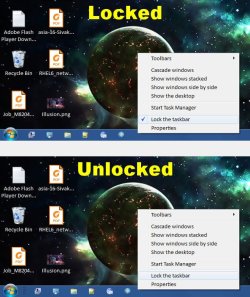
That dotted divider is not supposed to be there. The "normal" taskbar view is supposed to be like the
bottom image .
The dotted divider shows up when you are setting up Quick Launch. You can freeze certain icons on the taskbar so that they are always there. It's an old XP trick, but it also works on Win 7. It's not really necessary anymore, because you can pin items to the taskbar and they stay there. It looks as though Quick Launch has been activated to be setup, but since the dotted divider is not to the right of any icons, the Taskbar Manager is trying to shut off the Quick Launch setup, thus the constant refresh.
See this tutorial on Quick Launch and see if disabling it takes your problem away. (Or if you want the Quick Launch toolbar, drag the dotted divider to the right of the icons you want on the taskbar permanently. Either way, read the tutorial. It contains useful information.)
Quick Launch - Enable or Disable - Windows 7 Help Forums
Please post back any results or issues encountered if you try disabling Quick Launch
Computer type PC/Desktop Computer Manufacturer/Model Number Mellon Labs (custom build) OS Win 7 Pro x64/Win 10 Pro x64 dual boot CPU AMD FX 8350 Vishera @ 4200 Motherboard ASUS M5A97 R2.0 Memory 16 GB Mushkin Blackline DDR3-2400 @ 1866 (9-10-10-10-31) Graphics Card(s) XFX Radeon R9 280 Double D Black Edition Sound Card Realtek HD Audio on MB. Sounds great. Monitor(s) Displays Acer 24", Acer 22" Screen Resolution 3840 x 1080 Hard Drives 1 x Mushkin Chronos 120 GB SSD (Win 10) PSU Corsair TX-750 Case CoolerMaster HAF 912+ Cooling Coolermaster Seidon 240M Liquid AIO. 6 case fans Keyboard Logitech G710+ Mouse Logitech G500s Internet Speed Much better since I got fiber, but still way overpriced. Antivirus MSE, Malware Bytes for scanning Browser Firefox Other Info Corsair VOID USB headphones.
New member
Guru
Gold Member
VIP
Taskbar Unlocked
The dotted line (divider) also appears if the Taskbar is unlocked.
Computer type PC/Desktop Computer Manufacturer/Model Number n/a OS W7 Ultimate SP1, LM19.2 MATE, W10 Home 1703, W10 Pro 1703 VM, #All 64 bit CPU AMD Phenom II x6 1100T, 3.3 GHz Motherboard ASUS M4A88T-M/USB3 (AM3) Memory 12GB DDR3 1333 G-Skill (4GB x 2), G-Skill (2GB x 2) Graphics Card(s) NVIDIA GeForce GTX 660 Sound Card Realtek? Monitor(s) Displays Samsung S23B350 Screen Resolution 1920x1080 Hard Drives WD Green 2TB (SATA), WD Green 3TB (SATA), WD Blue 4TB (SATA), WD Blue 6TB (SATA) PSU Cooler Master Case Antec GX300 Tower Cooling 3x Antec TRICOOL 120mm Fans Mouse Wired Optical Internet Speed DSL Antivirus Avast Browser Pale Moon (64 bit) Other Info 2018-12-27 Upgraded HDDs
Electron Wrangler
Guru
Gold Member
VIP
Damned if I can see that divider...
Computer type PC/Desktop Computer Manufacturer/Model Number Mellon Labs (custom build) OS Win 7 Pro x64/Win 10 Pro x64 dual boot CPU AMD FX 8350 Vishera @ 4200 Motherboard ASUS M5A97 R2.0 Memory 16 GB Mushkin Blackline DDR3-2400 @ 1866 (9-10-10-10-31) Graphics Card(s) XFX Radeon R9 280 Double D Black Edition Sound Card Realtek HD Audio on MB. Sounds great. Monitor(s) Displays Acer 24", Acer 22" Screen Resolution 3840 x 1080 Hard Drives 1 x Mushkin Chronos 120 GB SSD (Win 10) PSU Corsair TX-750 Case CoolerMaster HAF 912+ Cooling Coolermaster Seidon 240M Liquid AIO. 6 case fans Keyboard Logitech G710+ Mouse Logitech G500s Internet Speed Much better since I got fiber, but still way overpriced. Antivirus MSE, Malware Bytes for scanning Browser Firefox Other Info Corsair VOID USB headphones.
Senior Member
Guru
Gold Member
VIP
It's next to the Start Button, in lehnerus2000's lower screen shot.
Computer type PC/Desktop Computer Manufacturer/Model Number Self built using existing case OS Windows 7 Home Premium 64 bit sp1 CPU Intel i5 3570 3.4Ghz Ivy Bridge SKT 1155 quad core Motherboard Gigabyte Z77-HD3 SKT 1155 2xSata 3, 4x USB 3.0 Memory G-Skill Rip Jaws 16Gb (8x2) DDR3 -1600 PC3 12800 CL 10 red Graphics Card(s) Gigabyte NVIDIA GT610 1Gb DDR3 810/1200 PCI-E 2.0 Silent Sound Card NVIDIA High Definition & Realtech High Definition Audio Monitor(s) Displays 2 x Philips 226V4L 16:9 aspect ratio Screen Resolution 1920 x 1080 HD Hard Drives Samsung 840 Pro 256gb SSD, SATA 3. PSU Corsair VS450 Case Codeng Cooling PSU fan & CPU fan Keyboard Logitech Mouse Logitech Wireless trackball M570 Internet Speed Wireless 3G. 3mg down & 550kb up. Antivirus Bitdefender Internet Security 2020 Browser Opera (Current Version) & Firefox Other Info MS Office 2013 Pro. Davis weather station software. MGE Nova 600 avr UPS.
New member
Guru
Gold Member
VIP
Weird
Damned if I can see that divider...
Maybe my W7 is dodgy.
For example, my User folder won't hold its Folder Template settings, but all other folders will.
Computer type PC/Desktop Computer Manufacturer/Model Number n/a OS W7 Ultimate SP1, LM19.2 MATE, W10 Home 1703, W10 Pro 1703 VM, #All 64 bit CPU AMD Phenom II x6 1100T, 3.3 GHz Motherboard ASUS M4A88T-M/USB3 (AM3) Memory 12GB DDR3 1333 G-Skill (4GB x 2), G-Skill (2GB x 2) Graphics Card(s) NVIDIA GeForce GTX 660 Sound Card Realtek? Monitor(s) Displays Samsung S23B350 Screen Resolution 1920x1080 Hard Drives WD Green 2TB (SATA), WD Green 3TB (SATA), WD Blue 4TB (SATA), WD Blue 6TB (SATA) PSU Cooler Master Case Antec GX300 Tower Cooling 3x Antec TRICOOL 120mm Fans Mouse Wired Optical Internet Speed DSL Antivirus Avast Browser Pale Moon (64 bit) Other Info 2018-12-27 Upgraded HDDs
New member
Guru
Gold Member
VIP
Update AND you have other toolbars on it. :shock:did not appear!
Last edited: Aug 11, 2017
Computer type PC/Desktop Computer Manufacturer/Model Number n/a OS W7 Ultimate SP1, LM19.2 MATE, W10 Home 1703, W10 Pro 1703 VM, #All 64 bit CPU AMD Phenom II x6 1100T, 3.3 GHz Motherboard ASUS M4A88T-M/USB3 (AM3) Memory 12GB DDR3 1333 G-Skill (4GB x 2), G-Skill (2GB x 2) Graphics Card(s) NVIDIA GeForce GTX 660 Sound Card Realtek? Monitor(s) Displays Samsung S23B350 Screen Resolution 1920x1080 Hard Drives WD Green 2TB (SATA), WD Green 3TB (SATA), WD Blue 4TB (SATA), WD Blue 6TB (SATA) PSU Cooler Master Case Antec GX300 Tower Cooling 3x Antec TRICOOL 120mm Fans Mouse Wired Optical Internet Speed DSL Antivirus Avast Browser Pale Moon (64 bit) Other Info 2018-12-27 Upgraded HDDs
Electron Wrangler
Guru
Gold Member
VIP
It's next to the Start Button, in lehnerus2000's lower screen shot.
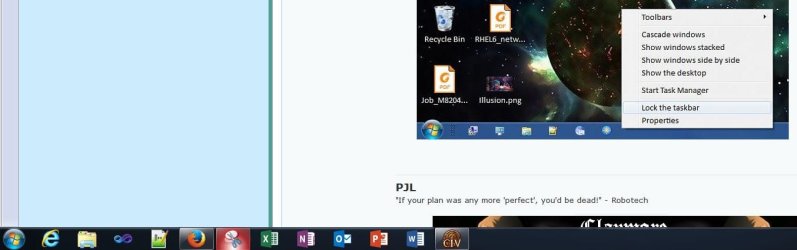
Oh yes, I can see lehnerus2000's dotted divider. I was referring to my own screen shot where I have unlocked the taskbar as lehnerus2000 did, though it may not be obvious what I am referring to as I accidentally included his screen shot in mine. I should have taken the shot with just the desktop. I can't seem to get the dotted divider to show on my taskbar no matter what I do, though I have no toolbars on my taskbar. Maybe that's the issue.
Definitely a weird one for the OP.
Computer type PC/Desktop Computer Manufacturer/Model Number Mellon Labs (custom build) OS Win 7 Pro x64/Win 10 Pro x64 dual boot CPU AMD FX 8350 Vishera @ 4200 Motherboard ASUS M5A97 R2.0 Memory 16 GB Mushkin Blackline DDR3-2400 @ 1866 (9-10-10-10-31) Graphics Card(s) XFX Radeon R9 280 Double D Black Edition Sound Card Realtek HD Audio on MB. Sounds great. Monitor(s) Displays Acer 24", Acer 22" Screen Resolution 3840 x 1080 Hard Drives 1 x Mushkin Chronos 120 GB SSD (Win 10) PSU Corsair TX-750 Case CoolerMaster HAF 912+ Cooling Coolermaster Seidon 240M Liquid AIO. 6 case fans Keyboard Logitech G710+ Mouse Logitech G500s Internet Speed Much better since I got fiber, but still way overpriced. Antivirus MSE, Malware Bytes for scanning Browser Firefox Other Info Corsair VOID USB headphones.