Solved Windows 7 Pro-Replaced the cmos -now i can't even Boot up in Safe Mode

chevytech

New member
Local time
3:47 PM
Messages
8
I got an Alert telling me the system voltage as low--i replaced the Cmos battery--it was 2.3V. Now the PC which is a Dell Optiplex 780--Windows 7 PRO--won't boot to the Wndows 7 logo. I tapped F8 on startup & got to the SafeMode choices---will not even boot in safe mode. Have rechecked the battery install---looks good at 3 V. I'm having trouble remembering my user//password as an admin. lol . HELP !! I think the HD settings in Bios have changed so that the SATA drive is not visible on startup. I see 2 small pieces of the Windows logo & then it goes to- " Windows was unable to start " choices of F2 or start normally---neither work. Wish i had known about that before i swapped batteries. Roger
 

My Computers My Computers

  • At a glance

    windows7 home premium 32 bitTwin AMD Turion4GBNvidia 7150M
    Computer type
    Laptop
    Computer Manufacturer/Model Number
    HP Pavilion DV9810us
    OS
    windows7 home premium 32 bit
    CPU
    Twin AMD Turion
    Memory
    4GB
    Graphics Card(s)
    Nvidia 7150M
    Hard Drives
    Dual boot--twin Drives---Windows Vista & windows 7
    Antivirus
    Mcaffee
    Browser
    Google Chrome
  • At a glance

    Wndows 7 Pro
    Computer type
    PC/Desktop
    System Manufacturer/Model Number
    Dell Optiplex 780
    OS
    Wndows 7 Pro
After some reading about the alert you mention, and knowing that you have replaced the CMOS battery, I believe this information might be of use to you:

"To get the motherboard to recognise this new battery properly you have to power cycle the computer 3 times (switch it on, get it to POST then switch it off again). After the third power cycle the low voltage alert message should disappear. If the alert message still displays, double check the output voltage of the replacement battery. It should read anywhere from 3V to 3.2V."

(Source: NEW!! - System battery low voltage alert (read this!!) - Dell Community)
(For moderators concerned: VirusTotal - URL - b2087d0719020177f3778b6e18a1c67f38e2c8612830685de3d7dcc5c8c0d47c)

Let us know what the result is if you try this,
Fox Computers
 

My Computers My Computers

  • At a glance

    Windows 7 Starter SP1
    OS
    Windows 7 Starter SP1
  • Computer type
    PC/Desktop
When you replace the CMOS (Contemporary Metal Oxide Semiconductor) battery that'll reset the BIOS settings to default. BIOS (Basic Input Output System) is what fires up first when you hit the power button. From there BIOS passes a command along to the hard drive to fire up the OS (Operating System). In this case Windows 7.


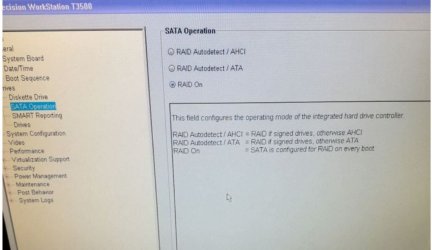
What I would explore first is your BIOS settings. Specifically AHCI mode for the hard drive.

I think the HD settings in Bios have changed so that the SATA drive is not visible on startup.

Exactly. It sounds like AHCI is now off when it was on before.

To get into BIOS you keep taping the F2 key on boot up. One second intervals or less. The computer just needs to detect the key press at the right time.

Here's what a BIOS chip look like:

https://upload.wikimedia.org/wikipedia/commons/d/d1/DIP-8_BIOS_chip.jpg

The BIOS software is in that little sucker.

- - - Updated - - -

After some reading about the alert you mention, and knowing that you have replaced the CMOS battery, I believe this information might be of use to you:

"To get the motherboard to recognise this new battery properly you have to power cycle the computer 3 times (switch it on, get it to POST then switch it off again). After the third power cycle the low voltage alert message should disappear. If the alert message still displays, double check the output voltage of the replacement battery. It should read anywhere from 3V to 3.2V."

(Source: NEW!! - System battery low voltage alert (read this!!) - Dell Community)
(For moderators concerned: VirusTotal - URL - b2087d0719020177f3778b6e18a1c67f38e2c8612830685de3d7dcc5c8c0d47c)

Let us know what the result is if you try this,
Fox Computers

That just clears up the sensing circuit for the low voltage warning of the CMOS battery. The issue now is that the PC can't boot the HDD.
 

My Computer My Computer

At a glance

Windows 7 Ultimate x64
Computer type
PC/Desktop
OS
Windows 7 Ultimate x64
Dell by default often set the hd to raid
 

My Computer My Computer

At a glance

win 8 32 bit
Computer type
PC/Desktop
OS
win 8 32 bit
Yes Samuria----i noticed in the RAID settings in BIOS that it is now set to "on ". RAID 0 & RAID 1 are also listed. The PC has only 1 Hard drive if that matters. I thought RAID was for multiple HDs . Tomorrow i will go back in & try turning RAID off---is that what you are saying ?? Thanks for helping me.

- - - Updated - - -

Thank you Samuria--F-22 SimPilot--Fox Computers---When i replaced the cmos battery, the Bios was changed to RAID--ON --- all i had to do was uncheck that box & check RAID Autodetect AHCI . Dell Optiplex 780 PC Windows 7 PRO . Enter Bios by tapping F2 before the DELL logo appears .Capture.JPG This is the screen---
 

My Computers My Computers

  • At a glance

    windows7 home premium 32 bitTwin AMD Turion4GBNvidia 7150M
    Computer type
    Laptop
    Computer Manufacturer/Model Number
    HP Pavilion DV9810us
    OS
    windows7 home premium 32 bit
    CPU
    Twin AMD Turion
    Memory
    4GB
    Graphics Card(s)
    Nvidia 7150M
    Hard Drives
    Dual boot--twin Drives---Windows Vista & windows 7
    Antivirus
    Mcaffee
    Browser
    Google Chrome
  • At a glance

    Wndows 7 Pro
    Computer type
    PC/Desktop
    System Manufacturer/Model Number
    Dell Optiplex 780
    OS
    Wndows 7 Pro
Dell by default often set the hd to raid

Interesting enough, I just read a day or two ago and completely unrelated to this issue, that Intel thinks that the AHCI/RAID option should be a best practice default option. Me thinks not too many in the general PC consumer market are using RAID in the advent of NVMe or even SATA m.2. On the other hand, it's not really a good backup strategy anyway... PSU or mains power has funny business and say good by to bit integrity of a HDD. I've seen it many times.
 

My Computer My Computer

At a glance

Windows 7 Ultimate x64
Computer type
PC/Desktop
OS
Windows 7 Ultimate x64
Back
Top