
Windows 7 Pro space usage

CatMT

New member
Local time
8:43 AM
Messages
7
I'm new to the forum so thanks in advance for any advice....I'm building a new PC with a Corsair Nova 2 SSD ATA 30GB (boot drive) and MSi Z77MA-G45 motherboard. Have just successfully put everything together and installed Windows 7 Professional - 64 bit. Have also downloaded and installed current motherboard drivers for: chipset, network interface card, USB 3.0 and built in audio from MSi website. After both installs (Windows and drivers) there is only 945MB free on the SSD which doesn't seem enough to account for future Windows updates.
used = 26.9GB
free = 945MB
TOTAL = 27.8GB

I calculate:
Windows 7 64-bit = 20GB
Drivers:
chipset = 2.69MB
NIC = 5.63MB
USB 3.0 = 13.7MB
audio = 125.39MB

Per another post I checked System Protection - Restore Settings, and it is set at the minimum = 106MB. The total SSD usage should be at most 21-22GB. Also, how come it shows only 27.8GB as total capacity when the advertised capacity is 30GB? Where is the difference of 2.2GB? Overall, there ought to be about 8GB available. Thanks!
 

My Computer

OS
Windows 7 Pro 64 bit
CPU
Intel Core i5-3570K CPU @ 3.40GHz
Motherboard
MSi Z77MA-G-45
Memory
16GB
Graphics Card(s)
GeForce GTX 560Ti
Hard Drives
Corsair Nova 2 SSD ATA 30 GB
HDD 1 TB
Run disk clean up and have it clean up the system files and backups and see if that frees up some space.
 

My Computer

Computer Manufacturer/Model Number
HAL-9000
OS
Windows 7 Ultimate 64bit
CPU
Intel i7 3770K
Motherboard
Asus Sabertooth Z77
Memory
16GB DDR3 1333 Corsair XMS3
Graphics Card(s)
XFX HD6950 2GB EyeFinity
Sound Card
Logitech G35 & Sennheiser PC135 & VIA HD
Monitor(s) Displays
23" HP 2310e, 23" Samsung B2230, 21.5" Viewsonic
Screen Resolution
5760x1080
Hard Drives
16TB of Storage
128GB & 256GB Crucial M4 SSD's, 2X 1TB WD Black, 3x 2TB WD, 3x 2TB Samsung F4, 1.5TB Seagate, WD 500GB,
PSU
Antec True Power New 650watt
Case
Cooler Master HAF-932
Cooling
Corsair H60 Hydro Cooler, 3x 230mm Fans, 2x120mm Fan
Keyboard
Logitech G15 and G13
Mouse
Logitech G700 Gaming Mouse
Internet Speed
50/10 Mbit
Other Info
Speakers : Alesis M1 Active Mk2 Studio Monitors , APC RS 1200 UPS, HP 4500DN Color Laser, HP P1006 mono Laser, Kodak 8500 Dye-Sub, Epson 1280 inkjet, Epson Worforce 610 MFC
What is displayed is the megabytes rounded off to 30 something. They advertise it that way to make the buyer think he`s getting more.

Example 160 GB hard drive is actually 149 GBs
Example 250 GB hard drive is actually 232 GBs
Example 1000 GB ( 1 Terabyte ) is actually 931 GBs

It`s a bit difficult to explain.
 

My Computer

Computer type
PC/Desktop
Computer Manufacturer/Model Number
Skylake Special #666
OS
Windows 10 Pro x64
CPU
Intel Core i7 6700K
Motherboard
Asus Sabertooth Z170 Mark 1
Memory
GSkill TridentZ RGB 16GB 3600 16-16-16-36
Graphics Card(s)
EVGA GTX 980 Ti SC x2
Sound Card
Realtek High Definition
Monitor(s) Displays
AOC G2460PG
Screen Resolution
1920 x 1080 144Hz
Hard Drives
Samsung 860 Pro 256GB, Seagate Barracuda 4TB x2
PSU
EVGA 1000 P2, EVGA White Custom Braided Cables
Case
Corsair Vengeance C70 Gunmetal Black
Cooling
Corsair H100i v2, Corsair ML120 x2, Thermal Grizzly Kryonaut
Keyboard
Logitech G910 Orion Spectrum
Mouse
Logitech G700s
Internet Speed
Verizon Fios Quantum Gateway 75/75
Antivirus
Windows Defender, Malwarebytes Free 3.8.3
Browser
Chrome
Other Info
Corsair SP120 x4, LG Blu-ray Drive, Durabrand HT-395 100 Watt Dolby Digital Amp, Corsair H2100 Wireless 7.1 Headset
Why did you install the factory chipset? Were drivers missing or performance problem(s) which required different drivers than what Win7 delivers during install and optional Updates? This is not XP. Win7 decides what drivers it wants.

The chipset often has bloatware packages that are best uninstalled unless research shows they are vital to the safe functioning of the board. Same with the display driver software. This might save significant space. Then clean up using CCleaner Disk and Registry tab.

There might even be space to install your most important programs so that they benefit from the faster speeds. All data can be linked from another HD to the relate Library - Include a Folder - Windows 7 Forums
 
Thank you all for your responses. I ran disk cleanup and only gained 3MB.

We bought this system from Newegg, and I installed the MSi chipsets as per the instructions on Newegg's Youtube video, "How To Build a Computer - Part 3 - Installing Windows & Finishing Touches." But if these chipsets really aren't needed, unless anyone has any other ideas, this morning I will wipe the drive and start over with only Windows 7.

Thanks again!
 

My Computer

OS
Windows 7 Pro 64 bit
CPU
Intel Core i5-3570K CPU @ 3.40GHz
Motherboard
MSi Z77MA-G-45
Memory
16GB
Graphics Card(s)
GeForce GTX 560Ti
Hard Drives
Corsair Nova 2 SSD ATA 30 GB
HDD 1 TB
It depends upon how much bloatware the chipset installed in your Control Panel>Programs and features. You can probably uninstall it from there to save the trouble of reinstalling and still regain the space. If a driver is uninstalled with the software, Win7 should either auto-install it at reboot or deliver it under optional Updates. Then gauge performance to see if you lose any functionality.

If you choose to reinstall use the same Best Practices as in Clean Reinstall OEM
 
I successfully uninstalled the chipset programs from Control Panel/Uninstall Programs and only gained 18MB. I have not yet reinstalled Windows and am not sure if it would accomplish anything.

Should Windows 7 Pro 64bit really consume 26GB when it's touted to use only 20MB, or is something wrong with the way I installed it? If perhaps I did something wrong during install I could reinstall to double check. However, if it is truly using 26GB, should I be concerned that I'll eventually run out of space on the SSD with only ~1GB free for Windows updates, or should I just link the other HDD as you suggested earlier, forget about it and move on?

Thank you.
 

My Computer

OS
Windows 7 Pro 64 bit
CPU
Intel Core i5-3570K CPU @ 3.40GHz
Motherboard
MSi Z77MA-G-45
Memory
16GB
Graphics Card(s)
GeForce GTX 560Ti
Hard Drives
Corsair Nova 2 SSD ATA 30 GB
HDD 1 TB

My Computer

Computer Manufacturer/Model Number
* BFK Customs *
OS
W 7 64-bit Ultimate
CPU
Intel Q9550 Yorkfield
Motherboard
ASUS P5Q Pro
Memory
8GB Dominator 8500C5D
Graphics Card(s)
ATI : XFX 5870
Sound Card
Realtek HD Audio 7-1
Monitor(s) Displays
1x 47" LCD HDMI & 3x 26" LCD HDMI
Screen Resolution
1920x1080P & 1920x1200
Hard Drives
1x 80GB Intel X25-M G2 SSD : 1x 500GB & 1x 640GB WD Caviar Black(s)
PSU
Corsair 620HX
Case
Cooler Master RC-690
Cooling
Tuniq Tower 120, 2x 140mm and 3x 120mm case fans
Keyboard
Microsoft 500
Mouse
Razer Diamondback 3G
Internet Speed
14 Mb/s
Other Info
1x Koutech 3Gb/s SATA HDD Hot Swap Rack
What was installed for chipset was apparently only the drivers and no accompanying bloatware. The drivers likely remain installed until a reinstall is done to put back the drivers given by Win7 installer.

If I had such a small margin I would reinstall closely following the Best Practices (for drivers, cleanup, defrag) in Clean Reinstall OEM to see if I can whittle it down closer to 20gb since you'll have Updates and may want to try to squeeze in your most used programs if possible - although they can be uninstalled and reinstalled to the data HD if you get a low disk warning.

Make sure you use the latest official installer with SP1 from the tutorial. After install and setup run CCleaner and the Puran boot time defrag with full disk check to elminate empty spaces and perfectly order the SSD.
 
What is displayed is the megabytes rounded off to 30 something. They advertise it that way to make the buyer think he`s getting more.

Example 160 GB hard drive is actually 149 GBs
Example 250 GB hard drive is actually 232 GBs
Example 1000 GB ( 1 Terabyte ) is actually 931 GBs

It`s a bit difficult to explain.

It's pretty easy to explain. In Windows, a gigabyte is 2^30 bytes (1.0737E09). The disk manufacturers use the decimal version (1E9).

If you feel cheated that your 1TB drive doesn't actually hold 1.0737 TB, that's sad.
 

My Computer

Computer Manufacturer/Model Number
homegrown
OS
Windows 7 Pro X64 SP1
CPU
Intel Core I7-3930k
Motherboard
Asus P9X79 Pro
Memory
16 GB Gskill DDR3-2133
Graphics Card(s)
eVGA GTX680
Sound Card
Creative X-Fi Titanium
Monitor(s) Displays
As PA246Q
Screen Resolution
1920 X 1200
Hard Drives
Corsair Force GT, 120 GB
WDC 1.5TB Caviar Black
PSU
PCP&C Silencer 750 Crossfire
Case
Silverstone FT02
Cooling
Noctua NH-D14
Keyboard
cheap Logitech USB
Mouse
Microsoft Intellimouse Explorer (old optical) USB
Internet Speed
6Mb cable
Other Info
Pioneer BDR-205
Samsung SH-203B
Monsoon 5.1 speakers
I successfully uninstalled the chipset programs from Control Panel/Uninstall Programs and only gained 18MB. I have not yet reinstalled Windows and am not sure if it would accomplish anything.

Should Windows 7 Pro 64bit really consume 26GB when it's touted to use only 20MB, or is something wrong with the way I installed it? If perhaps I did something wrong during install I could reinstall to double check. However, if it is truly using 26GB, should I be concerned that I'll eventually run out of space on the SSD with only ~1GB free for Windows updates, or should I just link the other HDD as you suggested earlier, forget about it and move on?

Thank you.

One thing that I haven't seem mentioned: are you using hibernation? Windows creates hiberfil.sys, which is the same size as your physical RAM (4GB). If you don't want to use hibernation (which is quite different from S3 sleep), get rid of it.

What is hiberfil.sys and How Do I Delete It? - How-To Geek

My Windows folder (7 Pro X64) comes in at under 20GB, by the way. I don't regret buying a 120GB SSD for my boot drive, though. Allows me to be a bit more careless.
 

My Computer

Computer Manufacturer/Model Number
homegrown
OS
Windows 7 Pro X64 SP1
CPU
Intel Core I7-3930k
Motherboard
Asus P9X79 Pro
Memory
16 GB Gskill DDR3-2133
Graphics Card(s)
eVGA GTX680
Sound Card
Creative X-Fi Titanium
Monitor(s) Displays
As PA246Q
Screen Resolution
1920 X 1200
Hard Drives
Corsair Force GT, 120 GB
WDC 1.5TB Caviar Black
PSU
PCP&C Silencer 750 Crossfire
Case
Silverstone FT02
Cooling
Noctua NH-D14
Keyboard
cheap Logitech USB
Mouse
Microsoft Intellimouse Explorer (old optical) USB
Internet Speed
6Mb cable
Other Info
Pioneer BDR-205
Samsung SH-203B
Monsoon 5.1 speakers
So, the 30GB SSD came free with the 1TB HDD, so we thought we'd use it as a boot drive since Windows was only supposed to need 20GB.

So far, I've reinstalled Windows. During install, at the prompt "Where do you want to install Windows?" I deleted one partition so that the result was:

Disk 0 Partition: System Reserved; total size 100MB; free 7.0MB
Disk 0 Unallocated space; total size 27.9GB; free 27.9GB

After selecting "unallocated space" and installing Windows, and running disk cleanup, drive C shows 1.29GB free of 27.8GB.

The folders in C and their size / size on disk are:
Perflogs = 0
Program Files = 227MB / 229MB
Program Files (x86) = 136MB / 138MB
Users = 89.7MB / 90.5MB
Windows = 10.5GB / 10.6GB

There is no hiberfil.sys file in C that I can find, though "hibernate" is an active option.

I'm currently reading through the article Hard Disk Space - Free Up and Recover to see what else I should do...I note gregrocker's suggestion of using ccleaner too. Since this is a brand new build and there are no other programs installed on the drive at all, I'm really baffled by this space issue!

I'm not a IT person at all, but can trouble shoot most issues with logic, years of experience with PCs at home and at work, and good instructions. Thanks for all of the help and your patience.
 

My Computer

OS
Windows 7 Pro 64 bit
CPU
Intel Core i5-3570K CPU @ 3.40GHz
Motherboard
MSi Z77MA-G-45
Memory
16GB
Graphics Card(s)
GeForce GTX 560Ti
Hard Drives
Corsair Nova 2 SSD ATA 30 GB
HDD 1 TB
Hiberfile.sys is likely hidden.

If you don't want to use hibernation, you can do as Bobkn mentioned in post 11.

Turn it off with this method:


In an elevated command prompt, type powercfg -h off and press Enter

That should get you back 4 GB if it is not already turned off.

My C Windows folder is 17.8 GB on a year old installation, with another 4 GB in Program Files folders.
 

My Computer

Computer type
PC/Desktop
Computer Manufacturer/Model Number
Ignatz Special; 4 speed manual gearbox; factory air conditioning; one of one
OS
Windows 7 Home Premium SP1, 64-bit
CPU
Intel Skylake i5-6600K, not overclocked
Motherboard
AsRock Z170M Extreme 4, micro ATX
Memory
8 GB HyperX DDR4-2666 (2 x 4 GB)
Graphics Card(s)
none; graphics are integrated on CPU
Sound Card
onboard: Realtek ALC1150; external: USB Behringer UF0-202
Monitor(s) Displays
Dell S2340M 23 inch IPS
Screen Resolution
1600 x 900
Hard Drives
System: Crucial MX100 series SSD, 128 GB;
Data: Samsung Spinpoint 103SJ, 1 TB;
Backup: WD Caviar Green WD30EZRX-00D8PB0, 3 TB
PSU
Rosewill SilentNight 500 watt fanless, semi-modular
Case
Antec Solo II
Cooling
Noctua NH-U12S; Noctua F12 intake, Noctua S12A exhaust
Keyboard
Microsoft 200 6JH-00001 USB
Mouse
Dell or Microsoft optical wired; USB
Antivirus
Microsoft Security Essentials and Malwarebytes Premium
Browser
Pale Moon
Other Info
All fans PWM; speeds at idle: CPU circa 500 rpm; intake circa 600 rpm; exhaust circa 600 rpm; CPU temps 27 idle and 47 C load in a warm room (27 C/81 F) when running Intel Extreme Tuning Utility stress test.
In Control Panel>Folder options unhide Hidden files to see if Hiberfil.sys is onboard already. Either way I'd disable it for now. Later you can move it to the HD if you want the modern hibernate function, or you may have room for it by then.

You can run it this way for awhile to set it up and shake it out, CClean and defrag to compact it more.

What programs installed to the two Program folders? How much space did they take in the hidden Program Data folders? What's in the hidden User appdata folders? CCleaner will take a broom to that.
 
OK I just executed the powercfg -h off command that ignatzatsonic recommended and now with hibernate deleted we're back into safe territory with 4.3 GB free, but "sleep" mode is also disabled (greyed out on the shut down options button). I think I will need that back, but can do that later as you suggest.

In "Program Files" are the following folders:
Common Files
DVD Maker
Internet Explorer
MSBuild
Reference Assemblies
Windows Defender
Windows Journal
Windows Mail
Windows Media Player
Windows NT
Windows Photo Viewer
Windows Portable Devices
Windows Sidebar

In "Program Files (x86)" are some of the same from above (Hmmm, is this why the space is being eaten up?)
Common Files
Internet Explorer
MSBuild
Reference Assemblies
Windows Defender
Windows Mail
Windows Media Player
Windows NT
Windows Photo Viewer
Windows Portable Devices
Windows Sidebar
 

My Computer

OS
Windows 7 Pro 64 bit
CPU
Intel Core i5-3570K CPU @ 3.40GHz
Motherboard
MSi Z77MA-G-45
Memory
16GB
Graphics Card(s)
GeForce GTX 560Ti
Hard Drives
Corsair Nova 2 SSD ATA 30 GB
HDD 1 TB
All of those are on my system, so it looks like a default bunch of folders.

You may have something else going on.

Have you used something like WinDirStat to get a better idea of what is taking up space?
 

My Computer

Computer type
PC/Desktop
Computer Manufacturer/Model Number
Ignatz Special; 4 speed manual gearbox; factory air conditioning; one of one
OS
Windows 7 Home Premium SP1, 64-bit
CPU
Intel Skylake i5-6600K, not overclocked
Motherboard
AsRock Z170M Extreme 4, micro ATX
Memory
8 GB HyperX DDR4-2666 (2 x 4 GB)
Graphics Card(s)
none; graphics are integrated on CPU
Sound Card
onboard: Realtek ALC1150; external: USB Behringer UF0-202
Monitor(s) Displays
Dell S2340M 23 inch IPS
Screen Resolution
1600 x 900
Hard Drives
System: Crucial MX100 series SSD, 128 GB;
Data: Samsung Spinpoint 103SJ, 1 TB;
Backup: WD Caviar Green WD30EZRX-00D8PB0, 3 TB
PSU
Rosewill SilentNight 500 watt fanless, semi-modular
Case
Antec Solo II
Cooling
Noctua NH-U12S; Noctua F12 intake, Noctua S12A exhaust
Keyboard
Microsoft 200 6JH-00001 USB
Mouse
Dell or Microsoft optical wired; USB
Antivirus
Microsoft Security Essentials and Malwarebytes Premium
Browser
Pale Moon
Other Info
All fans PWM; speeds at idle: CPU circa 500 rpm; intake circa 600 rpm; exhaust circa 600 rpm; CPU temps 27 idle and 47 C load in a warm room (27 C/81 F) when running Intel Extreme Tuning Utility stress test.
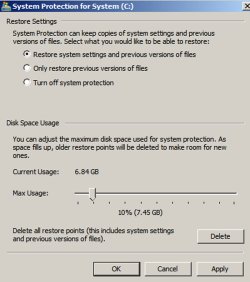
Have you confirmed you currently have no restore points?

If I understand you correctly, you have looked at System Restore.

Below is a pic of the control slider used to allot space to that function. Is this where you set the 106 MB size mentioned in post 1?
 

Attachments

  • Untitled-1.jpg
    Untitled-1.jpg
    87.3 KB · Views: 1

My Computer

Computer type
PC/Desktop
Computer Manufacturer/Model Number
Ignatz Special; 4 speed manual gearbox; factory air conditioning; one of one
OS
Windows 7 Home Premium SP1, 64-bit
CPU
Intel Skylake i5-6600K, not overclocked
Motherboard
AsRock Z170M Extreme 4, micro ATX
Memory
8 GB HyperX DDR4-2666 (2 x 4 GB)
Graphics Card(s)
none; graphics are integrated on CPU
Sound Card
onboard: Realtek ALC1150; external: USB Behringer UF0-202
Monitor(s) Displays
Dell S2340M 23 inch IPS
Screen Resolution
1600 x 900
Hard Drives
System: Crucial MX100 series SSD, 128 GB;
Data: Samsung Spinpoint 103SJ, 1 TB;
Backup: WD Caviar Green WD30EZRX-00D8PB0, 3 TB
PSU
Rosewill SilentNight 500 watt fanless, semi-modular
Case
Antec Solo II
Cooling
Noctua NH-U12S; Noctua F12 intake, Noctua S12A exhaust
Keyboard
Microsoft 200 6JH-00001 USB
Mouse
Dell or Microsoft optical wired; USB
Antivirus
Microsoft Security Essentials and Malwarebytes Premium
Browser
Pale Moon
Other Info
All fans PWM; speeds at idle: CPU circa 500 rpm; intake circa 600 rpm; exhaust circa 600 rpm; CPU temps 27 idle and 47 C load in a warm room (27 C/81 F) when running Intel Extreme Tuning Utility stress test.
Re: the slider. Yes, that's where it was set to 106 MB. After the reinstall of Windows, it was set at 1% (275.24MB) for max usage. I just deleted the restore points, and free disk space is now 4.62GB. I'll download the other cleanup programs to a thumb drive and will run those and see what happens. I'll let you know what the outcome is so we can all put this to rest! Thanks!
 

My Computer

OS
Windows 7 Pro 64 bit
CPU
Intel Core i5-3570K CPU @ 3.40GHz
Motherboard
MSi Z77MA-G-45
Memory
16GB
Graphics Card(s)
GeForce GTX 560Ti
Hard Drives
Corsair Nova 2 SSD ATA 30 GB
HDD 1 TB

My Computer

Computer Manufacturer/Model Number
* BFK Customs *
OS
W 7 64-bit Ultimate
CPU
Intel Q9550 Yorkfield
Motherboard
ASUS P5Q Pro
Memory
8GB Dominator 8500C5D
Graphics Card(s)
ATI : XFX 5870
Sound Card
Realtek HD Audio 7-1
Monitor(s) Displays
1x 47" LCD HDMI & 3x 26" LCD HDMI
Screen Resolution
1920x1080P & 1920x1200
Hard Drives
1x 80GB Intel X25-M G2 SSD : 1x 500GB & 1x 640GB WD Caviar Black(s)
PSU
Corsair 620HX
Case
Cooler Master RC-690
Cooling
Tuniq Tower 120, 2x 140mm and 3x 120mm case fans
Keyboard
Microsoft 500
Mouse
Razer Diamondback 3G
Internet Speed
14 Mb/s
Other Info
1x Koutech 3Gb/s SATA HDD Hot Swap Rack
Back
Top