
Hello everyone,
This is a strange issue I can't seem to solve:
For browsing pictures, I used 'Windows Photo Viewer' as long as I remember; since it is fast, and does the job.
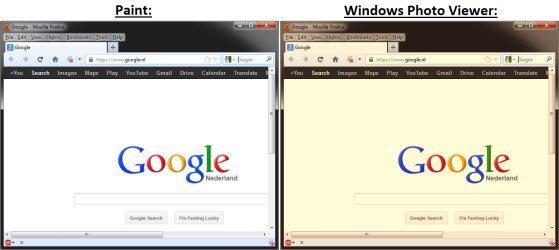
However, since I installed Win7 Pro x64 in summer 2010, images are shown with a 'too warm color temperature', i.e. 'too red'.
This is only the case in Windows Photo Viewer; when viewed in e.g. Paint the image looks perfectly fine. See the attached screenshot.
I re-installed Windows last week after I bought an SSD, but the problem still persists (or, again).
I forgot to check if this issue was there before I installed my video card drivers; as I suspect it might have something to do with the nVidia 'Desktop color settings'.
Namely, I had an issue before, where sometimes my monitor would look 'dimmed' except for my cursor (I know, right?).
Re-starting would solve it, but sometimes the issue returned. Googling gave me the answer: under 'Adjust desktop color settings', change the radio button from 'Other applications control color settings' to 'Use NVIDIA settings'.
I hoped this would also fix the strange Windows Photo Viewer issue; but unfortunately, it did not.
At my work I don't have this issue in Win7, and it seems I'm out of options
It is quite an annoyance, since pictures look like crap.
Does anyone have an idea?
This is a strange issue I can't seem to solve:
For browsing pictures, I used 'Windows Photo Viewer' as long as I remember; since it is fast, and does the job.
However, since I installed Win7 Pro x64 in summer 2010, images are shown with a 'too warm color temperature', i.e. 'too red'.
This is only the case in Windows Photo Viewer; when viewed in e.g. Paint the image looks perfectly fine. See the attached screenshot.
I re-installed Windows last week after I bought an SSD, but the problem still persists (or, again).
I forgot to check if this issue was there before I installed my video card drivers; as I suspect it might have something to do with the nVidia 'Desktop color settings'.
Namely, I had an issue before, where sometimes my monitor would look 'dimmed' except for my cursor (I know, right?).
Re-starting would solve it, but sometimes the issue returned. Googling gave me the answer: under 'Adjust desktop color settings', change the radio button from 'Other applications control color settings' to 'Use NVIDIA settings'.
I hoped this would also fix the strange Windows Photo Viewer issue; but unfortunately, it did not.
At my work I don't have this issue in Win7, and it seems I'm out of options
It is quite an annoyance, since pictures look like crap.
Does anyone have an idea?
Attachments
My Computer
At a glance
Windows 7 Professional x64Intel Core i7-860Corsair XMS3 TW3X4G1333C9 (2x 2GB - DDR3 CL9)EVGA GTX460 SuperC (768 MB, PCIe)
- OS
- Windows 7 Professional x64
- CPU
- Intel Core i7-860
- Motherboard
- MSI P55-GD65
- Memory
- Corsair XMS3 TW3X4G1333C9 (2x 2GB - DDR3 CL9)
- Graphics Card(s)
- EVGA GTX460 SuperC (768 MB, PCIe)
- Sound Card
- Creative SoundBlaster Audigy 2 ZS Platinum
- Monitor(s) Displays
- Samsung SyncMaster 2032BW
- Hard Drives
- 1x Samsung SSD 830 Series (256 GB),
2x WD HDD 2TB 64MB GREEN (WD20EARS),
2x WD HDD 2TB 64MB BLACK (WD2002FAEX)
- PSU
- Cooler Master Silent Pro Gold 600W
- Case
- Cooler Master CM 690 II Advanced
- Cooling
- Zalman CNPS 10X Quiet
- Keyboard
- Logitech thingy
- Mouse
- Logitech MX310
