TIFF will not preview in Windows Photo Viewer

OvalOffice

New member
Local time
9:50 PM
Messages
4
Hi,

I received a TIFF with extension .tif

Size: 907 MB

Trying to open with: Windows Photo Viewer (WPV)

Method of transfer: copy/paste from thumb drive

Associated files received with: .tfw & .xyz files

It is an air photo that has already been mosaicked from many single air photos.

Things I've tried:
-opening with Windows Photo Viewer: WPV can't open that picture because either Photo Viewer doesn't support this file, or you don't have the latest updates to Photo Viewer. New laptop and updates are up to date.
-opening with paint: Paint cannot read this file. This is not a valid bitmap file, or its format is not currently supported.
-changed extension to .tiff & .jpeg to see if maybe it had wrong extension. No luck!
-made sure that .tif & .tiff were recognized in 'Associate file type or protocol with a specific program'

My goal is to not have to download an additional 'file converter' or 'image opener' etc... and simply use what I have now. My end goal is to use it in ArcMap 9.3. I have tried opening it in Ozi Explorer but it shows up as 3 oddly out-of-place air photos that do not align?

sorry for the long thread but I just wanted to show that I've made several attempts before seeking help

Thanks!
 

My Computer My Computer

At a glance

Windows 7 Professional 64bit32
Computer type
Laptop
Computer Manufacturer/Model Number
Dell
OS
Windows 7 Professional 64bit
Memory
32
Download atrial version of adobe lightroom. Your tiff will open then.
 

My Computer My Computer

At a glance

win 7 home premium 64 bitintel I5 3470 3.2ghz12gbasus radeon 5450 512mb
Computer type
PC/Desktop
Computer Manufacturer/Model Number
gigabyte z77-d3sh
OS
win 7 home premium 64 bit
CPU
intel I5 3470 3.2ghz
Motherboard
gigabyte z77-d3sh
Memory
12gb
Graphics Card(s)
asus radeon 5450 512mb
Sound Card
no
Monitor(s) Displays
viewsonic
Screen Resolution
1920*1080
Hard Drives
Crucial m4 sata 3 SSD
PSU
0cz
Case
corair carbide 200
Cooling
corsair h60
Keyboard
wireless logitech
Internet Speed
60 mbs
You can convert it with PAINT which is in Accessories. Just open it in Paint and then 'save as' in e.g. .png.
 

My Computer My Computer

At a glance

Vista, Windows7, Mint Mate, Zorin, Windows 8from 1.6GHz Duo to i7
Computer Manufacturer/Model Number
HP, Dell, Gateway, Toshiba - 4 laptops and 2 desktops
OS
Vista, Windows7, Mint Mate, Zorin, Windows 8
CPU
from 1.6GHz Duo to i7
Monitor(s) Displays
2x HP w2207
Hard Drives
5x HDD, 7x SSD, 12x Externals
Keyboard
with trackball - no mices
Mouse
Trackball mice
Internet Speed
DSL 6000
Thanks kingscurate but I'm really trying to do this without having to download anything new. I can't see why I shouldn't be able to unless something is wrong with the data???

WHS: As stated in my original post, I tried paint but it wouldn't open there too?!
 

My Computer My Computer

At a glance

Windows 7 Professional 64bit32
Computer type
Laptop
Computer Manufacturer/Model Number
Dell
OS
Windows 7 Professional 64bit
Memory
32
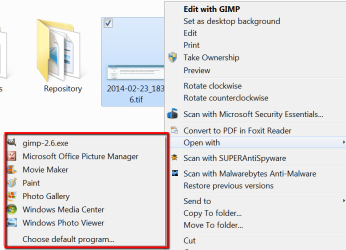
Something is missing in your system. Here are all the programs that can open .tif in my windows 7 system.
 

Attachments

  • 2014-02-23_1840.png
    2014-02-23_1840.png
    25.1 KB · Views: 0

My Computer My Computer

At a glance

Vista, Windows7, Mint Mate, Zorin, Windows 8from 1.6GHz Duo to i7
Computer Manufacturer/Model Number
HP, Dell, Gateway, Toshiba - 4 laptops and 2 desktops
OS
Vista, Windows7, Mint Mate, Zorin, Windows 8
CPU
from 1.6GHz Duo to i7
Monitor(s) Displays
2x HP w2207
Hard Drives
5x HDD, 7x SSD, 12x Externals
Keyboard
with trackball - no mices
Mouse
Trackball mice
Internet Speed
DSL 6000
whs: those are what I have except for the gimp. The person who gave me this file uses gimp to do his work but I don't have it. I'm able to open other .tif, .pdf, .jpeg etc... files on a daily basis but not this TIFF. If opening it is a very simple task then I'm thinking that the file has been corrupted somehow?! It wasn't emailed (copy/pasted from thumb drive). The other idea I was thinking could be the issue was that the many original TIFFs had already been mosaicked and now it is no longer a 'normal' .tif file?! If this is even possible?? I'm trying to do someone a favour and challenge myself to open it on arcmap to use as a basemap. Because of this, I'm trying to do it without having to download anything new to open it. Guess I'll just keep trying... thanks for the feedback and keep 'em coming!!
 

My Computer My Computer

At a glance

Windows 7 Professional 64bit32
Computer type
Laptop
Computer Manufacturer/Model Number
Dell
OS
Windows 7 Professional 64bit
Memory
32
I think you are right. Something with this file is non-standard. I would try a few other programs:

1. GIMP from here - the button from the top line
2. FastStone Image Viewer from here - also first line

Both those programs can deal with .tif
 

My Computer My Computer

At a glance

Vista, Windows7, Mint Mate, Zorin, Windows 8from 1.6GHz Duo to i7
Computer Manufacturer/Model Number
HP, Dell, Gateway, Toshiba - 4 laptops and 2 desktops
OS
Vista, Windows7, Mint Mate, Zorin, Windows 8
CPU
from 1.6GHz Duo to i7
Monitor(s) Displays
2x HP w2207
Hard Drives
5x HDD, 7x SSD, 12x Externals
Keyboard
with trackball - no mices
Mouse
Trackball mice
Internet Speed
DSL 6000
The joke is that TIFF stands for:
Thousands of Incompatible File Formats

This thread was interesting to me...
Tiff image corruption under windows 7
...it might not be interesting to you :-)

From this website:
TIFF: Summary from the Encyclopedia of Graphics File Formats

The JPEG table fields use a highly nonstandard layout: rather than containing data directly in the field structure, the fields hold pointers to information elsewhere in the file. This requires special-purpose code to be added to every TIFF-manipulating application. Even a trivial TIFF editor (for example, a program to add an ImageDescription field to a TIFF file) must be explicitly aware of the internal structure of the JPEG-related tables, or it will probably break the file. Every other auxiliary field in TIFF follows the normal TIFF rules and can be copied or relocated by standard code.
I could not find any reference to a TIFF file where images have been layered over other images, but my guess is that such a file falls under the heading of a multi-paged TIFF and as such is not going to work well with MS Paint. The Windows Photo Viewer can open some (but not all) multi-paged TIFF files - as you have observed.
 

My Computer My Computer

At a glance

W7 Pro SP1 64biti78GBIntel HD Graphics
Computer type
Laptop
Computer Manufacturer/Model Number
Employer provided Dell Latitude
OS
W7 Pro SP1 64bit
CPU
i7
Memory
8GB
Graphics Card(s)
Intel HD Graphics
Hard Drives
crappy SSD
Antivirus
Employer mandated Symantec Endpoint Protection
Browser
Pale Moon 64bit, IE11 64bit & Chrome 64bit
Just wanted to post a solution to my TIFF issue...

Failed in attempting to open it without having to download something I didn't already have.
Downloaded GIMP just to see what it can do, and it loads but I can not change it to a .jpeg (assuming it's too large)

Either way, all I ever wanted to do was to be able to use it in ArcMap but I've since loaded it in Global Mapper and now all is good...

Thanks for all the TIFF advice!!
 

My Computer My Computer

At a glance

Windows 7 Professional 64bit32
Computer type
Laptop
Computer Manufacturer/Model Number
Dell
OS
Windows 7 Professional 64bit
Memory
32
Thanks for posting your findings.
 

My Computer My Computer

At a glance

W7 Pro SP1 64biti78GBIntel HD Graphics
Computer type
Laptop
Computer Manufacturer/Model Number
Employer provided Dell Latitude
OS
W7 Pro SP1 64bit
CPU
i7
Memory
8GB
Graphics Card(s)
Intel HD Graphics
Hard Drives
crappy SSD
Antivirus
Employer mandated Symantec Endpoint Protection
Browser
Pale Moon 64bit, IE11 64bit & Chrome 64bit
Back
Top