Windows 7 problem, need some help

hfbroady

New member
Local time
11:54 AM
Messages
7
When I startup windows the hard drive acts like it is really busy, and I'm not even doing anything. This happens even when I'm not connected to the internet, I ran virus scan and found tracking cookies which I deleted, then I ran SpywareTerminator, found one critical object in startup, openned masconfig and disabled it and restarted, with the same results. I alos ran a free reg scan and it found 5500 errors, but I could fix or clean them because I have to buy it, and I have no money. So any help would be great.
I'm running windows 7 home premium 64-bit
Thank you anyone and everyone
Heath
 

My Computer

OS
Windows 7 64-bit
I wouldn't get too bent out of shape about the 5500 registry errors. A lot of those free scans exaggerate the errors found to suck you into buying the paid version. And when you do they are more likely to cause more problems than fix the bogus ones they listed.
As for the hard drive use, it may be the indexing service or something similar that is causing it. You may have to look at what processes or services are running to figure it out. If it is the indexing service it will eventually slow down once it has indexed most of the files on the hard drive.
 

My Computer

Computer type
PC/Desktop
Computer Manufacturer/Model Number
Home Built
OS
Windows 10 Education 64 bit
CPU
AMD Phenom II X4 980 Black Edition Deneb 3.7GHz
Motherboard
Asus M4N68T-M V2 µATX Motherboard
Memory
8GB 4GBx2 Kingston PC10600 DDR3 1333 Memory
Graphics Card(s)
Zotac NVIDIA Geforce GT640 2 Gig DDR3 PCIe
Sound Card
VIA VT1708s High Definition Audio 8-channel Onboard
Monitor(s) Displays
22" LG E2242 1080p and 2 19" I-INC AG191D
Screen Resolution
1280x1024 - 1920x1080 - 1280x1024
Hard Drives
Crucial M100 256 GB SSD and 500 GB WD Blue SATA
PSU
Thermaltake TR 620
Case
Power Up Black ATX Mid-Tower Case
Cooling
Stock heatsink and fan
Keyboard
Logitech Wireless K350 Wave
Mouse
Logitech Wireless M570 Trackman Wheel
Internet Speed
80 Mbps Down 30 Mbps Up
Antivirus
Windows Defender
Browser
Internet Explorer 11
Other Info
HP DVD1040e Lightscribe - External USB2
As far as your drive activity is concerned, it sounds like its indexing... this is normal and should settle down eventually... ;)
 

My Computer

Computer type
PC/Desktop
Computer Manufacturer/Model Number
LENOVO K450 @3.0GHZ
OS
64-bit Windows 8.1 Pro
CPU
Core(TM) i5 CPU 4330 Haswell @ 3.20GHz
Motherboard
LENOVO
Memory
12.00 GB
Graphics Card(s)
Intel(R) HD Graphics
Sound Card
Intel HD integtrated
Monitor(s) Displays
HP 25' ISP Monitor
Screen Resolution
1900/1020
Hard Drives
(1) ST1000DM003-1CH162 (2) Generic STORAGE DEVICE USB Device (3) Generic STORAGE DEVICE USB Device
Internet Speed
100mb down/10mb up
+1 for Alpha and Tews.
Indexing, antivirus and update checks kicking in.
 

My Computer

Computer Manufacturer/Model Number
Hopalong/ Godzilla
OS
Windows7 Pro 64bit SP-1; Windows XP Pro 32bit
CPU
Intel Core i7-870 Lynnfield 2.93GHz LGA 1156 95W Quad-Core
Motherboard
ASUS P7P55D-E PRO
Memory
8GB@1400MHz Crucial Ballistix DDR3-1600 4x2GB
Graphics Card(s)
ASUS ENGTX460 DirectCU/2DI/1GD5 1GB 256-bit GDDR5
Sound Card
VIA Onboard
Monitor(s) Displays
Asus VS248H-P 24"; Samsung SyncMaster 941BW 19"ws
Screen Resolution
1920x1080; 1440x900
Hard Drives
Samsung 830 120GB SSD
Intel 320 120GB SSD
Western Digital Caviar Black WD7501AALS 750GB 7200 RPM SATA 3.0Gb/s
Western Digital Caviar Black WD6401AALS 640GB 7200 RPM SATA 3.0Gb/s
PSU
COOLER MASTER Silent Pro RS850-AMBAJ3-US 850W Modular
Case
COOLER MASTER HAF 932 RC-932-KKN5-GP Black
Cooling
Scythe "Mugen-2 Rev.B" (2 ScytheKaze-Jyuni PWM fans)
Keyboard
Logitech K-320
Mouse
Kensington
Antivirus
Avast Inernet Suite
Browser
IE 9 ; Chrome
Since it is when you first start up windows it could be your startup items and various windows services starting. Superfetch should help in that area overtime but otherwise it is pretty normal for there to be hard drive activity when you first startup windows which dies down once it has been running for a few minutes.
 

My Computer

Computer type
Laptop
Computer Manufacturer/Model Number
Toshiba P775-S7100
OS
Windows 7 Professional SP1 64-bit
CPU
Intel Core i5-2450M @2.5 GHz
Memory
6 GB DDR3 1333MHz
Graphics Card(s)
Intel HD 3000
Monitor(s) Displays
Built-in 17.3" LED; 22" Insignia NS-L22Q-10A
Screen Resolution
1600x900; 1360x768
Hard Drives
750 GB Hitachi
1TB Seagate FreeAgent External
Internet Speed
Verizon DSL Speed(Down/Up): 3360 Kbps / 800 Kbps
Antivirus
MSE and MBAM Pro
Browser
IE10
Thank you all for the replies.
The hard drive has been running hard for about 4hours now, How long does the indexing last?
thanks
Heath
 

My Computer

OS
Windows 7 64-bit
It all depends on how big the drive is... ;)
 

My Computer

Computer type
PC/Desktop
Computer Manufacturer/Model Number
LENOVO K450 @3.0GHZ
OS
64-bit Windows 8.1 Pro
CPU
Core(TM) i5 CPU 4330 Haswell @ 3.20GHz
Motherboard
LENOVO
Memory
12.00 GB
Graphics Card(s)
Intel(R) HD Graphics
Sound Card
Intel HD integtrated
Monitor(s) Displays
HP 25' ISP Monitor
Screen Resolution
1900/1020
Hard Drives
(1) ST1000DM003-1CH162 (2) Generic STORAGE DEVICE USB Device (3) Generic STORAGE DEVICE USB Device
Internet Speed
100mb down/10mb up
the hd is 218GB's...just want to make sure there is nothing wrong I spend a lot of time in front of my computer. It acts slow sometime too is that normal during indexing?
 

My Computer

OS
Windows 7 64-bit

My Computer

Computer Manufacturer/Model Number
Too many to describe...
OS
Windows 7 x64 pro/ Windows 7 x86 Pro/ XP SP3 x86
The best way to figure out what is using your hard drive is to open resource monitor. You can either type resoruce monitor into the start menu search box and press enter, or open task manager (ctrl+shift+esc), go to the performance tab and press the resource monitor button. Once resource montor is open you can go to the disk tab and you can see what is using your hard drive. The other tabs can provide information on RAM and CPU usage as well.
 

My Computer

Computer type
Laptop
Computer Manufacturer/Model Number
Toshiba P775-S7100
OS
Windows 7 Professional SP1 64-bit
CPU
Intel Core i5-2450M @2.5 GHz
Memory
6 GB DDR3 1333MHz
Graphics Card(s)
Intel HD 3000
Monitor(s) Displays
Built-in 17.3" LED; 22" Insignia NS-L22Q-10A
Screen Resolution
1600x900; 1360x768
Hard Drives
750 GB Hitachi
1TB Seagate FreeAgent External
Internet Speed
Verizon DSL Speed(Down/Up): 3360 Kbps / 800 Kbps
Antivirus
MSE and MBAM Pro
Browser
IE10
Follow above member's advices. Also, make sure that the HDD isnt much fragmented as that may cause higher disk activity as it has to search for the file parts here and there..
 

My Computer

Computer Manufacturer/Model Number
HCL
OS
Winbdows 7 ultimate x64 | Ubuntu 12.04 x64 LTS
CPU
Core 2 Duo e7400 @ 2.90GHz
Motherboard
Gigabyte G31M-ES2L
Memory
3GB DDR2
Graphics Card(s)
Asus Nvidia GTX 560Ti 1GB
Sound Card
On-board
Monitor(s) Displays
HCL eZeeBee 18.5" LCD
Screen Resolution
1366x768 @ 60Hz
Hard Drives
Western Digital 320GB
PSU
Corsair CX500 V2 500W
Cooling
Stock
Keyboard
Stock
Mouse
Stock
Internet Speed
15-25kBps D/L | 10kBps U/L | Hey Don't laugh
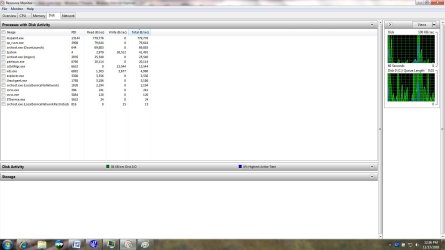
It is the hard drive indexing because I just stopped that and disabled it and the HD is still running hard. I have posted a screenshot of the resource monitor disk tab what should I turn off.
Thanks
Heath
 

Attachments

  • Resource_Monitor_Disk.jpg
    Resource_Monitor_Disk.jpg
    94.6 KB · Views: 10

My Computer

OS
Windows 7 64-bit
I turn off Superfech, and viewed the indexer an it said it was complete. I have attached a screenshot of the resource monitor what do or can I turn off.
Thanks
Heath
 

Attachments

  • Resource_Monitor_Disk.jpg
    Resource_Monitor_Disk.jpg
    94.6 KB · Views: 7

My Computer

OS
Windows 7 64-bit
According to the pics you attached, you've Norton AV installed, right? As we can see, it's the culprit which is causing much write activity. Disable it's start-up scan if there's any option for it and reduce the scan's intensity/depth level to medium if it's set to higher value. It'd be more b better if you can switch to any other light AV.
Disable Indexing and Superfetch and regular defrags (as per your choice). This should reduce some load on HDD.
 

My Computer

Computer Manufacturer/Model Number
HCL
OS
Winbdows 7 ultimate x64 | Ubuntu 12.04 x64 LTS
CPU
Core 2 Duo e7400 @ 2.90GHz
Motherboard
Gigabyte G31M-ES2L
Memory
3GB DDR2
Graphics Card(s)
Asus Nvidia GTX 560Ti 1GB
Sound Card
On-board
Monitor(s) Displays
HCL eZeeBee 18.5" LCD
Screen Resolution
1366x768 @ 60Hz
Hard Drives
Western Digital 320GB
PSU
Corsair CX500 V2 500W
Cooling
Stock
Keyboard
Stock
Mouse
Stock
Internet Speed
15-25kBps D/L | 10kBps U/L | Hey Don't laugh
Actually I don't have Norton installed nor do I use it, I use CA security suite, so maybe I need to find the norton file in startup and disable it.
Thanks
Heath
 

My Computer

OS
Windows 7 64-bit
Disable Indexing and Superfetch and regular defrags (as per your choice). This should reduce some load on HDD.
I would just like to say that I do not recommend disabling any of the three. It's up to you, but I find superfetch gets everything up and running faster when I first startup Windows and even people with SSD's say they see a performance increase with superfetch on. Defrag should be left on so that you don't have to worry about your HDD becoming fragmented, which will increase HDD activity more than anything, and keep your computer running fast. Indexing I'm not as concerned about but it does speed up file searching. If you never use the search function than turn it of. If you do use it, leave indexing on.
 

My Computer

Computer type
Laptop
Computer Manufacturer/Model Number
Toshiba P775-S7100
OS
Windows 7 Professional SP1 64-bit
CPU
Intel Core i5-2450M @2.5 GHz
Memory
6 GB DDR3 1333MHz
Graphics Card(s)
Intel HD 3000
Monitor(s) Displays
Built-in 17.3" LED; 22" Insignia NS-L22Q-10A
Screen Resolution
1600x900; 1360x768
Hard Drives
750 GB Hitachi
1TB Seagate FreeAgent External
Internet Speed
Verizon DSL Speed(Down/Up): 3360 Kbps / 800 Kbps
Antivirus
MSE and MBAM Pro
Browser
IE10
Disable Indexing and Superfetch and regular defrags (as per your choice). This should reduce some load on HDD.
I would just like to say that I do not recommend disabling any of the three. It's up to you, but I find superfetch gets everything up and running faster when I first startup Windows and even people with SSD's say they see a performance increase with superfetch on. Defrag should be left on so that you don't have to worry about your HDD becoming fragmented, which will increase HDD activity more than anything, and keep your computer running fast. Indexing I'm not as concerned about but it does speed up file searching. If you never use the search function than turn it of. If you do use it, leave indexing on.

actuallyi meant the same by writing "(as per your choice)", I should have used some punctuation marks to point that out.. :p
 

My Computer

Computer Manufacturer/Model Number
HCL
OS
Winbdows 7 ultimate x64 | Ubuntu 12.04 x64 LTS
CPU
Core 2 Duo e7400 @ 2.90GHz
Motherboard
Gigabyte G31M-ES2L
Memory
3GB DDR2
Graphics Card(s)
Asus Nvidia GTX 560Ti 1GB
Sound Card
On-board
Monitor(s) Displays
HCL eZeeBee 18.5" LCD
Screen Resolution
1366x768 @ 60Hz
Hard Drives
Western Digital 320GB
PSU
Corsair CX500 V2 500W
Cooling
Stock
Keyboard
Stock
Mouse
Stock
Internet Speed
15-25kBps D/L | 10kBps U/L | Hey Don't laugh
Actually I don't have Norton installed nor do I use it, I use CA security suite, so maybe I need to find the norton file in startup and disable it.
Thanks
Heath

You might have had it before and some files might have got left due to incomplete uninstall. Always check if there's any uninstall tool available for your AV/Security app from it's vendor before you uninstall it with built-in or any 3rd party uninstaller.
 

My Computer

Computer Manufacturer/Model Number
HCL
OS
Winbdows 7 ultimate x64 | Ubuntu 12.04 x64 LTS
CPU
Core 2 Duo e7400 @ 2.90GHz
Motherboard
Gigabyte G31M-ES2L
Memory
3GB DDR2
Graphics Card(s)
Asus Nvidia GTX 560Ti 1GB
Sound Card
On-board
Monitor(s) Displays
HCL eZeeBee 18.5" LCD
Screen Resolution
1366x768 @ 60Hz
Hard Drives
Western Digital 320GB
PSU
Corsair CX500 V2 500W
Cooling
Stock
Keyboard
Stock
Mouse
Stock
Internet Speed
15-25kBps D/L | 10kBps U/L | Hey Don't laugh
Thank you for the suggestions everyone. After turn service after service off I was able to get the HDD to run normal now. I turned Superfetch back on. I ended up turning services off based on the manufacture, like search settings:Manufacturer Spigot,Inc. I also set my Spyware terminator to manual for all of it's services, and I turned off Synaptics Pointing Device Driver: Form Synaptics Incorporated this was the last one I turned off, than when I restarted the problem was fixed. I also turned of some 02Flash thing that had no manfucturer. So I'm really not to sure what actually did it, I would think that the search settings would have done it just because of the name.
Thank you so much everyone for the help
Heath:D
 

My Computer

OS
Windows 7 64-bit
Glad you were able to sort everything out! ;)
 

My Computer

Computer type
PC/Desktop
Computer Manufacturer/Model Number
LENOVO K450 @3.0GHZ
OS
64-bit Windows 8.1 Pro
CPU
Core(TM) i5 CPU 4330 Haswell @ 3.20GHz
Motherboard
LENOVO
Memory
12.00 GB
Graphics Card(s)
Intel(R) HD Graphics
Sound Card
Intel HD integtrated
Monitor(s) Displays
HP 25' ISP Monitor
Screen Resolution
1900/1020
Hard Drives
(1) ST1000DM003-1CH162 (2) Generic STORAGE DEVICE USB Device (3) Generic STORAGE DEVICE USB Device
Internet Speed
100mb down/10mb up
Back
Top