Windows 7 Problem Steps Recorder: miracle tool

NormCameron

@ Tenforums.com
Pro User
VIP
Local time
12:36 AM
Messages
576
Location
Gladstone, Queensland
This tool is something we really need to get people using to help in problem solving


"Windows 7 Problem Steps Recorder: miracle tool

January 11th, 2009 by Long Zheng

If you’ve ever offered technical support to other computer users, you might find yourself losing a slice of your sanity over their inability to describe the problem clearly. And most times it’s not the fault of the user, it’s just difficult to describe what you see with words. A feature new to Windows 7, called “Problem Steps Recorder” looks to be the missing tool for documenting where it all goes wrong.
What the tool is a simple but advanced variation of a screen capture software. Think of it as an automated “Print Screen” plus a little monkey in the background documenting all the mouse clicks, key strokes and gathers some technical reading material, who then ties up everything in a neat box and saves the results. The neat little box you get is a zipped MHTML report page which can be sent off directly to the help desk.
The report page is where this tool really shines. It actually is an XML page documenting each step of the user’s actions complete with a screenshot with the item highlighted. You can view the report as is, or as a slideshow, or even dig into the raw XML to expose greater detail like the X&Y coordinates of the mouse.
Here’s a report I prepared earlier for your viewing pleasure. You must use Internet Explorer to view MHTMLs.
To try the “Problem Steps Recorder” for yourself, type and select “psr.exe” in the Windows 7 start menu."


Recorded Problem Steps


See Tutorial: http://www.sevenforums.com/tutorials/2022-problem-steps-recorder.html

Norm​
 

My Computer

Computer Manufacturer/Model Number
Self Built
OS
Vista X32. Windows 7 32bit
CPU
Intel Quad Core 6600
Motherboard
Asus P5B
Memory
4096 MB Xtreme-Dark 800mhz
Graphics Card(s)
Zotac Amp Edition 8800GT - 512MB DDR3, O/C 700mhz
Monitor(s) Displays
Samsung 206BW
Screen Resolution
1680 X 1024
Hard Drives
4 X Samsung 500GB 7200rpm Serial ATA-II HDD w. 16MB Cache .
PSU
550 w
Case
Thermaltake
Cooling
3 x octua NF-S12-1200 - 120mm 1200RPM Sound Optimised Fans
Keyboard
Microsoft
Mouse
Targus
Internet Speed
1500kbs
Thanks Norm. That could be a very useful tool in some/many situations. Nice Find.

Gary
 

My Computer

Computer Manufacturer/Model Number
Dell XPS420
OS
Vista Ult 64 bit Seven Ult RTM x64
CPU
Intel Core2 Quad Q6600 2.40 gigahertz
Memory
Crucial Ballistix 4x2GB PC2 6400
Graphics Card(s)
NVIDIA GeForce 8600 GTS 256 MB
Sound Card
Creative SB X-Fi audio
Monitor(s) Displays
HP w2207 + HPvs15
Screen Resolution
1680x1050 + 1024x768
Hard Drives
2-WD5000AAKS-500 GB
WD5000AAV-500 GB external
Keyboard
Microsoft Comfort Curve
Mouse
MX Revolution
Other Info
Wacom Intuos 2 Graphics Tablet
Experience Index=5.5

My Computers

System One System Two

  • Computer type
    PC/Desktop
    Computer Manufacturer/Model Number
    The Beast Model A (homebrew)
    OS
    Windows 11 21H2 Current build
    CPU
    AMD Ryzen 9 3950X
    Motherboard
    MSI MEG X570 GODLIKE
    Memory
    4 * 32 GB - Corsair Vengeance 3600 MHz
    Graphics Card(s)
    EVGA GeForce RTX 3080 Ti XC3 ULTRA GAMING (12G-P5-3955-KR)
    Sound Card
    Realtek® ALC1220 Codec
    Monitor(s) Displays
    2x Eve Spectrum ES07D03 4K Gaming Monitor (Matte) | Eve Spec
    Screen Resolution
    3x 3840 x 2160
    Hard Drives
    3x Samsung 980 Pro NVMe PCIe 4 M.2 2 TB SSD (MZ-V8P2T0B/AM) } 3x Sabrent Rocket NVMe 4.0 1 TB SSD
    PSU
    PC Power & Cooling’s Silencer Series 1050 Watt, 80 Plus Plat
    Case
    Fractal Design Define 7 XL Dark ATX Full Tower Case
    Cooling
    SteelSeries Apex Pro Wired Gaming Keyboard
    Keyboard
    SteelSeries Apex Pro
    Mouse
    Logitech MX Master 3S | MX Master 3 for business
    Internet Speed
    AT&T LightSpeed Gigabit Duplex Ftth
    Antivirus
    Windows Defender + MB 3
    Browser
    Nightly (default) + Firefox (stable),Chrome, Edge
  • Computer type
    PC/Desktop
    System Manufacturer/Model Number
    Dell Latitude E5470
    OS
    ChromeOS Flex Dev Channel (current)
    CPU
    Intel(R) Core(TM) i5-6300U CPU @ 2.40GHz, 2501 Mhz, 2 Core(s), 4 Logical Processor(s)
    Motherboard
    Dell
    Memory
    16 GB
    Graphics Card(s)
    Intel(R) HD Graphics 520
    Sound Card
    Intel(R) HD Graphics 520 + RealTek Audio
    Monitor(s) Displays
    Dell laptop display 15"
    Screen Resolution
    1920 * 1080
    Hard Drives
    Toshiba 128GB M.2 22300 drive
    INTEL Cherryville 520 Series SSDSC2CW180A 180 GB SATA III SSD
    PSU
    Dell
    Case
    Dell
    Cooling
    Dell
    Keyboard
    Dell
    Mouse
    Logitech MX Master 3S (shared w. Sys 1) | Dell TouchPad
    Internet Speed
    AT&T LightSpeed Gigabit Duplex Ftth
Nice find, could be useful.
 

My Computer

Computer Manufacturer/Model Number
Custom
OS
XP Pro, Windows 7 Ultimate 64 & 32 Build 7022
CPU
6600 2.40 Ghz Intel Core 2 Duo
Motherboard
Nvidia nForce 650i Ultra
Memory
4096 GB DDR2
Graphics Card(s)
512 MB Nvidia GeForce 8400 GS PCI E
Hard Drives
2 x 250 GB Western Digital SATA
1 x 500 GB Western Digital SATA
1 x 250 GB Western Digital SATA USB
1 x 80 GB Western Digital IDE
PSU
600 Watt
Case
Custom
Cooling
Zalman
Keyboard
Logitech Wireless Keyboard
Mouse
Logitech MX 700 Wireless Optical Mouse
Internet Speed
Fios
Other Info
Also a Dell Inspiron E1505 1.6 Core Duo with 2GB DDR2, 320GB HDD running dual boot Windows 7 32 build 7057 & XP Pro 32 SP3.
Looks like a nice tool, but that still leaves the problem of explaining to the noobs on the other end of the phone how to start it, use it, and then zip and email the results...

At least Microsoft is moving in the right direction with this.
 

My Computer

Computer type
PC/Desktop
Computer Manufacturer/Model Number
Virtual Machine
OS
Windows 7 Professional 32-bit SP1
CPU
AMD A4/A6
Motherboard
Intel Corporation 440BX Desktop Reference Platform
Memory
3.00GB EDO
Graphics Card(s)
VMware SVGA 3D
Sound Card
High Definition Audio Device
Monitor(s) Displays
Generic Non-PnP Monitor on VMware SVGA 3D
Screen Resolution
1440x900
Hard Drives
1 x 60GB VMware Virtual SATA Hard Drive ATA Device
Antivirus
Kaspersky Total Security
I think if someone is using Windows 7, they have enough brains to know how to type in psr.exe. Very good tool. Windows 7 just keeps getting better. Hopefully Microsoft implements this program into the start orb, or control panel. This actually would be a very good program to go in the control panel. Thanks for the info.

I want to say:

Don't forget to provide positive feedback so that tools like this make it to the Release Candidate.
 

My Computer

Computer Manufacturer/Model Number
Dell XPS 400 / HP ProBook 4510s
OS
Windows 7 Build 7277
CPU
Intel Pentium D @ 2.8/Intel Centrino @ 2.10GHz
Motherboard
Dell DXP051
Memory
2GB DDR2
Graphics Card(s)
GeForce 7300 LE / Intel Integrated Graphics 4 Series
Sound Card
Realtek AC'97
Monitor(s) Displays
17" CRT (for now) / 15.6" LCD / 65" DLP Mitsubishi
Screen Resolution
1280 x 768 / 1920 x 1080i
Hard Drives
250GB WD IDE
160GB WD SATA
320GB Samsung SATA
500GB WD Caviar Green SATA
250GB WD SATA in HP ProBook
Case
Dell XPS 400
Cooling
2 fans (1 case, 1 CPU)
Keyboard
Dell Slim Standard Keyboard / Full Keypad w/ number pad
Mouse
Dell 3-Button Mouse / Logitech Wireless Mouse
Internet Speed
29mbps Down; 3.0mbps Up

My Computer

Computer Manufacturer/Model Number
Dell XPS420
OS
Vista Ult 64 bit Seven Ult RTM x64
CPU
Intel Core2 Quad Q6600 2.40 gigahertz
Memory
Crucial Ballistix 4x2GB PC2 6400
Graphics Card(s)
NVIDIA GeForce 8600 GTS 256 MB
Sound Card
Creative SB X-Fi audio
Monitor(s) Displays
HP w2207 + HPvs15
Screen Resolution
1680x1050 + 1024x768
Hard Drives
2-WD5000AAKS-500 GB
WD5000AAV-500 GB external
Keyboard
Microsoft Comfort Curve
Mouse
MX Revolution
Other Info
Wacom Intuos 2 Graphics Tablet
Experience Index=5.5
Also. This tool has another use.

It can be used for a tutorial. Just do the steps you want someone to follow, and they can do exactly as you do. Also you can put comments for them to read.

Just make the screens a little bigger, and it needs some tweaking on recognizing what the mouse clicks. When I clicked on Notepad it said: User left click on Name(editable text).
 

My Computer

Computer Manufacturer/Model Number
Dell XPS 400 / HP ProBook 4510s
OS
Windows 7 Build 7277
CPU
Intel Pentium D @ 2.8/Intel Centrino @ 2.10GHz
Motherboard
Dell DXP051
Memory
2GB DDR2
Graphics Card(s)
GeForce 7300 LE / Intel Integrated Graphics 4 Series
Sound Card
Realtek AC'97
Monitor(s) Displays
17" CRT (for now) / 15.6" LCD / 65" DLP Mitsubishi
Screen Resolution
1280 x 768 / 1920 x 1080i
Hard Drives
250GB WD IDE
160GB WD SATA
320GB Samsung SATA
500GB WD Caviar Green SATA
250GB WD SATA in HP ProBook
Case
Dell XPS 400
Cooling
2 fans (1 case, 1 CPU)
Keyboard
Dell Slim Standard Keyboard / Full Keypad w/ number pad
Mouse
Dell 3-Button Mouse / Logitech Wireless Mouse
Internet Speed
29mbps Down; 3.0mbps Up
Hello all.

Thanks Norm.

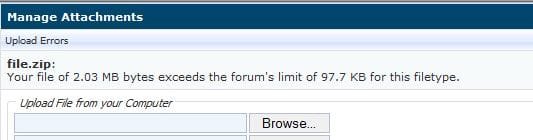
It is very easy; I just did it as a test. Here is the only problem with using it at these forums; the Zip is too big to upload to the post. Also; once it's open, it can be left on the desktop for future use.

Zip.JPG


Later :shock: Ted
 

My Computer

Computer Manufacturer/Model Number
* BFK Customs *
OS
W 7 64-bit Ultimate
CPU
Intel Q9550 Yorkfield
Motherboard
ASUS P5Q Pro
Memory
8GB Dominator 8500C5D
Graphics Card(s)
ATI : XFX 5870
Sound Card
Realtek HD Audio 7-1
Monitor(s) Displays
1x 47" LCD HDMI & 3x 26" LCD HDMI
Screen Resolution
1920x1080P & 1920x1200
Hard Drives
1x 80GB Intel X25-M G2 SSD : 1x 500GB & 1x 640GB WD Caviar Black(s)
PSU
Corsair 620HX
Case
Cooler Master RC-690
Cooling
Tuniq Tower 120, 2x 140mm and 3x 120mm case fans
Keyboard
Microsoft 500
Mouse
Razer Diamondback 3G
Internet Speed
14 Mb/s
Other Info
1x Koutech 3Gb/s SATA HDD Hot Swap Rack
Great tool..Its a well developed tool indeed..Thanks Norm
this will help a lot of fokes for sure good find..
 

My Computer

Computer Manufacturer/Model Number
custom
OS
windows 7 6.1 build 7068x64
CPU
1333 Qcore 2.5
Motherboard
MSI neo3 p43 icH10
Memory
8gb ddr2 dual channal 800
Graphics Card(s)
ati hd 4870 512 sapphire
Sound Card
onboard hd realtech
Monitor(s) Displays
acerx193w
Screen Resolution
1440x900
Hard Drives
seagate baracuta 500 gb .11
samung 250gb sat.8
seagate baracuta 300gb.8
PSU
Antec 650 blue
Cooling
Stock fan
Internet Speed
15mb
Bare Foot Kid,

Can it be hosted outside somewhere? I have never hosted a document before.
 

My Computer

Computer Manufacturer/Model Number
Dell XPS 400 / HP ProBook 4510s
OS
Windows 7 Build 7277
CPU
Intel Pentium D @ 2.8/Intel Centrino @ 2.10GHz
Motherboard
Dell DXP051
Memory
2GB DDR2
Graphics Card(s)
GeForce 7300 LE / Intel Integrated Graphics 4 Series
Sound Card
Realtek AC'97
Monitor(s) Displays
17" CRT (for now) / 15.6" LCD / 65" DLP Mitsubishi
Screen Resolution
1280 x 768 / 1920 x 1080i
Hard Drives
250GB WD IDE
160GB WD SATA
320GB Samsung SATA
500GB WD Caviar Green SATA
250GB WD SATA in HP ProBook
Case
Dell XPS 400
Cooling
2 fans (1 case, 1 CPU)
Keyboard
Dell Slim Standard Keyboard / Full Keypad w/ number pad
Mouse
Dell 3-Button Mouse / Logitech Wireless Mouse
Internet Speed
29mbps Down; 3.0mbps Up
Bare Foot Kid,

Can it be hosted outside somewhere? I have never hosted a document before.

Hello JL.

Neither have I; besides how would that be explained to people seeking help....:huh:


Later :shock: Ted
 

My Computer

Computer Manufacturer/Model Number
* BFK Customs *
OS
W 7 64-bit Ultimate
CPU
Intel Q9550 Yorkfield
Motherboard
ASUS P5Q Pro
Memory
8GB Dominator 8500C5D
Graphics Card(s)
ATI : XFX 5870
Sound Card
Realtek HD Audio 7-1
Monitor(s) Displays
1x 47" LCD HDMI & 3x 26" LCD HDMI
Screen Resolution
1920x1080P & 1920x1200
Hard Drives
1x 80GB Intel X25-M G2 SSD : 1x 500GB & 1x 640GB WD Caviar Black(s)
PSU
Corsair 620HX
Case
Cooler Master RC-690
Cooling
Tuniq Tower 120, 2x 140mm and 3x 120mm case fans
Keyboard
Microsoft 500
Mouse
Razer Diamondback 3G
Internet Speed
14 Mb/s
Other Info
1x Koutech 3Gb/s SATA HDD Hot Swap Rack
Looks like a nice tool, but that still leaves the problem of explaining to the noobs on the other end of the phone how to start it, use it, and then zip and email the results...

At least Microsoft is moving in the right direction with this.

Well, its use is pretty simple since the UI resembles the one of the Sound Recorder. Zip and e-mail are taken care of by the tool itself. You can select "e-mail" option after the steps are recorded and then it would create an e-mail in the default e-mail client and attach zip file to it. So all that is left to user is enter the adress and send it.

However, one big problem is that this tool is not easily discoverable and you should really know about its existence to start using it. Hope they add it to the Start menu. I personally think it fits quite nicely into Start\Accessories\System Tools bundle of apps.
 

My Computer

OS
Windows 7
I love PSR, lol. I was just going to make a PSR fle actually for a short tutorial. Its awesome. I do agree with the above poster, it should be more readily accessible from the start menu.
 

My Computer

Computer Manufacturer/Model Number
Compaq CQ50-107NR
OS
Windows 7 Build 7077 x64
CPU
AMD Athlon Dual Core QL-60 - 1.9Ghz
Memory
2GB
Graphics Card(s)
NVIDIA GeForce 8200 M G
Screen Resolution
1280 x 800
Hard Drives
120GB, Not sure of RPM but prolly 5400 or lower.
This may be over a year later, but I think we should really try to get some of the people reporting problems to use this. It's a bit easier to decipher than "See web page in notepad without code" which translates as "How can I preview a web page via an HTML editor without opening a browser?"
 

My Computer

Computer Manufacturer/Model Number
Apple Macbook Pro (April 2009)
OS
W7 Ult. x64 | OS X
CPU
Intel Mobile Core 2 Duo 2.93Ghz [T9800 Penryn]
Motherboard
NVIDIA nForce 730i Rev. B1 [Mac-F2268EC8 (U2E1)]
Memory
4096MB Samsung DDR3 Dual Channel [PC3-8500F 1066Mhz]
Graphics Card(s)
NVIDIA GeForce 9600M GT 512MB [G96M Rev. C1]
Sound Card
SB X-Fi Surround 5.1 USB | Onboard Realtek (Disabled)
Monitor(s) Displays
Acer x223wbd 22" | Apple Anti-Glare 17" (Disabled)
Screen Resolution
{Current} 1440x900 {Acer} 1680x1050 {Apple} 1920x1200
Hard Drives
{Internal}
Seagate Momentus 320GB 2.5" 7200RPM [ST9320421AS]

{Externals}
LaCie 320GB USB 2.0 HDD [301284UR]
LaCie 750GB USB 2.0 FW400 eSATA HDD [301314U]
LaCie 1TB USB 2.0 HDD [301304UR]
PSU
Magsafe
Case
Aluminum/Unibody (MBP52)
Cooling
2 x 6000 RPM Fans
Keyboard
Logitech G-15v2 [PN 920-000379]
Mouse
Logitech G-9 [PN 910-000338]
Internet Speed
12Mbps/2.5Mbps w/ 24Mbps Speed Boost [Comcast]
Other Info
Logitech X-540 Speakers [PN 970223-0122]
Sennheiser PC-151 Headset
Back
Top