Solved windows 7 problem

mickwales60

New member
Local time
7:50 PM
Messages
3
I downloaded a game which I had problems opening.Eventually opened it and was prompted by which application I wanted to open it with.I clicked windows media centre for no apparent reason.Since then I am unable to get rid of it.It is stopping me playing games,opening my files.If I click on IE goes straight to WMC.Tried a few things but no joy. Any ideas guys?
Ty Mick.
 

My Computer

OS
windows 7 home premium 32 bit
I would just open Control Panel and un-install it.
 

My Computer

Computer type
Laptop
Computer Manufacturer/Model Number
HP Pavilion g7-1260us Notebook
OS
Desk Top with Win 7 Home Premium 64 bit and Lap Top with Windows 8.1 Pro 64 bit
Memory
8Gig
Screen Resolution
1600x900
Welcome to Windows Seven Forums.

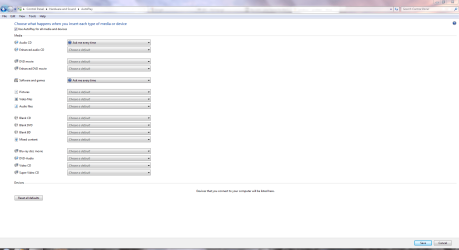
Have you checked your AutoPlay settings?

Click Start>Control Panel>Hardware & Sound>AutoPlay, from where you can configure AutoPlay settings.

Defaults.PNG
 

My Computer

Computer Manufacturer/Model Number
HP Pavilion Elite 495UK
OS
Windows 7 Ultimate SP1 64-Bit
CPU
Intel Core i7 870 @ 2.93GHz
Motherboard
MSI 2A9C (CPU1)
Memory
8Gb Dual-Channel DDR3 @ 664MHz
Graphics Card(s)
nVidia GeForce GTX 460 1024MB dedicated RAM
Sound Card
Realtek HD Audio
Monitor(s) Displays
HP2310i
Screen Resolution
1920 x 1080
Hard Drives
1x1954GB Hitachi HDS22020ALA 330 (RAID), 1x1954GB Hitachi External for backup and storage
PSU
460W
Case
HP Elite
Cooling
Air cooled
Keyboard
Logitech K750 solar-powered keyboard
Mouse
Logitech Wireless M180 mouse
Internet Speed
2Mb
Other Info
Pure Avanti Flow Internet Radio with iPod Dock, 64Gb iPod, HP USB Speakers, Sony MDR-V500 Headphones, Sony Vaio F-Series Laptop
I downloaded a game which I had problems opening.Eventually opened it and was prompted by which application I wanted to open it with.I clicked windows media centre for no apparent reason.Since then I am unable to get rid of it.It is stopping me playing games,opening my files.If I click on IE goes straight to WMC.Tried a few things but no joy. Any ideas guys?
Ty Mick.

Try this tutorial :
Default file type associations
http://www.sevenforums.com/tutorials/19449-default-file-type-associations-restore.html

Scroll down to and click exe - Executable application files
Follow the instructions listed at the top of the tutorial, from #1 to #7.

Scroll down to and click lnk - Shortcut link (LNK) files
Follow the instructions listed at the top of the tutorial, from #1 to #7.
 

My Computer

Computer Manufacturer/Model Number
Acer Aspire 7741Z
OS
Windows 7 Home Premium 64-bit, SP1
CPU
Intel Pentium P6200, Cores 2, 2.13 GHz
Memory
4 GB
Graphics Card(s)
Intel HD
Sound Card
unknown
Monitor(s) Displays
17.3 inches
Screen Resolution
1600 x 900
Hard Drives
640 GB, 5400 PRM
I've got the same exact problem, except this one was left by a virus
 

My Computer

Computer Manufacturer/Model Number
Myself
OS
Windows 7 Ultimate 32-Bit
CPU
Intel core i7 @ 2.23GHz Quad-core CPU
Motherboard
Asus II Rampage Extreme (Full-ATX)
Memory
3 x 2 GB DDR3 Kingston
Graphics Card(s)
2x Nvidia GeForce 260 GTX OC
Sound Card
5.1 Creative Labs PCI sound card
Monitor(s) Displays
1920x1080 Vizio 23" LED TV
Hard Drives
1.5 TB 7200 RPM SATA HDD 3Gb/s
2TB 5200 RPM SATA HDD 6Gb/s
PSU
750 watts
I've got the same exact problem, except this one was left by a virus

The symptom may be " exactly " the same. The cause is not. Therefore the resolution may not be the same.

If you are still facing that problem, please kindly start a new thread for yourself.
That way, replies directing to your problem will not confuse the OP ( original poster ) whose problem is entirely different than yours.
Thank you.
 

My Computer

Computer Manufacturer/Model Number
Acer Aspire 7741Z
OS
Windows 7 Home Premium 64-bit, SP1
CPU
Intel Pentium P6200, Cores 2, 2.13 GHz
Memory
4 GB
Graphics Card(s)
Intel HD
Sound Card
unknown
Monitor(s) Displays
17.3 inches
Screen Resolution
1600 x 900
Hard Drives
640 GB, 5400 PRM
I've got the same exact problem, except this one was left by a virus
Looks like this was left by a virus.How did you get rid of it?I click on my anti virus and WMC comes up.surprise surprise
 

My Computer

OS
windows 7 home premium 32 bit
Did you do what t-4-2 suggested?
 

My Computer

Computer Manufacturer/Model Number
HP, Dell, Gateway, Toshiba - 4 laptops and 2 desktops
OS
Vista, Windows7, Mint Mate, Zorin, Windows 8
CPU
from 1.6GHz Duo to i7
Monitor(s) Displays
2x HP w2207
Hard Drives
5x HDD, 7x SSD, 12x Externals
Keyboard
with trackball - no mices
Mouse
Trackball mice
Internet Speed
DSL 6000
To both of you new posters, download MalwareBytes and Super AntiSpyware, (See links in my sig) run updates on then and do FULL scans with each. If they won't run, boot into safemode by repeatedly tapping F8 during bootup, select Safe Mode With Networking.

Follow t-4-2's suggestion too.
 

My Computer

Computer type
PC/Desktop
Computer Manufacturer/Model Number
Home Built Desktop By DataTech
OS
Windows 7 Ultimate X64 SP1
CPU
Intel i5-2550K, Differing ~4.4-4.8GHz No built in GPU
Motherboard
ASUS P8Z68-V PRO/GEN3
Memory
16GB G.Skill Sniper 1866MHz @ 2133MHz 2x8GB
Graphics Card(s)
ASUS GTX650TIB-DC2OC-2GD5, (650TI Boost)
Sound Card
Onboard Realtek 5-1
Monitor(s) Displays
Samsung P2570HD
Screen Resolution
1920x1080
Hard Drives
Samsung 840 Pro 256GB SSD for OS, 500GB Seagate Constellation (Enterprise drive) for Data
PSU
Corsair HX650W
Case
Inwin Dragon Rider
Cooling
Hyper 212 EVO w/two Noctua fans, push-pull, @1300 RPM
Keyboard
E-Z Eyes, bright yellow keys with large characters
Mouse
steelseries SENSEI Laser Pro Gaming
Internet Speed
48-51Mbs Mbs down, 11 Mbs up Xfinity Cable
Antivirus
Norton Internet Security 2013
Browser
IE 10, Opera, Pale Moon if needed
Other Info
4 case fans, LG BluRay-RE, ASUS DVD-RW, Mr. Fusion power supply, 1.21 gigawatts.
thx for advice.did a system restore in safe mode.running ok now.ty again
 

My Computer

OS
windows 7 home premium 32 bit
That's good to hear. Thanks for letting us know.
 

My Computer

Computer Manufacturer/Model Number
HP Pavilion Elite 495UK
OS
Windows 7 Ultimate SP1 64-Bit
CPU
Intel Core i7 870 @ 2.93GHz
Motherboard
MSI 2A9C (CPU1)
Memory
8Gb Dual-Channel DDR3 @ 664MHz
Graphics Card(s)
nVidia GeForce GTX 460 1024MB dedicated RAM
Sound Card
Realtek HD Audio
Monitor(s) Displays
HP2310i
Screen Resolution
1920 x 1080
Hard Drives
1x1954GB Hitachi HDS22020ALA 330 (RAID), 1x1954GB Hitachi External for backup and storage
PSU
460W
Case
HP Elite
Cooling
Air cooled
Keyboard
Logitech K750 solar-powered keyboard
Mouse
Logitech Wireless M180 mouse
Internet Speed
2Mb
Other Info
Pure Avanti Flow Internet Radio with iPod Dock, 64Gb iPod, HP USB Speakers, Sony MDR-V500 Headphones, Sony Vaio F-Series Laptop
Back
Top