Windows 7 problems with ram

wally1324

New member
Power User
VIP
Local time
5:47 PM
Messages
116
When i right click on properties of my computer it says that i have 6.00Gb (2.93GB Usable)

Why don't i have more to use
 

My Computer

Computer type
PC/Desktop
Computer Manufacturer/Model Number
Custom Build
OS
Windows 7 Professional x64 Sp1
CPU
Intel Core i5 650 @ 3.2Ghz
Motherboard
Dell 33FF6 Motherboard
Memory
10GB
Graphics Card(s)
ASUS GTX 650Ti
Sound Card
Nvidia
Monitor(s) Displays
2 Monitors
Screen Resolution
1920 x 1080
Hard Drives
2 1TB 7200RPM
PSU
Thermaltake 600w
Keyboard
Logitech G110
Internet Speed
75Mbs
When i right click on properties of my computer it says that i have 6.00Gb (2.93GB Usable)

Why don't i have more to use

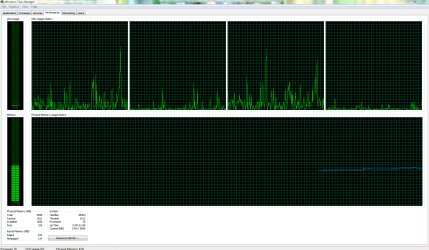
Win 7 uses about half for fast app launching (a very good thing) plus your video card plus other things. It will release as nec. and is perfectly normal. If you wish to continue please upload a screenshot of your task manager performance tab


Ken J
 

My Computer

Computer Manufacturer/Model Number
HP Pavillion dv-7 1005 Tx
OS
Win 8 Release candidate 8400
CPU
[email protected]
Memory
4 gigs
Graphics Card(s)
Nvidia 9600M
Sound Card
HD built-in
Monitor(s) Displays
17" Wxga
Screen Resolution
1440x900
Cooling
none
Internet Speed
45Mb down 5Mb up
Here is the screen shot

heres the screen shot
 

Attachments

  • CPU.PNG
    CPU.PNG
    38 KB · Views: 26

My Computer

Computer type
PC/Desktop
Computer Manufacturer/Model Number
Custom Build
OS
Windows 7 Professional x64 Sp1
CPU
Intel Core i5 650 @ 3.2Ghz
Motherboard
Dell 33FF6 Motherboard
Memory
10GB
Graphics Card(s)
ASUS GTX 650Ti
Sound Card
Nvidia
Monitor(s) Displays
2 Monitors
Screen Resolution
1920 x 1080
Hard Drives
2 1TB 7200RPM
PSU
Thermaltake 600w
Keyboard
Logitech G110
Internet Speed
75Mbs
When i right click on properties of my computer it says that i have 6.00Gb (2.93GB Usable)

Why don't i have more to use

Win 7 uses about half for fast app launching (a very good thing) plus your video card plus other things. It will release as nec. and is perfectly normal. If you wish to continue please upload a screenshot of your task manager performance tab


Ken J

theres the screen shot
 

My Computer

Computer type
PC/Desktop
Computer Manufacturer/Model Number
Custom Build
OS
Windows 7 Professional x64 Sp1
CPU
Intel Core i5 650 @ 3.2Ghz
Motherboard
Dell 33FF6 Motherboard
Memory
10GB
Graphics Card(s)
ASUS GTX 650Ti
Sound Card
Nvidia
Monitor(s) Displays
2 Monitors
Screen Resolution
1920 x 1080
Hard Drives
2 1TB 7200RPM
PSU
Thermaltake 600w
Keyboard
Logitech G110
Internet Speed
75Mbs
I think the problem is starting-up settings. Open the msconfig and in advanced starting-up setting change the size of RAM to default. You probably have 3GB limit in this option. Check it out.
 

My Computer

OS
Windows 7 Professional x64
CPU
E8400 @ 3000MHz
Motherboard
Asus P5QL-Pro
Memory
4 x DD2 A-Data Vitesta Extreme 1GB 1066MHz
Graphics Card(s)
Sparkle GTX 260-216core 896MB DDR3
Sound Card
Audigy 2 ZS
Monitor(s) Displays
Samsung SyncMaster 2243
Screen Resolution
1920x1080
Hard Drives
Samsung F2 1,5TB
Seagate 7200.12 500GB
PSU
Chieftec 450W
Case
NoName
Cooling
SilentiumPC Spartan
Mouse
Intellimouse 3.0

My Computer

Computer type
Laptop
Computer Manufacturer/Model Number
Sony Vaio VPCEB47GM Laptop
OS
Win 7 Pro 64-bit
CPU
Intel i5 2.4 Ghz
Memory
8GB DDR3
Graphics Card(s)
Intel HD 3000
Sound Card
IDT High Definition
Monitor(s) Displays
15.6 WGXA Anti-Glare LED
Screen Resolution
1280x800
Hard Drives
640Gb 7200rpm
Antivirus
MSE
Browser
Opera (primary) with IE9 backup
The problem is that your Physical Memory size is not showing all 6GB of your RAM. Fill in the rest of your system specs so we know what hardware you're running. :)
 

My Computer

Computer Manufacturer/Model Number
Self
OS
Main - Windows 7 Pro SP1 64-Bit; 2nd - Windows Server 2008 R2
CPU
Main - Core i7 2600K; 2nd - Core i7 920
Motherboard
Main - Asus P8Z68-V Pro/Gen3; 2nd - Gigabyte GA-EX58-UDR3
Memory
Main - 16GB Corsair Vengeance; 2nd - 12GB Corsair Vengeance
Graphics Card(s)
Main - XFX Radeon 6870 1GB; 2nd - XFX Radeon 4870 1GB
Sound Card
Both: Onboard Realtek Azalia
Monitor(s) Displays
Main - Hann 25" + I-INC 25" + Acer 23"; 2nd - Upgrading Soon
Screen Resolution
Main - 1920x1080 (All Three Monitors); 2nd - Upgrading Soon
Hard Drives
Main - (1) Crucial M4 128GB (Boot)
Main - (1) Seagate 2TB 64MB Cache (Data)
Main - (1) Seagate 2TB 64MB Cache (Data Backup)
2nd - (1) Intel X25-M SSD 80GB (Boot)
2nd - (3) Seagate 1TB 32MB Cache (Data Backup)
2nd - (1) Seagate 320GB (Because)
PSU
Main - OCZ 600W Modular; 2nd - OCZ 600W
Case
Main - Thermaltake Element G; 2nd - NZXT something or other
Cooling
Main - Corsair H80; 2nd - Prolimatech Megahalems
Keyboard
Main - Razer Reclusa; 2nd - Old MS Keyboard
Mouse
Main - Logitech MX Revolution; 2nd - Old MS Mouse
Internet Speed
20Mbps Time-Warner Cable
The problem is that your Physical Memory size is not showing all 6GB of your RAM. Fill in the rest of your system specs so we know what hardware you're running. :)

I have

Windows 7 Pro x64.
Intel I5 Processor 3.2 GH
GB of ram
1 TB hd
1tb external drive
intel HD graphics card
 

My Computer

Computer type
PC/Desktop
Computer Manufacturer/Model Number
Custom Build
OS
Windows 7 Professional x64 Sp1
CPU
Intel Core i5 650 @ 3.2Ghz
Motherboard
Dell 33FF6 Motherboard
Memory
10GB
Graphics Card(s)
ASUS GTX 650Ti
Sound Card
Nvidia
Monitor(s) Displays
2 Monitors
Screen Resolution
1920 x 1080
Hard Drives
2 1TB 7200RPM
PSU
Thermaltake 600w
Keyboard
Logitech G110
Internet Speed
75Mbs
What Brand and Model is the motherboard? ;)
 

My Computer

Computer Manufacturer/Model Number
Self
OS
Main - Windows 7 Pro SP1 64-Bit; 2nd - Windows Server 2008 R2
CPU
Main - Core i7 2600K; 2nd - Core i7 920
Motherboard
Main - Asus P8Z68-V Pro/Gen3; 2nd - Gigabyte GA-EX58-UDR3
Memory
Main - 16GB Corsair Vengeance; 2nd - 12GB Corsair Vengeance
Graphics Card(s)
Main - XFX Radeon 6870 1GB; 2nd - XFX Radeon 4870 1GB
Sound Card
Both: Onboard Realtek Azalia
Monitor(s) Displays
Main - Hann 25" + I-INC 25" + Acer 23"; 2nd - Upgrading Soon
Screen Resolution
Main - 1920x1080 (All Three Monitors); 2nd - Upgrading Soon
Hard Drives
Main - (1) Crucial M4 128GB (Boot)
Main - (1) Seagate 2TB 64MB Cache (Data)
Main - (1) Seagate 2TB 64MB Cache (Data Backup)
2nd - (1) Intel X25-M SSD 80GB (Boot)
2nd - (3) Seagate 1TB 32MB Cache (Data Backup)
2nd - (1) Seagate 320GB (Because)
PSU
Main - OCZ 600W Modular; 2nd - OCZ 600W
Case
Main - Thermaltake Element G; 2nd - NZXT something or other
Cooling
Main - Corsair H80; 2nd - Prolimatech Megahalems
Keyboard
Main - Razer Reclusa; 2nd - Old MS Keyboard
Mouse
Main - Logitech MX Revolution; 2nd - Old MS Mouse
Internet Speed
20Mbps Time-Warner Cable

My Computer

Computer type
PC/Desktop
Computer Manufacturer/Model Number
Custom Build
OS
Windows 7 Professional x64 Sp1
CPU
Intel Core i5 650 @ 3.2Ghz
Motherboard
Dell 33FF6 Motherboard
Memory
10GB
Graphics Card(s)
ASUS GTX 650Ti
Sound Card
Nvidia
Monitor(s) Displays
2 Monitors
Screen Resolution
1920 x 1080
Hard Drives
2 1TB 7200RPM
PSU
Thermaltake 600w
Keyboard
Logitech G110
Internet Speed
75Mbs
I'm going to make a wild guess here and say that you probably didn't build this yourself. :geek:

Is it a laptop or desktop? Who made it? What is the model number?

Look all over the case for a sticker or a logo and tell us what it says. The reason why knowing will help us is that once we know what motherboard the RAM is running in it will be easier to find potential problems with your settings so we can help you fix it. The fact that Windows is only seeing 3GB of your 6GB of RAM likely means that something is not in the right place.

One final question: Did you add RAM since you bought it and if so, how much was in there before? :)
 

My Computer

Computer Manufacturer/Model Number
Self
OS
Main - Windows 7 Pro SP1 64-Bit; 2nd - Windows Server 2008 R2
CPU
Main - Core i7 2600K; 2nd - Core i7 920
Motherboard
Main - Asus P8Z68-V Pro/Gen3; 2nd - Gigabyte GA-EX58-UDR3
Memory
Main - 16GB Corsair Vengeance; 2nd - 12GB Corsair Vengeance
Graphics Card(s)
Main - XFX Radeon 6870 1GB; 2nd - XFX Radeon 4870 1GB
Sound Card
Both: Onboard Realtek Azalia
Monitor(s) Displays
Main - Hann 25" + I-INC 25" + Acer 23"; 2nd - Upgrading Soon
Screen Resolution
Main - 1920x1080 (All Three Monitors); 2nd - Upgrading Soon
Hard Drives
Main - (1) Crucial M4 128GB (Boot)
Main - (1) Seagate 2TB 64MB Cache (Data)
Main - (1) Seagate 2TB 64MB Cache (Data Backup)
2nd - (1) Intel X25-M SSD 80GB (Boot)
2nd - (3) Seagate 1TB 32MB Cache (Data Backup)
2nd - (1) Seagate 320GB (Because)
PSU
Main - OCZ 600W Modular; 2nd - OCZ 600W
Case
Main - Thermaltake Element G; 2nd - NZXT something or other
Cooling
Main - Corsair H80; 2nd - Prolimatech Megahalems
Keyboard
Main - Razer Reclusa; 2nd - Old MS Keyboard
Mouse
Main - Logitech MX Revolution; 2nd - Old MS Mouse
Internet Speed
20Mbps Time-Warner Cable
I'm going to make a wild guess here and say that you probably didn't build this yourself. :geek:

Is it a laptop or desktop? Who made it? What is the model number?

Look all over the case for a sticker or a logo and tell us what it says. The reason why knowing will help us is that once we know what motherboard the RAM is running in it will be easier to find potential problems with your settings so we can help you fix it. The fact that Windows is only seeing 3GB of your 6GB of RAM likely means that something is not in the right place.

One final question: Did you add RAM since you bought it and if so, how much was in there before? :)

Its the dell inspiron 580s and i didn't add any ram after i bought it it came with the 6gb.
 

My Computer

Computer type
PC/Desktop
Computer Manufacturer/Model Number
Custom Build
OS
Windows 7 Professional x64 Sp1
CPU
Intel Core i5 650 @ 3.2Ghz
Motherboard
Dell 33FF6 Motherboard
Memory
10GB
Graphics Card(s)
ASUS GTX 650Ti
Sound Card
Nvidia
Monitor(s) Displays
2 Monitors
Screen Resolution
1920 x 1080
Hard Drives
2 1TB 7200RPM
PSU
Thermaltake 600w
Keyboard
Logitech G110
Internet Speed
75Mbs
The website for your machine is a little confusing. In the "Tech Specs" section it lists this:

Video Card


  • 1024 (MB) ATI HD5450 RadeonTM
  • Integrated Intel® Graphics Media Accelerator

http://www.dell.com/us/p/inspiron-5...ank=0&~ck=baynoteSearch&redirect=1&redirect=2

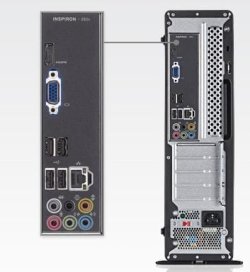
But the picture only shows a connector for the onboard video. (Attached)


The reason I'm asking is that the onboard video will be sharing some system RAM (though certainly not 3GB worth) and could be disabled if you're not using it. How many places on the back are there to plug a monitor into? If there is more than one, which one are you using? Is the monitor plugged in at the area shown in the picture I've attached highlighted in blue?
 

Attachments

  • 580s.JPG
    580s.JPG
    24 KB · Views: 3

My Computer

Computer Manufacturer/Model Number
Self
OS
Main - Windows 7 Pro SP1 64-Bit; 2nd - Windows Server 2008 R2
CPU
Main - Core i7 2600K; 2nd - Core i7 920
Motherboard
Main - Asus P8Z68-V Pro/Gen3; 2nd - Gigabyte GA-EX58-UDR3
Memory
Main - 16GB Corsair Vengeance; 2nd - 12GB Corsair Vengeance
Graphics Card(s)
Main - XFX Radeon 6870 1GB; 2nd - XFX Radeon 4870 1GB
Sound Card
Both: Onboard Realtek Azalia
Monitor(s) Displays
Main - Hann 25" + I-INC 25" + Acer 23"; 2nd - Upgrading Soon
Screen Resolution
Main - 1920x1080 (All Three Monitors); 2nd - Upgrading Soon
Hard Drives
Main - (1) Crucial M4 128GB (Boot)
Main - (1) Seagate 2TB 64MB Cache (Data)
Main - (1) Seagate 2TB 64MB Cache (Data Backup)
2nd - (1) Intel X25-M SSD 80GB (Boot)
2nd - (3) Seagate 1TB 32MB Cache (Data Backup)
2nd - (1) Seagate 320GB (Because)
PSU
Main - OCZ 600W Modular; 2nd - OCZ 600W
Case
Main - Thermaltake Element G; 2nd - NZXT something or other
Cooling
Main - Corsair H80; 2nd - Prolimatech Megahalems
Keyboard
Main - Razer Reclusa; 2nd - Old MS Keyboard
Mouse
Main - Logitech MX Revolution; 2nd - Old MS Mouse
Internet Speed
20Mbps Time-Warner Cable
The website for your machine is a little confusing. In the "Tech Specs" section it lists this:

Video Card


  • 1024 (MB) ATI HD5450 RadeonTM
  • Integrated Intel® Graphics Media Accelerator

Inspiron 580s Desktop Details | Dell

But the picture only shows a connector for the onboard video. (Attached)


The reason I'm asking is that the onboard video will be sharing some system RAM (though certainly not 3GB worth) and could be disabled if you're not using it. How many places on the back are there to plug a monitor into? If there is more than one, which one are you using? Is the monitor plugged in at the area shown in the picture I've attached highlighted in blue?

I have 2 monitors so I use both of the plugs
The VGA and HDMI
 

My Computer

Computer type
PC/Desktop
Computer Manufacturer/Model Number
Custom Build
OS
Windows 7 Professional x64 Sp1
CPU
Intel Core i5 650 @ 3.2Ghz
Motherboard
Dell 33FF6 Motherboard
Memory
10GB
Graphics Card(s)
ASUS GTX 650Ti
Sound Card
Nvidia
Monitor(s) Displays
2 Monitors
Screen Resolution
1920 x 1080
Hard Drives
2 1TB 7200RPM
PSU
Thermaltake 600w
Keyboard
Logitech G110
Internet Speed
75Mbs
Are both of the graphics chips built into the motherboard, or is there a separate card for the Ati 5450? Have you looked in the BIOS to see how much system RAM is being shared for the video device(s)?

What does Device Manager say under the Display Adapters category? try and provide as much detail as possible. :)
 

My Computer

Computer Manufacturer/Model Number
Self
OS
Main - Windows 7 Pro SP1 64-Bit; 2nd - Windows Server 2008 R2
CPU
Main - Core i7 2600K; 2nd - Core i7 920
Motherboard
Main - Asus P8Z68-V Pro/Gen3; 2nd - Gigabyte GA-EX58-UDR3
Memory
Main - 16GB Corsair Vengeance; 2nd - 12GB Corsair Vengeance
Graphics Card(s)
Main - XFX Radeon 6870 1GB; 2nd - XFX Radeon 4870 1GB
Sound Card
Both: Onboard Realtek Azalia
Monitor(s) Displays
Main - Hann 25" + I-INC 25" + Acer 23"; 2nd - Upgrading Soon
Screen Resolution
Main - 1920x1080 (All Three Monitors); 2nd - Upgrading Soon
Hard Drives
Main - (1) Crucial M4 128GB (Boot)
Main - (1) Seagate 2TB 64MB Cache (Data)
Main - (1) Seagate 2TB 64MB Cache (Data Backup)
2nd - (1) Intel X25-M SSD 80GB (Boot)
2nd - (3) Seagate 1TB 32MB Cache (Data Backup)
2nd - (1) Seagate 320GB (Because)
PSU
Main - OCZ 600W Modular; 2nd - OCZ 600W
Case
Main - Thermaltake Element G; 2nd - NZXT something or other
Cooling
Main - Corsair H80; 2nd - Prolimatech Megahalems
Keyboard
Main - Razer Reclusa; 2nd - Old MS Keyboard
Mouse
Main - Logitech MX Revolution; 2nd - Old MS Mouse
Internet Speed
20Mbps Time-Warner Cable
I talked with dell and there are no psu's that will work with it except the one that came with it
 

My Computer

Computer type
PC/Desktop
Computer Manufacturer/Model Number
Custom Build
OS
Windows 7 Professional x64 Sp1
CPU
Intel Core i5 650 @ 3.2Ghz
Motherboard
Dell 33FF6 Motherboard
Memory
10GB
Graphics Card(s)
ASUS GTX 650Ti
Sound Card
Nvidia
Monitor(s) Displays
2 Monitors
Screen Resolution
1920 x 1080
Hard Drives
2 1TB 7200RPM
PSU
Thermaltake 600w
Keyboard
Logitech G110
Internet Speed
75Mbs
Back
Top