Solved Windows 7 product ID fail

ys45387

New member
Local time
4:21 AM
Messages
15
This is my first post. If I am posting incorrectly kindly
provide correct steps and accept my apologies.

I have two desk top pc's both hand-me-downs.
I have back up on both.

pc A:

dual core Vista upgraded to windows 7 several years ago

pc B:

quad core HP with windows 7
I do not see any sticker with product ID on this one


I have purchased one Window 7 Professional service pack 1 64-bit
and one Windows 7 professional Upgrade Key.

I attempted to follow tutorial to switch the HDD's and contacted
Microsoft via phone without success.

Product ID validation fails and I have one day left.

Any help is most appreciated.
 

My Computer

Computer type
PC/Desktop
OS
Windows 7 Professional 32-bit
CPU
Intel Pentium D 915 Presler 65nm Technology
Motherboard
Intel Corporation D945GCL (LGA 775)
Memory
2.00GB Dual-Channel DDR2 @ 333MHz (5-5-5-14)
Graphics Card(s)
G205H (1600x900@60Hz) Intel 82945G Express Chipset Family
Hard Drives
232GB Seagate ST3250318AS (SATA) (two)
Antivirus
Avira
Browser
Firefox
What "tutorial to switch the HD's" did you follow and what exactly are you trying to do?

If you already had Windows 7 on these PC's, why did you buy new copies? You can Clean Reinstall Windows 7
64-bit using the same key used to activate 32-bit as these are interchangeable.

If you're only wanting to upgrade Home Premium to Professional without reinstalling then you can insert the key into Windows Anytime Upgrade - How to - Windows 7 Forums

You can always Clean Reinstall Windows 7 using the same Product Key, even if you move it to different hardware if it is a retail copy. If it is Factory or Builder's OEM then it can be reinstalled as often as you want on the same PC.

Based on this information, now please tell us exactly what it is you are trying to do because it is not at all clear and leaving me to guess.
 
I have lost my link to the tutorial, but it was on this site & I think you were the author gregrocker.
Sorry to be unclear.
After I backed up both PC's
I removed the HDD's and put the drives from A into B and B into A.
I have:
booted from repair disk
reflect emergency disk
installed windows 7
but when I activate I get message that the product ID is not valid
I bought new copies because the microsoft tech told me I needed to purchase as the OEM versions on each PC
were not valid once the drives were exchanged.
Thank you & I hope this is more clear.
 

My Computer

Computer type
PC/Desktop
OS
Windows 7 Professional 32-bit
CPU
Intel Pentium D 915 Presler 65nm Technology
Motherboard
Intel Corporation D945GCL (LGA 775)
Memory
2.00GB Dual-Channel DDR2 @ 333MHz (5-5-5-14)
Graphics Card(s)
G205H (1600x900@60Hz) Intel 82945G Express Chipset Family
Hard Drives
232GB Seagate ST3250318AS (SATA) (two)
Antivirus
Avira
Browser
Firefox
If you have OEM versions on each PC, then did you reactivate the moved image with that PC's Product Key on the System page Activation link?

Try that first, as you should never need to buy a new license when you already own one for that PC, just reactivate with the key that had been used on that same PC. You can then use Anytime Upgrade to go to Professional.

If you moved Professional to a PC that only had a license tied to it for Home Premium, then you can do this Change between Win7 versions workaround to change it back to Home Premium, Activate with the license tied to that PC, then insert the Pro key as an Anytime Upgrade.
 
The OEM version on PC A was for Vista & had been upgraded to Windows 7 & the activation window will not accept the Vista OEM product key.
 

My Computer

Computer type
PC/Desktop
OS
Windows 7 Professional 32-bit
CPU
Intel Pentium D 915 Presler 65nm Technology
Motherboard
Intel Corporation D945GCL (LGA 775)
Memory
2.00GB Dual-Channel DDR2 @ 333MHz (5-5-5-14)
Graphics Card(s)
G205H (1600x900@60Hz) Intel 82945G Express Chipset Family
Hard Drives
232GB Seagate ST3250318AS (SATA) (two)
Antivirus
Avira
Browser
Firefox
If you installed Win7 then you should not expect it to accept a Vista key. How was the Win7 install to that PC originally activated? Use that Product Key to activate it.


Are you wanting to change the hard drives for the same version of Win7 between two PC's and used the tutorial to Adjust Win7 to boot on new hardware with Paragon Adaptive Restore CD? Did you attempt to reactivate each with the Product Key that was originally used for that OS and not that PC, if these are retail keys? If one is an OEM key then it needs to have the key changed to the one which is tied to the existing mobo.
 
I did not expect the windows 7 install to accept a Vista key, but it will not accept the windows 7 key that was active and functioning prior to the disk exchange.

Both PC's are windows 7 professional
on pc A Vista OEM was original OS & was upgraded to windows 7 professional (32-bit)
(a Gateway)
on pc B windows 7 OEM was original OS I brought windows 7 professional (64-bit) because Microsoft Tec indicated I had to purchase & that the OEM software was not valid once I moved the HDD.
(a HP there is no sticker on the HP case)

I want to use the HP (quad core) for better response. I do a lot of family history with pictures etc. & use many software packages which seem to "bog down" with the Gateway (dual core).

I am sorry you are having to guess what I am trying to do.
My goal is to simply use the drive from Gateway PC in HP PC.

I hope this is more clear.
 

My Computer

Computer type
PC/Desktop
OS
Windows 7 Professional 32-bit
CPU
Intel Pentium D 915 Presler 65nm Technology
Motherboard
Intel Corporation D945GCL (LGA 775)
Memory
2.00GB Dual-Channel DDR2 @ 333MHz (5-5-5-14)
Graphics Card(s)
G205H (1600x900@60Hz) Intel 82945G Express Chipset Family
Hard Drives
232GB Seagate ST3250318AS (SATA) (two)
Antivirus
Avira
Browser
Firefox
It is not possible that HP would ship preinstalled WIn7 on a PC without affixing a COA sticker, so check again. It is illegal for them to do so. Is it possible you acquired the OS some other way?

If not where did you get the Product Key you were using to activate the HP install? What happened when you tried to reinsert it before MS told you to buy another key?

If you have slow performance then we can help you troubleshoot that. The HP Factory install is the worst possible install of Win7 one can have, larded with bloatware including a dozen factory utilties that duplicate and interfere with better versions built into Win7. Having these freeloaders all start on the back of Win7 cripples it so badly it isn't even Win7, so you may have never even experienced Win7 on that PC.

You can greatly regain the OS's native performance working gradually through the steps in Clean Up Factory Bloatware, but most tech enthusiasts prefer to do a Clean Reinstall Windows 7.

The installer is provided in Step 1. Over a million users have done this without a single complaint, nor has anyone returned with problems who stuck with the tools and methods recommended, which are based on tens of thousands of installs we've directly helped with here since beta.
 
I will try the Clean Reinstall Windows 7 & let you know how it goes.

Am I correct that this method saves my installed programs to windows.old?
 

My Computer

Computer type
PC/Desktop
OS
Windows 7 Professional 32-bit
CPU
Intel Pentium D 915 Presler 65nm Technology
Motherboard
Intel Corporation D945GCL (LGA 775)
Memory
2.00GB Dual-Channel DDR2 @ 333MHz (5-5-5-14)
Graphics Card(s)
G205H (1600x900@60Hz) Intel 82945G Express Chipset Family
Hard Drives
232GB Seagate ST3250318AS (SATA) (two)
Antivirus
Avira
Browser
Firefox
I would not depend upon Windows.old as a backup method. You should have any files you don't want to lose backed up externally or to free Cloud storage as in Sync, Backup and Store your Files to the Cloud with OneDrive.

Plus if you are going to do a Clean Reinstall Windows 7 I would delete all partitions except where the conditions apply in Special Note to HP Owners at the end of tutorial. If you have the OEM partitions then it definitely is/was a factory install and must have the COA sticker. Some of those partitions may be worth keeping. You might also get by with doing the Minimal Factory Recovery which is discussed as close to a Clean Reinstall without the bloatware.
 
Thank you
I have a back up on external HD.
 

My Computer

Computer type
PC/Desktop
OS
Windows 7 Professional 32-bit
CPU
Intel Pentium D 915 Presler 65nm Technology
Motherboard
Intel Corporation D945GCL (LGA 775)
Memory
2.00GB Dual-Channel DDR2 @ 333MHz (5-5-5-14)
Graphics Card(s)
G205H (1600x900@60Hz) Intel 82945G Express Chipset Family
Hard Drives
232GB Seagate ST3250318AS (SATA) (two)
Antivirus
Avira
Browser
Firefox
Then to me the presence of a windows.old folder means a less clean install was achieved. The cleanest install deletes all partitions to create and format New.
 
I have had no success.
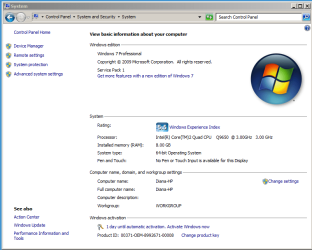
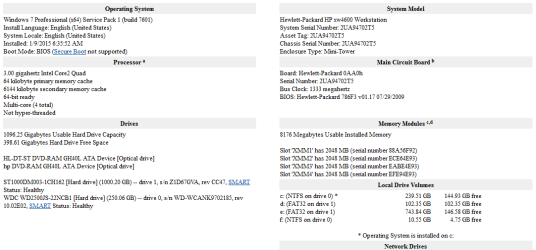
I can not find the sticker on the HP.
I have attached some pictures in an effort to be more clear.
 

Attachments

  • Capture 1.PNG
    Capture 1.PNG
    26.5 KB · Views: 2
  • Capture.PNG
    Capture.PNG
    23.4 KB · Views: 2
  • IMAG0738.jpg
    IMAG0738.jpg
    514.4 KB · Views: 1
  • IMAG0739.jpg
    IMAG0739.jpg
    337.1 KB · Views: 1
  • IMAG0741.jpg
    IMAG0741.jpg
    251.8 KB · Views: 1
  • IMAG0742.jpg
    IMAG0742.jpg
    340 KB · Views: 1

My Computer

Computer type
PC/Desktop
OS
Windows 7 Professional 32-bit
CPU
Intel Pentium D 915 Presler 65nm Technology
Motherboard
Intel Corporation D945GCL (LGA 775)
Memory
2.00GB Dual-Channel DDR2 @ 333MHz (5-5-5-14)
Graphics Card(s)
G205H (1600x900@60Hz) Intel 82945G Express Chipset Family
Hard Drives
232GB Seagate ST3250318AS (SATA) (two)
Antivirus
Avira
Browser
Firefox
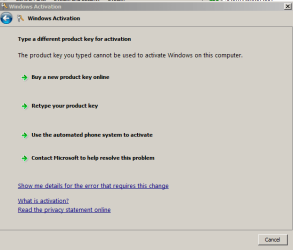
Activate at the bottom of the System page you posted. Try Activate Now to see if it will accept the present key via Internet or Phone Activation. If not click Change Key to try inserting the Professional Product key you wrote about in first post which is not Anytime Upgrade.
 
results:
 

Attachments

  • can not activate.PNG
    can not activate.PNG
    9.5 KB · Views: 16

My Computer

Computer type
PC/Desktop
OS
Windows 7 Professional 32-bit
CPU
Intel Pentium D 915 Presler 65nm Technology
Motherboard
Intel Corporation D945GCL (LGA 775)
Memory
2.00GB Dual-Channel DDR2 @ 333MHz (5-5-5-14)
Graphics Card(s)
G205H (1600x900@60Hz) Intel 82945G Express Chipset Family
Hard Drives
232GB Seagate ST3250318AS (SATA) (two)
Antivirus
Avira
Browser
Firefox
Exactly which License had been used on this installation in its prior PC?

Confirm the hard drive with OS was moved here.

If it's retail Win7 Pro but not Anytime Upgrade then it should Activate. Try phone activation.

If it Anytime then you'll need to change it to Home Premium using workaround we use then activate with a Home Premium retail license before running Anytime Upgrade.
 
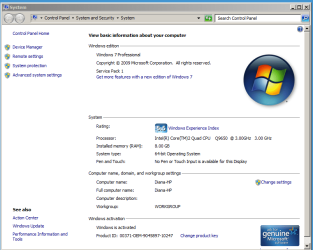
Successful with phone choice!
Thank you
 

Attachments

  • success.PNG
    success.PNG
    29.3 KB · Views: 1

My Computer

Computer type
PC/Desktop
OS
Windows 7 Professional 32-bit
CPU
Intel Pentium D 915 Presler 65nm Technology
Motherboard
Intel Corporation D945GCL (LGA 775)
Memory
2.00GB Dual-Channel DDR2 @ 333MHz (5-5-5-14)
Graphics Card(s)
G205H (1600x900@60Hz) Intel 82945G Express Chipset Family
Hard Drives
232GB Seagate ST3250318AS (SATA) (two)
Antivirus
Avira
Browser
Firefox
But you'll want to know which license is used so you know the other one is free to use again.

The presence of OEM in the Product ID string means the key used was the one from
Factory pre-install, COA sticker on factory preinstalled Win7, or retail Builders OEM. None if those should have activated on a different mobo. So something is strange.

Please run the Genuine Diagnostics tool (MGADiag.exe) at this link http://go.microsoft.com/fwlink/?linkid=52012. Click "Continue", click the "Copy" button then “Paste” the report into a reply message in this thread.
 
I will audit with Belarc and keep a record so I know which ID belongs here.

Thank you again for your patience.

I am grateful.
 

My Computer

Computer type
PC/Desktop
OS
Windows 7 Professional 32-bit
CPU
Intel Pentium D 915 Presler 65nm Technology
Motherboard
Intel Corporation D945GCL (LGA 775)
Memory
2.00GB Dual-Channel DDR2 @ 333MHz (5-5-5-14)
Graphics Card(s)
G205H (1600x900@60Hz) Intel 82945G Express Chipset Family
Hard Drives
232GB Seagate ST3250318AS (SATA) (two)
Antivirus
Avira
Browser
Firefox
Actually there's a chance that the OEM in Product ID string means it is still the key used to mass activate at Factory which would not be reusable. So run the mgadiag tool I linked instead so we can see what's happened.

It would help if you could remember what key was used to activate this particular install on its original hardware. Please help us help you.
 
Back
Top