Windows 7 professional system image backup to USB thumb drive?

Quadzilla

New member
Local time
2:47 PM
Messages
27
Hello everyone, I'm hoping someone can help me with problems I'm having with my Windows 7 Professional installation. It crashed the other day and luckily I was able to use the install disc to fix the problem, I have questions on that I'll put in another post. For now I'm hoping you can all tell me if it's possible to use a USB flash drive to write a Windows 7 professional system image backup on to? I did a couple of Google searches and from what I've read its possible as long as the USB flash drive is formatted as NTFS. Does that sound right to you all? Until recently, I had been doing my backups to a USB external hard drive but just noticed , when I tried to use the drive for a backup, the system said the drive cannot be used as it's not recognized. The same drive is listed in Windows Explorer and seems to be working fine though. Anyway, when I was in the "set up backup" window which had all my drives listed in the window labeled "save backup on:" there was a message on the bottom of the page saying "this drive does not have enough space to store a system image" and when I click "more information " another window popped up saying I need 224.61 GB free space to store a system image.
Can this be a USB flash drive as long as it has enough capacity? And be formatted to NTFS? Any suggestions on Brands to use or to avoid? Amazon has plenty of 1 TB USB flash drives for around $30 but I'm not sure if I would trust them, brands I've never heard of. I was considering the SanDisk 512GB Ultra Flair USB 3.0 Flash Drive - SDCZ73-512G-G46 which goes for around $48. Anyway, thanks in advance for any info you all can provide!.
Dan G.
 

My Computer My Computer

At a glance

Windows 7 Proffessional 64-biti 712 GB tape
Computer type
PC/Desktop
Computer Manufacturer/Model Number
Dell XPS
OS
Windows 7 Proffessional 64-bit
CPU
i 7
Memory
12 GB tape
Hi Quadzilla

Yes, you can use a USB flash drive, however it is not as reliable as an external hard drive. You didn't say what make your external hard drive is and what backup program you are using.

I would try to gain access to the external hard drive again and use either AOMEI Backupper Standard or what I see as a more daunting GUI, Macrium Reflect Free, both are recommended by SevenForums. I personally use AOMEI. Microsoft's built in backup program is inherently unreliable as is system restore.

How much data are you wishing to backup?
 

My Computer My Computer

At a glance

Win 10 x64, Linux Lite, Win 7 x64, BlackArch,...
Computer type
PC/Desktop
Computer Manufacturer/Model Number
HP Desktop & Compaq Laptop
OS
Win 10 x64, Linux Lite, Win 7 x64, BlackArch, & Kali
Hard Drives
Samsung 850 Pro 256Gb,
Hitachi HDD 1Tb,
Crucial MX SSD 250Gb
Segate 3Tb USB 3.0 Ext. Backup HDD
Internet Speed
150Mbps dn, 20Mbps up
Antivirus
Avast Free, Malwarebytes Anti-Exploit & Anti-Ransomware
Browser
Firefox, Chrome, Opera, & VPN
I would try to gain access to the external hard drive again and use either AOMEI Backupper Standard or what I see as a more daunting GUI, Macrium Reflect Free, both are recommended by SevenForums. I personally use AOMEI. Microsoft's built in backup program is inherently unreliable as is system restore.

personally I prefer to use Macrium Reflect. While we may differ on that, there is one thing we can agree on wholeheartedly. The built in Microsoft 'create a system image' is the most temperamental and unreliable system imaging you could possibly find. Even Microsoft have given up on it and now say you should use something else.

Microsoft said:
System Image Backup (SIB) Solution We recommend that users use full-disk backup solutions from other vendors.
Windows 10 features we're no longer developing - Windows Deployment | Microsoft Docs

... can all tell me if it's possible to use a USB flash drive to write a Windows 7 professional system image backup on to?....from what I've read its possible as long as the USB flash drive is formatted as NTFS. Does that sound right to you all?

That sounds like you are looking at the Microsoft built in system imaging, the requirement for the destination to be NTFS is one of its (many) limitations.. Macrium Reflect can back up a system image to a Fat32 USB, and I'm sure Snick will confirm that Aomei can too. The best place to store you image would be on an external USB HDD though, larger capacity and less likely to die unexpectedly than a USB stick.
 

My Computers My Computers

  • At a glance

    Windows 7 Home Premium x64AMD V1204GB
    Computer type
    Laptop
    Computer Manufacturer/Model Number
    Toshiba satellite C650D
    OS
    Windows 7 Home Premium x64
    CPU
    AMD V120
    Memory
    4GB
    Internet Speed
    150 Mbps
    Antivirus
    MSE
    Browser
    IE11, Edge, Firefox
    Other Info
    I also have W7 Pro on my System Two, and several W7 Hyper-V VMs. My other machines run Windows 10/11. Their specs are in my Ten Forums & Eleven Forum profiles.
  • At a glance

    Windows 7 Pro x64Intel i5-3320M8 GB
    Computer type
    Laptop
    System Manufacturer/Model Number
    Lenovo Thinkpad T430
    OS
    Windows 7 Pro x64
    CPU
    Intel i5-3320M
    Memory
    8 GB
    Hard Drives
    250GB Samsung SSD 860 EVO
    Antivirus
    MSE
I agree with Bree

Both Macrium Free and AOMEI Free can perform the basic functions of a backup imaging system. As I stated both AOMEI and Macrium are recommended by SevenForums. I find AOMEI a bit easier learning curve & the GUI a little less daunting.

Quadzilla
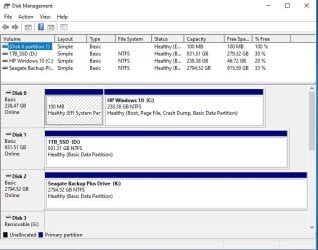
Can you take a screenshot of Disk Management and post it?
How to use the Snipping Tool in Windows 7

Here's what my disk management looks like
 

Attachments

  • Capture.JPG
    Capture.JPG
    65.9 KB · Views: 1
Last edited:

My Computer My Computer

At a glance

Win 10 x64, Linux Lite, Win 7 x64, BlackArch,...
Computer type
PC/Desktop
Computer Manufacturer/Model Number
HP Desktop & Compaq Laptop
OS
Win 10 x64, Linux Lite, Win 7 x64, BlackArch, & Kali
Hard Drives
Samsung 850 Pro 256Gb,
Hitachi HDD 1Tb,
Crucial MX SSD 250Gb
Segate 3Tb USB 3.0 Ext. Backup HDD
Internet Speed
150Mbps dn, 20Mbps up
Antivirus
Avast Free, Malwarebytes Anti-Exploit & Anti-Ransomware
Browser
Firefox, Chrome, Opera, & VPN
We still have a few EaseUS Todo Backup Home Licenses left to give away if anybody wants one (I forgot to offer them on SF :o )
 

My Computer My Computer

At a glance

Windows 11
Computer type
PC/Desktop
OS
Windows 11

My Computer My Computer

At a glance

Win 10 x64, Linux Lite, Win 7 x64, BlackArch,...
Computer type
PC/Desktop
Computer Manufacturer/Model Number
HP Desktop & Compaq Laptop
OS
Win 10 x64, Linux Lite, Win 7 x64, BlackArch, & Kali
Hard Drives
Samsung 850 Pro 256Gb,
Hitachi HDD 1Tb,
Crucial MX SSD 250Gb
Segate 3Tb USB 3.0 Ext. Backup HDD
Internet Speed
150Mbps dn, 20Mbps up
Antivirus
Avast Free, Malwarebytes Anti-Exploit & Anti-Ransomware
Browser
Firefox, Chrome, Opera, & VPN
z3r010
Thank you, but I'm good, have AOMEI Pro license.
 

My Computer My Computer

At a glance

Win 10 x64, Linux Lite, Win 7 x64, BlackArch,...
Computer type
PC/Desktop
Computer Manufacturer/Model Number
HP Desktop & Compaq Laptop
OS
Win 10 x64, Linux Lite, Win 7 x64, BlackArch, & Kali
Hard Drives
Samsung 850 Pro 256Gb,
Hitachi HDD 1Tb,
Crucial MX SSD 250Gb
Segate 3Tb USB 3.0 Ext. Backup HDD
Internet Speed
150Mbps dn, 20Mbps up
Antivirus
Avast Free, Malwarebytes Anti-Exploit & Anti-Ransomware
Browser
Firefox, Chrome, Opera, & VPN
Thanks!

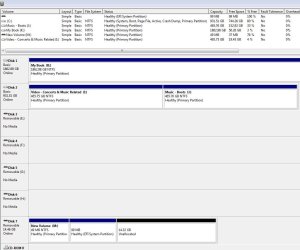
Hey snick and everyone else who replied,first of all, thanks for the replies! I was using Windows 7 professional built-in backup/restore function. The drive I've been using that was reported as failed the other day is a Western Digital MyBook. As you requested, I took a screenshot of the disk management tool so you can see the specs below. The tool says it's healthy so I don't know what Windows was talking about. I'm not sure exactly how much I want to back up at the moment, I think it's a little over 200 gig of user data that I want to back up along with the system image which, according to Windows is 224.61 GB as I mentioned in my last post. Just to confirm, by system image, they are just referring to the OS files, new user data like documents and pictures, correct?I'll definitely check out Macrium Free and AOMEI Free this weekend and give one of them a try.
 

Attachments

  • disk management Capture.JPG
    disk management Capture.JPG
    92.4 KB · Views: 1

My Computer My Computer

At a glance

Windows 7 Proffessional 64-biti 712 GB tape
Computer type
PC/Desktop
Computer Manufacturer/Model Number
Dell XPS
OS
Windows 7 Proffessional 64-bit
CPU
i 7
Memory
12 GB tape
Quadzilla

How are you doing with your backups?
Have you tried testing your external drive?
Seatools for Windows is a good free program to test your drive.
SeaTools | Seagate Support US
You can reformat which erases all data on the external drive and see if that works.
Here's another excellent free program to do the job.
EaseUS® Partition Master Free


My Computer My Computer

At a glance

Win 10 x64, Linux Lite, Win 7 x64, BlackArch,...
Computer type
PC/Desktop
Computer Manufacturer/Model Number
HP Desktop & Compaq Laptop
OS
Win 10 x64, Linux Lite, Win 7 x64, BlackArch, & Kali
Hard Drives
Samsung 850 Pro 256Gb,
Hitachi HDD 1Tb,
Crucial MX SSD 250Gb
Segate 3Tb USB 3.0 Ext. Backup HDD
Internet Speed
150Mbps dn, 20Mbps up
Antivirus
Avast Free, Malwarebytes Anti-Exploit & Anti-Ransomware
Browser
Firefox, Chrome, Opera, & VPN
Back
Top