Windows 7 Professional

zakka1da

New member
Local time
11:12 PM
Messages
6
Hi mates, I installed Professional version of Windows 7 (final RTM) and then saw that I can't install any additional languages on this english version. Is there any way how to do that? Thanks for any replies.
 

My Computer

OS
Windows 7 Professional
Hi mates, I installed Professional version of Windows 7 (final RTM) and then saw that I can't install any additional languages on this english version. Is there any way how to do that? Thanks for any replies.

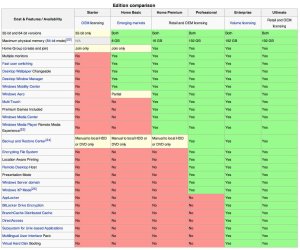
Legally Languages can only be installed in ultimate.

ken
 

My Computer

Computer Manufacturer/Model Number
HP Pavillion dv-7 1005 Tx
OS
Win 8 Release candidate 8400
CPU
[email protected]
Memory
4 gigs
Graphics Card(s)
Nvidia 9600M
Sound Card
HD built-in
Monitor(s) Displays
17" Wxga
Screen Resolution
1440x900
Cooling
none
Internet Speed
45Mb down 5Mb up
Badluck, can't understand why is THIS option blocked in Professional edition... some silly heads in Redmont?!
 

My Computer

OS
Windows 7 Professional
Perhaps I was mistaken. I thought Ultimate simply included all of the MUI, and the necessary MUI packages could be downloaded and applied to other versions.

I was mistaken, wasn't I? I have pre-ordered the wrong version for a Spanish speaking friend.
 
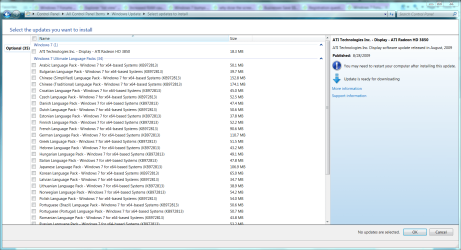
You should be able to download and install any additional language packs from MS Update...

They will be under optional updates. Try that.

~Lordbob
 

My Computer

Computer Manufacturer/Model Number
Hera
OS
Windows 7 Ultimate x64, Mint 9
CPU
Intel i5-2500k
Motherboard
ASUS P8P67 Pro
Memory
2x 4Gb Corsair VENGEANCE DDR3-1600
Graphics Card(s)
NVidia GeForce N260GTX Twin Frozr
Sound Card
Realtek HD OnBoard Audio
Monitor(s) Displays
ASUS 24" Monitor
Screen Resolution
1920x1080
Hard Drives
G.SKILL Phoenix Series 60GB SATA II MLC Internal Solid State Drive (SSD)
SAMSUNG Spinpoint F3R 1TB 7200 RPM 32MB Cache SATA II
PSU
Cooler Master Real Power Pro 750W
Case
Cooler Master Haf 932
Cooling
Fans
Keyboard
Razer Tarantula
Mouse
Razer Lachesis
Internet Speed
not fast enough
Hmm. So the OP has a fixable problem? Try Windows Update.
 

Attachments

  • Capture.PNG
    Capture.PNG
    114.7 KB · Views: 63
So the OP has a fixable problem?
:eek::what:

NO!

That is not allowed to happen. Quick, someone do something before it can be fixed!

~Lordbob

NOTE: To the OP, that is just a joke, no worries. ;)
 

My Computer

Computer Manufacturer/Model Number
Hera
OS
Windows 7 Ultimate x64, Mint 9
CPU
Intel i5-2500k
Motherboard
ASUS P8P67 Pro
Memory
2x 4Gb Corsair VENGEANCE DDR3-1600
Graphics Card(s)
NVidia GeForce N260GTX Twin Frozr
Sound Card
Realtek HD OnBoard Audio
Monitor(s) Displays
ASUS 24" Monitor
Screen Resolution
1920x1080
Hard Drives
G.SKILL Phoenix Series 60GB SATA II MLC Internal Solid State Drive (SSD)
SAMSUNG Spinpoint F3R 1TB 7200 RPM 32MB Cache SATA II
PSU
Cooler Master Real Power Pro 750W
Case
Cooler Master Haf 932
Cooling
Fans
Keyboard
Razer Tarantula
Mouse
Razer Lachesis
Internet Speed
not fast enough
The way I understand things is that only ultimate allows multiple languages to be installed concurrently, I am not sure what the EULA states about the changing of languages in the Pro Version. In vista I recall it was prohibited in certain SKUs. As pro is a new SKU I think only Microsoft can state the actual situation
 

My Computers

System One System Two

  • Computer type
    PC/Desktop
    Computer Manufacturer/Model Number
    ChillBlast - Custom to my design
    OS
    Windows 11 Pro x64 [Latest Release and Release Preview]
    CPU
    Ryzen 9 5950X, 3.8 - 5.2 MHz
    Motherboard
    Asus Prime X570-Pro
    Memory
    64GB [2 x 32GB] DDR4 3200MHz
    Graphics Card(s)
    4GB NVIDIA GEFORCE GTX 1650 Ti
    Sound Card
    On-board SPDIF to 5.1 System + HDMI [5.1 system]
    Monitor(s) Displays
    32" UHD 32 Bit HDR Monitor + 43" UHD 4K 32Bit HDR TV
    Screen Resolution
    2 x 3840 x 2160 @60Hz
    Hard Drives
    1TB M2 SSD OS, 500GB Fast Access SSD, 2 x 8TB Data + Various Externals from 1TB to 4TB, 10TB NAS
    PSU
    NZXT C750 80 PLUS Gold 750W Modular PSU
    Case
    Workstation Case [Matt Black]
    Cooling
    NZXT Kraken X63 280mm CPU Cooler +2x Quiet Case fans
    Keyboard
    Logitech Wireless MX Keys & K400 + others
    Mouse
    Logitech Wireless MX Master 3S
    Internet Speed
    920 MB Down 50 MB Up
    Antivirus
    BitDefender Total Security Pro
    Browser
    Chrome (always run latest Non-Beta)
    Other Info
    Also run ...
    Laptop - Quad 8GB - Windows 10 Pro x64
    Nexus 7 Android tablet x2
    Samsung 10.2" tablet
    Blackview TAB 8 4G Android Tablet c/w Keyboard
    Wacom Intuos Pro Medium Pen Pad
    Wacom Intuos Pro Small Pen Pad
    Wacom Expresskeys Remote
    Loopdeck+ Graphics Controller
    Shuttle Pro v2 Control
  • Computer type
    Laptop
    System Manufacturer/Model Number
    Dell XPS 17 10750H
    OS
    Windows 11 Pro x64 Latest RP
    CPU
    Intel I7 10750H 5.0GHz
    Motherboard
    Dell XPS
    Memory
    32GB [2x16GB] DDR4 2933 MHz
    Graphics Card(s)
    nVidia GTX1650Ti 4 GB GDDR6
    Sound Card
    Stock [Realtek] 4 Speaker
    Monitor(s) Displays
    17" IPS UHD+ Infinity Edge Touchscreen
    Screen Resolution
    3840 x 2400
    Hard Drives
    2TB M2 NVMe, 4TB External + various 500GB & 1TB External NVMe (also have access to spinner HDD from
    PSU
    Stock
    Case
    Stock XPS Aluminium & Carbon Fibre
    Cooling
    Stock - Active Fan Control
    Keyboard
    Backlit + Various Logitech
    Mouse
    Stock Track Pad + Logitech MX Trackball
    Internet Speed
    72 MB Down 18MB Up
    Browser
    Chrome
    Other Info
    Also run ...
    Laptop - Quad 8GB - Windows 10 Pro x64
    Nexus 7 Android tablet x2
    10.2" tablet
    Sony Z3 Android Smartphone
    Wacom Intuos Pro Medium Pen Pad
    Wacom Intuos Pro Small Pen Pad
    Wacom Expresskeys Remote
    Loopdeck+ Graphics Controller
    Shuttle Pro v2 Control Pad
    10TB NAS
you can change language in any version of Windows7 if u change language on support before install it, u can have only one language active

Deploying an image that contains multiple languages, but only one language is activated as the default.

Licensing requirements state that Windows 7 can include only a single language, with the exception of the Windows 7 Ultimate and the Enterprise editions. These are referred to as single-language editions. When multiple language packs are added to a Windows image and a single-language edition of Windows is deployed, during Windows Welcome (OOBE) users are prompted to select the language they want to use from a list of available languages. Once that language is selected, and the computer is restarted, all other language packs will be deleted from the computer by the language-pack removal task.

refer Microsoft Technet


there are many tutorial on the net for substitute English language on windows7 iso
 

My Computer

Computer Manufacturer/Model Number
self made
OS
Win7 RTM ITA MSDN-AA
CPU
Athlon 3800+
Motherboard
Asus M2NPV-VM
Memory
3GB DDR2 667
Graphics Card(s)
ATI HD3850
Monitor(s) Displays
1x 19" + 1x 17"
Hard Drives
2x WD Caviar 500GB raid 1 (data) 2x Seagate Barracuda 250GB raid 0 (System)
I know there are possibilies to substite english but I downloaded genuine image with genuine key and don't want to make naythink with the .iso - Only can't understand why is it blocked and article above sloving nothing...
 

My Computer

OS
Windows 7 Professional
dose this mean in the language options i can install language support files
just inserting the DVD

like you were able t in XP..

because i want to be able to view east Asian languages on websites..
 

My Computer

Computer Manufacturer/Model Number
Dell 110L
OS
XP SP3
CPU
Pentum M 1.7 Ghz
Memory
1.25 Gb
Graphics Card(s)
intel 915
Sound Card
Sigma Tel C-Majior
Screen Resolution
1024x768
Hard Drives
Fjitsu 40 Gb
Case
Laptop
Mouse
HP
Internet Speed
6Mb/s

Attachments

  • 167444-windows7_editions_guide_original.jpg
    167444-windows7_editions_guide_original.jpg
    108.8 KB · Views: 131

My Computer

Computer Manufacturer/Model Number
Intel
OS
Windows 7 Professional, Windows XP
CPU
Intel Dual Core
Motherboard
Intel D945GCNL
Memory
2GB
Graphics Card(s)
Intel 82945G Express
Monitor(s) Displays
HP Pavilion 1859m
Screen Resolution
1366x768
Hard Drives
Samsung 250GB SATA
Maxtor 80GB SATA
Case
High Tower
Cooling
Air
Keyboard
Delux
Mouse
A4Tech
Internet Speed
512kbps downlink and 128kbps uplink :(
yeah, I saw it, but why THIS languages option? Can understand things like some advanced programs, utilities but this??? Weird...
 

My Computer

OS
Windows 7 Professional
Well IMO,
Ulitimate/Enterprise is for Pros and Bussines personel(or if you have money you can get too). Pros and Bussiness means better productivity, which includes developpers creating, testing stuff and doing marketting etc.. These people may need the ability to work under many user environments which in this case is considered in Muli Language stuff. So the better the rank the better things you get.

A Chariman has a desk, so does the Cleark. But the charimen has many drawers than the clearks one. Coz he may use them more than the cleark.:D

About Multilingual User Interface
 

My Computer

Computer Manufacturer/Model Number
Intel
OS
Windows 7 Professional, Windows XP
CPU
Intel Dual Core
Motherboard
Intel D945GCNL
Memory
2GB
Graphics Card(s)
Intel 82945G Express
Monitor(s) Displays
HP Pavilion 1859m
Screen Resolution
1366x768
Hard Drives
Samsung 250GB SATA
Maxtor 80GB SATA
Case
High Tower
Cooling
Air
Keyboard
Delux
Mouse
A4Tech
Internet Speed
512kbps downlink and 128kbps uplink :(
Hi mates, I installed Professional version of Windows 7 (final RTM) and then saw that I can't install any additional languages on this english version. Is there any way how to do that? Thanks for any replies.

Why do you struggle in this dilemma?

You are adviced to install Windows 7 RTM in your language (not English version) with your legit key.

How to have all versions of Windows 7 (unlock all windows 7 SKU)? Please refer to the tutorial in our forum:

Install Windows 7 on Computer with Less than 512MB RAM

It's just too easy, isn't it?


Most of the time, the easiest way is the best way.
 

My Computer

OS
Server 2008 R2 SP1, Win7 x64 Pro SP1
CPU
Intel Core 2 Duo E6700 @3.3GHz
Motherboard
ASUS P5W DH DELUXE
Memory
Transcend DDRII 800 4GB (2 x 2GB )
Graphics Card(s)
GeForce 7950GX2
Sound Card
Realtek ALC882M Integrated on board
Monitor(s) Displays
ACER AL2723 27" LCD
Screen Resolution
1920x1200
Hard Drives
WD 6401 AALS 640G x 1
Seagate 160 GB (Barracuda 7200.7) x 2
PSU
Zippy PSL-6720P(G1)720W
Case
Thermaltake Kandalf VA9000SWA
Cooling
Zalman CNPS9500
Keyboard
Standard
Mouse
Standard
Internet Speed
10M, Cable
Other Info
Above is one of my desktops.
Why do you struggle in this dilemma?

You are adviced to install Windows 7 RTM in your language (not English version) with your legit key.

How to have all versions of Windows 7 (unlock all windows 7 SKU)? Please refer to the tutorial in our forum:

Install Windows 7 on Computer with Less than 512MB RAM

It's just too easy, isn't it?


Most of the time, the easiest way is the best way.
Ok so your tutorial looks awesome and this will offer me to install any version of Windows 7? How it looks during instalation? It will ask me which version I want to install?

Thanks for help anyway
 

My Computer

OS
Windows 7 Professional
because i want to be able to view east Asian languages on websites..

This is I think a different issue - As long as your browser is set to use an international font (most of the ones supplied with windows 7 ) then you should find that the pages render correctly.

The issue that the OP has is to set Windows 7 to display it's dialogs and buttons in another language
 

My Computers

System One System Two

  • Computer type
    PC/Desktop
    Computer Manufacturer/Model Number
    ChillBlast - Custom to my design
    OS
    Windows 11 Pro x64 [Latest Release and Release Preview]
    CPU
    Ryzen 9 5950X, 3.8 - 5.2 MHz
    Motherboard
    Asus Prime X570-Pro
    Memory
    64GB [2 x 32GB] DDR4 3200MHz
    Graphics Card(s)
    4GB NVIDIA GEFORCE GTX 1650 Ti
    Sound Card
    On-board SPDIF to 5.1 System + HDMI [5.1 system]
    Monitor(s) Displays
    32" UHD 32 Bit HDR Monitor + 43" UHD 4K 32Bit HDR TV
    Screen Resolution
    2 x 3840 x 2160 @60Hz
    Hard Drives
    1TB M2 SSD OS, 500GB Fast Access SSD, 2 x 8TB Data + Various Externals from 1TB to 4TB, 10TB NAS
    PSU
    NZXT C750 80 PLUS Gold 750W Modular PSU
    Case
    Workstation Case [Matt Black]
    Cooling
    NZXT Kraken X63 280mm CPU Cooler +2x Quiet Case fans
    Keyboard
    Logitech Wireless MX Keys & K400 + others
    Mouse
    Logitech Wireless MX Master 3S
    Internet Speed
    920 MB Down 50 MB Up
    Antivirus
    BitDefender Total Security Pro
    Browser
    Chrome (always run latest Non-Beta)
    Other Info
    Also run ...
    Laptop - Quad 8GB - Windows 10 Pro x64
    Nexus 7 Android tablet x2
    Samsung 10.2" tablet
    Blackview TAB 8 4G Android Tablet c/w Keyboard
    Wacom Intuos Pro Medium Pen Pad
    Wacom Intuos Pro Small Pen Pad
    Wacom Expresskeys Remote
    Loopdeck+ Graphics Controller
    Shuttle Pro v2 Control
  • Computer type
    Laptop
    System Manufacturer/Model Number
    Dell XPS 17 10750H
    OS
    Windows 11 Pro x64 Latest RP
    CPU
    Intel I7 10750H 5.0GHz
    Motherboard
    Dell XPS
    Memory
    32GB [2x16GB] DDR4 2933 MHz
    Graphics Card(s)
    nVidia GTX1650Ti 4 GB GDDR6
    Sound Card
    Stock [Realtek] 4 Speaker
    Monitor(s) Displays
    17" IPS UHD+ Infinity Edge Touchscreen
    Screen Resolution
    3840 x 2400
    Hard Drives
    2TB M2 NVMe, 4TB External + various 500GB & 1TB External NVMe (also have access to spinner HDD from
    PSU
    Stock
    Case
    Stock XPS Aluminium & Carbon Fibre
    Cooling
    Stock - Active Fan Control
    Keyboard
    Backlit + Various Logitech
    Mouse
    Stock Track Pad + Logitech MX Trackball
    Internet Speed
    72 MB Down 18MB Up
    Browser
    Chrome
    Other Info
    Also run ...
    Laptop - Quad 8GB - Windows 10 Pro x64
    Nexus 7 Android tablet x2
    10.2" tablet
    Sony Z3 Android Smartphone
    Wacom Intuos Pro Medium Pen Pad
    Wacom Intuos Pro Small Pen Pad
    Wacom Expresskeys Remote
    Loopdeck+ Graphics Controller
    Shuttle Pro v2 Control Pad
    10TB NAS
Ok so your tutorial looks awesome and this will offer me to install any version of Windows 7? How it looks during instalation? It will ask me which version I want to install?

Thanks for help anyway

open the windows 7 32bit iso with UltraISO or PowerISO. delete ei.cfg file to unlock all windows 7 SKU. And then save the ISO. Burn it and Install.
This will make the Installation ask you what Version you need. ;)
 

My Computer

Computer Manufacturer/Model Number
Intel
OS
Windows 7 Professional, Windows XP
CPU
Intel Dual Core
Motherboard
Intel D945GCNL
Memory
2GB
Graphics Card(s)
Intel 82945G Express
Monitor(s) Displays
HP Pavilion 1859m
Screen Resolution
1366x768
Hard Drives
Samsung 250GB SATA
Maxtor 80GB SATA
Case
High Tower
Cooling
Air
Keyboard
Delux
Mouse
A4Tech
Internet Speed
512kbps downlink and 128kbps uplink :(
Language packs are only available to Windows 7 Ultimate and Enterprise users as mentioned in the Windows 7 Compare Editions page. Users running the Windows 7 Release Candidate (RC) can already download and install the RC language packs.
more here: Windows 7 RTM Language Packs Released | Windows 7 News

So yes you should could ;) if you have it activated with a legal key, you can download them from WU (Windows Update.). If youre running on re-arms, you can get the lp elsewhere. google is your friend.
 
Back
Top