windows 7 quick launch like XP / VISTA ?

Well the link you posted on the how-to-geek seems to be just like what you're after.. So :)
 

My Computer

OS
Windows 7 x64
CPU
Intel Core 2 Quad 6600 (2.4GHz)
Memory
4GB
Graphics Card(s)
GigaByte NVIDIA GeFroce 8600GT 512MB
Monitor(s) Displays
22" LCD
Screen Resolution
1680 x 1050
Hard Drives
Seagate 500GB
Internet Speed
8MB
Well the link you posted on the how-to-geek seems to be just like what you're after.. So :)
Not really. I meant exactly like in XP / VISTA.
I tried this one out,but it's not the same like in XP or Vista.
 

My Computer

OS
xp
It's exactly the same as Vista/xp
 

My Computer

Computer type
PC/Desktop
Computer Manufacturer/Model Number
Made by Dixon Butz
OS
Win7 Win 10, Win 8.1
CPU
AMD FX-8350, Corsair H100i
Motherboard
ASUS Crosshair V Formula-Z
Memory
16GB G.SKILL Ripjaws DDR3
Graphics Card(s)
EVGA GTX 980, EVGA GTX 860
Sound Card
Denon x4200 Dolby AMOS!
Monitor(s) Displays
65" Samsung 4K, +3 27inch
Screen Resolution
4K, 1080x3
Hard Drives
2TB Samsung hd204ui

1X Samsung 850 SSD
PSU
1000w EVGA, 2000VA UPS, 1000VA UPS and many others
Case
Lian Li
Cooling
Corsair H100i
Keyboard
Logitech K800
Mouse
Logitech Couch Mouse
Internet Speed
Gigabit!
Antivirus
Defender
Browser
Slimjet Chrome
It's exactly the same as Vista/xp
Sorry,is not the same. For example : after i opened Mozilla Firefox,and i wanna open again one more,from the quick launch,in XP i just press the Mozilla icon,but in W7 i have to right click on the opened one,and so on....
That's just an example. There is more,but anyway.
 

My Computer

OS
xp
Sorry,is not the same. For example : after i opened Mozilla Firefox,and i wanna open again one more,from the quick launch,in XP i just press the Mozilla icon,but in W7 i have to right click on the opened one,and so on....
That's just an example. There is more,but anyway.

If you have applied it correctly that is not the case, all you need to do is create a new toolbar and then add your shorcuts to it and it will behave in the same manner as Quicklaunch.

If you don't want to make your own toolbar then you can easily open up a second instance of an application (eg. IE or Firefox) by clicking on your pinned or running app with the midle button on your mouse.
 

My Computer

Computer Manufacturer/Model Number
Home Brew
OS
Windows 7 Ultimate Vista Ultimate x64
CPU
Core 2 Duo E8500 3.16Ghz @ 3.8Ghz
Motherboard
eVGA 750i FTW
Memory
2x2Gigs Patriot PC2-6400 LL
Graphics Card(s)
Inno3D GeForce GTX260 216 SP
Monitor(s) Displays
ASUS VW222U 22" 2ms Response time
Screen Resolution
1680x1050
Hard Drives
SATA 150GB
SATA II 250GB
USB IDE 750GB Ext.
PSU
HYTEC 600W & Thermaltake 650W Toughpower Power Exp
Case
Thermaltake Armor LCS (Liquid Cooling System)
Cooling
Liquid Cooling System
Keyboard
Logitech G15 Gaming Keyboard
Mouse
Logitech G9 Gaming Mouse
You may be mixing up the superbar and Quick Launch. I just tested a shortcut on Quick Launch by clicking it twice and it opened twice just like XP.
 

My Computer

Computer Manufacturer/Model Number
Haha! You peeked. Why so nosey?
OS
XP / Windows 7 Pro RTM
You may be mixing up the superbar and Quick Launch. I just tested a shortcut on Quick Launch by clicking it twice and it opened twice just like XP.
Please give / explain / more details about how to do that.
 

My Computer

OS
xp
This is mine. To get similar, activate quick launch, then with taskbar not locked, right click in the quick launch and select view | large icons. Also, uncheck show title. Then lock the taskbar again if that's how you like it.

Also, I'm using a double sized taskbar as you can see.
 

Attachments

  • Capture.JPG
    Capture.JPG
    15.2 KB · Views: 39

My Computer

Computer Manufacturer/Model Number
self built
OS
7600.20510 x86
CPU
P4 550 3.4 GHz HT running at 3.5 GHz
Motherboard
MSI PM8M3-V (MS-7211 v1.x) Micro-ATX mainboard
Memory
OCZ 2 GB(2x1GB) DDR400mHz running @ 414 mHz
Graphics Card(s)
HIS Radeon HD 3850 IceQ 3 Turbo HDMI Dual DL-DVI AGP
Sound Card
MOTU Traveler firewire studio interface 192 kHz 24 bit
Monitor(s) Displays
22" widescreen Acer X223W LCD, 17" Compaq P75 CRT
Screen Resolution
1680x1050 and 1280x1024
Hard Drives
SATA I x2 WD, 400 GB and 120 GB, SATA 2 WD Caviar Black 1 TB
PSU
350W generic
Case
Cybertronpc, it glows blue
Cooling
stock cpu fan, Ice-Q 3 gpu and system, many case fans
Keyboard
Logitch Classical Keyboard 200
Mouse
Logitech Mediaplay cordless
Internet Speed
1792/448 kbits/sec
Other Info
SATA II PCI fake RAID adapter, 1 GB Readyboost, original ATI Remote Wonder (even works with WMC perfectly), Logitech Rumblepad 2 game controller x2
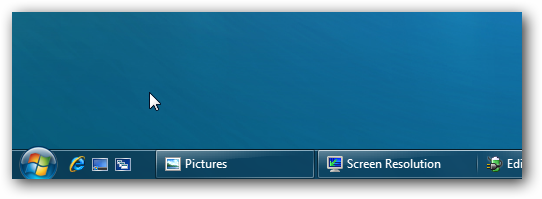
Look at image. I left it showing the title so it's easier to distinguish.
WindowClipping (2).png
On the right is Quick Launch and on the left is the superbar. The superbar is something like a Quick Launch and taskbar combined. You can remove all the pinned items from the superbar if you want to achieve something similar to XP.

Here it is looking and acting almost identical to XP.
WindowClipping (3).png
 

My Computer

Computer Manufacturer/Model Number
Haha! You peeked. Why so nosey?
OS
XP / Windows 7 Pro RTM
Lmao did you see the last picture? It looks EXACTLY like XP and Vista..

sshot731.png
 

My Computer

OS
Windows 7 x64
CPU
Intel Core 2 Quad 6600 (2.4GHz)
Memory
4GB
Graphics Card(s)
GigaByte NVIDIA GeFroce 8600GT 512MB
Monitor(s) Displays
22" LCD
Screen Resolution
1680 x 1050
Hard Drives
Seagate 500GB
Internet Speed
8MB
And how did you fix it ? I tried everything possible,but i can't have it like yours.
Please help me ,someone.
I wanna have it same like in the post above.
Thanks.
 

My Computer

OS
xp
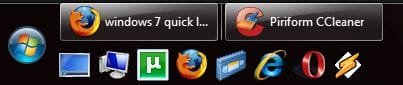
My Quick Launch works just as it worked in XP and Vista. I want to open something I just click the button on QL and that's it. See the image, QL on top under the orb (my taskbar is on the left).

QL.PNG
 

My Computer

Computer type
Laptop
Computer Manufacturer/Model Number
HP ENVY 17-1150eg
OS
Windows 10 Pro x64 EN-GB
CPU
1.6 GHz Intel Core i7-720QM Processor
Memory
6 GB
Graphics Card(s)
ATI Mobility Radeon HD 5850 Graphics
Sound Card
Beats sound system with integrated subwoofer
Monitor(s) Displays
17" laptop display, 22" LED and 32" Full HD TV through HDMI
Screen Resolution
1600*900 (1), 1920*1080 (2&3)
Hard Drives
Internal: 2 x 500 GB SATA Hard Disk Drive 7200 rpm
External: 2TB for backups, 3TB USB3 network drive for media
Cooling
As Envy runs a bit warm, I have it on a Cooler Master pad
Keyboard
Logitech diNovo Media Desktop Laser (bluetooth)
Mouse
Logitech Performance Mouse MX
Internet Speed
50/10 Mbps VDSL
Antivirus
Windows Defender 4.3.9431.0
Browser
Maxthon 3.5.2., IE11

My Computer

Computer type
PC/Desktop
Computer Manufacturer/Model Number
Self built custom
OS
64-bit Windows 11 Pro for Workstations
CPU
Intel i7-8700K OC'd to 5 GHz
Motherboard
ASUS ROG Maximus XI Formula Z390
Memory
64 GB (4x16GB) G.SKILL TridentZ RGB DDR4 3600 MHz
Graphics Card(s)
ASUS ROG-STRIX-GTX1080TI-O11G-GAMING
Sound Card
Integrated
Monitor(s) Displays
2 x Samsung Odyssey G7 27"
Screen Resolution
2560x1440
Hard Drives
1TB Samsung 990 PRO M.2,
4TB Samsung 990 PRO PRO M.2,
TerraMaster F8 SSD Plus NAS
PSU
Seasonic Prime Titanium 850W
Case
Thermaltake Core P3
Cooling
Corsair Hydro H115i
Keyboard
Logitech wireless K800
Mouse
Logitech MX Master 4
Internet Speed
2 Gb/s Download and 100 Mb/s Upload
Antivirus
Malwarebyte Anti-Malware Premium
Browser
Google Chrome
Other Info
Logitech Z625 speaker system,
Logitech BRIO 4K Pro webcam,
HP Color LaserJet Pro MFP M477fdn,
APC SMART-UPS RT 1000 XL - SURT1000XLI,
Galaxy S23 Plus phone
Quick Launch was just a name for the default/prefabricated/predfined toolbar. This could be pulled out of the default location in the task bar and put wherever.

'Quick Launch' for the toolbar is analogous to the default/prefabricated/predifined 'Links' folder in the old Internet Explorer Bookmarks.

What is missing is toolbar from XP which could be put on any side of the monitor.

THEN

You could create a new toolbar and name it Quicker Launch, and then put THAT on another side of the monitor.

THEN

You could do this 2 more times and have 4 totally different toolbars (only one of which was the 'quick launch', each defined by unique system folders) on each side of your monitor. (These toolbars could also be 'copies' of each other instead as they really just pointed to a system folder; you could have multiple copies of the quick launch at need.)

THAT is no longer possible in windows 7. Its a loss especially for people who use multiple monitors. I mean come on -- motherboards nowdays can easily give you PCIe space for 3 sli/cf graphics cards allowing you to setup an array of six monitors (and that's just with normal GPUs not using DVI links) -- you do NOT want just one toolbar for that, you want toolbars accessible on those other monitors or you have a mouse traversal nightmare.

This aspect of the windows xp toolbar is gone entirely.

---

A lot of people don't seem to realize the "Quick Launch" was just a folder name on the Hard Disk where the default Tool Bar contents was defined. Most people didn't realize apparently that you could have multiple totally different 'quick launch' bars defined and put all over the desktop.
 
Last edited:

My Computer

Computer Manufacturer/Model Number
Homebuilt
OS
Windows 7 x64 Professional
CPU
Intel Core i7 3960X
Motherboard
ASUS Rampage IV Extreme
Memory
64 GB g.Skill
Graphics Card(s)
ATI Radeon HD 6970 x 2 (Crossfire)
Monitor(s) Displays
HP 2711x (x2), 1 Panasonic 60 inch flat panel
Hard Drives
Intel 510 SSD (x2)
600 GB Western Digital VelociRaptor
2 TB Western Digital Caviar Black
PSU
Seasonic 1000W Platinum
Case
Cooler Master Storm Trooper
Cooling
Noctua NH-D14 (cpu), Blade Scythe (case)
Keyboard
S 510
Mouse
Logitech G9x
Internet Speed
10 Mbps D/S (official), 25 Mbps D/S (tested)
Back
Top