Windows 7 -> Random BSOD, help appreciated

Zangy

New member
Local time
10:34 AM
Messages
5
Hey

I've been getting random BSOD's lately and I have no idea what the problem is.

Windows 7 Enterprise
Intel Core i7 950 @ 3.07GHz 4.01GHz
Installed memory (RAM) 6GB
System Type: 64bit

I've attached the files asked of me in my post. As well as picture of the BSOD.

http://img694.imageshack.us/img694/7555/dscf0192b.jpg


Any help would be greatly appreciated

Thanks in advance
 

My Computer

OS
Windows 7
Hey

I've been getting random BSOD's lately and I have no idea what the problem is.

Windows 7 Enterprise
Intel Core i7 950 @ 3.07GHz 4.01GHz
Installed memory (RAM) 6GB
System Type: 64bit

I've attached the files asked of me in my post. As well as picture of the BSOD.

http://img694.imageshack.us/img694/7555/dscf0192b.jpg


Any help would be greatly appreciated

Thanks in advance

It is a memory exception but need the actual DMP file witch wasnt included in the upload try this method.


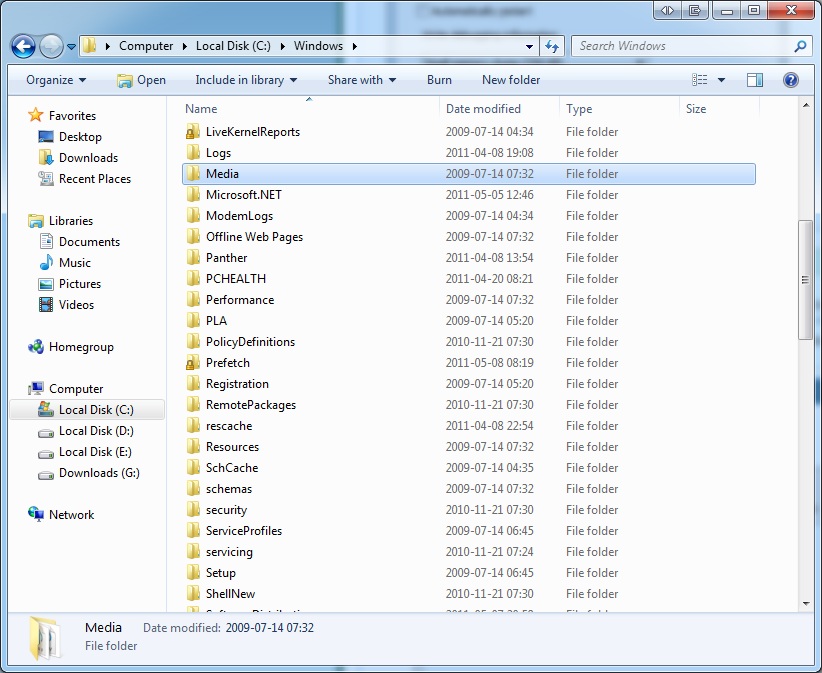
To enable us to assist you with your computer's BSOD symptoms, upload the contents of your "\Windows\Minidump" folder.

The procedure:

* Copy the contents of \Windows\Minidump to another (temporary) location somewhere on your machine.
* Zip up the copy.
* Attach the ZIP archive to your post using the "paperclip" (file attachments) button.


To ensure minidumps are enabled:

Go to Start, in the Search Box type: sysdm.cpl, press Enter.
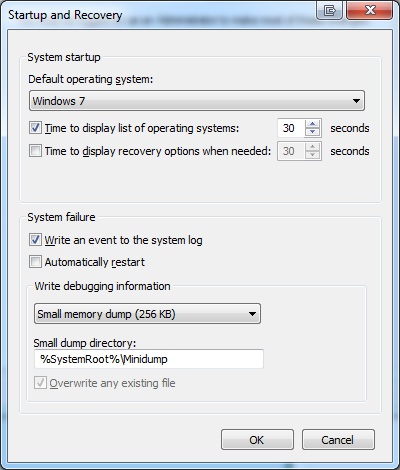
Under the Advanced tab, click on the Startup and Recovery Settings... button.
Ensure that Automatically restart is unchecked.
Under the Write Debugging Information header select Small memory dump (256 kB) in the dropdown box (the 256kb varies).
Ensure that the Small Dump Directory is listed as %systemroot%\Minidump.
OK your way out.
Reboot if changes have been made.
 

My Computer

Computer Manufacturer/Model Number
HP Pavillion dv-7 1005 Tx
OS
Win 8 Release candidate 8400
CPU
[email protected]
Memory
4 gigs
Graphics Card(s)
Nvidia 9600M
Sound Card
HD built-in
Monitor(s) Displays
17" Wxga
Screen Resolution
1440x900
Cooling
none
Internet Speed
45Mb down 5Mb up
I dont have a minidump folder, i changed it from kernel to Small memory dump (256 kB) though. Im assuming next crash ill find a file in there? =x

Thanks again
 

My Computer

OS
Windows 7
I rebooted after changing it to small memory dump.

5xklT.jpg


Then ran a Prime64 stress test, which resulted with a BSOD =/

But there still isn't any minidump folder.

NNfpw.jpg


Results from Prime64 are as following:

[Sun May 08 11:22:50 2011]
FATAL ERROR: Rounding was 0.5, expected less than 0.4
Hardware failure detected, consult stress.txt file.
FATAL ERROR: Rounding was 0.5, expected less than 0.4
Hardware failure detected, consult stress.txt file.
[Sun May 08 11:43:15 2011]
FATAL ERROR: Rounding was 0.5, expected less than 0.4
Hardware failure detected, consult stress.txt file.
FATAL ERROR: Rounding was 0.5, expected less than 0.4
Hardware failure detected, consult stress.txt file.
FATAL ERROR: Rounding was 0.5, expected less than 0.4
Hardware failure detected, consult stress.txt file.
FATAL ERROR: Rounding was 0.494140625, expected less than 0.4
Hardware failure detected, consult stress.txt file.
[Sun May 08 11:57:33 2011]
Self-test 1024K passed!
[Sun May 08 12:13:11 2011]
Self-test 8K passed!


The BSOD error also looks different this time.

http://i.imgur.com/9SRpJ.jpg


<.<?
 
Last edited:

My Computer

OS
Windows 7

My Computer

Computer Manufacturer/Model Number
Self Built
OS
Windows 7 Home Premium 64bit
CPU
Intel Core i5-2500 @ 3.8GHz
Motherboard
MSI P67A-GD65
Memory
G.SKILL Ripjaws Series 8GB (2 x 4GB) DDR3 1600
Graphics Card(s)
NVIDIA GTX 550Ti
Sound Card
On Board
Monitor(s) Displays
ASUS 23"
Hard Drives
OCZ Vertex 3 VTX3-25SAT3-60G
Keyboard
Wireless
Mouse
Wireless
I did ;o It's in the perform.rar attachment. Anyway I think I figured it out. My overclocking settings were off, and cpu wasn't getting enough power when overloading the pc resulting in a crash. Fixed that, but now cpu is overheating way more than it should, hit 100C while running prime64, immediately shut it off. To overclock I followed some guide, only OC'd to 4GHz and have a decent heat sink so not sure what to do about it. Going to re apply thermal paste and see if that solves anything tomorow.

Thanks again
 

My Computer

OS
Windows 7
Good luck and glad you figured it out.
 

My Computer

Computer Manufacturer/Model Number
HP Pavillion dv-7 1005 Tx
OS
Win 8 Release candidate 8400
CPU
[email protected]
Memory
4 gigs
Graphics Card(s)
Nvidia 9600M
Sound Card
HD built-in
Monitor(s) Displays
17" Wxga
Screen Resolution
1440x900
Cooling
none
Internet Speed
45Mb down 5Mb up
Back
Top