Windows 7 Random Freezes Requiring Hard Reboot (no minidump files)

sosowie

New member
Member
Local time
12:51 AM
Messages
34
Hello fellow experts,

My custom build computer (spec in my sig) is experiencing random freezes (screen and cursor), without going to a blue screen--necessitating manual restarts. I have identified no patterns that effect this behavior: browsing of internet, playing graphics intensive game, watching a video, computer left on idle overnight, etc. Sometimes I get 5 freezes over a couple of hours. Other times I am able to be issue-free for up to 2 days. I've tried googling to help diagnose this issue, and I've tried:
  • Fresh install of windows home premium 64bit + windows updates
  • Making sure all drivers and bios are up-to-date
  • Replaced/upgraded graphics card
  • Replaced/upgraded SSD
  • Ran /sfcnow, chkdsk, Windows Fix it, graphics test, memtest, etc
  • Enabled minidump files, disabled automatic restarts, but curiously no dump files are ever written
  • Downloaded Speccy to monitor core temperatures. Nothing to note (all hovering around 30 degrees)
As a relative computer illiterate, I'm having trouble taking additional steps to further this investigation. I've attached my latest event viewer log files for your kind review. Can anyone help me diagnose this issue?

Many, many thanks :geek:
 

Attachments

My Computer My Computer

At a glance

Windows 7 Home 64 bitIntel Core i5 2500k8 GBNVIDIA GeForce GTX 780
Computer type
PC/Desktop
Computer Manufacturer/Model Number
custom build
OS
Windows 7 Home 64 bit
CPU
Intel Core i5 2500k
Motherboard
ASUS P8P67
Memory
8 GB
Graphics Card(s)
NVIDIA GeForce GTX 780
Hard Drives
Samsung SSD 840 PRO Series ATA Device
WDC WD20EARS-00MVWBO ATA Device
Antivirus
Windows Essentials
Browser
Google Chrome
Log Name: System
Source: Microsoft-Windows-Wininit
Date: 13-09-2013 PM 02:07:46
Event ID: 11
Task Category: None
Level: Warning
Keywords:
User: SYSTEM
Computer: Edwin-PC
Description:
Custom dynamic link libraries are being loaded for every application. The system administrator should review the list of libraries to ensure they are related to trusted applications.
Which antivirus do you use? Please uninstall it, at least as a test. Use Microsoft Security Essentials as your antivirus with windows inbuilt firewall, and free MBAM as the on demand scanner.
Download, install and update those, and then run full system scans with both of them, one by one.

Scan the system for possible virus infection with the following programs, too.

Let us know the results.
 

My Computer My Computer

At a glance

Microsoft Windows 10 Pro Insider Preview 64-bitIntel(R) Core(TM) i3-4130 CPU @ 3.40GHzCorsair Vengence 4GB x2 (8.00GB Dual-Channel ...2047MB GeForce GTS 450 (ZOTAC International)
Computer type
PC/Desktop
Computer Manufacturer/Model Number
Self Assembled
OS
Microsoft Windows 10 Pro Insider Preview 64-bit
CPU
Intel(R) Core(TM) i3-4130 CPU @ 3.40GHz
Motherboard
Gigabyte Technology Co., Ltd. B85M-D3H
Memory
Corsair Vengence 4GB x2 (8.00GB Dual-Channel DDR3 @ 798MHz)
Graphics Card(s)
2047MB GeForce GTS 450 (ZOTAC International)
Sound Card
Onboard (Realtek High Definition Audio)
Monitor(s) Displays
LG Flatron E2040T
Screen Resolution
1600x900
Hard Drives
Western Digital 1 TB
Seagate 500 GB
PSU
Corsair VS550
Case
Cooler Master K380
Cooling
Cooler Master Seidon 120V Plus
Keyboard
Logitech MK260r
Mouse
Logitech MK260r
Internet Speed
PMPL Broadband
Antivirus
Windows Defender + MBAM
Browser
Firefox
Other Info
Dell Studio 15" Laptop
Hello Arc,

I'm already using Microsoft Security Essentials, and Malwarebytes. I was previously using AVAST, but i read elsewhere that sometimes that's an issue so I swapped over a few weeks ago. Everything is updated and scans review no issues.

As an FYI, my computer crashed again while I left it on over the night. I've attached another event viewer log in case it's of use.
 

Attachments

My Computer My Computer

At a glance

Windows 7 Home 64 bitIntel Core i5 2500k8 GBNVIDIA GeForce GTX 780
Computer type
PC/Desktop
Computer Manufacturer/Model Number
custom build
OS
Windows 7 Home 64 bit
CPU
Intel Core i5 2500k
Motherboard
ASUS P8P67
Memory
8 GB
Graphics Card(s)
NVIDIA GeForce GTX 780
Hard Drives
Samsung SSD 840 PRO Series ATA Device
WDC WD20EARS-00MVWBO ATA Device
Antivirus
Windows Essentials
Browser
Google Chrome
Hello,

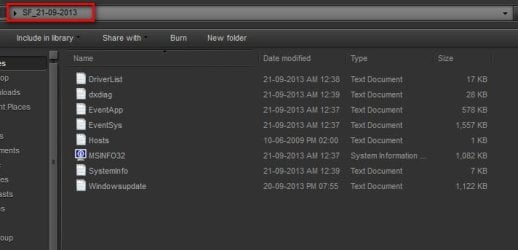
Please also find attached the results of the SF Diagnostics Tool.
Kindest regards, and my apologies for not supplying this sooner.
 

Attachments

My Computer My Computer

At a glance

Windows 7 Home 64 bitIntel Core i5 2500k8 GBNVIDIA GeForce GTX 780
Computer type
PC/Desktop
Computer Manufacturer/Model Number
custom build
OS
Windows 7 Home 64 bit
CPU
Intel Core i5 2500k
Motherboard
ASUS P8P67
Memory
8 GB
Graphics Card(s)
NVIDIA GeForce GTX 780
Hard Drives
Samsung SSD 840 PRO Series ATA Device
WDC WD20EARS-00MVWBO ATA Device
Antivirus
Windows Essentials
Browser
Google Chrome
I will also go with what Greg suggested. And, let us know how you uninstalled Intel Rapid Storage?

The storage are set to AHCI mode, the controller is msahci.sys, but iastor (which had been a great problem a month ago) is still left over there.
Code:
iastor    Intel AHCI Controller    c:\windows\system32\drivers\iastor.sys    Kernel Driver    Yes    Boot    Running    OK    Normal    No    Yes
iastora    iaStorA    c:\windows\system32\drivers\iastora.sys    Kernel Driver    Yes    Boot    Running    OK    Normal    No    Yes
iastorf    iaStorF    c:\windows\system32\drivers\iastorf.sys    Kernel Driver    Yes    Boot    Running    OK    Normal    No    Yes
iastorv    Intel RAID Controller Windows 7    c:\windows\system32\drivers\iastorv.sys    Kernel Driver    No    Manual    Stopped    OK    Normal    No    No
On the contrary, the storage controller is msahci.
Code:
Name    Standard AHCI 1.0 Serial ATA Controller
Driver    c:\windows\system32\drivers\msahci.sys (6.1.7601.17514, 30.38 KB (31,104 bytes), 11/08/2013 10:56 PM)
Intel storage drivers have been a great problem here.
Event[2575]:
Log Name: Application
Source: PSI
Date: 2013-08-17T23:56:11.000
Event ID: 0
Task: N/A
Level: Information
Opcode: Info
Keyword: Classic
User: N/A
User Name: N/A
Computer: Edwin-PC
Description:
System.Exception: Initial Storage Driver Data Load failed.
0: SSI Status: Invalid Session
1: SSI Status: Internal Error

0: SSI Status: Invalid Session
Invalid GroupLength in CIoctlRaidCfgGroup, expected size: 220, actual: 216
Error in getting the session data in IsiGetSystemInfo
1: Invalid GroupLength in CIoctlRaidCfgGroup, expected size: 220, actual: 216
Could Not Open ISI Session.

System.Exception: 0: Error returned by IsiGetSystemInfo() in PsiData::PsiDataSource::GetSystemInfo
1: ISI IsiSessionOpen Error in PsiData::PsiDataSource::Load


Stack Trace
at System.Environment.GetStackTrace(Exception e, Boolean needFileInfo)
at System.Environment.get_StackTrace()
at PSI.PsiSystemDataModel.RecordExceptionInEventLog(Exception exception)
at PSI.PsiSystemDataModel.CreateStaticDataModel()
at PSI.PsiSystemDataModel..cctor()
at PSI.PsiSystemDataModel.Connect()
at PSIClient.PsiClient.Init()
at IAStorUtil.SystemDataModelListener..ctor()
at IAStorDataMgr.EventRelay.<Start>b__0(Object o)

at System.Threading.QueueUserWorkItemCallback.WaitCallback_Context(Object state)
at System.Threading.ExecutionContext.Run(ExecutionContext executionContext, ContextCallback callback, Object state, Boolean ignoreSyncCtx)
at System.Threading.QueueUserWorkItemCallback.System.Threading.IThreadPoolWorkItem.ExecuteWorkItem()
at System.Threading.ThreadPoolWorkQueue.Dispatch()
at System.Threading._ThreadPoolWaitCallback.PerformWaitCallback()
==================================================================================
Event[2100]:
Log Name: Application
Source: Application Error
Date: 2013-08-15T00:10:21.000
Event ID: 1000
Task: Application Crashing Events
Level: Error
Opcode: Info
Keyword: Classic
User: N/A
User Name: N/A
Computer: Edwin-PC
Description:
Faulting application name: IAStorDataMgrSvc.exe, version: 10.5.0.1027, time stamp: 0x4dbbba22
Faulting module name: mscorwks.dll, version: 2.0.50727.5472, time stamp: 0x5174dd69
Exception code: 0xc0000005
Fault offset: 0x0000d719
Faulting process id: 0x%9
Faulting application start time: 0x%10
Faulting application path: %11
Faulting module path: %12
Report Id: %13
==========================================================================
Event[2576]:
Log Name: Application
Source: .NET Runtime
Date: 2013-08-17T23:56:14.000
Event ID: 1026
Task: N/A
Level: Error
Opcode: Info
Keyword: Classic
User: N/A
User Name: N/A
Computer: Edwin-PC
Description:
Application: IAStorDataMgrSvc.exe
Framework Version: v4.0.30319
Description: The process was terminated due to an unhandled exception.
Exception Info: System.NullReferenceException
Stack:
at IAStorUtil.SystemDataModelListener.ProcessSystemDataModelChanges()
at IAStorUtil.SystemDataModelListener.LoadSavedSystemState()
at IAStorDataMgr.EventRelay.<Start>b__0(System.Object)

at System.Threading.QueueUserWorkItemCallback.WaitCallback_Context(System.Object)
at System.Threading.ExecutionContext.Run(System.Threading.ExecutionContext, System.Threading.ContextCallback, System.Object, Boolean)
at System.Threading.QueueUserWorkItemCallback.System.Threading.IThreadPoolWorkItem.ExecuteWorkItem()
at System.Threading.ThreadPoolWorkQueue.Dispatch()
at System.Threading._ThreadPoolWaitCallback.PerformWaitCallback()
I would suggest a http://www.sevenforums.com/tutorials/219487-clean-reinstall-factory-oem-windows-7-a.html without intel rapid storage technology.
 

My Computer My Computer

At a glance

Microsoft Windows 10 Pro Insider Preview 64-bitIntel(R) Core(TM) i3-4130 CPU @ 3.40GHzCorsair Vengence 4GB x2 (8.00GB Dual-Channel ...2047MB GeForce GTS 450 (ZOTAC International)
Computer type
PC/Desktop
Computer Manufacturer/Model Number
Self Assembled
OS
Microsoft Windows 10 Pro Insider Preview 64-bit
CPU
Intel(R) Core(TM) i3-4130 CPU @ 3.40GHz
Motherboard
Gigabyte Technology Co., Ltd. B85M-D3H
Memory
Corsair Vengence 4GB x2 (8.00GB Dual-Channel DDR3 @ 798MHz)
Graphics Card(s)
2047MB GeForce GTS 450 (ZOTAC International)
Sound Card
Onboard (Realtek High Definition Audio)
Monitor(s) Displays
LG Flatron E2040T
Screen Resolution
1600x900
Hard Drives
Western Digital 1 TB
Seagate 500 GB
PSU
Corsair VS550
Case
Cooler Master K380
Cooling
Cooler Master Seidon 120V Plus
Keyboard
Logitech MK260r
Mouse
Logitech MK260r
Internet Speed
PMPL Broadband
Antivirus
Windows Defender + MBAM
Browser
Firefox
Other Info
Dell Studio 15" Laptop
Thank you both for your advice.
Arc, I'm a little confused by your comment re: IASTOR. I had Intel drivers installed initially (linked from my motherboard's suggested chipset drivers), but I uninstalled them in favor of window drivers later on as recommended by other posters. Was the uninstall not clean? Is there no other way to eliminate the errors without resorting to a clean reinstall of windows?

I've run most of the things in the Troubleshooting Steps already, but I'll re-run them again, starting with the memtest. Will post an update when I can, thanks.
 

My Computer My Computer

At a glance

Windows 7 Home 64 bitIntel Core i5 2500k8 GBNVIDIA GeForce GTX 780
Computer type
PC/Desktop
Computer Manufacturer/Model Number
custom build
OS
Windows 7 Home 64 bit
CPU
Intel Core i5 2500k
Motherboard
ASUS P8P67
Memory
8 GB
Graphics Card(s)
NVIDIA GeForce GTX 780
Hard Drives
Samsung SSD 840 PRO Series ATA Device
WDC WD20EARS-00MVWBO ATA Device
Antivirus
Windows Essentials
Browser
Google Chrome
Was the uninstall not clean?
No, it is not, and that is why I asked it in my earlier post ....
Code:
let us know how you uninstalled Intel Rapid Storage?
Leftovers are there, and active.
At that time, as it is uninstalled, I am not sure seeing that data that how iastor.sys was working there in the system ... SCSI or AHCI. And so I cannot say you the exact steps what should be taken now.

So it would be better to start afresh.
 

My Computer My Computer

At a glance

Microsoft Windows 10 Pro Insider Preview 64-bitIntel(R) Core(TM) i3-4130 CPU @ 3.40GHzCorsair Vengence 4GB x2 (8.00GB Dual-Channel ...2047MB GeForce GTS 450 (ZOTAC International)
Computer type
PC/Desktop
Computer Manufacturer/Model Number
Self Assembled
OS
Microsoft Windows 10 Pro Insider Preview 64-bit
CPU
Intel(R) Core(TM) i3-4130 CPU @ 3.40GHz
Motherboard
Gigabyte Technology Co., Ltd. B85M-D3H
Memory
Corsair Vengence 4GB x2 (8.00GB Dual-Channel DDR3 @ 798MHz)
Graphics Card(s)
2047MB GeForce GTS 450 (ZOTAC International)
Sound Card
Onboard (Realtek High Definition Audio)
Monitor(s) Displays
LG Flatron E2040T
Screen Resolution
1600x900
Hard Drives
Western Digital 1 TB
Seagate 500 GB
PSU
Corsair VS550
Case
Cooler Master K380
Cooling
Cooler Master Seidon 120V Plus
Keyboard
Logitech MK260r
Mouse
Logitech MK260r
Internet Speed
PMPL Broadband
Antivirus
Windows Defender + MBAM
Browser
Firefox
Other Info
Dell Studio 15" Laptop
And there's no other way to manually clean up the remnants? I uninstalled the drivers from right clicking them via device manager.

FYI, I ran 8 passes of the memtest: no errors.

I guess a fresh install is in order....
 

My Computer My Computer

At a glance

Windows 7 Home 64 bitIntel Core i5 2500k8 GBNVIDIA GeForce GTX 780
Computer type
PC/Desktop
Computer Manufacturer/Model Number
custom build
OS
Windows 7 Home 64 bit
CPU
Intel Core i5 2500k
Motherboard
ASUS P8P67
Memory
8 GB
Graphics Card(s)
NVIDIA GeForce GTX 780
Hard Drives
Samsung SSD 840 PRO Series ATA Device
WDC WD20EARS-00MVWBO ATA Device
Antivirus
Windows Essentials
Browser
Google Chrome
Just popping in to say I haven't had a chance to do a clean re-install yet, but I plan on doing this tonight. Will monitor and report back my results when able.
Thank you.
 

My Computer My Computer

At a glance

Windows 7 Home 64 bitIntel Core i5 2500k8 GBNVIDIA GeForce GTX 780
Computer type
PC/Desktop
Computer Manufacturer/Model Number
custom build
OS
Windows 7 Home 64 bit
CPU
Intel Core i5 2500k
Motherboard
ASUS P8P67
Memory
8 GB
Graphics Card(s)
NVIDIA GeForce GTX 780
Hard Drives
Samsung SSD 840 PRO Series ATA Device
WDC WD20EARS-00MVWBO ATA Device
Antivirus
Windows Essentials
Browser
Google Chrome
Dont install Intel Rapid Storage after the installation :)
 

My Computer My Computer

At a glance

Microsoft Windows 10 Pro Insider Preview 64-bitIntel(R) Core(TM) i3-4130 CPU @ 3.40GHzCorsair Vengence 4GB x2 (8.00GB Dual-Channel ...2047MB GeForce GTS 450 (ZOTAC International)
Computer type
PC/Desktop
Computer Manufacturer/Model Number
Self Assembled
OS
Microsoft Windows 10 Pro Insider Preview 64-bit
CPU
Intel(R) Core(TM) i3-4130 CPU @ 3.40GHz
Motherboard
Gigabyte Technology Co., Ltd. B85M-D3H
Memory
Corsair Vengence 4GB x2 (8.00GB Dual-Channel DDR3 @ 798MHz)
Graphics Card(s)
2047MB GeForce GTS 450 (ZOTAC International)
Sound Card
Onboard (Realtek High Definition Audio)
Monitor(s) Displays
LG Flatron E2040T
Screen Resolution
1600x900
Hard Drives
Western Digital 1 TB
Seagate 500 GB
PSU
Corsair VS550
Case
Cooler Master K380
Cooling
Cooler Master Seidon 120V Plus
Keyboard
Logitech MK260r
Mouse
Logitech MK260r
Internet Speed
PMPL Broadband
Antivirus
Windows Defender + MBAM
Browser
Firefox
Other Info
Dell Studio 15" Laptop
Following your advice, I did a clean install of windows, and made sure not to download the Intel Rapid Storage. Things were looking bright, until just now, when everything froze and crashed, requiring a hard reboot.
Please find attached the latest file.
 

Attachments

My Computer My Computer

At a glance

Windows 7 Home 64 bitIntel Core i5 2500k8 GBNVIDIA GeForce GTX 780
Computer type
PC/Desktop
Computer Manufacturer/Model Number
custom build
OS
Windows 7 Home 64 bit
CPU
Intel Core i5 2500k
Motherboard
ASUS P8P67
Memory
8 GB
Graphics Card(s)
NVIDIA GeForce GTX 780
Hard Drives
Samsung SSD 840 PRO Series ATA Device
WDC WD20EARS-00MVWBO ATA Device
Antivirus
Windows Essentials
Browser
Google Chrome
No stress of a BSOD there ......

2013-09-21_132917.jpg

But we see one unexpected shutdown.
Follow it: http://www.sevenforums.com/tutorials/174459-dump-files-configure-windows-create-bsod.html
Go to Option Two, Point 2. Download the .reg file and merge it in registry by double clicking it.

Now wait for another BSOD. When it occurred, search the .dmp files manually in the default path: C:\Windows\Minidump or %SystemRoot%\Minidump. See if the crash dump is recorded or not (hopefully it will be recorded).Post it following the Blue Screen of Death (BSOD) Posting Instructions.
 

My Computer My Computer

At a glance

Microsoft Windows 10 Pro Insider Preview 64-bitIntel(R) Core(TM) i3-4130 CPU @ 3.40GHzCorsair Vengence 4GB x2 (8.00GB Dual-Channel ...2047MB GeForce GTS 450 (ZOTAC International)
Computer type
PC/Desktop
Computer Manufacturer/Model Number
Self Assembled
OS
Microsoft Windows 10 Pro Insider Preview 64-bit
CPU
Intel(R) Core(TM) i3-4130 CPU @ 3.40GHz
Motherboard
Gigabyte Technology Co., Ltd. B85M-D3H
Memory
Corsair Vengence 4GB x2 (8.00GB Dual-Channel DDR3 @ 798MHz)
Graphics Card(s)
2047MB GeForce GTS 450 (ZOTAC International)
Sound Card
Onboard (Realtek High Definition Audio)
Monitor(s) Displays
LG Flatron E2040T
Screen Resolution
1600x900
Hard Drives
Western Digital 1 TB
Seagate 500 GB
PSU
Corsair VS550
Case
Cooler Master K380
Cooling
Cooler Master Seidon 120V Plus
Keyboard
Logitech MK260r
Mouse
Logitech MK260r
Internet Speed
PMPL Broadband
Antivirus
Windows Defender + MBAM
Browser
Firefox
Other Info
Dell Studio 15" Laptop
Thank you for your continued support. I have dump files already enabled, so I don't know why it isn't being written. I followed the thread you posted, and changed the file to a complete dump file. Hopefully that will work.

I"ll update again when I am able to grab the next dump file.
 

My Computer My Computer

At a glance

Windows 7 Home 64 bitIntel Core i5 2500k8 GBNVIDIA GeForce GTX 780
Computer type
PC/Desktop
Computer Manufacturer/Model Number
custom build
OS
Windows 7 Home 64 bit
CPU
Intel Core i5 2500k
Motherboard
ASUS P8P67
Memory
8 GB
Graphics Card(s)
NVIDIA GeForce GTX 780
Hard Drives
Samsung SSD 840 PRO Series ATA Device
WDC WD20EARS-00MVWBO ATA Device
Antivirus
Windows Essentials
Browser
Google Chrome
My computer crashed two more times, but both times I am unable to grab any dump files despite following the steps in the links you provided. The first time I had neglected to check "Automatically Restart", and I also increased the paging file size. The second time I manually went into regedit to change the dump file from a kernal dump to a complete dump file, and I changed the paging file size back to auto (and now total paging file size is over 8000MB for all drives). Any ideas from here?

Here's another SF diagnostic file minus the dump file--just in case it is of any use.
 

Attachments

My Computer My Computer

At a glance

Windows 7 Home 64 bitIntel Core i5 2500k8 GBNVIDIA GeForce GTX 780
Computer type
PC/Desktop
Computer Manufacturer/Model Number
custom build
OS
Windows 7 Home 64 bit
CPU
Intel Core i5 2500k
Motherboard
ASUS P8P67
Memory
8 GB
Graphics Card(s)
NVIDIA GeForce GTX 780
Hard Drives
Samsung SSD 840 PRO Series ATA Device
WDC WD20EARS-00MVWBO ATA Device
Antivirus
Windows Essentials
Browser
Google Chrome
Also, I noticed there isn't a folder titled "Minidump" in my C:\Windows. Is this the cause of the issue? I've now manually created one...
 

My Computer My Computer

At a glance

Windows 7 Home 64 bitIntel Core i5 2500k8 GBNVIDIA GeForce GTX 780
Computer type
PC/Desktop
Computer Manufacturer/Model Number
custom build
OS
Windows 7 Home 64 bit
CPU
Intel Core i5 2500k
Motherboard
ASUS P8P67
Memory
8 GB
Graphics Card(s)
NVIDIA GeForce GTX 780
Hard Drives
Samsung SSD 840 PRO Series ATA Device
WDC WD20EARS-00MVWBO ATA Device
Antivirus
Windows Essentials
Browser
Google Chrome

My Computer My Computer

At a glance

Windows 10 ProAMD Ryzen 5 2400G Processor with Radeon RX Ve...G.SKILL Ripjaws V Series 16GB (2 x 8GB) 288-P...2047MB NVIDIA GeForce GTX 1060 6GB (EVGA)
Computer type
PC/Desktop
Computer Manufacturer/Model Number
Custom Built
OS
Windows 10 Pro
CPU
AMD Ryzen 5 2400G Processor with Radeon RX Vega 11 Graphics
Motherboard
ASRock X470 Master SLI/AC AM4 AMD Promontory X470 SATA 6Gb/s
Memory
G.SKILL Ripjaws V Series 16GB (2 x 8GB) 288-Pin DDR4 SDRAM D
Graphics Card(s)
2047MB NVIDIA GeForce GTX 1060 6GB (EVGA)
Sound Card
Motherboard Built in
Monitor(s) Displays
Acer R240HY bidx 23.8-Inch IPS HDMI DVI VGA (1920 x 1080) Wi
Screen Resolution
1920 x 1080
Hard Drives
1TB Sandisk SSD PLUS (Main drive)
500 GB Seagate 7200 RPM (Games)
500 GB Western Digital 7200 RPM (Virtual Machines)
PSU
CORSAIR TX Series TX650M 650W 80+ Gold Modular Power Supply
Case
CORSAIR CARBIDE SPEC-02 Mid-Tower Gaming Case, Red LED Fan
Cooling
220mm, two 120mm, and four 60mm fans
Keyboard
Wired Dell keyboard
Mouse
Wireless Logitech mouse
Internet Speed
250mb down, 30mb up
Antivirus
Panda Cloud Antivirus
Browser
Chrome-ish x64
Other Info
Your awesome for reading this.
Here is what happened when you tried to configure crash dumps .........
Event[4266]:
Log Name: System
Source: volmgr
Date: 2013-09-21T02:42:31.342
Event ID: 49
Task: N/A
Level: Error
Opcode: N/A
Keyword: Classic
User: N/A
User Name: N/A
Computer: Edwin-PC
Description:
Configuring the Page file for crash dump failed. Make sure there is a page file on the boot partition and that is large enough to contain all physical memory.
And then there was another abnormal shutdown.
Event[4514]:
Log Name: System
Source: EventLog
Date: 2013-09-21T11:11:58.000
Event ID: 6008
Task: N/A
Level: Error
Opcode: N/A
Keyword: Classic
User: N/A
User Name: N/A
Computer: Edwin-PC
Description:
The previous system shutdown at 11:09:21 AM on ?9/?21/?2013 was unexpected.
You need to configure the minidump recording. Then go for the Driver Verifier that Andrew is suggested.
 

My Computer My Computer

At a glance

Microsoft Windows 10 Pro Insider Preview 64-bitIntel(R) Core(TM) i3-4130 CPU @ 3.40GHzCorsair Vengence 4GB x2 (8.00GB Dual-Channel ...2047MB GeForce GTS 450 (ZOTAC International)
Computer type
PC/Desktop
Computer Manufacturer/Model Number
Self Assembled
OS
Microsoft Windows 10 Pro Insider Preview 64-bit
CPU
Intel(R) Core(TM) i3-4130 CPU @ 3.40GHz
Motherboard
Gigabyte Technology Co., Ltd. B85M-D3H
Memory
Corsair Vengence 4GB x2 (8.00GB Dual-Channel DDR3 @ 798MHz)
Graphics Card(s)
2047MB GeForce GTS 450 (ZOTAC International)
Sound Card
Onboard (Realtek High Definition Audio)
Monitor(s) Displays
LG Flatron E2040T
Screen Resolution
1600x900
Hard Drives
Western Digital 1 TB
Seagate 500 GB
PSU
Corsair VS550
Case
Cooler Master K380
Cooling
Cooler Master Seidon 120V Plus
Keyboard
Logitech MK260r
Mouse
Logitech MK260r
Internet Speed
PMPL Broadband
Antivirus
Windows Defender + MBAM
Browser
Firefox
Other Info
Dell Studio 15" Laptop
Thank you for your continued patience and help!

I got the dump file to work. Here are the results of my latest crash:
 

Attachments

My Computer My Computer

At a glance

Windows 7 Home 64 bitIntel Core i5 2500k8 GBNVIDIA GeForce GTX 780
Computer type
PC/Desktop
Computer Manufacturer/Model Number
custom build
OS
Windows 7 Home 64 bit
CPU
Intel Core i5 2500k
Motherboard
ASUS P8P67
Memory
8 GB
Graphics Card(s)
NVIDIA GeForce GTX 780
Hard Drives
Samsung SSD 840 PRO Series ATA Device
WDC WD20EARS-00MVWBO ATA Device
Antivirus
Windows Essentials
Browser
Google Chrome
Back
Top