
Solved Windows 7 RDP shortcuts

Norwood

Lowly IT Drone
Member
VIP
Local time
4:15 AM
Messages
105
Location
A bit south o' Boston
In XP, I was able to create a shortcut to the many computers on a daily basis onto which I need to RDP.

This was done by simply creating a shortcut with:

Code:
mstsc.exe /v:server-name

Clicking on that shortcut would simply open the connection and ask me for my credentials.

On Windows 7, however, it works - but there's an extra step in the process. The shortcut is created the same way yet when clicking it I am asked "Do you want to open this file?"

Obviously I'd like to get rid of the extra mouse click/space bar tap in order to get to the remote machine so has anyone else done this? Is the shortcut created a different way somehow?
 

My Computer

Computer type
PC/Desktop
OS
Windows 7 64bit
CPU
AMD Phenom II X4 955 Black Edition Deneb 3.2GHz Quad-Core
Motherboard
ASUS M4A77TD AM3 AMD 770 ATX
Memory
G.SKILL Ripjaws DDR3 SDRAM DDR3 1600 (PC3 12800)
Graphics Card(s)
SAPPHIRE 100284L Radeon HD 5750 1GB 128-bit GDDR5 PCI-E
Sound Card
Audigy
Monitor(s) Displays
2 x 22" Widescreens
Hard Drives
System Drive: OCZ Vertex 3.20 120GB SSD
Internal: 2x 1TB Seagates
External: 1 TB Seagate
Case
Cooler Master Elite 310 ATX
Cooling
Arctic Cooling Freezer 7 Pro Rev.2 92mm Liquid Cooling
Keyboard
Microsoft Comfort Curve Keyboard 2000 v1.0
Mouse
Logitech G5 w/ full 36g weighted cartridge

My Computer

Computer type
PC/Desktop
Computer Manufacturer/Model Number
Self built custom
OS
64-bit Windows 11 Pro for Workstations
CPU
Intel i7-8700K OC'd to 5 GHz
Motherboard
ASUS ROG Maximus XI Formula Z390
Memory
64 GB (4x16GB) G.SKILL TridentZ RGB DDR4 3600 MHz
Graphics Card(s)
ASUS ROG-STRIX-GTX1080TI-O11G-GAMING
Sound Card
Integrated
Monitor(s) Displays
2 x Samsung Odyssey G7 27"
Screen Resolution
2560x1440
Hard Drives
1TB Samsung 990 PRO M.2,
4TB Samsung 990 PRO PRO M.2,
TerraMaster F8 SSD Plus NAS
PSU
Seasonic Prime Titanium 850W
Case
Thermaltake Core P3
Cooling
Corsair Hydro H115i
Keyboard
Logitech wireless K800
Mouse
Logitech MX Master 4
Internet Speed
2 Gb/s Download and 100 Mb/s Upload
Antivirus
Malwarebyte Anti-Malware Premium
Browser
Google Chrome
Other Info
Logitech Z625 speaker system,
Logitech BRIO 4K Pro webcam,
HP Color LaserJet Pro MFP M477fdn,
APC SMART-UPS RT 1000 XL - SURT1000XLI,
Galaxy S23 Plus phone
I wish it were that, but it isn't.

Here's some pics to better explain what I mean.

I created the shortcut the same way I did on my Windows XP machine: Add Links Toolbar > Open Folder > New Shortcut enter the information. And it shows up exactly how I want it:

2cfxhlt.jpg


I press that link, and on my XP machine it would give me the window you have above, but I checked it for each computer...I have about 3 dozen that I connect to on a daily basis. So once I checked that it simply connected.

Here's the properties of the link on the Win 7 machine:

2ldthw.jpg


And once I click it I'm faced with the following:

nwfsc0.jpg


No matter how many times I agree to "Open It" it does the same thing each time.

Can anyone duplicate this? Or perhaps show me a way to create a proper RDP shortcut without this other stuff?

Thanks!
 

My Computer

Computer type
PC/Desktop
OS
Windows 7 64bit
CPU
AMD Phenom II X4 955 Black Edition Deneb 3.2GHz Quad-Core
Motherboard
ASUS M4A77TD AM3 AMD 770 ATX
Memory
G.SKILL Ripjaws DDR3 SDRAM DDR3 1600 (PC3 12800)
Graphics Card(s)
SAPPHIRE 100284L Radeon HD 5750 1GB 128-bit GDDR5 PCI-E
Sound Card
Audigy
Monitor(s) Displays
2 x 22" Widescreens
Hard Drives
System Drive: OCZ Vertex 3.20 120GB SSD
Internal: 2x 1TB Seagates
External: 1 TB Seagate
Case
Cooler Master Elite 310 ATX
Cooling
Arctic Cooling Freezer 7 Pro Rev.2 92mm Liquid Cooling
Keyboard
Microsoft Comfort Curve Keyboard 2000 v1.0
Mouse
Logitech G5 w/ full 36g weighted cartridge
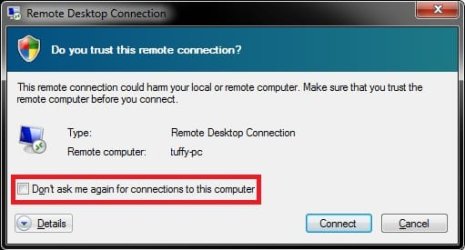
A little more digging and I came across this post here.

While that seems like a completely logical way to fix this I'm left with two questions.


  1. I'm sure this opens some kind of security risk, .lnk files must be able to be exploited
  2. My first question to a user when something doesn't work anymore is always "What's changed?" They love to tell me "Nothing, I did nothing I swear"...and I always know it's BS. :) Here's the thing...nothing's changed, I swear! :) This is a fresh install of Windows 7 Professional on my work laptop, which was why I was recreating shortcuts etc.
 

My Computer

Computer type
PC/Desktop
OS
Windows 7 64bit
CPU
AMD Phenom II X4 955 Black Edition Deneb 3.2GHz Quad-Core
Motherboard
ASUS M4A77TD AM3 AMD 770 ATX
Memory
G.SKILL Ripjaws DDR3 SDRAM DDR3 1600 (PC3 12800)
Graphics Card(s)
SAPPHIRE 100284L Radeon HD 5750 1GB 128-bit GDDR5 PCI-E
Sound Card
Audigy
Monitor(s) Displays
2 x 22" Widescreens
Hard Drives
System Drive: OCZ Vertex 3.20 120GB SSD
Internal: 2x 1TB Seagates
External: 1 TB Seagate
Case
Cooler Master Elite 310 ATX
Cooling
Arctic Cooling Freezer 7 Pro Rev.2 92mm Liquid Cooling
Keyboard
Microsoft Comfort Curve Keyboard 2000 v1.0
Mouse
Logitech G5 w/ full 36g weighted cartridge
If you click on the General tab of it's properties page, do you have a Unblock button available?
 

My Computer

Computer type
PC/Desktop
Computer Manufacturer/Model Number
Self built custom
OS
64-bit Windows 11 Pro for Workstations
CPU
Intel i7-8700K OC'd to 5 GHz
Motherboard
ASUS ROG Maximus XI Formula Z390
Memory
64 GB (4x16GB) G.SKILL TridentZ RGB DDR4 3600 MHz
Graphics Card(s)
ASUS ROG-STRIX-GTX1080TI-O11G-GAMING
Sound Card
Integrated
Monitor(s) Displays
2 x Samsung Odyssey G7 27"
Screen Resolution
2560x1440
Hard Drives
1TB Samsung 990 PRO M.2,
4TB Samsung 990 PRO PRO M.2,
TerraMaster F8 SSD Plus NAS
PSU
Seasonic Prime Titanium 850W
Case
Thermaltake Core P3
Cooling
Corsair Hydro H115i
Keyboard
Logitech wireless K800
Mouse
Logitech MX Master 4
Internet Speed
2 Gb/s Download and 100 Mb/s Upload
Antivirus
Malwarebyte Anti-Malware Premium
Browser
Google Chrome
Other Info
Logitech Z625 speaker system,
Logitech BRIO 4K Pro webcam,
HP Color LaserJet Pro MFP M477fdn,
APC SMART-UPS RT 1000 XL - SURT1000XLI,
Galaxy S23 Plus phone
No, it's not there. The file didn't come from another computer...I simply made it by hand.

One thing I noticed is that if I run it as administrator it connects to the remote server immediately...simply clicking it gives me the above warning.
 

My Computer

Computer type
PC/Desktop
OS
Windows 7 64bit
CPU
AMD Phenom II X4 955 Black Edition Deneb 3.2GHz Quad-Core
Motherboard
ASUS M4A77TD AM3 AMD 770 ATX
Memory
G.SKILL Ripjaws DDR3 SDRAM DDR3 1600 (PC3 12800)
Graphics Card(s)
SAPPHIRE 100284L Radeon HD 5750 1GB 128-bit GDDR5 PCI-E
Sound Card
Audigy
Monitor(s) Displays
2 x 22" Widescreens
Hard Drives
System Drive: OCZ Vertex 3.20 120GB SSD
Internal: 2x 1TB Seagates
External: 1 TB Seagate
Case
Cooler Master Elite 310 ATX
Cooling
Arctic Cooling Freezer 7 Pro Rev.2 92mm Liquid Cooling
Keyboard
Microsoft Comfort Curve Keyboard 2000 v1.0
Mouse
Logitech G5 w/ full 36g weighted cartridge

My Computer

Computer type
PC/Desktop
Computer Manufacturer/Model Number
Self built custom
OS
64-bit Windows 11 Pro for Workstations
CPU
Intel i7-8700K OC'd to 5 GHz
Motherboard
ASUS ROG Maximus XI Formula Z390
Memory
64 GB (4x16GB) G.SKILL TridentZ RGB DDR4 3600 MHz
Graphics Card(s)
ASUS ROG-STRIX-GTX1080TI-O11G-GAMING
Sound Card
Integrated
Monitor(s) Displays
2 x Samsung Odyssey G7 27"
Screen Resolution
2560x1440
Hard Drives
1TB Samsung 990 PRO M.2,
4TB Samsung 990 PRO PRO M.2,
TerraMaster F8 SSD Plus NAS
PSU
Seasonic Prime Titanium 850W
Case
Thermaltake Core P3
Cooling
Corsair Hydro H115i
Keyboard
Logitech wireless K800
Mouse
Logitech MX Master 4
Internet Speed
2 Gb/s Download and 100 Mb/s Upload
Antivirus
Malwarebyte Anti-Malware Premium
Browser
Google Chrome
Other Info
Logitech Z625 speaker system,
Logitech BRIO 4K Pro webcam,
HP Color LaserJet Pro MFP M477fdn,
APC SMART-UPS RT 1000 XL - SURT1000XLI,
Galaxy S23 Plus phone
I'm logged in as a Domain Admin.

So, to test it today while not in the office...I'm simply VPN'ed into the office where I still have access to all network resources as I normally do as a Domain Admin.

But the same behavior was happening yesterday while at work.

Anyway...I think I've found the solution. I right clicked the shortcut, and all the options under "Compatibility" were greyed out (yes, 64-bit OS), so I simply clicked the "Shortcut" Tab and hit advanced, then checked off "Run as admin".

Very strange little problem here. But, it's working.
 

My Computer

Computer type
PC/Desktop
OS
Windows 7 64bit
CPU
AMD Phenom II X4 955 Black Edition Deneb 3.2GHz Quad-Core
Motherboard
ASUS M4A77TD AM3 AMD 770 ATX
Memory
G.SKILL Ripjaws DDR3 SDRAM DDR3 1600 (PC3 12800)
Graphics Card(s)
SAPPHIRE 100284L Radeon HD 5750 1GB 128-bit GDDR5 PCI-E
Sound Card
Audigy
Monitor(s) Displays
2 x 22" Widescreens
Hard Drives
System Drive: OCZ Vertex 3.20 120GB SSD
Internal: 2x 1TB Seagates
External: 1 TB Seagate
Case
Cooler Master Elite 310 ATX
Cooling
Arctic Cooling Freezer 7 Pro Rev.2 92mm Liquid Cooling
Keyboard
Microsoft Comfort Curve Keyboard 2000 v1.0
Mouse
Logitech G5 w/ full 36g weighted cartridge
May be some sort of domain/permission issue, but I'm happy to hear that the workaround worked for you. :)
 

My Computer

Computer type
PC/Desktop
Computer Manufacturer/Model Number
Self built custom
OS
64-bit Windows 11 Pro for Workstations
CPU
Intel i7-8700K OC'd to 5 GHz
Motherboard
ASUS ROG Maximus XI Formula Z390
Memory
64 GB (4x16GB) G.SKILL TridentZ RGB DDR4 3600 MHz
Graphics Card(s)
ASUS ROG-STRIX-GTX1080TI-O11G-GAMING
Sound Card
Integrated
Monitor(s) Displays
2 x Samsung Odyssey G7 27"
Screen Resolution
2560x1440
Hard Drives
1TB Samsung 990 PRO M.2,
4TB Samsung 990 PRO PRO M.2,
TerraMaster F8 SSD Plus NAS
PSU
Seasonic Prime Titanium 850W
Case
Thermaltake Core P3
Cooling
Corsair Hydro H115i
Keyboard
Logitech wireless K800
Mouse
Logitech MX Master 4
Internet Speed
2 Gb/s Download and 100 Mb/s Upload
Antivirus
Malwarebyte Anti-Malware Premium
Browser
Google Chrome
Other Info
Logitech Z625 speaker system,
Logitech BRIO 4K Pro webcam,
HP Color LaserJet Pro MFP M477fdn,
APC SMART-UPS RT 1000 XL - SURT1000XLI,
Galaxy S23 Plus phone
Thanks for the help...sometimes just voicing stuff helps one work something out. :)
 

My Computer

Computer type
PC/Desktop
OS
Windows 7 64bit
CPU
AMD Phenom II X4 955 Black Edition Deneb 3.2GHz Quad-Core
Motherboard
ASUS M4A77TD AM3 AMD 770 ATX
Memory
G.SKILL Ripjaws DDR3 SDRAM DDR3 1600 (PC3 12800)
Graphics Card(s)
SAPPHIRE 100284L Radeon HD 5750 1GB 128-bit GDDR5 PCI-E
Sound Card
Audigy
Monitor(s) Displays
2 x 22" Widescreens
Hard Drives
System Drive: OCZ Vertex 3.20 120GB SSD
Internal: 2x 1TB Seagates
External: 1 TB Seagate
Case
Cooler Master Elite 310 ATX
Cooling
Arctic Cooling Freezer 7 Pro Rev.2 92mm Liquid Cooling
Keyboard
Microsoft Comfort Curve Keyboard 2000 v1.0
Mouse
Logitech G5 w/ full 36g weighted cartridge
Anytime mate. :)
 

My Computer

Computer type
PC/Desktop
Computer Manufacturer/Model Number
Self built custom
OS
64-bit Windows 11 Pro for Workstations
CPU
Intel i7-8700K OC'd to 5 GHz
Motherboard
ASUS ROG Maximus XI Formula Z390
Memory
64 GB (4x16GB) G.SKILL TridentZ RGB DDR4 3600 MHz
Graphics Card(s)
ASUS ROG-STRIX-GTX1080TI-O11G-GAMING
Sound Card
Integrated
Monitor(s) Displays
2 x Samsung Odyssey G7 27"
Screen Resolution
2560x1440
Hard Drives
1TB Samsung 990 PRO M.2,
4TB Samsung 990 PRO PRO M.2,
TerraMaster F8 SSD Plus NAS
PSU
Seasonic Prime Titanium 850W
Case
Thermaltake Core P3
Cooling
Corsair Hydro H115i
Keyboard
Logitech wireless K800
Mouse
Logitech MX Master 4
Internet Speed
2 Gb/s Download and 100 Mb/s Upload
Antivirus
Malwarebyte Anti-Malware Premium
Browser
Google Chrome
Other Info
Logitech Z625 speaker system,
Logitech BRIO 4K Pro webcam,
HP Color LaserJet Pro MFP M477fdn,
APC SMART-UPS RT 1000 XL - SURT1000XLI,
Galaxy S23 Plus phone
Back
Top