Solved Windows 7 Recognizes wireless networks - Will not connect

hawzmolly

New member
Local time
8:05 PM
Messages
5
:mad: Installed brand new NetGear N300 Wireless Adapter in my PC. All went well. However, the computer will not connect. I click on the host and after several seconds I get "..... connection unsucessful".

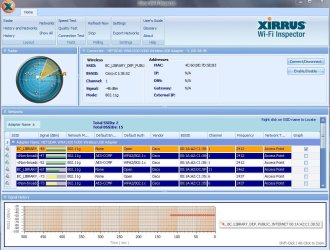
The PC is used at our club in a library. We are allowed and have been connected to the open system - "BC Library" shown on the xirrus thumbnail.

For your perusal I have included the "IPCONFIG" and "xirrus...." files.

Please help!
 

Attachments

  • IPCONFIG.txt
    IPCONFIG.txt
    634 bytes · Views: 24
  • xirrusGBAMRC.JPG
    xirrusGBAMRC.JPG
    137.9 KB · Views: 37

My Computer My Computer

Computer Manufacturer/Model Number
Dell Dimension E521
OS
W7
CPU
Dell
Expand Network Adapters in Device Manager, what does it show, any yellow marks there or anywhere?

Your ipconfig output does not even show a Wireless Adapter connection so I'd say the N300 is not installed correctly.
 

My Computer My Computer

Computer type
PC/Desktop
Computer Manufacturer/Model Number
Lenovo IdeaCenter 450
OS
Windows 10 Pro X64
CPU
Intel Quad Core i7-4770 @ 3.4Ghz
Memory
16.0GB PC3-12800 DDR3 SDRAM 1600 MHz
Graphics Card(s)
Intel Integrated HD Graphics
Sound Card
Realtek HD Audio
Monitor(s) Displays
HP 22" LCD
Screen Resolution
1680 x 1050
Hard Drives
250GB Samsung EVO SATA-3 SSD
2TB Seagate ST2000DM001 SATA-2
1.5TB Seagate ST3150041AS SATA
Keyboard
Dell USB
Mouse
Lenovo USB
Internet Speed
Cable via Road Runner 3MB Upload, 30MB Download
Antivirus
Windows Defender, MBAM Pro, MBAE
Browser
Seamonkey
Other Info
UEFI/GPT
PLDS DVD-RW DH16AERSH
I have uninstalled and reinstalled the NetGear N300 USB Adapter twice (I know - definition of insanity). The problem "Windows is unable to connect to the network" still exists. There has got to be something in W7 reinstall that creates this problem. This computer had W7 in it but the system got corrupted and I therefore had to reinstall W7. This computer would access the Library's WiFi with no problem before W7 reinstall. You will notice the connections are being shown on "xirrus" as well as on the computer such as you normally see when you are disconnected i.e., "Connections are available".

I used the complete W7 reinstall i.e., "Don't save anything"

I think I read on someones post that the only way they got there wireless adapter to work on W7 reinstall was to make sure the first thing they did was to install the Adapter software and then their USB Adapter. However, I can not find that site again. I believe I'll try that next.

I believe this is a MS W7 issue that they (MS) can't or will not solve for us.
 

My Computer My Computer

Computer Manufacturer/Model Number
Dell Dimension E521
OS
W7
CPU
Dell
Note 'IPCONFIG' still the same.
 

My Computer My Computer

Computer Manufacturer/Model Number
Dell Dimension E521
OS
W7
CPU
Dell
did this just happen?
maybe after a windows update?

cause i think i have the same issue. here is my story

strange because it is and is not.

it started when i swapped out router to test an old one i had. old one seemed to have an issue so i replaced the regular unit. then the desktop nic appeared to stop working. i did all the usual things - reinstalled drivers, reset everything, etc. other system were still connected.

i put in an addon nic and it did the same thing. i put on a wireless usb nic and it did the same thing. desktop would not connect to router but it appeared like all nics were talking to the router. it just never got an ip.

i had a recent image so i reimaged the system. works fine now. other systems worked yesterday though i did have some outage.

today 2 of my computers don't connect wireless or wired. the one i reimaged still works (wired). one laptop connects either way and my droid and ipod both still connect. if i delete the network on a laptop and try to reconnect, it will ask for a p/w. the router shows the computers in the status but ipconfig returns a list with no wired nic showing. but the nic is showing as connected in networks.

I installed a usb wireless on the desktop and it connects fine. I installed it on a laptop and limited connection.

SOOOOO the problem appears to be associated with WINDOZ - how about that?

there was a recent windoz update.


inssid shows many wireless networks in the area including mine so the wireless is working, though i don't have an open one to try to connect to. btw, the test router is exhibiting the same type of issue when trying to connect wireless to the laptop that works either way on this router.


it is not a p/w or mac filter issue - both were disabled. it is not an AV issue - it was turned off on both none working computers. all systems r W7 AV is Vipre it worked yesterday it tried different ports on router and switch router id dlink 601 with dd-wrt f/w.


point me please.

 

My Computer My Computer

OS
windows 7
Excuse my ignorance, but what is a "nic"?
 

My Computer My Computer

Computer Manufacturer/Model Number
Dell Dimension E521
OS
W7
CPU
Dell
"nic" is Network Interface Card.

Download the Netgear driver from here: Global Download Center

Use WNA3100 as the model number. 3 versions are available.
 

My Computer My Computer

Computer type
PC/Desktop
Computer Manufacturer/Model Number
Lenovo IdeaCenter 450
OS
Windows 10 Pro X64
CPU
Intel Quad Core i7-4770 @ 3.4Ghz
Memory
16.0GB PC3-12800 DDR3 SDRAM 1600 MHz
Graphics Card(s)
Intel Integrated HD Graphics
Sound Card
Realtek HD Audio
Monitor(s) Displays
HP 22" LCD
Screen Resolution
1680 x 1050
Hard Drives
250GB Samsung EVO SATA-3 SSD
2TB Seagate ST2000DM001 SATA-2
1.5TB Seagate ST3150041AS SATA
Keyboard
Dell USB
Mouse
Lenovo USB
Internet Speed
Cable via Road Runner 3MB Upload, 30MB Download
Antivirus
Windows Defender, MBAM Pro, MBAE
Browser
Seamonkey
Other Info
UEFI/GPT
PLDS DVD-RW DH16AERSH
sorry, i guess "nic" is dating me. - old terminology.
one issue resolved.
I tried to install a NETTALK app and it gave me a BSOD
apparently that is what messed up both the desktop and one laptop.
BUT i had not installed it on the other wireless system which also would not connect.
as soon as i uninstalled it from the one laptop both started working.
that is strange.
what will be even stranger is if the other router starts working now.

otherwise i still have to resolve why it won't give me an ip wirelessly.

BTW, that ipconfig looks like mine before my resolution - ie, the adapters were installed and i could see wireless networks and it tried to connect but nothing showed in ipconfig.

so u may have a similar situation with another driver.
 

My Computer My Computer

OS
windows 7
Today I bit the bullet and reinstalled W7. Did a full (Wiped the HD) install.

Immediately after the installation I installed the Netgear N300 software and adapter. All worked perfectly.

Now all I have to do is install the software we us at the club. We keep all files on a flash drive so nothing was lost.

I marked this thread "Solved" as there is a fix that seems , at least for now, to work. Maybe MS should take a look at this problem. I really don't know how to explain it or inform MS but maybe someone on this forum does.
 

My Computer My Computer

Computer Manufacturer/Model Number
Dell Dimension E521
OS
W7
CPU
Dell
Back
Top