
You are using an out of date browser. It may not display this or other websites correctly.
You should upgrade or use an alternative browser.
You should upgrade or use an alternative browser.
Windows 7 Recovery CD OS does not appear
- Thread starter mbfs
- Start date

Hello Mbfs, and welcome to Seven Forums.
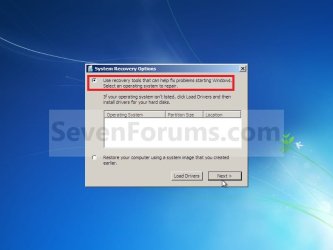
The note under step 5 in OPTION TWO in the tutorial below should still allow you to continue on.
NOTE: If Windows 7 is not listed here, or it is blank, then it is ok. Click on Next anyway.
http://www.sevenforums.com/tutorials/668-system-recovery-options.html
Hope this helps,
Shawn
The note under step 5 in OPTION TWO in the tutorial below should still allow you to continue on.
NOTE: If Windows 7 is not listed here, or it is blank, then it is ok. Click on Next anyway.
http://www.sevenforums.com/tutorials/668-system-recovery-options.html
Hope this helps,
Shawn
My Computer
- Computer type
- PC/Desktop
- Computer Manufacturer/Model Number
- Self built custom
- OS
- 64-bit Windows 11 Pro for Workstations
- CPU
- Intel i7-8700K OC'd to 5 GHz
- Motherboard
- ASUS ROG Maximus XI Formula Z390
- Memory
- 64 GB (4x16GB) G.SKILL TridentZ RGB DDR4 3600 MHz
- Graphics Card(s)
- ASUS ROG-STRIX-GTX1080TI-O11G-GAMING
- Sound Card
- Integrated
- Monitor(s) Displays
- 2 x Samsung Odyssey G7 27"
- Screen Resolution
- 2560x1440
- Hard Drives
- 1TB Samsung 990 PRO M.2,
4TB Samsung 990 PRO PRO M.2,
TerraMaster F8 SSD Plus NAS
- PSU
- Seasonic Prime Titanium 850W
- Case
- Thermaltake Core P3
- Cooling
- Corsair Hydro H115i
- Keyboard
- Logitech wireless K800
- Mouse
- Logitech MX Master 4
- Internet Speed
- 2 Gb/s Download and 100 Mb/s Upload
- Antivirus
- Malwarebyte Anti-Malware Premium
- Browser
- Google Chrome
- Other Info
- Logitech Z625 speaker system,
Logitech BRIO 4K Pro webcam,
HP Color LaserJet Pro MFP M477fdn,
APC SMART-UPS RT 1000 XL - SURT1000XLI,
Galaxy S23 Plus phone
Yeah sure I read that, although my problem is, when I continue the process an error occur due to this problem.
What happened was, when one day after cleaning my cpu fan i started my computer and i could not boot from my HD.
I have already test if it was properly working with a linux live cd and it's all right. So i don't think it's caused by my 'clean operation' , so no hardware problem i guess.
Than I remembered to use the recovery CD to try to solve the boot problem.
My actual Ideas
It's possible to reinstall W7 without making drastic changes to my system?
As u may think I'm trying to avoid format system partition.
Rgds
What happened was, when one day after cleaning my cpu fan i started my computer and i could not boot from my HD.
I have already test if it was properly working with a linux live cd and it's all right. So i don't think it's caused by my 'clean operation' , so no hardware problem i guess.
Than I remembered to use the recovery CD to try to solve the boot problem.
My actual Ideas
- may be the recovery CD it's not good?
- lost some files of windows boot start up
It's possible to reinstall W7 without making drastic changes to my system?
As u may think I'm trying to avoid format system partition.
Rgds
Last edited by a moderator:
My Computer
- OS
- Windows 7
What is the error message?
Does it give you the list of System Recovery Options to be able to select and do a Startup Repair?
Does it give you the list of System Recovery Options to be able to select and do a Startup Repair?
My Computer
- Computer type
- PC/Desktop
- Computer Manufacturer/Model Number
- Self built custom
- OS
- 64-bit Windows 11 Pro for Workstations
- CPU
- Intel i7-8700K OC'd to 5 GHz
- Motherboard
- ASUS ROG Maximus XI Formula Z390
- Memory
- 64 GB (4x16GB) G.SKILL TridentZ RGB DDR4 3600 MHz
- Graphics Card(s)
- ASUS ROG-STRIX-GTX1080TI-O11G-GAMING
- Sound Card
- Integrated
- Monitor(s) Displays
- 2 x Samsung Odyssey G7 27"
- Screen Resolution
- 2560x1440
- Hard Drives
- 1TB Samsung 990 PRO M.2,
4TB Samsung 990 PRO PRO M.2,
TerraMaster F8 SSD Plus NAS
- PSU
- Seasonic Prime Titanium 850W
- Case
- Thermaltake Core P3
- Cooling
- Corsair Hydro H115i
- Keyboard
- Logitech wireless K800
- Mouse
- Logitech MX Master 4
- Internet Speed
- 2 Gb/s Download and 100 Mb/s Upload
- Antivirus
- Malwarebyte Anti-Malware Premium
- Browser
- Google Chrome
- Other Info
- Logitech Z625 speaker system,
Logitech BRIO 4K Pro webcam,
HP Color LaserJet Pro MFP M477fdn,
APC SMART-UPS RT 1000 XL - SURT1000XLI,
Galaxy S23 Plus phone
the error of the recovery disc is that I must specify windows installation to proced (not to windows start up repair, but after it runs it doesn't do anything..)
Yes it shows the list and to the first option (the one I want to use) it doesn't solve he problem but it runs for like 4 secs.
Ideas?
Does this helps?
http://www.sevenforums.com/tutorials/20864-mbr-restore-windows-7-master-boot-record.html?filter[2]=General%20Tips
Yes it shows the list and to the first option (the one I want to use) it doesn't solve he problem but it runs for like 4 secs.
Ideas?
Does this helps?
http://www.sevenforums.com/tutorials/20864-mbr-restore-windows-7-master-boot-record.html?filter[2]=General%20Tips
My Computer
- OS
- Windows 7
That would be another good option to try.
Sometimes it may take running Startup Repair 3 times to fix it.
Sometimes it may take running Startup Repair 3 times to fix it.
Last edited:
My Computer
- Computer type
- PC/Desktop
- Computer Manufacturer/Model Number
- Self built custom
- OS
- 64-bit Windows 11 Pro for Workstations
- CPU
- Intel i7-8700K OC'd to 5 GHz
- Motherboard
- ASUS ROG Maximus XI Formula Z390
- Memory
- 64 GB (4x16GB) G.SKILL TridentZ RGB DDR4 3600 MHz
- Graphics Card(s)
- ASUS ROG-STRIX-GTX1080TI-O11G-GAMING
- Sound Card
- Integrated
- Monitor(s) Displays
- 2 x Samsung Odyssey G7 27"
- Screen Resolution
- 2560x1440
- Hard Drives
- 1TB Samsung 990 PRO M.2,
4TB Samsung 990 PRO PRO M.2,
TerraMaster F8 SSD Plus NAS
- PSU
- Seasonic Prime Titanium 850W
- Case
- Thermaltake Core P3
- Cooling
- Corsair Hydro H115i
- Keyboard
- Logitech wireless K800
- Mouse
- Logitech MX Master 4
- Internet Speed
- 2 Gb/s Download and 100 Mb/s Upload
- Antivirus
- Malwarebyte Anti-Malware Premium
- Browser
- Google Chrome
- Other Info
- Logitech Z625 speaker system,
Logitech BRIO 4K Pro webcam,
HP Color LaserJet Pro MFP M477fdn,
APC SMART-UPS RT 1000 XL - SURT1000XLI,
Galaxy S23 Plus phone

MacGyvr
Banned
It means that your hard drive is pretty much screwed. If you had backups of any information you need, reinstall Windows. If not, reinstall Windows and remember to make backups next time!
My Computer
- Computer Manufacturer/Model Number
- Custom
- OS
- Windows 7 Ultimate RTM (Technet)
- CPU
- 3.00 gigahertz Intel Core2 Duo E8400
- Motherboard
- ASUSTeK Computer INC. P5K/EPU Rev 1.xx
- Memory
- 4GB
- Graphics Card(s)
- ATI Radeon X1950 Pro
- Sound Card
- Built in HD Audio
- Monitor(s) Displays
- 22" Gateway LCD
- Screen Resolution
- 1920 x 1200
- Hard Drives
- ST3160023A [Hard drive] (160.04 GB) -- drive 0, rev 8.01, ST3500630AS [Hard drive] (500.11 GB) -- drive 2, rev 3.AAK
ST3500630AS [Hard drive] (500.11 GB) -- drive 1, rev 3.AAK
- Keyboard
- Logitech G11
- Mouse
- Microsoft Wireless Laser Mouse 5000
- Internet Speed
- 13.44 Mbps
@Brink:
I tried already that, didn't solve. I have already do that 3 times and after the command line process...and mixed.. etc..
Still not working..
@MacGyvr:
i don't think it's screwed once i can access it from a live cd and also I can backup anything I want but I have a automatic backup so docs wouldn't be a problem..I'm smarter than that.
Any more ideas?
I tried already that, didn't solve. I have already do that 3 times and after the command line process...and mixed.. etc..
Still not working..
@MacGyvr:
i don't think it's screwed once i can access it from a live cd and also I can backup anything I want but I have a automatic backup so docs wouldn't be a problem..I'm smarter than that.
Any more ideas?
My Computer
- OS
- Windows 7