Windows 7 Reinstall ?

mcrams

New member
Local time
6:58 PM
Messages
3
I recently had a bsod crash that required a reinstall of Home Premium 64 bit. I now cannot access or find files that were in my user folder. Can anyone offer any help or point me in the right direction?
Thanks in advance.
Mike
 

My Computer

OS
Windows 7 Home Premium 64 bit
How did you reinstall it?

You may find there is a folder on your drive called Windows.old

If so - your data will be in there.
 

My Computers

System One System Two

  • Computer type
    PC/Desktop
    OS
    7 X64
    CPU
    i5 8400
    Motherboard
    gigabyte b365m ds3h
    Memory
    2x8gb 3200mhz
    Hard Drives
    various
    PSU
    pure power 11 400w cm
    Case
    Coolermaster
    Cooling
    cryorig m9i
  • Computer type
    PC/Desktop
    OS
    7x64
    CPU
    g5400
    Motherboard
    ga b365m ds3h
    Memory
    8gb ddr4 2400
    PSU
    xfx pro 450w
I am not sure. I had a bsod crash. I tried everything that day to get back up. I don't know if I used Windows recover (I don't think so) or reinstalled from the dvd. I know this sounds pretty stupid but I can't understand where all the files from Documents, Music, Downloads etc can be gone. Does this make any sense?
Thanks for the reply,
Mike
 

My Computer

OS
Windows 7 Home Premium 64 bit
Hello mcrams, welcome to Seven Forums!


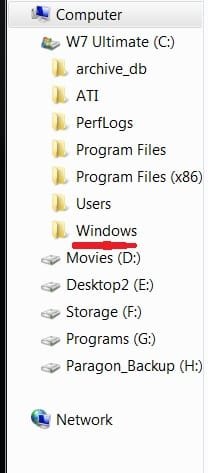
Look here, where the red mark is to see if the Windows.old file SIW mentioned above is present.


click to enlarge
.old.jpg
 

My Computer

Computer Manufacturer/Model Number
* BFK Customs *
OS
W 7 64-bit Ultimate
CPU
Intel Q9550 Yorkfield
Motherboard
ASUS P5Q Pro
Memory
8GB Dominator 8500C5D
Graphics Card(s)
ATI : XFX 5870
Sound Card
Realtek HD Audio 7-1
Monitor(s) Displays
1x 47" LCD HDMI & 3x 26" LCD HDMI
Screen Resolution
1920x1080P & 1920x1200
Hard Drives
1x 80GB Intel X25-M G2 SSD : 1x 500GB & 1x 640GB WD Caviar Black(s)
PSU
Corsair 620HX
Case
Cooler Master RC-690
Cooling
Tuniq Tower 120, 2x 140mm and 3x 120mm case fans
Keyboard
Microsoft 500
Mouse
Razer Diamondback 3G
Internet Speed
14 Mb/s
Other Info
1x Koutech 3Gb/s SATA HDD Hot Swap Rack
I know this sounds pretty stupid but I can't understand where all the files from Documents, Music, Downloads etc can be gone. Does this make any sense?
It doesn't to us, because we don't know what you did. Was it a repair install? Did you install overtop your existing install? Did you format the drive during the install?

It should make perfect sense to you, though, since you know what type of reinstall you did.

If you don't know, then where your programs still there on the computer when it was fixed, or did you have to reinstall all of them as well?
 

My Computer

OS
Windows 7 Ultimate x64 SP1
CPU
Intel Core i7-2600
Motherboard
Gigabyte GA-P67A-UD3P-B3
Memory
12 GB Patriot Extreme DDR3-1333
Graphics Card(s)
Nvidia GTX 470
Monitor(s) Displays
Dell UltraSharp 2209WA
Hard Drives
OCZ Agility3 240 GB, WD5001AALS, WD7501AALS
PSU
OCZ ModStream 700W
Case
CoolerMaster HAF 912 Advanced
Cooling
CoolerMaster Hyper 212 Plus
No, not a Windows old present and yes I did have to reinstall programs. Did not do a format.
 

My Computer

OS
Windows 7 Home Premium 64 bit
I can't say for sure, but it may have overwritten those files. I could give several reasons, but this is one why nothing of importance to me gets stored in the "My" folders on C:. I use a data drive or data partition for everything that's important. Problems with the OS are kept separate from my data.
 

My Computer

OS
Windows 7 Ultimate x64 SP1
CPU
Intel Core i7-2600
Motherboard
Gigabyte GA-P67A-UD3P-B3
Memory
12 GB Patriot Extreme DDR3-1333
Graphics Card(s)
Nvidia GTX 470
Monitor(s) Displays
Dell UltraSharp 2209WA
Hard Drives
OCZ Agility3 240 GB, WD5001AALS, WD7501AALS
PSU
OCZ ModStream 700W
Case
CoolerMaster HAF 912 Advanced
Cooling
CoolerMaster Hyper 212 Plus
Back
Top