Windows 7 reinstall

07sousterra

New member
Local time
1:23 AM
Messages
3
Hello everybody i just reinstalled my windows 7 professional laptop and it did it sucsfully and then when i went to my memory it said 54.2 out of 86.9 gb's left and when i first brought the laptop it came with 160gb and this is really annoying:mad:
how did it reduce my laptop from being a 160gb to 86.9
If you could hep me that would be great
Many Thanks
07sousterra
 

My Computer

Computer Manufacturer/Model Number
Tosiba satellite pro 450D-12X
OS
Windows 7 professional 32bit
Memory
160GB
Graphics Card(s)
Radeon HD 5750
Monitor(s) Displays
Laptop 1
Hard Drives
Bulit in laptop hardrive
Hello 07sousterra, welcome to Seven Forums!


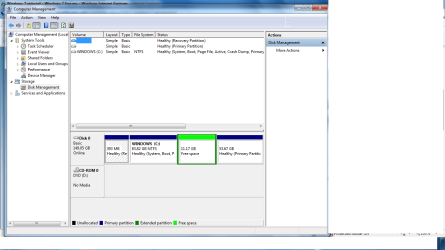
Before we make any specific recommendations will you please post a snip/screen-shot of the entire disk management drive map with a full description as to which drive/partition is which, so we can see what you have going on as there may be a fairly simple way to resolve the situation.

In the Windows start menu right click computer and click manage, in the left pane of the "Computer Management" window that opens click disk management and post a maximized snip of that.


How to Upload and Post a Screenshot and File in Seven Forums
 

My Computer

Computer Manufacturer/Model Number
* BFK Customs *
OS
W 7 64-bit Ultimate
CPU
Intel Q9550 Yorkfield
Motherboard
ASUS P5Q Pro
Memory
8GB Dominator 8500C5D
Graphics Card(s)
ATI : XFX 5870
Sound Card
Realtek HD Audio 7-1
Monitor(s) Displays
1x 47" LCD HDMI & 3x 26" LCD HDMI
Screen Resolution
1920x1080P & 1920x1200
Hard Drives
1x 80GB Intel X25-M G2 SSD : 1x 500GB & 1x 640GB WD Caviar Black(s)
PSU
Corsair 620HX
Case
Cooler Master RC-690
Cooling
Tuniq Tower 120, 2x 140mm and 3x 120mm case fans
Keyboard
Microsoft 500
Mouse
Razer Diamondback 3G
Internet Speed
14 Mb/s
Other Info
1x Koutech 3Gb/s SATA HDD Hot Swap Rack
just uploaded now :)
 

Attachments

  • Untitled.png
    Untitled.png
    41.6 KB · Views: 18

My Computer

Computer Manufacturer/Model Number
Tosiba satellite pro 450D-12X
OS
Windows 7 professional 32bit
Memory
160GB
Graphics Card(s)
Radeon HD 5750
Monitor(s) Displays
Laptop 1
Hard Drives
Bulit in laptop hardrive
You can right click, delete the green "Free Space" then C: can be extend into the created unallocated space.


What's on the partition to the far right?
 

My Computer

Computer Manufacturer/Model Number
* BFK Customs *
OS
W 7 64-bit Ultimate
CPU
Intel Q9550 Yorkfield
Motherboard
ASUS P5Q Pro
Memory
8GB Dominator 8500C5D
Graphics Card(s)
ATI : XFX 5870
Sound Card
Realtek HD Audio 7-1
Monitor(s) Displays
1x 47" LCD HDMI & 3x 26" LCD HDMI
Screen Resolution
1920x1080P & 1920x1200
Hard Drives
1x 80GB Intel X25-M G2 SSD : 1x 500GB & 1x 640GB WD Caviar Black(s)
PSU
Corsair 620HX
Case
Cooler Master RC-690
Cooling
Tuniq Tower 120, 2x 140mm and 3x 120mm case fans
Keyboard
Microsoft 500
Mouse
Razer Diamondback 3G
Internet Speed
14 Mb/s
Other Info
1x Koutech 3Gb/s SATA HDD Hot Swap Rack
Many thanks m8 the one on the far right i had never noticed i belive that i created it by acident or maybe freind did it not sure but nothing that i know was on it :confused:
Once again many thanks :)
Bare foot kid
 

My Computer

Computer Manufacturer/Model Number
Tosiba satellite pro 450D-12X
OS
Windows 7 professional 32bit
Memory
160GB
Graphics Card(s)
Radeon HD 5750
Monitor(s) Displays
Laptop 1
Hard Drives
Bulit in laptop hardrive
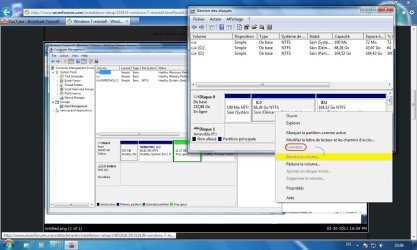
In that same disk management window you can right click the square box of the partition and click "Open" to explore the contents, if there's nothing there you want to save, you can do the same to it as the "Free Space" and recover it into the C: partition also.


I also have a way to recover the space to the left of the C: partition if you're interested, though it's a bit more complicated.
 

My Computer

Computer Manufacturer/Model Number
* BFK Customs *
OS
W 7 64-bit Ultimate
CPU
Intel Q9550 Yorkfield
Motherboard
ASUS P5Q Pro
Memory
8GB Dominator 8500C5D
Graphics Card(s)
ATI : XFX 5870
Sound Card
Realtek HD Audio 7-1
Monitor(s) Displays
1x 47" LCD HDMI & 3x 26" LCD HDMI
Screen Resolution
1920x1080P & 1920x1200
Hard Drives
1x 80GB Intel X25-M G2 SSD : 1x 500GB & 1x 640GB WD Caviar Black(s)
PSU
Corsair 620HX
Case
Cooler Master RC-690
Cooling
Tuniq Tower 120, 2x 140mm and 3x 120mm case fans
Keyboard
Microsoft 500
Mouse
Razer Diamondback 3G
Internet Speed
14 Mb/s
Other Info
1x Koutech 3Gb/s SATA HDD Hot Swap Rack
DD.jpg
You can try to extend your partition or create new partition and format the free space.
 

My Computer

OS
Windows 7 pro 64 bit
Memory
2 Go
Graphics Card(s)
Nvidia
Mouse
Microsoft optical mouse
Hello everybody i just reinstalled my windows 7 professional laptop and it did it sucsfully and then when i went to my memory it said 54.2 out of 86.9 gb's left...


You've touched on a pet peeve of mine. You didn't check "memory", you checked disk space. There is NO WAY you have more than 130G of memory. :geek:
 

My Computer

Computer type
PC/Desktop
Computer Manufacturer/Model Number
iBuyPower NZXT
OS
Microsoft Windows 10 Home Build 15036
CPU
Intel(R) Core(TM) i7-860 @ 2.80GHz
Motherboard
Gigabyte Technology Co., Ltd. P55-UD3L
Memory
4.00 GB
Graphics Card(s)
NVIDIA GeForce GTX 750
Sound Card
(1) Line 6 UX2 (2) Realtek High Definition Audio
Monitor(s) Displays
23" acer
Screen Resolution
1920 x 1080 x 32 bits (4294967296 colors) @ 60 Hz
Hard Drives
(1) WDC WD5000AAKS-00D2B0 ATA Device (2) Seagate FreeAgent Go 250G USB Device
Cooling
Corsair H75 liquid cooler (Very easy to install, actually)
Internet Speed
60M cable modem-->Linksys E1200-->1Gbps net card
Browser
Chrome
Other Info
This is probably the longest I've ever had a Windows machine run without having to restore it to scratch. I'm used to restoring to "factory" about every 2 yrs. I've run with Win7 since new in 2009 and only recently (Nov, '14) restored to clean up the machine from all my 'xperimenting. LOL!! I may never need another machine.

Upgraded to 10 when it was still free, then installed 2017 update.
Back
Top