Windows 7 reinstall

sevicetech

New member
Local time
9:05 PM
Messages
33
I have hard drive starting to fail and would like to move the installation to new partition on a different drive. Can I just copy the files over?

If I do need to reinstall on the empty partition will it activate with my upgrade media? System currently passes WGA and works, don't want to reinstall the wrong way and mess it up.
 

My Computer

Computer Manufacturer/Model Number
Asus
OS
Windows 7/Linux Ubuntu
CPU
AMD 7750
Motherboard
Asus M3N78-EM
Memory
2GB
Graphics Card(s)
8300 IGP
Monitor(s) Displays
65" HDTV
Hard Drives
80GB and 1TB
PSU
Rosewill Green 430W
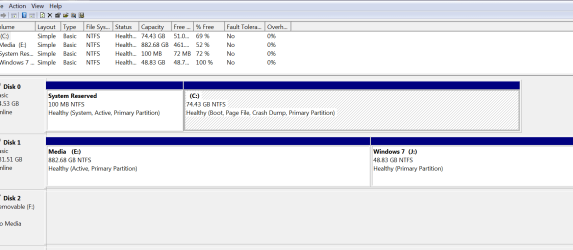
Please post back a screenshot of your full Disk management map, using Snipping Tool in Start Menu attaching file using paper clip in reply box.

Note exactly which partition you want to copy where, and what is on other partitions.

Apart from copying to another partition, would you consider saving a backup image of your current HD to reimage onto the other HD?
 
I have an 80GB C drive where W7 is installed (25GB is used). I have a 1TB drive divided into 2 partitions, one is 50GB empty and the rest is the other partition which holds my photos, video. media etc. I want to move my Windows 7 install to the 50GB empty partition on my 1TB drive and take the 80GB drive out all together. I'm OK with reinstalling W7 if that's the "easy way" to do it. My concern is the "system reserved" portion won't get moved to the 1TB drive. If i pull the 80GB drive out and just do a clean install on the 50GB partition, the windows install DVD won't see a current version of windows to upgrade/reinstall from.

I'll give the snipping tool a shot when I get to the HTPC.
 

My Computer

Computer Manufacturer/Model Number
Asus
OS
Windows 7/Linux Ubuntu
CPU
AMD 7750
Motherboard
Asus M3N78-EM
Memory
2GB
Graphics Card(s)
8300 IGP
Monitor(s) Displays
65" HDTV
Hard Drives
80GB and 1TB
PSU
Rosewill Green 430W
Here's the "snip" (cool tool BTW) I'm wanting to move the win7 install from C to J and remove disk0 out of the system entirely. I'm even OK with simply reinstalling W7 on the "J" partition, but I don't know if it will work since the upgrade media won't be able to verify the C drive installation. I know if the "system reserved" is on a different drive than the OS install the computer will need to have both drives in order to boot.
 

Attachments

  • Capture.PNG
    Capture.PNG
    22.4 KB · Views: 40

My Computer

Computer Manufacturer/Model Number
Asus
OS
Windows 7/Linux Ubuntu
CPU
AMD 7750
Motherboard
Asus M3N78-EM
Memory
2GB
Graphics Card(s)
8300 IGP
Monitor(s) Displays
65" HDTV
Hard Drives
80GB and 1TB
PSU
Rosewill Green 430W
You can take either of these general approaches:

Make an image of the entire disk 0, which contains the system reserved and C partitions. You would presumably put that image file on E. Then restore that image to J. C currently has about 24 GB used, so I think you would have to shrink C in Disk Managment to say 30 before you make the image. It would then fit on J. You could use Windows 7 imaging tools, Macrium Reflect, or Acronis. You would do this from your current C drive.

Or you could kiss off disk 0 entirely and just do a clean install on J. If you have a legit Windows 7 upgrade install disc, you don't need to worry about seeing a current version. A new system reserved partition will be created on disc 1. Disconnect disc 0 before doing this to avoid complications. Boot from the Windows 7 install disc. When it comes to life, it will be in a new world and completely unaware of disc 0 or any previous install. You have 48 gigs of space on J, which will be enough to last a long time assuming you keep most or all of your data on Media (E drive).

I would take the second route. You wouldn't be under time pressure worrying about drive failure, you wouldn't have to deal with imaging or partition shrinking.

If you are activated now and take the image route, you won't have to reactivate. If you are activated now and reinstall on J rather than make an image, you might have to reactivate. No problem; if you have to talk to Microsoft just tell them the truth--you had a drive failure and were forced into it.

If you do the image, you won't have to reinstall programs. If you reinstall to J, you will have to reinstall programs.

Stuff like mp3s, pictures, Word documents, etc can be dragged around across partitions. Installed programs cannot.

I would copy anything important on C to E right now (other than installed progams), including bookmarks and email. If all of your personal data is already on E, then who cares if C explodes--you can always recover if you have an install disc.
 

My Computer

Computer type
PC/Desktop
Computer Manufacturer/Model Number
Ignatz Special; 4 speed manual gearbox; factory air conditioning; one of one
OS
Windows 7 Home Premium SP1, 64-bit
CPU
Intel Skylake i5-6600K, not overclocked
Motherboard
AsRock Z170M Extreme 4, micro ATX
Memory
8 GB HyperX DDR4-2666 (2 x 4 GB)
Graphics Card(s)
none; graphics are integrated on CPU
Sound Card
onboard: Realtek ALC1150; external: USB Behringer UF0-202
Monitor(s) Displays
Dell S2340M 23 inch IPS
Screen Resolution
1600 x 900
Hard Drives
System: Crucial MX100 series SSD, 128 GB;
Data: Samsung Spinpoint 103SJ, 1 TB;
Backup: WD Caviar Green WD30EZRX-00D8PB0, 3 TB
PSU
Rosewill SilentNight 500 watt fanless, semi-modular
Case
Antec Solo II
Cooling
Noctua NH-U12S; Noctua F12 intake, Noctua S12A exhaust
Keyboard
Microsoft 200 6JH-00001 USB
Mouse
Dell or Microsoft optical wired; USB
Antivirus
Microsoft Security Essentials and Malwarebytes Premium
Browser
Pale Moon
Other Info
All fans PWM; speeds at idle: CPU circa 500 rpm; intake circa 600 rpm; exhaust circa 600 rpm; CPU temps 27 idle and 47 C load in a warm room (27 C/81 F) when running Intel Extreme Tuning Utility stress test.
Stuff like mp3s, pictures, Word documents, etc can be dragged around across partitions. Installed programs cannot.

You can move installed programs successfully if you relabel their destination location to match their origin.

So, if you move all your programs from say D:\Program Files to E:\Program Files, as long as you change the drive letter of the new program partition to D:\ then the program shortcuts will all still be pointing to correct directories and operate normally.
 

My Computer

Computer type
PC/Desktop
Computer Manufacturer/Model Number
Custom
OS
7 x64 Ultimate
CPU
AMD Ryzen 5
Motherboard
Gigabyte GA-AB350-Gaming
Memory
16GB DDR4
Graphics Card(s)
Radeon R7 360
Monitor(s) Displays
2 x Dell U2518D
Screen Resolution
2560x1440 2560x1440
Hard Drives
WD 500GB x2
Samsung SSD 128MB (OS)
XPG SX8200 Pro M.2 2280 1TB
PSU
Antec 500
Cooling
Hyper 212 EVO
Keyboard
Logitech cordless K800
Mouse
Logitech M510
Antivirus
Avira
Use free Partition Wizard bootable CD to shrink C: smaller than J: then copy C: into deleted J: space, recover MBR into C:

Boot PW CD, select 1 for screen resolution, then rightclick C:, Resize smaller than J:, OK.

Now rightclick J: partition to Delete, OK. Now rightclick C: Copy into J: space, letter it C:, OK. Apply all steps.

Either swap the cable for DISK0 to DISK1, or set DISK1 as first HD to boot in BIOS boot order, after DVD. Leave DISK0 unplugged.

Now boot into Win7 DVD, select Repair console on second screen, click through to recovery tools to open a Command Line, type:

DISKPART
LIST DISK
SELECT DISK # (# for new Win7 HD)
LIST PARTITION
SELECT PARTITION # (# for Win7 partition)
ACTIVE
EXIT

Now boot back into Win7 DVD Repair console, click through to Recovery Tools, select Startup Repair and run up to 3 separate times with reboots to rewrite MBR to Win7 partition.

After Win7 starts, you can plug in other HD to delete using booted PW CD.
 
I went ahead and just did a clean install on the "J" (now c) drive. I have 2 issues:
HDTV is forced into 480i when it is the only display (works fine at 1080i when ran in dual display mode). of course the default 480i is @ 30hz and the TV rolls and I can't change it to 1080i. This is all done through the Nvidia component output. New Nvidia drivers did not fix. Even setting the HDTV as primary monitor won't work.

The other problem I'm having is sound, center/rear channels are weak. Mixer shows all channels maxed.

FWIW Windows did not like the key until I left the 80gb HD hooked up for the reinstall. It needed to detect the old windows install. After all was said and done it activated with no problem.
 

My Computer

Computer Manufacturer/Model Number
Asus
OS
Windows 7/Linux Ubuntu
CPU
AMD 7750
Motherboard
Asus M3N78-EM
Memory
2GB
Graphics Card(s)
8300 IGP
Monitor(s) Displays
65" HDTV
Hard Drives
80GB and 1TB
PSU
Rosewill Green 430W
Safe mode works @ 480i, won't let me change from 800x600
 

My Computer

Computer Manufacturer/Model Number
Asus
OS
Windows 7/Linux Ubuntu
CPU
AMD 7750
Motherboard
Asus M3N78-EM
Memory
2GB
Graphics Card(s)
8300 IGP
Monitor(s) Displays
65" HDTV
Hard Drives
80GB and 1TB
PSU
Rosewill Green 430W
Check your computer manufacturer's Support Downloads webpage for your model for Sound drivers and possibly extra software. Ditto Video drivers. If its Custom built then check your Sound and Video hardware maker's Support Downloads website to try all of the latest and next-to-latest plus any Beta drivers.
 
I tried the VIA control panel but it doesn't offer bass management. No sub-woofer and VIA won't redirect the sub channel to the mains. In Windows the control panel will only allow the center and surround speaker to go to 36 in volume. Perhaps a dedicated sound card might do a better job...
 

My Computer

Computer Manufacturer/Model Number
Asus
OS
Windows 7/Linux Ubuntu
CPU
AMD 7750
Motherboard
Asus M3N78-EM
Memory
2GB
Graphics Card(s)
8300 IGP
Monitor(s) Displays
65" HDTV
Hard Drives
80GB and 1TB
PSU
Rosewill Green 430W
I tried doing another reinstall to correct my Graphics issue. W7 doesn't seem to be completely happy unless it's installed on the 1st partion on the drive and allows the boot 'system reserved' partition to be created. Unfortuantely that means moving the contents to the "back" of the drive and creating an new "front" partition. Sucks not having another huge drive I can just dump the data to then do a reformat.
 

My Computer

Computer Manufacturer/Model Number
Asus
OS
Windows 7/Linux Ubuntu
CPU
AMD 7750
Motherboard
Asus M3N78-EM
Memory
2GB
Graphics Card(s)
8300 IGP
Monitor(s) Displays
65" HDTV
Hard Drives
80GB and 1TB
PSU
Rosewill Green 430W
Back
Top