Windows 7 Repair Install ... expert advice needed

Contours

New member
Local time
11:53 PM
Messages
11
I've had severe problems with the icons and taskbar on my Win 7 desktop since I replaced the hard drive a few weeks ago. I've tried various troubleshooting methods (restore points ... sfc scan ... malwarebytes), but nothing has brought things back to full working order. The PC is a couple of years old and had been fine before this.

The problems are so various that I haven't been able to determine if my user accounts are corrupt or the Win7 files are corrupt. As examples, my main account is the only one that ever shows desktop icons. Even the PC's built-in Administrator account never shows any icons on the desktop or taskbar. And the Control Panel never shows any icons, regardless of which user is logged on. All my 8 or 9 installed applications run OK, but none of them show icons or graphics in their help files, only text.

Anyway, I'd like to entirely replace the Win7 on C:, but keep the contents of the D: and E: drives that I set up. When I read about repairs and reinstalls, I'm unsure how much of the hard drive will be erased. I'm also a bit strapped by the fact that the Win7 "copy" that I have was written from the PC back when it was new (pre-SP1 and pre-new-drive). I seem to recall it claims to overwrite everything.

So, what is my best course of action? ... one that leads to a reliable O/S in the fewest steps.

Thanks in advance for any help.
 

My Computer My Computer

Computer Manufacturer/Model Number
Acer Veriton
OS
Windows 7 Professional 32-bit

My Computer My Computer

Computer type
PC/Desktop
Computer Manufacturer/Model Number
Self built custom
OS
64-bit Windows 11 Pro for Workstations
CPU
Intel i7-8700K OC'd to 5 GHz
Motherboard
ASUS ROG Maximus XI Formula Z390
Memory
64 GB (4x16GB) G.SKILL TridentZ RGB DDR4 3600 MHz
Graphics Card(s)
ASUS ROG-STRIX-GTX1080TI-O11G-GAMING
Sound Card
Integrated
Monitor(s) Displays
2 x Samsung Odyssey G7 27"
Screen Resolution
2560x1440
Hard Drives
1TB Samsung 990 PRO M.2,
4TB Samsung 990 PRO PRO M.2,
TerraMaster F8 SSD Plus NAS
PSU
Seasonic Prime Titanium 850W
Case
Thermaltake Core P3
Cooling
Corsair Hydro H115i
Keyboard
Logitech wireless K800
Mouse
Logitech MX Master 4
Internet Speed
2 Gb/s Download and 100 Mb/s Upload
Antivirus
Malwarebyte Anti-Malware Premium
Browser
Google Chrome
Other Info
Logitech Z625 speaker system,
Logitech BRIO 4K Pro webcam,
HP Color LaserJet Pro MFP M477fdn,
APC SMART-UPS RT 1000 XL - SURT1000XLI,
Galaxy S23 Plus phone
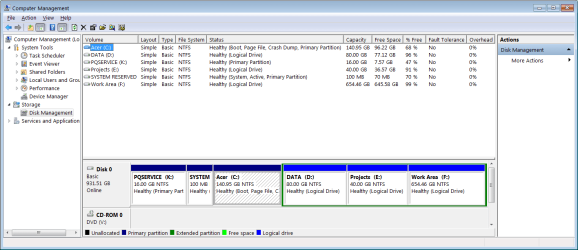
Sorry for the delay. Here's the capture.
 

Attachments

  • Disk Structure.png
    Disk Structure.png
    28.9 KB · Views: 2

My Computer My Computer

Computer Manufacturer/Model Number
Acer Veriton
OS
Windows 7 Professional 32-bit
Goto folder C:\Program Files and C:\Windows\System32. You see icons in front of some files?
Do you see picture preview images in "picture library"?
Can you display jpg, gif, png files?

win7 boot from "system reserved" (bootmanager and bootmenu)... not related to your problems. "repair install" or "clean install" will only affect Acer (C).

Try http://www.sevenforums.com/tutorials/3413-repair-install.html . It doesn't do anything on D,E,F.
Post if it solved the issue
 

My Computer My Computer

Computer type
Laptop
Computer Manufacturer/Model Number
ACER ASPIRE 5742G
OS
Microsoft Windows 7 Home Premium 64-bits 7601 Multiprocessor Free Service Pack 1
CPU
Intel(R) Core(TM) i3 CPU M 370 @ 2.40GHz
Motherboard
Acer Aspire 5742G
Memory
4,00 GB
Graphics Card(s)
ATI Mobility Radeon HD 5400 Series
Sound Card
(1) AMD High Definition Audio Device (2) Realtek High Defi
Screen Resolution
1366 x 768 x 32 bits (4294967296 colors) @ 60 Hz
Hard Drives
WDC WD5000BEVT-22ZAT0

My Computer My Computer

Computer type
Laptop
Computer Manufacturer/Model Number
ACER ASPIRE 5742G
OS
Microsoft Windows 7 Home Premium 64-bits 7601 Multiprocessor Free Service Pack 1
CPU
Intel(R) Core(TM) i3 CPU M 370 @ 2.40GHz
Motherboard
Acer Aspire 5742G
Memory
4,00 GB
Graphics Card(s)
ATI Mobility Radeon HD 5400 Series
Sound Card
(1) AMD High Definition Audio Device (2) Realtek High Defi
Screen Resolution
1366 x 768 x 32 bits (4294967296 colors) @ 60 Hz
Hard Drives
WDC WD5000BEVT-22ZAT0
Since you have preinstalled Win7 I would follow the steps to Clean Reinstall - Factory OEM Windows 7 without the bloatware and duplicate Acer utilities which interfere with better versions built into Win7. Everything needed including the latest official installer for your licensed version is in the blue link.

During the booted Custom install I would delete the PQService, System and C partition using the drive options shown in steps 7 and 8 of Clean Install Windows 7. Then highlight the Unallocated space created to create and format a New partition in the space. Don't touch the data partitions.
 
Thanks to each of you. I'm starting my inventory and the downloads. I'm convinced that the advantages of a clean install outweigh the other options ... especially since my Start button occasionally ceases to do anything at all (except blink when clicked).

I'll post my results.
 

My Computer My Computer

Computer Manufacturer/Model Number
Acer Veriton
OS
Windows 7 Professional 32-bit
Good choice.

You will get and keep a perfect Clean Reinstall - Factory OEM Windows 7 to the exact extent which you stick with only the tools and methods given.

Remember first thing after install to enable Automatically deliver drivers via Windows Update (Step 3) then run all rounds of Important and Optional WIndows Update with reboots, until there are no more when you Check for Updates. Then import any missing drivers in Device Manager from the Acer SUpport Downloads webpage for your model - there shouldn't be more than one or two.

Let us know how it goes.
 
For anyone following along, I found this excellent tool for identifying each and every module that's been installed since the PC's startup (sort on Installation Date). The best feature is an html file that exactly documents the "before" state of the PC's software. A good overview, of course, is provided by the recommended Belarc Advisor.

MyUninstaller: Alternative uninstaller to the standard Windows Add / Remove module
 

My Computer My Computer

Computer Manufacturer/Model Number
Acer Veriton
OS
Windows 7 Professional 32-bit
Back
Top