I believe that is the
System Repair Disk , which is booted to run
System Recovery Options.
Click the blue links to see what I'm referring to.
You can run Startup Repair repeatedly but I'm not sure that would complete the failed Recovery.
If you've tried running Factory Recovery repeatedly from boot and it won't work, and you don't have the Acer Recovery disks to use as a backup, then as stated earlier your options are to order the disks from Acer Tech Support, or use a Win7 installation DVD to
Clean Reinstall Windows 7 Factory OEM with the Product Key on the COA sticker.
yes , you are right it's system repair disk .
http://systemdiscs.com/
i don't want to clean install because my windows 7 starter is restored to factory and i am able to access os though it has some serious booting issues (
i will tell u how i got all these issues and how i recovered in steps and then give ur solution )
1) I am happy with my acer netbook containing windows 7 starter . one bad day (came to know later) i installed linux opensuse on other drive of my hardisk
2) right from the beginning of installation of linux i faced some bad issues , any how i successfully installed the opesuse. Used LINUX for 1 day after that i got some problems regarding hardware compatibility (especially my usb interent modem) without internet i can't do my work ,so decided to get rid of that linux ,i booted to windows 7 and deleted all the drives assoisated with the linux and restared .now the main issue arised was no boot menu was appearing,instead of this grub is opening and ubable to boot windows 7.
3) I followed the procedure as explained in this thread
http://www.sevenforums.com/backup-restore/62209-remove-grub-restore-windows-7-a.html but not done every thing exactly , ie ., just i selected startup repair instead of using command prompt to get back to windows .
4) for completing the above process i have one hurdle ie ., windows repair disk / usb (as my os was pre-installed so no repair/installation disk with me ) again i googled in this link i got the answer
Step-by-Step Guide to Making a Bootable Windows Recovery USB - EasyBCD - NeoSmart Technologies Wiki
5)now every thing is fine, i proceeded as stated in the link given in step 3 above .... a big relief for me my os was repaired but this time two entries are appearing one was windows 7 (recovered) where as remaining one was windows 7 recovery (i noticed later ,as it was created because of the procedure followed in the link stated in step 4 above) i dint mind much about this entry because i happy to recover my os back
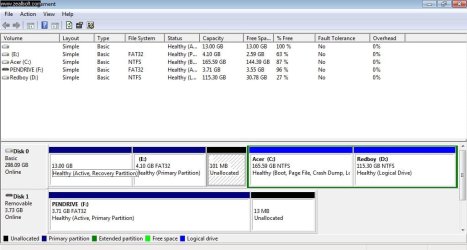
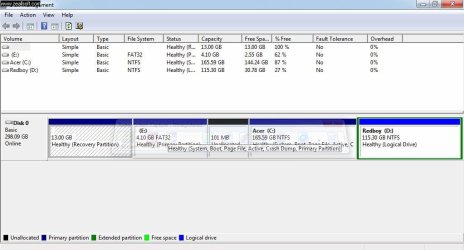
6)I am doing my regular work , in the process i opened "my computer" and i found one new drive named "system reserved" with 100 mb and 72 mb was free . because of over enthusiasm i deleted this drive also ... before deleting i have asked a question regarding this, one can observe it was the first post of this thread ...
now my fate completely reversed it's not booting again ... , once again i does the same process did earlier and again i recovered os back ....
now i created a new problem
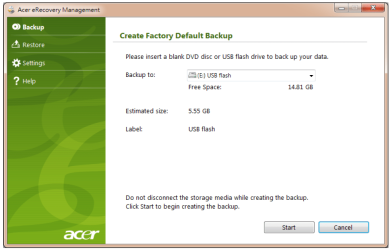
(this is my present issue to solve) i used acer erecovery management software in windows menu and selected restore to facory option with complete deletion of softwares and files ...the process started on boot up ,
e recovey management initiated and restore process was successfull and finished as i said it created new problem after boot up . instead of boot menu again e recovery managemnt software is appearing even though the process of restoring is successful one can observe this in the next link
04032012 - YouTube
again to get rid this i used my magic wand (windows 7 repair usb created earlier) this time also two entries appeared in that one was windows 7 starter i entered now the remaining process of installing drivers other acer sofwares are proceded auotmatically and after one hour i recoverd my os back with factory settings ... the only one problem is iam unable to boot form my hardisk, it cannot be done with out my magic wand (repair usb) ...
i mean if put boot from hard disk - the process of restoring form acer e recovey software was appearing repeatedly
if i put usb as primary booting device - boot menu appearing and boot entries are shown as windows 7 stater and windows 7 recovery ...
u can observe
There are a total of 2 entries listed in the bootloader. (in easy bcd s/w)
Default: Windows 7 Starter
Timeout: 30 seconds
EasyBCD Boot Device: F:\
Entry #1
Name: win 7 recovery
BCD ID: {23b9e2ca-66c0-11e1-b907-0021977d0568}
Device: boot
Bootloader Path: \NST\AutoNeoGrub0.mbr
Entry #2
Name: Windows 7 Starter
BCD ID: {current}
Drive: C:\
Bootloader Path: \Windows\system32\winload.exe
so please help me to boot from harddisk instead of using my usb repair disk ....

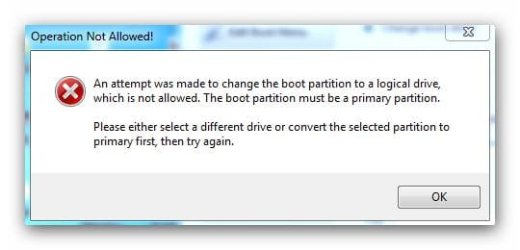

 or any other solution u can ....