Windows 7 RocketDock Skin

Hybrid

New member
Member
Local time
4:04 AM
Messages
66
Location
Ontario, Canada
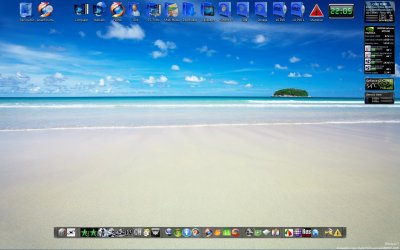
Hey guys. Working on a Windows 7 theme for a Rocketdock skin.

Tell me what you think so far.

http://www.imagenerd.com/uploads/w7rdskin1-5ZAlT.png

The bottom is the same as the top, it's just hiding. (The border and all is what I'm talking about)

And if you don't know what you're looking at, it's the Dock station at the bottom of the image. See the theme? :p


But ya, any suggestions/ideas?

Oh, and ya, forgot about the separators. Not sure what I should do for them. I'll come up with something I hope. If you have an idea for them. Share. :)
 

My Computer My Computer

At a glance

Windows 7 Ultimate 64xIntel Core 2 Duo Mobile T5750 @ 2000 MHz3072 MBNVIDIA GeForce 8600M GS
Computer Manufacturer/Model Number
LG R500
OS
Windows 7 Ultimate 64x
CPU
Intel Core 2 Duo Mobile T5750 @ 2000 MHz
Motherboard
LG Electronics COLUMBIA
Memory
3072 MB
Graphics Card(s)
NVIDIA GeForce 8600M GS
Sound Card
Speakers (Realtek High Definition Audio)
Monitor(s) Displays
15.4" WXGA with Fine Bright Technology
Screen Resolution
12800 x 800
Hard Drives
Internal: 250 GB
External: 250 GB
Mouse
Logitech G5 Laser Gaming Mouse
Looks great Hybrid. I like this application and have used it for a couple of years now.
Could the seperators be similar to the border perhaps?
I like your recycle icon, where did you get it?

Nice work, John:D
 

My Computer My Computer

At a glance

Windows 7 Home Premium 64 biti7 [email protected]2x4GB Corsair Vegeance DDR3XFX GTX 260 Black Edition
Computer Manufacturer/Model Number
The Monolith. 3.1
OS
Windows 7 Home Premium 64 bit
CPU
i7 [email protected]
Motherboard
Gigabyte Z77-D3H
Memory
2x4GB Corsair Vegeance DDR3
Graphics Card(s)
XFX GTX 260 Black Edition
Sound Card
none-through large stereo hi fi
Monitor(s) Displays
Croosover 27MDP LED IPS Dell 2408 WFP
Screen Resolution
2560x1440 1920x1200
Hard Drives
1x Samsung 840Pro 128GB SSD
1x Samsung Spinpoint F1 1TB
PSU
Corsair AX 850 Watt
Case
Cooler Master ACTS 840
Cooling
Be Quiet! Dark Rock Pro
Keyboard
Enermax Aurora
Mouse
Logitech Ballmouse
Internet Speed
20MBPS
See the theme? :p

Yes except that bar is actually a light shade of blue on top and a darker shade on bottom. I was kind of expecting a glass dock but it still looks good.
 

My Computer My Computer

At a glance

Win 7
OS
Win 7
It's a pretty good effort, what do you think of this one I made?

2009-06-15_220550.jpg
 

My Computer My Computer

At a glance

Windows 7 Ultimate Vista Ultimate x64Core 2 Duo E8500 3.16Ghz @ 3.8Ghz2x2Gigs Patriot PC2-6400 LLInno3D GeForce GTX260 216 SP
Computer Manufacturer/Model Number
Home Brew
OS
Windows 7 Ultimate Vista Ultimate x64
CPU
Core 2 Duo E8500 3.16Ghz @ 3.8Ghz
Motherboard
eVGA 750i FTW
Memory
2x2Gigs Patriot PC2-6400 LL
Graphics Card(s)
Inno3D GeForce GTX260 216 SP
Monitor(s) Displays
ASUS VW222U 22" 2ms Response time
Screen Resolution
1680x1050
Hard Drives
SATA 150GB
SATA II 250GB
USB IDE 750GB Ext.
PSU
HYTEC 600W & Thermaltake 650W Toughpower Power Exp
Case
Thermaltake Armor LCS (Liquid Cooling System)
Cooling
Liquid Cooling System
Keyboard
Logitech G15 Gaming Keyboard
Mouse
Logitech G9 Gaming Mouse
that looks awesome, hybrid. it's almost reason enough for me to start using a dock again! too bad rocketdock doesn't support aero blur :(

you might consider adding the little white details along the sides that aero window frames have to make it a bit more authentic. might boost the shadow depth a bit too, make it more like an active window...

it matches my skin for CD Art Display perfectly! i cheated with mine though, i made it straight from a screenshot of a true aero window :)
 

Attachments

  • cad.png
    cad.png
    49.8 KB · Views: 221

My Computer My Computer

At a glance

7600 x86Core 2 Duo e7200, 2.53 ghz2x DDR2 PC5300 1gb, 667 mhzGeForce 9500gt, 512mb
OS
7600 x86
CPU
Core 2 Duo e7200, 2.53 ghz
Motherboard
Micro-Star MS-7529
Memory
2x DDR2 PC5300 1gb, 667 mhz
Graphics Card(s)
GeForce 9500gt, 512mb
Monitor(s) Displays
22" LG Flatron w2234s
Screen Resolution
1680x1050
Hard Drives
Excelstor SATA-II 250gb 7200rpm, 8mb cache
PSU
CoolerMaster M520
Internet Speed
30/20 mbits
Windows 7 Theme - RocketDock.com

About the blue shade on the border. When I get home, I'll probably make it grey. Thanks for the suggestion.

I'm still working on some other styles for it too. I'll keep ya posted. ;)
 

My Computer My Computer

At a glance

Windows 7 Ultimate 64xIntel Core 2 Duo Mobile T5750 @ 2000 MHz3072 MBNVIDIA GeForce 8600M GS
Computer Manufacturer/Model Number
LG R500
OS
Windows 7 Ultimate 64x
CPU
Intel Core 2 Duo Mobile T5750 @ 2000 MHz
Motherboard
LG Electronics COLUMBIA
Memory
3072 MB
Graphics Card(s)
NVIDIA GeForce 8600M GS
Sound Card
Speakers (Realtek High Definition Audio)
Monitor(s) Displays
15.4" WXGA with Fine Bright Technology
Screen Resolution
12800 x 800
Hard Drives
Internal: 250 GB
External: 250 GB
Mouse
Logitech G5 Laser Gaming Mouse
that looks awesome, hybrid. it's almost reason enough for me to start using a dock again! too bad rocketdock doesn't support aero blur :(
Try this method to get aero blur i bet it would work.
 

My Computer My Computer

At a glance

Win 7
OS
Win 7
I find RD to be pointless, since W7 pretty much already has one.
 

My Computer My Computer

At a glance

Windows 7 RTMIntel Q660 Quad-Core CPU (2.40GHz)4GB Dual Channel DDR2 SDRAM (800MHz)ATI Radeon HD 4850 (512MB)
Computer Manufacturer/Model Number
Dell Studio 540
OS
Windows 7 RTM
CPU
Intel Q660 Quad-Core CPU (2.40GHz)
Memory
4GB Dual Channel DDR2 SDRAM (800MHz)
Graphics Card(s)
ATI Radeon HD 4850 (512MB)
Monitor(s) Displays
20'' Dell E207WFP
Screen Resolution
1680x1050
Hard Drives
500GB Serial ATA Hard Drive (7200RPM)

250GB Serial ATA Hard Drive (7200RPM)
PSU
400 Watt DC Power Supply
Case
H: 14.2 inches | W: 6.7 inches | D: 17.1 inches
Keyboard
Dell Multimedia Keyboard
Mouse
Dell Premium Optical USB Mouse
Internet Speed
Download Rate: 5533 KB/s | Upload Rate: 2085 KB/s
Agreed but it looks cool.:D
 

My Computer My Computer

At a glance

Windows 7 Home Premium 64 biti7 [email protected]2x4GB Corsair Vegeance DDR3XFX GTX 260 Black Edition
Computer Manufacturer/Model Number
The Monolith. 3.1
OS
Windows 7 Home Premium 64 bit
CPU
i7 [email protected]
Motherboard
Gigabyte Z77-D3H
Memory
2x4GB Corsair Vegeance DDR3
Graphics Card(s)
XFX GTX 260 Black Edition
Sound Card
none-through large stereo hi fi
Monitor(s) Displays
Croosover 27MDP LED IPS Dell 2408 WFP
Screen Resolution
2560x1440 1920x1200
Hard Drives
1x Samsung 840Pro 128GB SSD
1x Samsung Spinpoint F1 1TB
PSU
Corsair AX 850 Watt
Case
Cooler Master ACTS 840
Cooling
Be Quiet! Dark Rock Pro
Keyboard
Enermax Aurora
Mouse
Logitech Ballmouse
Internet Speed
20MBPS
I find RD to be pointless, since W7 pretty much already has one.

I generally have mine on the left side and have it on auto hide and it has nearly all my most common used apps on it, for me to have all those apps pinned on the taskbar would look simply ugly and take up valuable real estate, so IMO I find it far from pointless.

Could you imagine having all these pinned on the Taskbar?

2009-06-16_071350.jpg
 

My Computer My Computer

At a glance

Windows 7 Ultimate Vista Ultimate x64Core 2 Duo E8500 3.16Ghz @ 3.8Ghz2x2Gigs Patriot PC2-6400 LLInno3D GeForce GTX260 216 SP
Computer Manufacturer/Model Number
Home Brew
OS
Windows 7 Ultimate Vista Ultimate x64
CPU
Core 2 Duo E8500 3.16Ghz @ 3.8Ghz
Motherboard
eVGA 750i FTW
Memory
2x2Gigs Patriot PC2-6400 LL
Graphics Card(s)
Inno3D GeForce GTX260 216 SP
Monitor(s) Displays
ASUS VW222U 22" 2ms Response time
Screen Resolution
1680x1050
Hard Drives
SATA 150GB
SATA II 250GB
USB IDE 750GB Ext.
PSU
HYTEC 600W & Thermaltake 650W Toughpower Power Exp
Case
Thermaltake Armor LCS (Liquid Cooling System)
Cooling
Liquid Cooling System
Keyboard
Logitech G15 Gaming Keyboard
Mouse
Logitech G9 Gaming Mouse
I find RD to be pointless, since W7 pretty much already has one.
Depends on how you use it.
I don't want my taskbar having all/some of my games or most of the programs I have pinned to it.

My taskbar is set on small icons, group when full. So that's one reason why I use RocketDock. To save up space, not be cluttered, etc.
 

My Computer My Computer

At a glance

Windows 7 Ultimate 64xIntel Core 2 Duo Mobile T5750 @ 2000 MHz3072 MBNVIDIA GeForce 8600M GS
Computer Manufacturer/Model Number
LG R500
OS
Windows 7 Ultimate 64x
CPU
Intel Core 2 Duo Mobile T5750 @ 2000 MHz
Motherboard
LG Electronics COLUMBIA
Memory
3072 MB
Graphics Card(s)
NVIDIA GeForce 8600M GS
Sound Card
Speakers (Realtek High Definition Audio)
Monitor(s) Displays
15.4" WXGA with Fine Bright Technology
Screen Resolution
12800 x 800
Hard Drives
Internal: 250 GB
External: 250 GB
Mouse
Logitech G5 Laser Gaming Mouse
I generally have mine on the left side and have it on auto hide and it has nearly all my most common used apps on it, for me to have all those apps pinned on the taskbar would look simply ugly and take up valuable real estate, so IMO I find it far from pointless.

Could you imagine having all these pinned on the Taskbar?

View attachment 14485


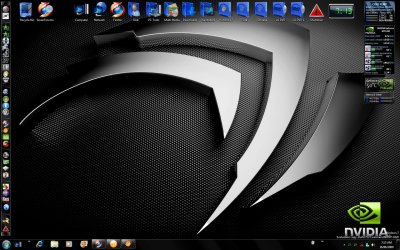
Hi, the blue folders on the top of your screen, are they just folders, or have you used any other application for it? If they are just folders, where did you get those icons from?
 

My Computer My Computer

At a glance

Windows 7 UltimateAMD Athlon(tm) 64 X2 Dual Core Processor 3600...6144MB RAMNVIDIA GeForce 8600 GT
OS
Windows 7 Ultimate
CPU
AMD Athlon(tm) 64 X2 Dual Core Processor 3600+ 2.00 Ghz
Motherboard
ASUS MPV4-NPV
Memory
6144MB RAM
Graphics Card(s)
NVIDIA GeForce 8600 GT
I made them and I have integrated them into imageres.dll and shell32.dll so I didn't have to use Iconpackager anymore, which wasn't working very well anyway, I found if I wanted to revert to the default icons every thing was wrong.

I ended up uninstalling it and doing a repair Install of Windows to get it back the it was ment to be and then I found a way of changing the default icons with the ones I made using Restorator.

You can find some of the packages I made for Iconpackager here, MrGRiM01 on deviantART
 

My Computer My Computer

At a glance

Windows 7 Ultimate Vista Ultimate x64Core 2 Duo E8500 3.16Ghz @ 3.8Ghz2x2Gigs Patriot PC2-6400 LLInno3D GeForce GTX260 216 SP
Computer Manufacturer/Model Number
Home Brew
OS
Windows 7 Ultimate Vista Ultimate x64
CPU
Core 2 Duo E8500 3.16Ghz @ 3.8Ghz
Motherboard
eVGA 750i FTW
Memory
2x2Gigs Patriot PC2-6400 LL
Graphics Card(s)
Inno3D GeForce GTX260 216 SP
Monitor(s) Displays
ASUS VW222U 22" 2ms Response time
Screen Resolution
1680x1050
Hard Drives
SATA 150GB
SATA II 250GB
USB IDE 750GB Ext.
PSU
HYTEC 600W & Thermaltake 650W Toughpower Power Exp
Case
Thermaltake Armor LCS (Liquid Cooling System)
Cooling
Liquid Cooling System
Keyboard
Logitech G15 Gaming Keyboard
Mouse
Logitech G9 Gaming Mouse
Edit: Sent in PM
 
Last edited:

My Computer My Computer

At a glance

Windows 7 RC - 7100 64bitAMD Athlon(tm) 64 x2 4800+ 2.50Ghz Dual Core4 gig Kingston DDR2XFX Nvidia GeForce GTS 250
OS
Windows 7 RC - 7100 64bit
CPU
AMD Athlon(tm) 64 x2 4800+ 2.50Ghz Dual Core
Motherboard
Hewlett Packard
Memory
4 gig Kingston DDR2
Graphics Card(s)
XFX Nvidia GeForce GTS 250
Sound Card
na
Monitor(s) Displays
22" Samsung LCD Syncmaster
Screen Resolution
1680x1050
Hard Drives
300gig Western Digital
PSU
BFG Tech 550watt
Case
Crap stock Dell
Cooling
Side panel open on case, and a box fan blowing in.
Keyboard
G15
Mouse
G9
Internet Speed
Bike Messenger
I will see what I can do for you concerning the folders, as far as the Firefox icons go, they were posted on the forum somewhere but I don't remember where so I will just post them again, the best ones I have seen and was the reason I started to make my own.

View attachment firefox icons.zip
 

My Computer My Computer

At a glance

Windows 7 Ultimate Vista Ultimate x64Core 2 Duo E8500 3.16Ghz @ 3.8Ghz2x2Gigs Patriot PC2-6400 LLInno3D GeForce GTX260 216 SP
Computer Manufacturer/Model Number
Home Brew
OS
Windows 7 Ultimate Vista Ultimate x64
CPU
Core 2 Duo E8500 3.16Ghz @ 3.8Ghz
Motherboard
eVGA 750i FTW
Memory
2x2Gigs Patriot PC2-6400 LL
Graphics Card(s)
Inno3D GeForce GTX260 216 SP
Monitor(s) Displays
ASUS VW222U 22" 2ms Response time
Screen Resolution
1680x1050
Hard Drives
SATA 150GB
SATA II 250GB
USB IDE 750GB Ext.
PSU
HYTEC 600W & Thermaltake 650W Toughpower Power Exp
Case
Thermaltake Armor LCS (Liquid Cooling System)
Cooling
Liquid Cooling System
Keyboard
Logitech G15 Gaming Keyboard
Mouse
Logitech G9 Gaming Mouse
lol Thanks. You are mighty quick sir. I just deleted the post to send it in a PM. :D
 

My Computer My Computer

At a glance

Windows 7 RC - 7100 64bitAMD Athlon(tm) 64 x2 4800+ 2.50Ghz Dual Core4 gig Kingston DDR2XFX Nvidia GeForce GTS 250
OS
Windows 7 RC - 7100 64bit
CPU
AMD Athlon(tm) 64 x2 4800+ 2.50Ghz Dual Core
Motherboard
Hewlett Packard
Memory
4 gig Kingston DDR2
Graphics Card(s)
XFX Nvidia GeForce GTS 250
Sound Card
na
Monitor(s) Displays
22" Samsung LCD Syncmaster
Screen Resolution
1680x1050
Hard Drives
300gig Western Digital
PSU
BFG Tech 550watt
Case
Crap stock Dell
Cooling
Side panel open on case, and a box fan blowing in.
Keyboard
G15
Mouse
G9
Internet Speed
Bike Messenger
I made them and I have integrated them into imageres.dll and shell32.dll so I didn't have to use Iconpackager anymore, which wasn't working very well anyway, I found if I wanted to revert to the default icons every thing was wrong.

I ended up uninstalling it and doing a repair Install of Windows to get it back the it was ment to be and then I found a way of changing the default icons with the ones I made using Restorator.

You can find some of the packages I made for Iconpackager here, MrGRiM01 on deviantART
Is there anyway we can get some of those icons for RocketDock?
 

My Computer My Computer

At a glance

Windows 7 Home Premium x64Intel Core i5-2410M Quad Core CPU @ 2.30 GHz8 GB Shared Channel DDR3 MemoryIntel HD Graphics 3000, AMD Radeon HD 6470M
Computer Manufacturer/Model Number
Dell Inspiron 14R N4110
OS
Windows 7 Home Premium x64
CPU
Intel Core i5-2410M Quad Core CPU @ 2.30 GHz
Memory
8 GB Shared Channel DDR3 Memory
Graphics Card(s)
Intel HD Graphics 3000, AMD Radeon HD 6470M
Sound Card
Intel Display Audio, Realtek High Definition Audio
Monitor(s) Displays
14" HD 720p LED Display
Screen Resolution
1366x768
Hard Drives
500 GB 5400 RPM SATA Hard Drive
Mouse
Microsoft USB IntelliMouse Explorer 3.0
You can use 7-Zip to open the Iconpackager archive and then just extract the icons and put them in your Rocketdock icon folder.
 

My Computer My Computer

At a glance

Windows 7 Ultimate Vista Ultimate x64Core 2 Duo E8500 3.16Ghz @ 3.8Ghz2x2Gigs Patriot PC2-6400 LLInno3D GeForce GTX260 216 SP
Computer Manufacturer/Model Number
Home Brew
OS
Windows 7 Ultimate Vista Ultimate x64
CPU
Core 2 Duo E8500 3.16Ghz @ 3.8Ghz
Motherboard
eVGA 750i FTW
Memory
2x2Gigs Patriot PC2-6400 LL
Graphics Card(s)
Inno3D GeForce GTX260 216 SP
Monitor(s) Displays
ASUS VW222U 22" 2ms Response time
Screen Resolution
1680x1050
Hard Drives
SATA 150GB
SATA II 250GB
USB IDE 750GB Ext.
PSU
HYTEC 600W & Thermaltake 650W Toughpower Power Exp
Case
Thermaltake Armor LCS (Liquid Cooling System)
Cooling
Liquid Cooling System
Keyboard
Logitech G15 Gaming Keyboard
Mouse
Logitech G9 Gaming Mouse
Actually, I was trying to find the download link. I found it though and downloaded the file. I unzipped it and copied the folder to the RocketDock Icon Folder. It works, but the icons seem very blurry and pixelated when they're enlarged when my mouse hovers over the icons. Is that normal?
 

My Computer My Computer

At a glance

Windows 7 Home Premium x64Intel Core i5-2410M Quad Core CPU @ 2.30 GHz8 GB Shared Channel DDR3 MemoryIntel HD Graphics 3000, AMD Radeon HD 6470M
Computer Manufacturer/Model Number
Dell Inspiron 14R N4110
OS
Windows 7 Home Premium x64
CPU
Intel Core i5-2410M Quad Core CPU @ 2.30 GHz
Memory
8 GB Shared Channel DDR3 Memory
Graphics Card(s)
Intel HD Graphics 3000, AMD Radeon HD 6470M
Sound Card
Intel Display Audio, Realtek High Definition Audio
Monitor(s) Displays
14" HD 720p LED Display
Screen Resolution
1366x768
Hard Drives
500 GB 5400 RPM SATA Hard Drive
Mouse
Microsoft USB IntelliMouse Explorer 3.0
Back
Top