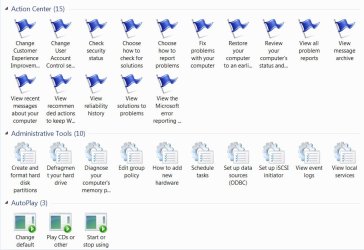
There’s more than one way to perform the GodMode trick in Windows 7 RTM, even though the final result will in fact be different that the initial action made public earlier this year. According to Steven Sinofsky, president, Windows and Windows Live Division, there are additional CLSID of extension which can be used as string forms in order to define file system folders as junction points. Specifically, users can create more than just the original GodMode shortcut via a folder placed on their desktop in Windows 7, both 32-bit and 64-bit.
The President of the Windows and Windows Live Division made public additional undocumented features for Windows, normally reserved for developers. Users will be able to find the list at the bottom of this article. Remember, the actual Windows 7 GodMode trick involves using file system folders as junction points.
This means that users will need to respect the MyFolder.{Extension CLSID} structure when labeling their folders. MyFolder can be any piece of text they desire, either GodMode, or Softpedia, it doesn’t actually matter, and will not have an influence over the final result. What is essential is that users include the extension CLSID provided in order to build folder shortcuts not only to Control Panel, but also to power options, taskbar icons, default programs, My Computer properties, firewall etc.
One thing is clear from all the excitement that Windows 7 GodMode managed to create, albeit the trick does anything but allow god-like control over the operating system. Microsoft should, as it is undoubtedly keeping its years to the street and harvesting feedback for Windows 8, at least consider the possibility of building its own breed of GodMode for the successor of Windows 7. Used wisely, a potential Windows 8 GodMode could do wonders in terms of marketing, so far as hardcore geeks go. Maybe it’s something that the Windows team should sleep on.
The original Windows 7 GodMode string was:
{ED7BA470-8E54-465E-825C-99712043E01C}
And here are the additional items:
{00C6D95F-329C-409a-81D7-C46C66EA7F33}
{0142e4d0-fb7a-11dc-ba4a-000ffe7ab428}
{025A5937-A6BE-4686-A844-36FE4BEC8B6D}
{05d7b0f4-2121-4eff-bf6b-ed3f69b894d9}
{1206F5F1-0569-412C-8FEC-3204630DFB70}
{15eae92e-f17a-4431-9f28-805e482dafd4}
{17cd9488-1228-4b2f-88ce-4298e93e0966}
{1D2680C9-0E2A-469d-B787-065558BC7D43}
{1FA9085F-25A2-489B-85D4-86326EEDCD87}
{208D2C60-3AEA-1069-A2D7-08002B30309D}
{20D04FE0-3AEA-1069-A2D8-08002B30309D}
{2227A280-3AEA-1069-A2DE-08002B30309D}
{241D7C96-F8BF-4F85-B01F-E2B043341A4B}
{4026492F-2F69-46B8-B9BF-5654FC07E423}
{62D8ED13-C9D0-4CE8-A914-47DD628FB1B0}
{78F3955E-3B90-4184-BD14-5397C15F1EFC}
Read details on how to create a Windows 7 GodMode folder here.
Sinofsky revealed to Beyond Binary that developers could take advantage of a variety of GodMode tricks as access points to Windows system settings. In fact, as GodMode demonstrations go, they are not limited to Windows 7, but also apply to older releases of Windows, indicating that the developer features are nothing new, or specific to the latest iteration of the Windows client. The President of the Windows and Windows Live Division made public additional undocumented features for Windows, normally reserved for developers. Users will be able to find the list at the bottom of this article. Remember, the actual Windows 7 GodMode trick involves using file system folders as junction points.
This means that users will need to respect the MyFolder.{Extension CLSID} structure when labeling their folders. MyFolder can be any piece of text they desire, either GodMode, or Softpedia, it doesn’t actually matter, and will not have an influence over the final result. What is essential is that users include the extension CLSID provided in order to build folder shortcuts not only to Control Panel, but also to power options, taskbar icons, default programs, My Computer properties, firewall etc.
One thing is clear from all the excitement that Windows 7 GodMode managed to create, albeit the trick does anything but allow god-like control over the operating system. Microsoft should, as it is undoubtedly keeping its years to the street and harvesting feedback for Windows 8, at least consider the possibility of building its own breed of GodMode for the successor of Windows 7. Used wisely, a potential Windows 8 GodMode could do wonders in terms of marketing, so far as hardcore geeks go. Maybe it’s something that the Windows team should sleep on.
The original Windows 7 GodMode string was:
{ED7BA470-8E54-465E-825C-99712043E01C}
And here are the additional items:
{00C6D95F-329C-409a-81D7-C46C66EA7F33}
{0142e4d0-fb7a-11dc-ba4a-000ffe7ab428}
{025A5937-A6BE-4686-A844-36FE4BEC8B6D}
{05d7b0f4-2121-4eff-bf6b-ed3f69b894d9}
{1206F5F1-0569-412C-8FEC-3204630DFB70}
{15eae92e-f17a-4431-9f28-805e482dafd4}
{17cd9488-1228-4b2f-88ce-4298e93e0966}
{1D2680C9-0E2A-469d-B787-065558BC7D43}
{1FA9085F-25A2-489B-85D4-86326EEDCD87}
{208D2C60-3AEA-1069-A2D7-08002B30309D}
{20D04FE0-3AEA-1069-A2D8-08002B30309D}
{2227A280-3AEA-1069-A2DE-08002B30309D}
{241D7C96-F8BF-4F85-B01F-E2B043341A4B}
{4026492F-2F69-46B8-B9BF-5654FC07E423}
{62D8ED13-C9D0-4CE8-A914-47DD628FB1B0}
{78F3955E-3B90-4184-BD14-5397C15F1EFC}
Read details on how to create a Windows 7 GodMode folder here.
My Computer
- OS
- Windows 7 Ultimate x64 Service Pack 1 (Build 6.1.7601)
- CPU
- Intel Core 2 Quad Q6600 (G0 Kentsfield) LGA775 (FC-LGA6)
- Motherboard
- GIGABYTE GA-EP35C-DS3R (Rev. 2.1)
- Memory
- Corsair TW3X4G1333C9A 4GB PC-10600 (2x XMS3 2GB)
- Graphics Card(s)
- ASUS nVIDIA GeForce 560
- Sound Card
- RealTek ALC885/889A/890
- Monitor(s) Displays
- ChiMei CMV CT-730D 17inch (LCD Monitor)
- Screen Resolution
- 1280-1024 60Hertz (Ture Colour 32bit)
- Hard Drives
- 2x Barracuda 7200.10 SATA 3.0Gb/s 160-GB Hard Drive ST3160815AS (AHCI)
- PSU
- ANTEC 750w Earthwatts
- Case
- Thermaltake Shark (VA7000SWA ATX) Full Tower
- Cooling
- Front 120mm fan (1400 RPM) /Rear 120mm (1400 RPM) blue LED
- Keyboard
- Labtec Media Desktop Y-SAD65
- Mouse
- Razer DeathAdder 3G Infrared Sensor (1800DPI)
- Internet Speed
- Telstra BigPond Elite Liberty ADSL2+ 24Mbps/256kbps
- Other Info
- ASUS PCE-N13 802.11n Wireless LAN card