Windows 7 Search Function Not Working Correctly

RyanC119

New member
Local time
11:19 PM
Messages
15
Hey all,

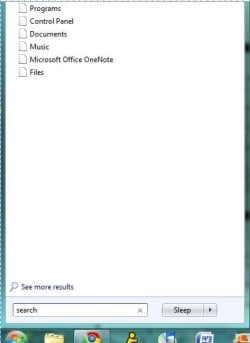
I've recently tried running a search for a simple program (I think it was the Disk Cleanup). What I normally do is click the "start" button, then immediately above it on the start menu, I begin my search. Typically, the search pulls up several different items while I am typing what I want to look for in the search bar. However, now it only seems to pull up blank-looking icons that say "Programs" and "Control Panel" and "Documents." It won't find anything now.

I have attached a file that shows a picture of the problem. Please inform me if this does not work when you try to look at it - I did my best to follow the forum instructions.

I am running Windows 7 32-bit on an HP Pavilion dv6000, and am familiar with computers but not with editing registries and the like.

Thanks in advance
 

Attachments
  • Search Problem.JPG
    Search Problem.JPG
    23.4 KB · Views: 28

My Computer

OS
Windows 7
I apologize for the double post - the only thing I have tried to fix the issue was by going into Control Panel>Programs>Turn Windows features on or off>Unchecked Windows search.

This did not solve my problem, as I went back through and enabled it and it still was messed up.
 

My Computer

OS
Windows 7
Welcome,

If a new problem, I would just do a system restore. Avoid having to fool with the registry etc.
 

My Computer

Computer type
PC/Desktop
Computer Manufacturer/Model Number
Dell XPS 420
OS
Windows 10, Home Clean Install
CPU
Intel Core2 processsor Q8200(2.33Ghz 1333FSB) Quad Core Tech
Motherboard
Dell
Memory
6 gb
Graphics Card(s)
ATI Radeon 256MB HD3650
Sound Card
Intergrated 7.1 Channel Audio
Monitor(s) Displays
Dell SP2009W 20"
Hard Drives
640 GB Serial ATA Hard drive
Cooling
Fan
Keyboard
Dell USB Keyboard
Mouse
Dell Premium Optical USB
Internet Speed
DSL 2.85
Hi Ryan,

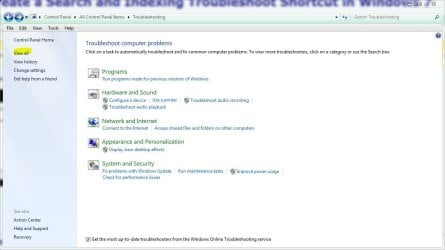
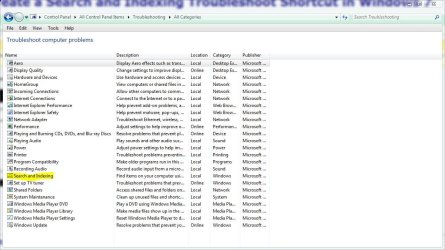
You could try the troubleshooter in control panel, upper left click view all, search and indexing. See if that helps or at least gives you more info.

Post back with your results.
 

Attachments

  • view all.JPG
    view all.JPG
    66.5 KB · Views: 318
  • search.JPG
    search.JPG
    114.5 KB · Views: 338

My Computer

Computer type
PC/Desktop
Computer Manufacturer/Model Number
Self Built
OS
Win 10 Pro x64
CPU
Intel I5-2500K @3.3GHz
Motherboard
Asrock P67 Extreme4
Memory
16GB G.Skill Ripjaws X (4x4GB)
Graphics Card(s)
EVGA GeForce 750 Ti SC 2GB
Sound Card
ASUS Xonar DG 5.1 Channels 24-bit 96KHz PCI Interface Sound
Monitor(s) Displays
auria eq2367
Screen Resolution
1920 x 1080
Hard Drives
250GB Samsung 850 EVO SSD
1TB WD Blue
1TB Hitachi
PSU
SeaSonic X 650W 80 Plus Gold
Case
Corsair Obsidian 750D
Cooling
Corsair H60, Three 140mm case fans
Keyboard
Logitech Wireless Keyboard K520
Mouse
Logitech Wireless Mouse M310
Internet Speed
Wave Broadband ~ 100 dn 5 up
Antivirus
Windows Defender, Malwarebytes Premium
Browser
Edge, IE11, Chrome
Other Info
Laptop specs: HP g7-1365dx /
CPU: AMD A6-3420M APU with Radeon(tm) HD Graphics /
RAM: Crucial 8Gb (2x4Gb) /
SSD: Crucial M4-CT128M4SSD2 ATA Device/ FW 000F /
GFX: AMD Radeon HD 6520G /
OS: Windows 10 Pro x64
I'm afraid of doing a system restore - will I have to back up all of my files and then go back and reinstall all of the programs I use? I'm not sure when this started (haven't used search function in a while, I suppose), so I can't pick a particular date to restore to.

I followed your instructions, derekimo, but the troubleshooter was unable to find anything. It didn't give me any more information, either :(
 

My Computer

OS
Windows 7

My Computer

Computer type
PC/Desktop
Computer Manufacturer/Model Number
Dell XPS 420
OS
Windows 10, Home Clean Install
CPU
Intel Core2 processsor Q8200(2.33Ghz 1333FSB) Quad Core Tech
Motherboard
Dell
Memory
6 gb
Graphics Card(s)
ATI Radeon 256MB HD3650
Sound Card
Intergrated 7.1 Channel Audio
Monitor(s) Displays
Dell SP2009W 20"
Hard Drives
640 GB Serial ATA Hard drive
Cooling
Fan
Keyboard
Dell USB Keyboard
Mouse
Dell Premium Optical USB
Internet Speed
DSL 2.85
Just tried a system restore - no luck....
 

My Computer

OS
Windows 7

My Computer

Computer type
PC/Desktop
Computer Manufacturer/Model Number
Dell XPS 420
OS
Windows 10, Home Clean Install
CPU
Intel Core2 processsor Q8200(2.33Ghz 1333FSB) Quad Core Tech
Motherboard
Dell
Memory
6 gb
Graphics Card(s)
ATI Radeon 256MB HD3650
Sound Card
Intergrated 7.1 Channel Audio
Monitor(s) Displays
Dell SP2009W 20"
Hard Drives
640 GB Serial ATA Hard drive
Cooling
Fan
Keyboard
Dell USB Keyboard
Mouse
Dell Premium Optical USB
Internet Speed
DSL 2.85
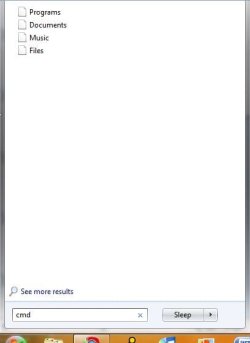
Okay, went back nearly two weeks for the second system restore, and it still didn't solve the problem. Also, if you'll view my attachment, you'll see I can't search for the "cmd" program because it just doesn't look for it - it pulls up the same thing every time. I do know how to get there and run it as an admin, though. What exactly does that command do, and will it have any effect on my search problems?

I do not know if this is relevant, but a few days ago when I turned my laptop on, it went immediately into a "CHKDSK" scan of my disk. This happened about 9 months ago, almost a week before my first hard drive failed.
 

Attachments

  • Capture.JPG
    Capture.JPG
    17.6 KB · Views: 14

My Computer

OS
Windows 7
Please disregard my question on what that command does - I just read the green box on the link you gave me. My apologies.
 

My Computer

OS
Windows 7
Try this

Go to start then
Start then Run

and then type cmd.exe in the 'Run-box'
 

My Computer

Computer type
PC/Desktop
Computer Manufacturer/Model Number
Dell XPS 420
OS
Windows 10, Home Clean Install
CPU
Intel Core2 processsor Q8200(2.33Ghz 1333FSB) Quad Core Tech
Motherboard
Dell
Memory
6 gb
Graphics Card(s)
ATI Radeon 256MB HD3650
Sound Card
Intergrated 7.1 Channel Audio
Monitor(s) Displays
Dell SP2009W 20"
Hard Drives
640 GB Serial ATA Hard drive
Cooling
Fan
Keyboard
Dell USB Keyboard
Mouse
Dell Premium Optical USB
Internet Speed
DSL 2.85
Okay, I am running "sfc /scannow" and it's at about 61%. I'll head back here and let you know if this works...
 

My Computer

OS
Windows 7
Alright, the "sfc /scannow" just concluded and presented me with the following message:

"Windows Resource Protection did not find any integrity violations."

...I'm guessing this isn't a common problem, huh....?
 

My Computer

OS
Windows 7

My Computer

Computer type
PC/Desktop
Computer Manufacturer/Model Number
Dell XPS 420
OS
Windows 10, Home Clean Install
CPU
Intel Core2 processsor Q8200(2.33Ghz 1333FSB) Quad Core Tech
Motherboard
Dell
Memory
6 gb
Graphics Card(s)
ATI Radeon 256MB HD3650
Sound Card
Intergrated 7.1 Channel Audio
Monitor(s) Displays
Dell SP2009W 20"
Hard Drives
640 GB Serial ATA Hard drive
Cooling
Fan
Keyboard
Dell USB Keyboard
Mouse
Dell Premium Optical USB
Internet Speed
DSL 2.85
Still nothing.

I just tried to click one of the files that pops up every time I run a search. It said that I was not allowed to open the file because of internet security. I shut down my anti-virus/internet security and still had no luck...
 

My Computer

OS
Windows 7
I read the thread, again, carefully. When you go to search did you type disc cleanup, immediately? You did not put the word search in first did you?
 

My Computer

Computer type
PC/Desktop
Computer Manufacturer/Model Number
Dell XPS 420
OS
Windows 10, Home Clean Install
CPU
Intel Core2 processsor Q8200(2.33Ghz 1333FSB) Quad Core Tech
Motherboard
Dell
Memory
6 gb
Graphics Card(s)
ATI Radeon 256MB HD3650
Sound Card
Intergrated 7.1 Channel Audio
Monitor(s) Displays
Dell SP2009W 20"
Hard Drives
640 GB Serial ATA Hard drive
Cooling
Fan
Keyboard
Dell USB Keyboard
Mouse
Dell Premium Optical USB
Internet Speed
DSL 2.85
Alright, the "sfc /scannow" just concluded and presented me with the following message:

"Windows Resource Protection did not find any integrity violations."

...I'm guessing this isn't a common problem, huh....?

These things don't just happen.

You have installed a program which causes the problem or have messed around with windows settings,etc or you have picked up a virus infection.

Using Control Panel | Programs and Features:
look at the programs installed on your computer and uninstall those that you do not need.

Avoid all of those "speed up your computer" and "clean up your computer" programs. Before you try one of those out, do a complete 100% system image backup so that you can undo their damage. That said many of us use CCleaner but this program also has the right to carry the Win 7 logo.

Here's virus/malware advice:

[FONT=&quot]VIRUS REMOVAL / PROTECTION[/FONT]
1. Download MalwareBytes. Malwarebytes
2. Disconnect from the Internet.
3. Disable your present antivirus software.
4. Remove your present antivirus software.
5. Install and run the MalwareBytes Quick Scan (remove any bad guys)
6. Reconnect to Internet.
7. Update MalwareBytes.
8. Run malwarebytes quick scan again.(remove any bad guys)
9. Download and Install Microsoft Security Essentials.
http://www.microsoft.com/security_essentials/

Now I advise you disable MalwareBytes and only enable again when and if you need it..


My Computer

Computer Manufacturer/Model Number
Toshiba Satellite S875D-S7239 laptop
OS
MS Windows 7 Ultimate SP1 64-bit
CPU
AMD A10-4600M
Motherboard
AMD Pumori (Socket FT1)
Memory
6.00 GB Dual-Channel DDR3 @ 798MHz (11-11-12-28)
Graphics Card(s)
AMD Radeon HD 7660G
Sound Card
High Definition Audio Device
Monitor(s) Displays
Generic PnP Monitor (1600x900@60Hz)
Screen Resolution
1600x900@60Hz
Hard Drives
SSD 119GB Corsair CSSD-V128GB2 ATA Device
Keyboard
Standard PS/2 Keyboard
Mouse
HP Wireless Optical Mobile Mouse Model FHA-3410
Internet Speed
What the local pub, local coffee shop offers.
Other Info
Optical Drive:MATSHITA BD-CMB UJ160B ATA Device


Also have an Asus ha1002xp netbook with Win 7 Ultimate installed.
Nope. I typed "Disk Cleanup" - I never type the word search first. Before, it would give me the names of programs, folders and files all neatly organized as I typed out my word. Now it acts like it is updating its returns but it just keeps spitting out those blank, unopenable "Programs" and "Documents" things.
 

My Computer

OS
Windows 7
Alright - I followed your advice karlsnooks and ran Malwarebytes, but it didn't find any sort of malicious malware on my computer. It scanned 150,000+ files, too. I also frequently visit my uninstall/change programs file and make sure there is nothing on there I do not need.

If it's a Windows setting that a program or I have changed, do you know which one it would be? I can't think of anything I would have done or anything I would have downloaded that actually messed with the search function...
 

My Computer

OS
Windows 7
Boot up in safe mode. Problem still there?

To boot up in safe mode,
Shutdown computer.
Turn on computer.
Immediately start taping the SPACEBAR.

Choose Safe Mode from the list.
 

My Computer

Computer Manufacturer/Model Number
Toshiba Satellite S875D-S7239 laptop
OS
MS Windows 7 Ultimate SP1 64-bit
CPU
AMD A10-4600M
Motherboard
AMD Pumori (Socket FT1)
Memory
6.00 GB Dual-Channel DDR3 @ 798MHz (11-11-12-28)
Graphics Card(s)
AMD Radeon HD 7660G
Sound Card
High Definition Audio Device
Monitor(s) Displays
Generic PnP Monitor (1600x900@60Hz)
Screen Resolution
1600x900@60Hz
Hard Drives
SSD 119GB Corsair CSSD-V128GB2 ATA Device
Keyboard
Standard PS/2 Keyboard
Mouse
HP Wireless Optical Mobile Mouse Model FHA-3410
Internet Speed
What the local pub, local coffee shop offers.
Other Info
Optical Drive:MATSHITA BD-CMB UJ160B ATA Device


Also have an Asus ha1002xp netbook with Win 7 Ultimate installed.
Back
Top