Windows 7 Search

syngenta

New member
Local time
4:38 PM
Messages
1
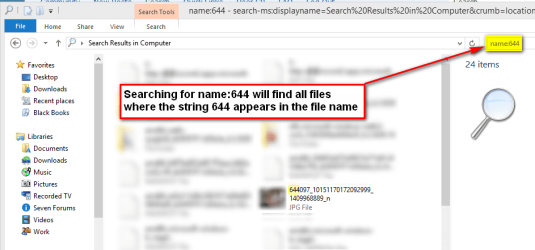
Hi I am trying to search on my entire hard for a file but the windows search is not searching all the directories, how do i make it search the entire drive. It is even missing out my Temp directory. I have spent hours trying to work out how to search on just on filenames, this is a nightmare, there is no quick and easy help on how to use the search within windows 7 that I can find. I am using the following search command name:644, which i thought windows 7 to search the entire c harddrive for all filesnames containing 644 which it is not doing.

Can anyone Help??.

Thanks
 

My Computer

OS
windows 7 64bit
Hi Syngenta, welcome to the Seven Forums. Here's a comprehensive tutorial for Windows Search: http://www.sevenforums.com/tutorials/129437-windows-search-configure-use.html

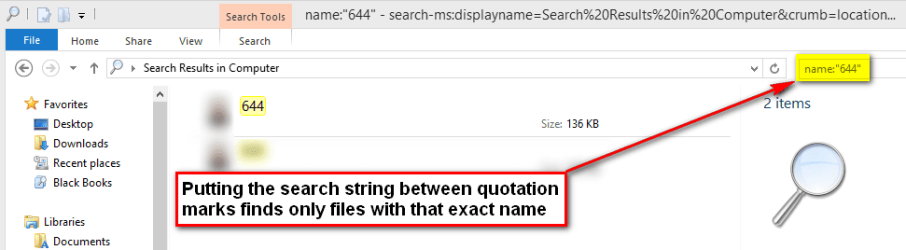
A few additional tips for you in following screenshots below. Click images to enlarge.

Search whole computer or just one drive:
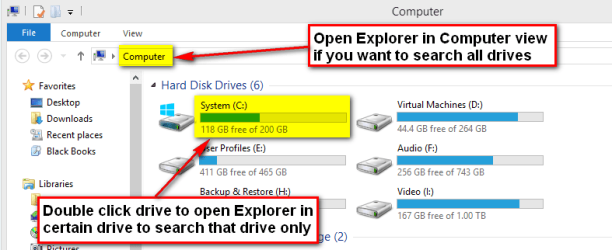
Search.png

Search a partial filename:

Search_1.png

Search an exact filename:

Search_2.png

Search partial filename but only a certain file type:
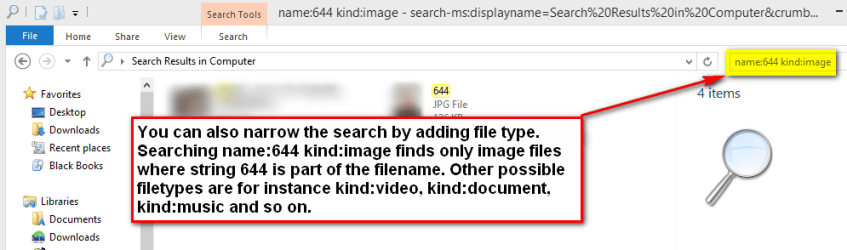
Search_3.png

In this last example you can also tell Windows Search the file type by using its extension. This finds all PDF files with partial filename 644:
Code:
name:644 ext:pdf

You can also use AND, OR & NOT operators to include more search criteria. With AND both criteria must be true, with NOT first one must be true, second one false, with OR one of the search criteria separated with it must be true. Notice that OR, AND & NOT must be written in capital letters.

This will find a PNG image where the name contains string 644 leaving out all files where also string 555 appears in the filename:
Code:
name:644 NOT name:555 ext:png
(Files 644.pdf and 6449604.pdf would be included in search results, but file 644234555.pdf would be left out.)

This finds all documents where partial filename is 644 and where also string 555 appears in the name:
Code:
name:644 AND name:555 kind:document
(Files 644sfsg555.doc and 644kasdl555asd.txt would be included in search results, but file 644asdsf.doc left out.)

This finds all BMP, JPG and PNG images with exact filename 644:
Code:
name:"644" ext:bmp OR ext:jpg OR ext:png

Kari

 
Last edited:

My Computer

Computer type
Laptop
Computer Manufacturer/Model Number
HP ENVY 17-1150eg
OS
Windows 10 Pro x64 EN-GB
CPU
1.6 GHz Intel Core i7-720QM Processor
Memory
6 GB
Graphics Card(s)
ATI Mobility Radeon HD 5850 Graphics
Sound Card
Beats sound system with integrated subwoofer
Monitor(s) Displays
17" laptop display, 22" LED and 32" Full HD TV through HDMI
Screen Resolution
1600*900 (1), 1920*1080 (2&3)
Hard Drives
Internal: 2 x 500 GB SATA Hard Disk Drive 7200 rpm
External: 2TB for backups, 3TB USB3 network drive for media
Cooling
As Envy runs a bit warm, I have it on a Cooler Master pad
Keyboard
Logitech diNovo Media Desktop Laser (bluetooth)
Mouse
Logitech Performance Mouse MX
Internet Speed
50/10 Mbps VDSL
Antivirus
Windows Defender 4.3.9431.0
Browser
Maxthon 3.5.2., IE11
Back
Top