Solved Windows 7 Service Pack 1 failed install

TheGTShortBus

New member
Local time
8:31 AM
Messages
12
Hey guys,
First of all, thank everyone for posting to this forum. I have found a lot of really helpful advice so far. Right now, however, I have not been able to diagnose and fix the problem I am currently having so I was hoping that someone could help me out. Basically my problem is that I have been able to install every update to Windows 7 up to Service Pack 1 which fails every time. I am pretty sure that I have tried everything I have read on here short of a clean reinstall, so I wanted to post first before I went to that. My error code screenshot and CBS files are attached. Thanks in advance for any help!

View attachment 351257
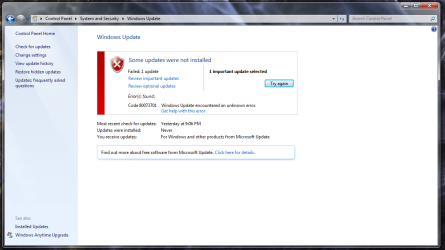
Windows Update Error - 3-2-2015.png
 

My Computer My Computer

Computer type
PC/Desktop
Computer Manufacturer/Model Number
iBuyPower
OS
Windows 7 Home Premium 64bit
CPU
Intel Q9550
Motherboard
Asus P5N D
Memory
8GB DDR2
Graphics Card(s)
EVGA GeForce GTX285
Hard Drives
OCZ Agility 3 120GB
Hitachi 1TB 7200rpm
Browser
Google Chrome
SFC is reporting these errors...
Code:
 Line 23334: 2015-03-02 07:48:15, Info                  CSI    00000343 [SR] Repairing 3 components
 Line 23335: 2015-03-02 07:48:15, Info                  CSI    00000344 [SR] Beginning Verify and Repair transaction
 Line 23338: 2015-03-02 07:48:15, Info                  CSI    00000346 [SR] Cannot repair member file [l:18{9}]"gulim.ttc" of Microsoft-Windows-Font-TrueType-Gulim, Version = 6.1.7600.16385, pA = PROCESSOR_ARCHITECTURE_AMD64 (9), Culture neutral, VersionScope = 1 nonSxS, PublicKeyToken = {l:8 b:31bf3856ad364e35}, Type neutral, TypeName neutral, PublicKey neutral in the store, hash mismatch
 Line 23341: 2015-03-02 07:48:15, Info                  CSI    00000348 [SR] Cannot repair member file [l:24{12}]"MSVidCtl.dll" of Microsoft-Windows-Video-TVVideoControl, Version = 6.1.7600.16385, pA = PROCESSOR_ARCHITECTURE_AMD64 (9), Culture neutral, VersionScope = 1 nonSxS, PublicKeyToken = {l:8 b:31bf3856ad364e35}, Type neutral, TypeName neutral, PublicKey neutral in the store, hash mismatch
 Line 23344: 2015-03-02 07:48:15, Info                  CSI    0000034a [SR] Cannot repair member file [l:24{12}]"nvd3dumx.dll" of nv_lh.inf, Version = 6.1.7600.16385, pA = PROCESSOR_ARCHITECTURE_AMD64 (9), Culture neutral, VersionScope = 1 nonSxS, PublicKeyToken = {l:8 b:31bf3856ad364e35}, Type = [l:24{12}]"driverUpdate", TypeName neutral, PublicKey neutral in the store, hash mismatch

CheckSUR is clear, so I'll post a fix for these later.
 

My Computer My Computer

Computer type
Laptop
Computer Manufacturer/Model Number
Asus K52F or Lenovo B51-80
OS
Win 7 x64 Home Premium (and x86 VirtualBox VM)/Win10
CPU
i3 370M/i7 6500U
Motherboard
Asus/Lenovo
Memory
8GB - finally :)/8GB
Graphics Card(s)
it's an i3, dude!/dual Intel&nVidia
Sound Card
onboard
Monitor(s) Displays
15.6" built-in
Screen Resolution
1366x768/1920x1080
Hard Drives
750GB Seagate internal
Sundry external drives attached to other computers on the local network
1TB SSD on the Lenovo
PSU
n/a
Internet Speed
as much as I can get - usually on a dongle/phone, so <1MB/s
Antivirus
MSE/Defender
Browser
IE11/12/Edge/Chrome/FF(if I must)
I've uploaded a file - gtbaa.zip - to my OneDrive at Noel's OneDrive
Please download and save it.

Right-click on the saved file and select Extract all...
Change the target to C:\ and click on Extract
Close all windows (it would be a good idea to print these instructions!)

Now reboot to the Repair Environment - as soon as the machine restarts, start tapping F8 - this should bring up the Advanced Boot Menu, at the top of which should be the option 'Repair my Computer'
Pick that
You'll have to log in with your username and password.

Pick the option to use a Command Prompt
At the prompt type
DIR C:\gtbaa
hit the enter key - if you get a 'Not Found' error try
DIR D:\gtbaa
or
DIR E:\gtbaa


The drive letter in use when you find the folder will need to be substituted (for<drive>) into the following command...


XCOPY <drive>:\gtbaa <drive>:\windows\winsxs /y /i /s /v /h


(e.g. XCOPY P:\wfire P:\windows\winsxs /y /i /s /v /h )


run the command (it should take almost no time) and when the prompt returns, type
EXIT
and hit the Enter key to exit Command Prompt - reboot to Normal Mode Windows.

Now run SFC /SCANNOW in an Elevated Command Prompt
then reboot and upload the new CBS.log file to your reply
 

My Computer My Computer

Computer type
Laptop
Computer Manufacturer/Model Number
Asus K52F or Lenovo B51-80
OS
Win 7 x64 Home Premium (and x86 VirtualBox VM)/Win10
CPU
i3 370M/i7 6500U
Motherboard
Asus/Lenovo
Memory
8GB - finally :)/8GB
Graphics Card(s)
it's an i3, dude!/dual Intel&nVidia
Sound Card
onboard
Monitor(s) Displays
15.6" built-in
Screen Resolution
1366x768/1920x1080
Hard Drives
750GB Seagate internal
Sundry external drives attached to other computers on the local network
1TB SSD on the Lenovo
PSU
n/a
Internet Speed
as much as I can get - usually on a dongle/phone, so <1MB/s
Antivirus
MSE/Defender
Browser
IE11/12/Edge/Chrome/FF(if I must)
Awesome! Thanks for uploading this, I am at work now but will go through these steps later tonight once I get home.
 

My Computer My Computer

Computer type
PC/Desktop
Computer Manufacturer/Model Number
iBuyPower
OS
Windows 7 Home Premium 64bit
CPU
Intel Q9550
Motherboard
Asus P5N D
Memory
8GB DDR2
Graphics Card(s)
EVGA GeForce GTX285
Hard Drives
OCZ Agility 3 120GB
Hitachi 1TB 7200rpm
Browser
Google Chrome
Ok, got everything to work. Ran SFC /SCANNOW again and it had some more errors that it was not able to fix again. CBS log attached:

View attachment 351304
 

My Computer My Computer

Computer type
PC/Desktop
Computer Manufacturer/Model Number
iBuyPower
OS
Windows 7 Home Premium 64bit
CPU
Intel Q9550
Motherboard
Asus P5N D
Memory
8GB DDR2
Graphics Card(s)
EVGA GeForce GTX285
Hard Drives
OCZ Agility 3 120GB
Hitachi 1TB 7200rpm
Browser
Google Chrome
Hmmm
Only one of the fixes actually 'took'... here's the new list...
Code:
 Line 4361: 2015-03-02 21:19:27, Info                  CSI    000002e8 [SR] Repairing 2 components
 Line 4362: 2015-03-02 21:19:27, Info                  CSI    000002e9 [SR] Beginning Verify and Repair transaction
 Line 4365: 2015-03-02 21:19:27, Info                  CSI    000002eb [SR] Cannot repair member file [l:24{12}]"MSVidCtl.dll" of Microsoft-Windows-Video-TVVideoControl, Version = 6.1.7600.16385, pA = PROCESSOR_ARCHITECTURE_AMD64 (9), Culture neutral, VersionScope = 1 nonSxS, PublicKeyToken = {l:8 b:31bf3856ad364e35}, Type neutral, TypeName neutral, PublicKey neutral in the store, hash mismatch
 Line 4368: 2015-03-02 21:19:27, Info                  CSI    000002ed [SR] Cannot repair member file [l:24{12}]"nvd3dumx.dll" of nv_lh.inf, Version = 6.1.7600.16385, pA = PROCESSOR_ARCHITECTURE_AMD64 (9), Culture neutral, VersionScope = 1 nonSxS, PublicKeyToken = {l:8 b:31bf3856ad364e35}, Type = [l:24{12}]"driverUpdate", TypeName neutral, PublicKey neutral in the store, hash mismatch

I'll have to do some cross-checking and see if I can work out why.
 

My Computer My Computer

Computer type
Laptop
Computer Manufacturer/Model Number
Asus K52F or Lenovo B51-80
OS
Win 7 x64 Home Premium (and x86 VirtualBox VM)/Win10
CPU
i3 370M/i7 6500U
Motherboard
Asus/Lenovo
Memory
8GB - finally :)/8GB
Graphics Card(s)
it's an i3, dude!/dual Intel&nVidia
Sound Card
onboard
Monitor(s) Displays
15.6" built-in
Screen Resolution
1366x768/1920x1080
Hard Drives
750GB Seagate internal
Sundry external drives attached to other computers on the local network
1TB SSD on the Lenovo
PSU
n/a
Internet Speed
as much as I can get - usually on a dongle/phone, so <1MB/s
Antivirus
MSE/Defender
Browser
IE11/12/Edge/Chrome/FF(if I must)
Hi, I posted this help request a while back and haven't had much time to follow up. Just wondering if you were able to figure anything out with the second round of problems that I was having. Thanks in advance for any help!
 

My Computer My Computer

Computer type
PC/Desktop
Computer Manufacturer/Model Number
iBuyPower
OS
Windows 7 Home Premium 64bit
CPU
Intel Q9550
Motherboard
Asus P5N D
Memory
8GB DDR2
Graphics Card(s)
EVGA GeForce GTX285
Hard Drives
OCZ Agility 3 120GB
Hitachi 1TB 7200rpm
Browser
Google Chrome
Sorry! It's been a mad few weeks.
I'll post back when I can...
 

My Computer My Computer

Computer type
Laptop
Computer Manufacturer/Model Number
Asus K52F or Lenovo B51-80
OS
Win 7 x64 Home Premium (and x86 VirtualBox VM)/Win10
CPU
i3 370M/i7 6500U
Motherboard
Asus/Lenovo
Memory
8GB - finally :)/8GB
Graphics Card(s)
it's an i3, dude!/dual Intel&nVidia
Sound Card
onboard
Monitor(s) Displays
15.6" built-in
Screen Resolution
1366x768/1920x1080
Hard Drives
750GB Seagate internal
Sundry external drives attached to other computers on the local network
1TB SSD on the Lenovo
PSU
n/a
Internet Speed
as much as I can get - usually on a dongle/phone, so <1MB/s
Antivirus
MSE/Defender
Browser
IE11/12/Edge/Chrome/FF(if I must)
Checking through what I uploaded, it was definitely correct.
Still - I'll try another upload and see if it works better....

I've uploaded a file - gtbab.zip - to my OneDrive at Noel's OneDrive
Please download and save it.

Right-click on the saved file and select Extract all...
Change the target to C:\ and click on Extract
Close all windows (it would be a good idea to print these instructions!)

Now reboot to the Repair Environment - as soon as the machine restarts, start tapping F8 - this should bring up the Advanced Boot Menu, at the top of which should be the option 'Repair my Computer'
Pick that
You'll have to log in with your username and password.

Pick the option to use a Command Prompt
At the prompt type
DIR C:\gtbab
hit the enter key - if you get a 'Not Found' error try
DIR D:\gtbab
or
DIR E:\gtbab


The drive letter in use when you find the folder will need to be substituted (for<drive>) into the following command...


XCOPY <drive>:\gtbab <drive>:\windows\winsxs /y /i /s /v /h


(e.g. XCOPY P:\wfire P:\windows\winsxs /y /i /s /v /h )


run the command (it should take almost no time) and when the prompt returns, type
EXIT
and hit the Enter key to exit Command Prompt - reboot to Normal Mode Windows.

Now run SFC /SCANNOW in an Elevated Command Prompt
then reboot and upload the new CBS.log file to your reply
 

My Computer My Computer

Computer type
Laptop
Computer Manufacturer/Model Number
Asus K52F or Lenovo B51-80
OS
Win 7 x64 Home Premium (and x86 VirtualBox VM)/Win10
CPU
i3 370M/i7 6500U
Motherboard
Asus/Lenovo
Memory
8GB - finally :)/8GB
Graphics Card(s)
it's an i3, dude!/dual Intel&nVidia
Sound Card
onboard
Monitor(s) Displays
15.6" built-in
Screen Resolution
1366x768/1920x1080
Hard Drives
750GB Seagate internal
Sundry external drives attached to other computers on the local network
1TB SSD on the Lenovo
PSU
n/a
Internet Speed
as much as I can get - usually on a dongle/phone, so <1MB/s
Antivirus
MSE/Defender
Browser
IE11/12/Edge/Chrome/FF(if I must)
Thanks again for the quick reply, you are a huge help. That seemed to have fixed the SFC \SCANNOW errors as it returned with no integrity violations. I did try a quick run of Windows Update though, and got a new error code (800F0900) when trying to install SP1. I attached the updated CBS file like you asked though:

View attachment 355324

Definitely progress though, so I am becoming optimistic!
 

My Computer My Computer

Computer type
PC/Desktop
Computer Manufacturer/Model Number
iBuyPower
OS
Windows 7 Home Premium 64bit
CPU
Intel Q9550
Motherboard
Asus P5N D
Memory
8GB DDR2
Graphics Card(s)
EVGA GeForce GTX285
Hard Drives
OCZ Agility 3 120GB
Hitachi 1TB 7200rpm
Browser
Google Chrome
Have you temporarily disabled your antivirus ? This can cause failure of service pack updates.
 

My Computer My Computer

Computer type
PC/Desktop
Computer Manufacturer/Model Number
Alienware® ALX X58
OS
Win 7 Ult SP1/Win 10 Pro (all x64)
CPU
Intel® Core™ i7-975 Extreme O/C to 4.02 GHz, 8MB Cache
Motherboard
Asus® P6T Deluxe V2 X58 LGA1366
Memory
24GB Corsair Vengeance DDR3 SDRAM at 1600MHz - 6 x 4096MB
Graphics Card(s)
1792 MB NVIDIA® GeForce® GTX 295 Dual Core
Sound Card
Onboard Soundmax® High-Definition 7.1 Performance Audio
Monitor(s) Displays
Samsung XL2370 LED backlit 23" W/S 2ms response time
Screen Resolution
1920 X 1080
Hard Drives
2 x 500gb SATA II
1 x 1TB SATA II
1 external eSATA LaCie 3TB
(Non-RAID)
PSU
Alienware® 1200 Watt Multi-GPU
Case
Alienware® P2 ALX Chassis with AlienIce™ 3.0 Video Cooling
Cooling
Alienware® High-Perf. Liquid Cooling + Acoustic Dampening
Keyboard
Microsoft® Wireless Entertainment 8000 + Logitech® G15 Wired
Mouse
Microsoft® Wireless Laser 8000 + Logitech® G9 Wired
Internet Speed
1Gb/s
Antivirus
McAfee LiveSafe
Browser
Firefox - latest
Other Info
Using non-RAID on purpose as I find RAID to be too temperamental.
Now set to AHCI
Yes, I am updating from a clean boot with only windows essential services running. I have also downloaded the standalone SP1 installer and when I try to run that it just says the data is invalid. I guess I should also mention that my Windows 7 version was an upgrade option version of windows that was sent to me after I bought my PC with Vista several years ago. Could this cause in issue with updating?
 

My Computer My Computer

Computer type
PC/Desktop
Computer Manufacturer/Model Number
iBuyPower
OS
Windows 7 Home Premium 64bit
CPU
Intel Q9550
Motherboard
Asus P5N D
Memory
8GB DDR2
Graphics Card(s)
EVGA GeForce GTX285
Hard Drives
OCZ Agility 3 120GB
Hitachi 1TB 7200rpm
Browser
Google Chrome
Windows Essentials should be disabled. When you downloaded the standalone, did you make sure it had completely downloaded, then right-click > Properties and Unblock first before using it? The original upgrade path shouldn't have any bearing here. I'm assuming you are completely updated so far, inclusing IE etc. ?
 

My Computer My Computer

Computer type
PC/Desktop
Computer Manufacturer/Model Number
Alienware® ALX X58
OS
Win 7 Ult SP1/Win 10 Pro (all x64)
CPU
Intel® Core™ i7-975 Extreme O/C to 4.02 GHz, 8MB Cache
Motherboard
Asus® P6T Deluxe V2 X58 LGA1366
Memory
24GB Corsair Vengeance DDR3 SDRAM at 1600MHz - 6 x 4096MB
Graphics Card(s)
1792 MB NVIDIA® GeForce® GTX 295 Dual Core
Sound Card
Onboard Soundmax® High-Definition 7.1 Performance Audio
Monitor(s) Displays
Samsung XL2370 LED backlit 23" W/S 2ms response time
Screen Resolution
1920 X 1080
Hard Drives
2 x 500gb SATA II
1 x 1TB SATA II
1 external eSATA LaCie 3TB
(Non-RAID)
PSU
Alienware® 1200 Watt Multi-GPU
Case
Alienware® P2 ALX Chassis with AlienIce™ 3.0 Video Cooling
Cooling
Alienware® High-Perf. Liquid Cooling + Acoustic Dampening
Keyboard
Microsoft® Wireless Entertainment 8000 + Logitech® G15 Wired
Mouse
Microsoft® Wireless Laser 8000 + Logitech® G9 Wired
Internet Speed
1Gb/s
Antivirus
McAfee LiveSafe
Browser
Firefox - latest
Other Info
Using non-RAID on purpose as I find RAID to be too temperamental.
Now set to AHCI
Well, after you mentioned it, I checked the file that I downloaded and it was about half of the size it was listed as on the windows website... redownloaded and tried again after unblocking it and it seems to be working correctly as of now. If everything goes well, I will post back and mark as resolved. Fingers crossed, and thanks to both of you for all the help, I greatly appreciate it!
 

My Computer My Computer

Computer type
PC/Desktop
Computer Manufacturer/Model Number
iBuyPower
OS
Windows 7 Home Premium 64bit
CPU
Intel Q9550
Motherboard
Asus P5N D
Memory
8GB DDR2
Graphics Card(s)
EVGA GeForce GTX285
Hard Drives
OCZ Agility 3 120GB
Hitachi 1TB 7200rpm
Browser
Google Chrome
That sounds good. Hope all goes well ;-)
 

My Computer My Computer

Computer type
PC/Desktop
Computer Manufacturer/Model Number
Alienware® ALX X58
OS
Win 7 Ult SP1/Win 10 Pro (all x64)
CPU
Intel® Core™ i7-975 Extreme O/C to 4.02 GHz, 8MB Cache
Motherboard
Asus® P6T Deluxe V2 X58 LGA1366
Memory
24GB Corsair Vengeance DDR3 SDRAM at 1600MHz - 6 x 4096MB
Graphics Card(s)
1792 MB NVIDIA® GeForce® GTX 295 Dual Core
Sound Card
Onboard Soundmax® High-Definition 7.1 Performance Audio
Monitor(s) Displays
Samsung XL2370 LED backlit 23" W/S 2ms response time
Screen Resolution
1920 X 1080
Hard Drives
2 x 500gb SATA II
1 x 1TB SATA II
1 external eSATA LaCie 3TB
(Non-RAID)
PSU
Alienware® 1200 Watt Multi-GPU
Case
Alienware® P2 ALX Chassis with AlienIce™ 3.0 Video Cooling
Cooling
Alienware® High-Perf. Liquid Cooling + Acoustic Dampening
Keyboard
Microsoft® Wireless Entertainment 8000 + Logitech® G15 Wired
Mouse
Microsoft® Wireless Laser 8000 + Logitech® G9 Wired
Internet Speed
1Gb/s
Antivirus
McAfee LiveSafe
Browser
Firefox - latest
Other Info
Using non-RAID on purpose as I find RAID to be too temperamental.
Now set to AHCI
The ..0900 error is fairly characteristic, and refers to missing/damaged/corrupt catalog files.

...from your old CheckSUR log...
Code:
Checking Package Manifests and Catalogs
(f) CBS MUM Corrupt 0x800F0900 servicing\Packages\Package_7_for_KB2799494~31bf3856ad364e35~amd64~~6.1.1.0.mum  Line 1: –Ø

Please run another CheckSUR scan, and post the new log file
 

My Computer My Computer

Computer type
Laptop
Computer Manufacturer/Model Number
Asus K52F or Lenovo B51-80
OS
Win 7 x64 Home Premium (and x86 VirtualBox VM)/Win10
CPU
i3 370M/i7 6500U
Motherboard
Asus/Lenovo
Memory
8GB - finally :)/8GB
Graphics Card(s)
it's an i3, dude!/dual Intel&nVidia
Sound Card
onboard
Monitor(s) Displays
15.6" built-in
Screen Resolution
1366x768/1920x1080
Hard Drives
750GB Seagate internal
Sundry external drives attached to other computers on the local network
1TB SSD on the Lenovo
PSU
n/a
Internet Speed
as much as I can get - usually on a dongle/phone, so <1MB/s
Antivirus
MSE/Defender
Browser
IE11/12/Edge/Chrome/FF(if I must)
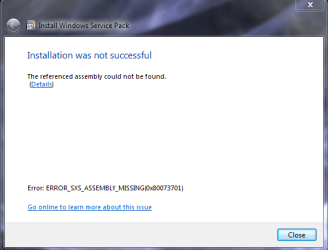
Well, unfortunately the update still did not take. The stand alone installer ran all the way through and then at the very end it said the installation was not successful with the error shown in the attached image. I searched the error and came up with a few suggestions from Microsoft, including running a diagnostic tool to reset windows update components, but nothing that has worked. Maybe you guys have an idea? Thanks again..

ERROR_SXS_ASSEMBLY_MISSING(0x80073701).png
 

My Computer My Computer

Computer type
PC/Desktop
Computer Manufacturer/Model Number
iBuyPower
OS
Windows 7 Home Premium 64bit
CPU
Intel Q9550
Motherboard
Asus P5N D
Memory
8GB DDR2
Graphics Card(s)
EVGA GeForce GTX285
Hard Drives
OCZ Agility 3 120GB
Hitachi 1TB 7200rpm
Browser
Google Chrome
As I said, please run CheckSUR again, and post the new log file.
 

My Computer My Computer

Computer type
Laptop
Computer Manufacturer/Model Number
Asus K52F or Lenovo B51-80
OS
Win 7 x64 Home Premium (and x86 VirtualBox VM)/Win10
CPU
i3 370M/i7 6500U
Motherboard
Asus/Lenovo
Memory
8GB - finally :)/8GB
Graphics Card(s)
it's an i3, dude!/dual Intel&nVidia
Sound Card
onboard
Monitor(s) Displays
15.6" built-in
Screen Resolution
1366x768/1920x1080
Hard Drives
750GB Seagate internal
Sundry external drives attached to other computers on the local network
1TB SSD on the Lenovo
PSU
n/a
Internet Speed
as much as I can get - usually on a dongle/phone, so <1MB/s
Antivirus
MSE/Defender
Browser
IE11/12/Edge/Chrome/FF(if I must)
Ok, I was able to run another CheckSUR and it looks like that came back clear. But I also ran SFC /SCANNOW again and it has errors again now. I've attached these files to the post below, but the CbsPersist log was too large to compress and send. I'll have to find another way to send that if you need to see it as well. Hopefully there is something that we can figure out, but I'm thinking I may need to start considering a clean reinstall :huh:

View attachment 355798
 

My Computer My Computer

Computer type
PC/Desktop
Computer Manufacturer/Model Number
iBuyPower
OS
Windows 7 Home Premium 64bit
CPU
Intel Q9550
Motherboard
Asus P5N D
Memory
8GB DDR2
Graphics Card(s)
EVGA GeForce GTX285
Hard Drives
OCZ Agility 3 120GB
Hitachi 1TB 7200rpm
Browser
Google Chrome
Here's the error from the SFC scan...
Code:
 Line 42349: 2015-04-11 07:13:50, Info                  CSI    00000629 [SR] Repairing 1 components
 Line 42350: 2015-04-11 07:13:50, Info                  CSI    0000062a [SR] Beginning Verify and Repair transaction
 Line 42353: 2015-04-11 07:13:51, Info                  CSI    0000062c [SR] Cannot repair member file [l:24{12}]"nvd3dumx.dll" of nv_lh.inf, Version = 6.1.7600.16385, pA = PROCESSOR_ARCHITECTURE_AMD64 (9), Culture neutral, VersionScope = 1 nonSxS, PublicKeyToken = {l:8 b:31bf3856ad364e35}, Type = [l:24{12}]"driverUpdate", TypeName neutral, PublicKey neutral in the store, hash mismatch

This is the same file that was in gtbab - and begs the question of what is corrupting this file repeatedly.
The most likely are either driver updates, malware, or a hardware problem (RAM or HD).
Let's check the hard drive first.


Click on Start > All Programs > Accessories
Right-click on the Command Prompt entry
Select Run as Administrator and accept the UAC prompt - the Elevated Command Prompt window should pop up.
At the Command prompt, type
CHKDSK C: /R
and hit the Enter key.
You will be told that the drive is locked, and the CHKDSK will run at the next boot - hit the Y key, and then reboot.
The CHKDSK will take a few hours depending on the size of the drive, so be patient!
After the CHKDSK has run, Windows should boot normally (possibly after a second auto-reboot) - then post the event logs...

Open Event Viewer
click on the Windows logs entry in the left pane to expand it.
Now click on the Application entry - wait while it loads.
Click on 'File' in the menu bar and select Save...
Save the file as Appevt.evtx
Repeat for the System log
then zip both, and upload them.
 

My Computer My Computer

Computer type
Laptop
Computer Manufacturer/Model Number
Asus K52F or Lenovo B51-80
OS
Win 7 x64 Home Premium (and x86 VirtualBox VM)/Win10
CPU
i3 370M/i7 6500U
Motherboard
Asus/Lenovo
Memory
8GB - finally :)/8GB
Graphics Card(s)
it's an i3, dude!/dual Intel&nVidia
Sound Card
onboard
Monitor(s) Displays
15.6" built-in
Screen Resolution
1366x768/1920x1080
Hard Drives
750GB Seagate internal
Sundry external drives attached to other computers on the local network
1TB SSD on the Lenovo
PSU
n/a
Internet Speed
as much as I can get - usually on a dongle/phone, so <1MB/s
Antivirus
MSE/Defender
Browser
IE11/12/Edge/Chrome/FF(if I must)
Back
Top