
You are using an out of date browser. It may not display this or other websites correctly.
You should upgrade or use an alternative browser.
You should upgrade or use an alternative browser.
windows 7 sharing problem
- Thread starter slick8
- Start date

- Local time
- 9:19 AM
- Messages
- 2,698
Hi, you're missing is to get al the machines pinging from one to the other. This basically means meansthey are on the same network. Only then can you share files.
Have and read of this.
http://www.sevenforums.com/tutorials/53830-file-sharing-between-xp-w7-vice-versa.html
Have and read of this.
http://www.sevenforums.com/tutorials/53830-file-sharing-between-xp-w7-vice-versa.html
My Computer
- Computer Manufacturer/Model Number
- Lenovo ThinkPad T60
- OS
- Windows 7 Ultimate 64Bit
- CPU
- GenuineIntel Intel(R) Core(TM) DuoCore T2400 @ 1.83GHz
- Motherboard
- Intel(R) 82801G (ICH7 Family)
- Memory
- 2.00 GB
- Graphics Card(s)
- Mobile Intel(R) 945 Express Chipset
- Sound Card
- SoundMAX Integrated Digital HD Audio
- Monitor(s) Displays
- ThinkPad Display
- Screen Resolution
- 1400x1050
- Hard Drives
- 100Gb SATA
- Keyboard
- Standard Keyboard
- Mouse
- HID-compliant Mouse
- Internet Speed
- Cable Broadband - 54Mbps
- Other Info
- Intel(R) PRO/1000 PL Network Connection
11a/b/g Wireless LAN Mini PCI Express Adapter
- Local time
- 9:19 AM
- Messages
- 2,698
Which folder is this, one you create or a system folder? And what's the Location of the folder?
My Computer
- Computer Manufacturer/Model Number
- Lenovo ThinkPad T60
- OS
- Windows 7 Ultimate 64Bit
- CPU
- GenuineIntel Intel(R) Core(TM) DuoCore T2400 @ 1.83GHz
- Motherboard
- Intel(R) 82801G (ICH7 Family)
- Memory
- 2.00 GB
- Graphics Card(s)
- Mobile Intel(R) 945 Express Chipset
- Sound Card
- SoundMAX Integrated Digital HD Audio
- Monitor(s) Displays
- ThinkPad Display
- Screen Resolution
- 1400x1050
- Hard Drives
- 100Gb SATA
- Keyboard
- Standard Keyboard
- Mouse
- HID-compliant Mouse
- Internet Speed
- Cable Broadband - 54Mbps
- Other Info
- Intel(R) PRO/1000 PL Network Connection
11a/b/g Wireless LAN Mini PCI Express Adapter
- Local time
- 9:19 AM
- Messages
- 2,698
Is the Sharing tab for the folder look like this?
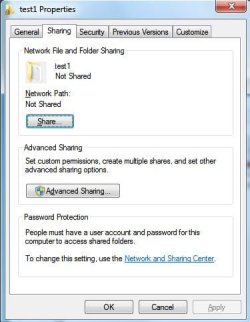
My Computer
- Computer Manufacturer/Model Number
- Lenovo ThinkPad T60
- OS
- Windows 7 Ultimate 64Bit
- CPU
- GenuineIntel Intel(R) Core(TM) DuoCore T2400 @ 1.83GHz
- Motherboard
- Intel(R) 82801G (ICH7 Family)
- Memory
- 2.00 GB
- Graphics Card(s)
- Mobile Intel(R) 945 Express Chipset
- Sound Card
- SoundMAX Integrated Digital HD Audio
- Monitor(s) Displays
- ThinkPad Display
- Screen Resolution
- 1400x1050
- Hard Drives
- 100Gb SATA
- Keyboard
- Standard Keyboard
- Mouse
- HID-compliant Mouse
- Internet Speed
- Cable Broadband - 54Mbps
- Other Info
- Intel(R) PRO/1000 PL Network Connection
11a/b/g Wireless LAN Mini PCI Express Adapter

Try this Win 7 Vista connection walkthough, click on the XP tab and follow the instructions.
Sharing files and printers with different versions of Windows - Help & How-to - Microsoft Windows
After going through all of that if you are still having file access problems try doing this registry adjustment on the Win 7 machine with the problem.
If you are using an A/V software or a third party firewall it's usually best to uninstall them until after you have your network up and running.
If you are still having problems try this registry adjustment on the Win 7 machine which usually fixes this sort of problem.
HKEY_LOCAL_MACHINE\SOFTWARE\Microsoft\Windows\CurrentVersion\Policies\System
create or modify 32-bit DWORD: LocalAccountTokenFilterPolicy
set the value to: 1
Sharing files and printers with different versions of Windows - Help & How-to - Microsoft Windows
After going through all of that if you are still having file access problems try doing this registry adjustment on the Win 7 machine with the problem.
If you are using an A/V software or a third party firewall it's usually best to uninstall them until after you have your network up and running.
If you are still having problems try this registry adjustment on the Win 7 machine which usually fixes this sort of problem.
HKEY_LOCAL_MACHINE\SOFTWARE\Microsoft\Windows\CurrentVersion\Policies\System
create or modify 32-bit DWORD: LocalAccountTokenFilterPolicy
set the value to: 1
My Computer
- Computer type
- PC/Desktop
- Computer Manufacturer/Model Number
- Home built
- OS
- Windows 7 Ult, Windows 8.1 Pro,
- CPU
- Q9650-4.275GHz, E8600 4.5GHz, E6750-3.8GHz
- Motherboard
- Evga 780i FTW
- Memory
- G.Skill PC2 9600 1200Mhz 5 5 5 15 2T
- Graphics Card(s)
- GTX480
- Sound Card
- Asus Xonar D2
- Monitor(s) Displays
- HannsG
- Screen Resolution
- 1680X1050
- Hard Drives
- GSkill Phoenix Pro 120GB SSD
- PSU
- ThermalTake Toughpower 1000Watt modular
- Case
- ThermalTake XaserV
- Cooling
- Xigmatek S1283
- Keyboard
- Logitech G15
- Mouse
- Logitech G9
- Internet Speed
- T1
bobbyrobby
New member
- Local time
- 6:19 PM
- Messages
- 4
Hi,
Not insulting your intelligence, but have you tried checking the "advanced sharing settings" (you can get there by typing it in the orb search menu) and turning on network discovery, file sharing etc.
Try entering \\PC-NAME-HERE in your windows explorer on xp.
I knowI'm stating the obvious but...
Not insulting your intelligence, but have you tried checking the "advanced sharing settings" (you can get there by typing it in the orb search menu) and turning on network discovery, file sharing etc.
Try entering \\PC-NAME-HERE in your windows explorer on xp.
I knowI'm stating the obvious but...
My Computer
- OS
- Windows 7 Starter