Windows 7 - Should I do a clean install?

ThumperSD

New member
Local time
3:41 AM
Messages
128
I just received my 7 Home Premium upgrade disk from HP.

Clean install is obviously better. The thing is that I have SOOO many programs that I have spent many many hours customizing. I will have to re-download many of these programs, which will results in days and days of downloading/installing/customizing. I also have tons of add-ons for Firefox.

Is there any way to make set all of my settings and preferences easier when I reinstall each program? For example, for iTunes alone, I would have to save every playlist, my entire library, iPhone apps, ringtones etc. Would Windows Easy Transfer save my iTunes library, Firefox addons etc?

My HP PC came with a 15-month license Norton Anti-Virus but did not come with a disk. What about my video card and sound card drivers? How would I reinstall it? How about the other HP pre-installed programs?

I have about 137 total programs installed. Many are just updates/patches or codecs for other programs such as Photoshop/Norton Anti-Virus etc.

I am going to hold off on installing 7 until I can get these questions answered. Thanks in advance.
 

My Computer

Computer Manufacturer/Model Number
Self-built
OS
Windows 7
CPU
i7 920 @ 3.8ghz
Motherboard
MSI X58 Pro-E
Memory
6GB Corsair Dominator
Graphics Card(s)
ATI Radeon HD5850
Sound Card
Musiland Monitor 02 US
Monitor(s) Displays
Dell 24"
Screen Resolution
1920x1200
Hard Drives
Intel X25-M 80GB SSD & Samsung Spinpoint F3 1TB
PSU
Antec EA650
Case
Antec 900
Cooling
Corsair H50
Keyboard
Logitech G11
Mouse
Logitech G9x
Internet Speed
23 mb/s
Welcome to Seven Forums, ThumperSD.

I can appreciate your quandry. I went through the same thing moving from the RC to Ultimate.

What I did was an upgrade which kept the old programs and settings intact. I believe that you can do the same thing moving from Vista to Windows 7.

While a clean install is always the first recommendation, if your current configuration is stable, you might want to consider an upgrade route.
 

My Computer

Computer Manufacturer/Model Number
Gateway, Toshiba Laptop, and Home Brew
OS
Windows 7 x64 HP, Windows 7 HP, Windows 7 Ult
CPU
Intel I3, Cerelon, Pentium 4 @ 3Ghz
Motherboard
Intel, Intel, Asus
Memory
8G, 3G, 3G
Graphics Card(s)
On-board Intel, On-board nVidia, nVIDIA card
Sound Card
on-board, on-board, SoundBlaster
Monitor(s) Displays
Hannspree HF237, Toshiba, SyncMaster 931B
Screen Resolution
default (all)
Hard Drives
1T internal, 320G internal, 160G internal, 1T networked
PSU
300w, unk, 650w
Case
black, black, grey
Cooling
air (all)
Keyboard
standard wired (all)
Mouse
standard wired (all)
Internet Speed
6M down, 768K up
Other Info
Home LAN through Linksys hub to 4 port and wireless switch/router. Networked HP 2600n. Wife's computer running Windows 7, and spare laptop running Ubuntu "Karmic Kola" (9.10).
Welcome to Seven Forums, ThumperSD.

I can appreciate your quandry. I went through the same thing moving from the RC to Ultimate.

What I did was an upgrade which kept the old programs and settings intact. I believe that you can do the same thing moving from Vista to Windows 7.

While a clean install is always the first recommendation, if your current configuration is stable, you might want to consider an upgrade route.
Thanks for the reply. I really want to do a clean install. My system is running okay but definitely has problems. So I am assuming that I cannot reinstall these preinstalled programs if I do a clean install?
 

My Computer

Computer Manufacturer/Model Number
Self-built
OS
Windows 7
CPU
i7 920 @ 3.8ghz
Motherboard
MSI X58 Pro-E
Memory
6GB Corsair Dominator
Graphics Card(s)
ATI Radeon HD5850
Sound Card
Musiland Monitor 02 US
Monitor(s) Displays
Dell 24"
Screen Resolution
1920x1200
Hard Drives
Intel X25-M 80GB SSD & Samsung Spinpoint F3 1TB
PSU
Antec EA650
Case
Antec 900
Cooling
Corsair H50
Keyboard
Logitech G11
Mouse
Logitech G9x
Internet Speed
23 mb/s
Hmm, you have quite a job ahead of yourself. Forget the programs. They have to be reinstalled anyhow. Norton you can get from here: ( http://www.norton.com/nis10 ). Make sure you keep all the product keys. No idea regarding iTunes and FF since I don't use those. The drivers will be reinstalled automatically - and if you have something really exotic, you can download the drivers from the manufacturer. The preinstalled programs you may have to reinstall - maybe even purchase again. Those were HP Vista gifts. The data including the playlist you can save and transfer - same with all your own files. I am not looking forward to that job either. But it may help to clean-up.
 

My Computer

Computer Manufacturer/Model Number
HP, Dell, Gateway, Toshiba - 4 laptops and 2 desktops
OS
Vista, Windows7, Mint Mate, Zorin, Windows 8
CPU
from 1.6GHz Duo to i7
Monitor(s) Displays
2x HP w2207
Hard Drives
5x HDD, 7x SSD, 12x Externals
Keyboard
with trackball - no mices
Mouse
Trackball mice
Internet Speed
DSL 6000
Hmm, you have quite a job ahead of yourself. Forget the programs. They have to be reinstalled anyhow. Norton you can get from here: ( http://www.norton.com/nis10 ). Make sure you keep all the product keys. No idea regarding iTunes and FF since I don't use those. The drivers will be reinstalled automatically - and if you have something really exotic, you can download the drivers from the manufacturer. The preinstalled programs you may have to reinstall - maybe even purchase again. Those were HP Vista gifts. The data including the playlist you can save and transfer - same with all your own files. I am not looking forward to that job either. But it may help to clean-up.
Yea I was afraid of that. It would literally take me days, even weeks to reinstall and restore everything. Even then, I still would probably not be able to find many pre-installed programs.

My PC came with Norton pre-installed and did not come with a serial code.

Blah.. upgrading to Win7 is more difficult than I thought.

I was anxious and excited to get my copy in the mail, only to find out the many steps and research I would have to go through.

Am I better off just upgrading instead of doing a clean install?
 

My Computer

Computer Manufacturer/Model Number
Self-built
OS
Windows 7
CPU
i7 920 @ 3.8ghz
Motherboard
MSI X58 Pro-E
Memory
6GB Corsair Dominator
Graphics Card(s)
ATI Radeon HD5850
Sound Card
Musiland Monitor 02 US
Monitor(s) Displays
Dell 24"
Screen Resolution
1920x1200
Hard Drives
Intel X25-M 80GB SSD & Samsung Spinpoint F3 1TB
PSU
Antec EA650
Case
Antec 900
Cooling
Corsair H50
Keyboard
Logitech G11
Mouse
Logitech G9x
Internet Speed
23 mb/s
Welcome to Seven Forums, ThumperSD.

I can appreciate your quandry. I went through the same thing moving from the RC to Ultimate.

What I did was an upgrade which kept the old programs and settings intact. I believe that you can do the same thing moving from Vista to Windows 7.

While a clean install is always the first recommendation, if your current configuration is stable, you might want to consider an upgrade route.
Thanks for the reply. I really want to do a clean install. My system is running okay but definitely has problems. So I am assuming that I cannot reinstall these preinstalled programs if I do a clean install?


If you mean the preinstalled programs that came with your computer..

HP *sometimes* may still have those software programs that you can download and install..to download those programs go to the manufacturer website..It all depends sometimes HP discontinues these programs because you are moving to Windows 7 and They may or may not work..with Windows 7

I do see what you mean about having to download all of your programs again..it takes time..but since you said you have been having problems with Vista I would (my opinion is to do a clean install) because those problems may come to Windows 7 since you are just upgrading..and you might have software related issues..

Hope this Helps..
 

My Computer

Computer Manufacturer/Model Number
HP Pavilion dv5 Notebook PC
OS
Windows Seven x64
CPU
2.2 GHz Dual Core
Motherboard
Quanta 3600
Memory
4GB
Graphics Card(s)
ATI Mobility RADEON HD 3470
Sound Card
ATI
Monitor(s) Displays
Laptop
Hard Drives
ATA Hitachi HTS543215 (5400RPM)
Case
Laptop
Cooling
Fan
Internet Speed
Basic DSL 1.5 up and Down
In the older Nortons, one could display the product key. In IS09, I cannot find it. Suggest you call Symantec. They'll tell you.
I always found upgrades very, very messy. A clean install is also a chance to revamp the whole installation. You do not have to do everything at once, day and night.

edit: I just found that you can get your product key if you go to your Norton account. If you click on your Norton window top right (help and support) and go to "one click support", you can eventually get there - avoids filling out a lot of stupid stuff because it's checking the parameters automatically.
 
Last edited:

My Computer

Computer Manufacturer/Model Number
HP, Dell, Gateway, Toshiba - 4 laptops and 2 desktops
OS
Vista, Windows7, Mint Mate, Zorin, Windows 8
CPU
from 1.6GHz Duo to i7
Monitor(s) Displays
2x HP w2207
Hard Drives
5x HDD, 7x SSD, 12x Externals
Keyboard
with trackball - no mices
Mouse
Trackball mice
Internet Speed
DSL 6000
Okay so I was able to get my Norton serial # so I can reinstall that after a clean install. Honestly, the only other preinstalled program I would like to keep is HP's hardware diagnostic tool. I believe that can only be reinstalled if I reinstall my recovery disk, which will reinstall Vista.

So I guess it all comes down to whether I want to keep that hardware diagnostic tool or not...

I'm not sure if there is any other preinstalled program I would like to keep. I cannot recall everything. I just fear that I do a clean install, then suddenly remember that there was a program I would like to keep. :(

I'm tired of Microsoft claiming it is SOOOO easy to upgrade to 7.. especially when people have so many problems.

What would YOU do in my case?
 

My Computer

Computer Manufacturer/Model Number
Self-built
OS
Windows 7
CPU
i7 920 @ 3.8ghz
Motherboard
MSI X58 Pro-E
Memory
6GB Corsair Dominator
Graphics Card(s)
ATI Radeon HD5850
Sound Card
Musiland Monitor 02 US
Monitor(s) Displays
Dell 24"
Screen Resolution
1920x1200
Hard Drives
Intel X25-M 80GB SSD & Samsung Spinpoint F3 1TB
PSU
Antec EA650
Case
Antec 900
Cooling
Corsair H50
Keyboard
Logitech G11
Mouse
Logitech G9x
Internet Speed
23 mb/s
MS has a program that will move your files and settings called Easy Transfer. I believe you still have to install your programs. Here is the tutorial from MS:
Step-by-Step: Windows 7 Upgrade and Migration
Yea I am currently using Windows Easy Transfer. I do not know what it completely does, but I already backed up everything into my Seagate external HDD. Having 2 backups won't hurt though.

I just don't want to change and modify the setting on nearly every program after I reinstall them on 7. I probably won't remember half of the little settings I have changed.
 

My Computer

Computer Manufacturer/Model Number
Self-built
OS
Windows 7
CPU
i7 920 @ 3.8ghz
Motherboard
MSI X58 Pro-E
Memory
6GB Corsair Dominator
Graphics Card(s)
ATI Radeon HD5850
Sound Card
Musiland Monitor 02 US
Monitor(s) Displays
Dell 24"
Screen Resolution
1920x1200
Hard Drives
Intel X25-M 80GB SSD & Samsung Spinpoint F3 1TB
PSU
Antec EA650
Case
Antec 900
Cooling
Corsair H50
Keyboard
Logitech G11
Mouse
Logitech G9x
Internet Speed
23 mb/s

My Computer

Computer Manufacturer/Model Number
tw33k
OS
Windows 7 Ultimate (x64) SP1
CPU
Intel 3770k 4.6GHz
Motherboard
ASUS Maximus V Formula
Memory
8GB (2x 4GB) Crucial Ballistix
Graphics Card(s)
Sapphire 7950 (1060/1600)
Sound Card
On Board Realtek HD Audio
Monitor(s) Displays
27" Acer B273HU (via HDMI)
Screen Resolution
2048 x 1152
Hard Drives
Crucial M4 128GB
2TB WD Black
1TB Samsung F3 SATA
1TB WD Elite External
2TB WD USB 3.0
PSU
Corsair AX750 Gold
Case
Corsair Obsidian 800DW
Cooling
Corsair H100 (2x AP-121/2x UK-3000 push/pull)
Keyboard
Microsoft Wireless 5000
Mouse
Microsoft Wireless 5000
Internet Speed
5mb/s
Other Info
Logitech z-2300 2.1 speakers
Lamptron FC-5 v2
If I were you, I'd bite the bullet and just do a clean install. If you're worried about forgetting about apps, use the trial of treesize pro (JAM Software - TreeSize Professional - Hard Disk Space Manager that shows folder size and many more statistics) and take inventory. I understand that you're hesitant but once you're finished the difference in performance will more than be worth it.
That is exactly why I want to do a clean install. I know it will be worth it after it's all done.

What does TreeSize professional do exactly?
 

My Computer

Computer Manufacturer/Model Number
Self-built
OS
Windows 7
CPU
i7 920 @ 3.8ghz
Motherboard
MSI X58 Pro-E
Memory
6GB Corsair Dominator
Graphics Card(s)
ATI Radeon HD5850
Sound Card
Musiland Monitor 02 US
Monitor(s) Displays
Dell 24"
Screen Resolution
1920x1200
Hard Drives
Intel X25-M 80GB SSD & Samsung Spinpoint F3 1TB
PSU
Antec EA650
Case
Antec 900
Cooling
Corsair H50
Keyboard
Logitech G11
Mouse
Logitech G9x
Internet Speed
23 mb/s
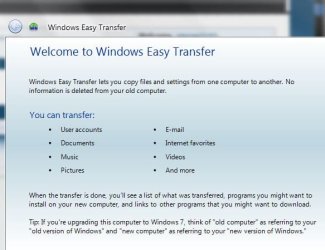
Easy Transfer will move your settings which are stored in AppData and elsewhere. So your programs should be set as they were before when you reinstall them.

Consider leaving the Norton bloatware behind. Try a lightweight free AV application like Avast Free Home, which impacts your system much less and still never lets bad guys in as long as you have it turned on. It works extremely well with the built-in Windows Defender and WIndows Firewall.
 
That is exactly why I want to do a clean install. I know it will be worth it after it's all done.

What does TreeSize professional do exactly?

It will tell you exactly what is installed and where. It's a very handy tool.I use it often at work when I'm doing pc audits etc
 

My Computer

Computer Manufacturer/Model Number
tw33k
OS
Windows 7 Ultimate (x64) SP1
CPU
Intel 3770k 4.6GHz
Motherboard
ASUS Maximus V Formula
Memory
8GB (2x 4GB) Crucial Ballistix
Graphics Card(s)
Sapphire 7950 (1060/1600)
Sound Card
On Board Realtek HD Audio
Monitor(s) Displays
27" Acer B273HU (via HDMI)
Screen Resolution
2048 x 1152
Hard Drives
Crucial M4 128GB
2TB WD Black
1TB Samsung F3 SATA
1TB WD Elite External
2TB WD USB 3.0
PSU
Corsair AX750 Gold
Case
Corsair Obsidian 800DW
Cooling
Corsair H100 (2x AP-121/2x UK-3000 push/pull)
Keyboard
Microsoft Wireless 5000
Mouse
Microsoft Wireless 5000
Internet Speed
5mb/s
Other Info
Logitech z-2300 2.1 speakers
Lamptron FC-5 v2
MS has a program that will move your files and settings called Easy Transfer. I believe you still have to install your programs. Here is the tutorial from MS:
Step-by-Step: Windows 7 Upgrade and Migration
Yea I am currently using Windows Easy Transfer. I do not know what it completely does, but I already backed up everything into my Seagate external HDD. Having 2 backups won't hurt though.

I just don't want to change and modify the setting on nearly every program after I reinstall them on 7. I probably won't remember half of the little settings I have changed.


How large was your Windows Easy Transfer file to your external HD ?
 

Attachments

  • WindowsEasyTransfer_Capture.JPG
    WindowsEasyTransfer_Capture.JPG
    40.4 KB · Views: 8
  • Windows_Easy_Transfer.JPG
    Windows_Easy_Transfer.JPG
    13.1 KB · Views: 8

My Computer

Computer type
PC/Desktop
Computer Manufacturer/Model Number
Built them myself, Science Experiments !
OS
Win7 Enterprise, Win7 x86 (Ult 7600), Win7 x64 Ult 7600, TechNet RTM on AMD x64 (2.8Ghz)
CPU
AMD fx8350 4ghz, AMD-32 2400mhz, AMD-64 3200mhz, AMDx64 2.8G
Motherboard
SIS 755, ECS-K8M890M-M (Ult 7600), GigaByte & others
Memory
2gb, 4gb on the Ult 7600, 4gb on Technet RTM, 32gb on FX8350
Graphics Card(s)
Draw my own Graphics, several nVidia cards
Sound Card
on motherboard
Monitor(s) Displays
19" flat scr, 28" I-Inc widescr,22" Emprex Widescr, 23" Acer
Screen Resolution
1280 x 1024, 1440 x 900, 1920 x 1080
Hard Drives
6 pata Ide HD's & 2 Sata HD's
added 80gb external on Ult 7600 computer,
numerous extra 1tb, 2TB, 3Tb SATA HD's
A collection of ext HD Docks w/ HDs
PSU
430w, 550w, 600w, 700, 800, etc
Case
All Generic Full Towers
Cooling
Open Air & a few fans, some w/ colored LEDs
Keyboard
Compaq & Dell recycled from GoodWill
Mouse
Made in China Optical Wired Mouse
Internet Speed
Fast Cable InterNet
Antivirus
AVG Free on 24 different Desktops, NO Problems!
Browser
IE 8 is preferred, but use FireFox sometimes
Other Info
Linksys Routers, switches, & Hubs
Too Many USB Flash Drives to count, Biggest is 64GB !
Eight computers in my home network.
Sixteen computers at my business network.
Linked via TeamViewer !
Lots of old used spare computer parts everywhere!
Okay so I was able to get my Norton serial # so I can reinstall that after a clean install. Honestly, the only other preinstalled program I would like to keep is HP's hardware diagnostic tool. I believe that can only be reinstalled if I reinstall my recovery disk, which will reinstall Vista.

So I guess it all comes down to whether I want to keep that hardware diagnostic tool or not...

I'm not sure if there is any other preinstalled program I would like to keep. I cannot recall everything. I just fear that I do a clean install, then suddenly remember that there was a program I would like to keep. :(

I'm tired of Microsoft claiming it is SOOOO easy to upgrade to 7.. especially when people have so many problems.

What would YOU do in my case?

No, No, No - not the serial number. You need the 25 digit product key. The serial number is something different.
Looks like you are getting a lot of advice. Like using Avast in lieu of Norton - this is completely ridiculous. Norton IS09 and 10 are fine products that outperform most every other product.
Treesize is a similar product like WinDirStat ( http://windirstat.info/ ) that I use. It shows you what's on your disk - all the system and user files. But not the shadowstorage - for that you have to use cmd.
 

My Computer

Computer Manufacturer/Model Number
HP, Dell, Gateway, Toshiba - 4 laptops and 2 desktops
OS
Vista, Windows7, Mint Mate, Zorin, Windows 8
CPU
from 1.6GHz Duo to i7
Monitor(s) Displays
2x HP w2207
Hard Drives
5x HDD, 7x SSD, 12x Externals
Keyboard
with trackball - no mices
Mouse
Trackball mice
Internet Speed
DSL 6000
MS has a program that will move your files and settings called Easy Transfer. I believe you still have to install your programs. Here is the tutorial from MS:
Step-by-Step: Windows 7 Upgrade and Migration
Yea I am currently using Windows Easy Transfer. I do not know what it completely does, but I already backed up everything into my Seagate external HDD. Having 2 backups won't hurt though.

I just don't want to change and modify the setting on nearly every program after I reinstall them on 7. I probably won't remember half of the little settings I have changed.


How large was your Windows Easy Transfer file to your external HD ?
125gb
 

My Computer

Computer Manufacturer/Model Number
Self-built
OS
Windows 7
CPU
i7 920 @ 3.8ghz
Motherboard
MSI X58 Pro-E
Memory
6GB Corsair Dominator
Graphics Card(s)
ATI Radeon HD5850
Sound Card
Musiland Monitor 02 US
Monitor(s) Displays
Dell 24"
Screen Resolution
1920x1200
Hard Drives
Intel X25-M 80GB SSD & Samsung Spinpoint F3 1TB
PSU
Antec EA650
Case
Antec 900
Cooling
Corsair H50
Keyboard
Logitech G11
Mouse
Logitech G9x
Internet Speed
23 mb/s
Okay so I was able to get my Norton serial # so I can reinstall that after a clean install. Honestly, the only other preinstalled program I would like to keep is HP's hardware diagnostic tool. I believe that can only be reinstalled if I reinstall my recovery disk, which will reinstall Vista.

So I guess it all comes down to whether I want to keep that hardware diagnostic tool or not...

I'm not sure if there is any other preinstalled program I would like to keep. I cannot recall everything. I just fear that I do a clean install, then suddenly remember that there was a program I would like to keep. :(

I'm tired of Microsoft claiming it is SOOOO easy to upgrade to 7.. especially when people have so many problems.

What would YOU do in my case?

No, No, No - not the serial number. You need the 25 digit product key. The serial number is something different.
Looks like you are getting a lot of advice. Like using Avast in lieu of Norton - this is completely ridiculous. Norton IS09 and 10 are fine products that outperform most every other product.
Treesize is a similar product like WinDirStat ( WinDirStat - Windows Directory Statistics ) that I use. It shows you what's on your disk - all the system and user files. But not the shadowstorage - for that you have to use cmd.
I also have the 25 digit product key along with the product #. I will definitely be using Norton since my processor and RAM is more than capable of handling the program. I like Norton a lot.
 

My Computer

Computer Manufacturer/Model Number
Self-built
OS
Windows 7
CPU
i7 920 @ 3.8ghz
Motherboard
MSI X58 Pro-E
Memory
6GB Corsair Dominator
Graphics Card(s)
ATI Radeon HD5850
Sound Card
Musiland Monitor 02 US
Monitor(s) Displays
Dell 24"
Screen Resolution
1920x1200
Hard Drives
Intel X25-M 80GB SSD & Samsung Spinpoint F3 1TB
PSU
Antec EA650
Case
Antec 900
Cooling
Corsair H50
Keyboard
Logitech G11
Mouse
Logitech G9x
Internet Speed
23 mb/s
So I suppose there is no way to reinstall HP's hardware diagnostic tool on a clean installed Win7
 

My Computer

Computer Manufacturer/Model Number
Self-built
OS
Windows 7
CPU
i7 920 @ 3.8ghz
Motherboard
MSI X58 Pro-E
Memory
6GB Corsair Dominator
Graphics Card(s)
ATI Radeon HD5850
Sound Card
Musiland Monitor 02 US
Monitor(s) Displays
Dell 24"
Screen Resolution
1920x1200
Hard Drives
Intel X25-M 80GB SSD & Samsung Spinpoint F3 1TB
PSU
Antec EA650
Case
Antec 900
Cooling
Corsair H50
Keyboard
Logitech G11
Mouse
Logitech G9x
Internet Speed
23 mb/s
So I suppose there is no way to reinstall HP's hardware diagnostic tool on a clean installed Win7


Check the Hp website. Maybe they have a download for it. I would have looked it up but all I get is the German Hp website. Else, there are many diagnostic tools from other sources. Maybe you can find an equivalent.
 

My Computer

Computer Manufacturer/Model Number
HP, Dell, Gateway, Toshiba - 4 laptops and 2 desktops
OS
Vista, Windows7, Mint Mate, Zorin, Windows 8
CPU
from 1.6GHz Duo to i7
Monitor(s) Displays
2x HP w2207
Hard Drives
5x HDD, 7x SSD, 12x Externals
Keyboard
with trackball - no mices
Mouse
Trackball mice
Internet Speed
DSL 6000
Back
Top