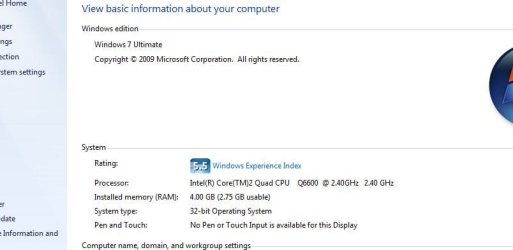
Windows 7 showing far less RAM than should be....

Spice Boy

New member
Local time
12:54 PM
Messages
13
Location
Cardiff, S.Wales, UK
Hiya people, lurker speaking for the 1st time :D

I have a RAM issue that a little baffling...

Now I know that the 32-bit OS wont show all of my 4GB as usable but its showing alot less than 4GB.... See pic :)

Any ideas what I can do?
 

Attachments

  • desk2.JPG
    desk2.JPG
    33 KB · Views: 3,519

My Computer My Computer

Computer Manufacturer/Model Number
Custom Build
OS
Windows 7 Ultimate 7600
CPU
Intel Core2Quad Q6600
Motherboard
XFX nForce 680i LT SLi
Memory
OCZ DDR2 4GB 800MHz SLi
Graphics Card(s)
nVidia GeForce 9800GT 512MB SLi
Sound Card
Mobo soundcard output to Panasonic SA-AK770
Monitor(s) Displays
LG Flatron W2234S
Screen Resolution
1680 x 1050
Hard Drives
Samsung 1TB HD103UJ Internal
Maxtor 1TB External
PSU
Novatech WinPower 750W
Case
Coolermaster CM 690 Tower
Cooling
Standard case fans (for now)
Keyboard
Microsoft Wireless Keyboard 2000
Mouse
Microsoft Wireless Optical Mouse 2000
Internet Speed
8MB
Do you have an integrated video card on your machine with "shared memory"?? My guess is that a certain amount of your main memory is being reserved for the video card....thus leaving about 2.75G
 

My Computer My Computer

Computer Manufacturer/Model Number
Self-Built in July 2009
OS
Windows 7 Ultimate x64
CPU
Intel Q9550 2.83Ghz OC'd to 3.40Ghz
Motherboard
Gigabyte GA-EP45-UD3R rev. 1.1, F12 BIOS
Memory
8GB G.Skill PI DDR2-800, 4-4-4-12 timings
Graphics Card(s)
EVGA 1280MB Nvidia GeForce GTX570
Sound Card
Realtek ALC899A 8 channel onboard audio
Monitor(s) Displays
23" Acer x233H
Screen Resolution
1920x1080
Hard Drives
Intel X25-M 80GB Gen 2 SSD
Western Digital 1TB Caviar Black, 32MB cache. WD1001FALS
PSU
Corsair 620HX modular
Case
Antec P182
Cooling
stock
Keyboard
ABS M1 Mechanical
Mouse
Logitech G9 Laser Mouse
Internet Speed
15/2 cable modem
Other Info
Windows and Linux enthusiast. Logitech G35 Headset.
I have an external graphics card so I dont think that any of the RAM should be used for graphics... but Im not that tech savvy so could be wrong! lol
 

My Computer My Computer

Computer Manufacturer/Model Number
Custom Build
OS
Windows 7 Ultimate 7600
CPU
Intel Core2Quad Q6600
Motherboard
XFX nForce 680i LT SLi
Memory
OCZ DDR2 4GB 800MHz SLi
Graphics Card(s)
nVidia GeForce 9800GT 512MB SLi
Sound Card
Mobo soundcard output to Panasonic SA-AK770
Monitor(s) Displays
LG Flatron W2234S
Screen Resolution
1680 x 1050
Hard Drives
Samsung 1TB HD103UJ Internal
Maxtor 1TB External
PSU
Novatech WinPower 750W
Case
Coolermaster CM 690 Tower
Cooling
Standard case fans (for now)
Keyboard
Microsoft Wireless Keyboard 2000
Mouse
Microsoft Wireless Optical Mouse 2000
Internet Speed
8MB
Open Resource Monitor (start, type: "resource monitor") then go to the memory section. Take a screenshot of the "Physical Memory" block.
 

My Computer My Computer

Computer type
PC/Desktop
Computer Manufacturer/Model Number
Alienware Aurora ALX R4
OS
Windows 10 Pro (x64)
CPU
Intel Core i7-3930K (3.2GHz - 4.5GHz)
Motherboard
Alienware Aurora-R4 x79
Memory
4x Samsung 4GB PC3-12800 DDR3 (16GB 1600MHz)
Graphics Card(s)
Nvidia Geforce GTX 690
Sound Card
SteelSeries Siberia Elite
Monitor(s) Displays
Dell UltraSharp U3011
Screen Resolution
2560x1600
Hard Drives
Samsung 850 Pro 256 GB, Seagate 1TB Desktop Hybrid HDD, 2x Western Digital 4TB Green HDD
PSU
875W Some Dell PSU <.<
Case
Alienware Aurora ALX
Cooling
Custom Liquid Cooling (EK CPU & GPU blocks) dual EK 480RAD
Keyboard
Logitech G710+ Mechanical
Mouse
Logitech G700s
Internet Speed
Verizon Fios (50 mbps average)
Other Info
Server: Intel NUC D54250WYK: i5-4250U, 16GB, 256 GB mSATA, Windows Server 2012 R2
Ok, here is what you asked for (I think)
 

Attachments

  • ram1.JPG
    ram1.JPG
    95.4 KB · Views: 795

My Computer My Computer

Computer Manufacturer/Model Number
Custom Build
OS
Windows 7 Ultimate 7600
CPU
Intel Core2Quad Q6600
Motherboard
XFX nForce 680i LT SLi
Memory
OCZ DDR2 4GB 800MHz SLi
Graphics Card(s)
nVidia GeForce 9800GT 512MB SLi
Sound Card
Mobo soundcard output to Panasonic SA-AK770
Monitor(s) Displays
LG Flatron W2234S
Screen Resolution
1680 x 1050
Hard Drives
Samsung 1TB HD103UJ Internal
Maxtor 1TB External
PSU
Novatech WinPower 750W
Case
Coolermaster CM 690 Tower
Cooling
Standard case fans (for now)
Keyboard
Microsoft Wireless Keyboard 2000
Mouse
Microsoft Wireless Optical Mouse 2000
Internet Speed
8MB
Well as you can see from the graph, 1282 MB is going for hardware reservations. There might be an option in the BIOS to limit that. Memory mapping or something similar sounding. I really know nothing of the GeForce 9800G, but does it have 1 GB of onboard memory?

http://www.asisupport.com/ts_4GB_memory_info.htm (A little old but still contains good information)
This behavior is due to "memory mapped IO reservations". Those reservations overlay the physical address space and mask out those physical addresses so that they cannot be used for working memory. This is independent of the OS running on the machine.
 

My Computer My Computer

Computer type
PC/Desktop
Computer Manufacturer/Model Number
Alienware Aurora ALX R4
OS
Windows 10 Pro (x64)
CPU
Intel Core i7-3930K (3.2GHz - 4.5GHz)
Motherboard
Alienware Aurora-R4 x79
Memory
4x Samsung 4GB PC3-12800 DDR3 (16GB 1600MHz)
Graphics Card(s)
Nvidia Geforce GTX 690
Sound Card
SteelSeries Siberia Elite
Monitor(s) Displays
Dell UltraSharp U3011
Screen Resolution
2560x1600
Hard Drives
Samsung 850 Pro 256 GB, Seagate 1TB Desktop Hybrid HDD, 2x Western Digital 4TB Green HDD
PSU
875W Some Dell PSU <.<
Case
Alienware Aurora ALX
Cooling
Custom Liquid Cooling (EK CPU & GPU blocks) dual EK 480RAD
Keyboard
Logitech G710+ Mechanical
Mouse
Logitech G700s
Internet Speed
Verizon Fios (50 mbps average)
Other Info
Server: Intel NUC D54250WYK: i5-4250U, 16GB, 256 GB mSATA, Windows Server 2012 R2
no its only got 512mb onboard memory, could that be a factor?

I shall take a look at the bios settings shortly ansd have a play :D
 

My Computer My Computer

Computer Manufacturer/Model Number
Custom Build
OS
Windows 7 Ultimate 7600
CPU
Intel Core2Quad Q6600
Motherboard
XFX nForce 680i LT SLi
Memory
OCZ DDR2 4GB 800MHz SLi
Graphics Card(s)
nVidia GeForce 9800GT 512MB SLi
Sound Card
Mobo soundcard output to Panasonic SA-AK770
Monitor(s) Displays
LG Flatron W2234S
Screen Resolution
1680 x 1050
Hard Drives
Samsung 1TB HD103UJ Internal
Maxtor 1TB External
PSU
Novatech WinPower 750W
Case
Coolermaster CM 690 Tower
Cooling
Standard case fans (for now)
Keyboard
Microsoft Wireless Keyboard 2000
Mouse
Microsoft Wireless Optical Mouse 2000
Internet Speed
8MB

My Computer My Computer

Computer Manufacturer/Model Number
Self-Built in July 2009
OS
Windows 7 Ultimate x64
CPU
Intel Q9550 2.83Ghz OC'd to 3.40Ghz
Motherboard
Gigabyte GA-EP45-UD3R rev. 1.1, F12 BIOS
Memory
8GB G.Skill PI DDR2-800, 4-4-4-12 timings
Graphics Card(s)
EVGA 1280MB Nvidia GeForce GTX570
Sound Card
Realtek ALC899A 8 channel onboard audio
Monitor(s) Displays
23" Acer x233H
Screen Resolution
1920x1080
Hard Drives
Intel X25-M 80GB Gen 2 SSD
Western Digital 1TB Caviar Black, 32MB cache. WD1001FALS
PSU
Corsair 620HX modular
Case
Antec P182
Cooling
stock
Keyboard
ABS M1 Mechanical
Mouse
Logitech G9 Laser Mouse
Internet Speed
15/2 cable modem
Other Info
Windows and Linux enthusiast. Logitech G35 Headset.
I searched through the whole BIOS menu but nothing anywhere that even sounds a little like Memory Mapping... so Im lost there :(

I have an nVidia GeForce 9800GT as my graphics which has 512MB of onboard memory...

Sorry but I cant see any helpful stuff in that Gamespot link? Also would what they are talking about be relevent for the 32-Bit OS?
 

My Computer My Computer

Computer Manufacturer/Model Number
Custom Build
OS
Windows 7 Ultimate 7600
CPU
Intel Core2Quad Q6600
Motherboard
XFX nForce 680i LT SLi
Memory
OCZ DDR2 4GB 800MHz SLi
Graphics Card(s)
nVidia GeForce 9800GT 512MB SLi
Sound Card
Mobo soundcard output to Panasonic SA-AK770
Monitor(s) Displays
LG Flatron W2234S
Screen Resolution
1680 x 1050
Hard Drives
Samsung 1TB HD103UJ Internal
Maxtor 1TB External
PSU
Novatech WinPower 750W
Case
Coolermaster CM 690 Tower
Cooling
Standard case fans (for now)
Keyboard
Microsoft Wireless Keyboard 2000
Mouse
Microsoft Wireless Optical Mouse 2000
Internet Speed
8MB

My Computer My Computer

Computer Manufacturer/Model Number
Self-Built in July 2009
OS
Windows 7 Ultimate x64
CPU
Intel Q9550 2.83Ghz OC'd to 3.40Ghz
Motherboard
Gigabyte GA-EP45-UD3R rev. 1.1, F12 BIOS
Memory
8GB G.Skill PI DDR2-800, 4-4-4-12 timings
Graphics Card(s)
EVGA 1280MB Nvidia GeForce GTX570
Sound Card
Realtek ALC899A 8 channel onboard audio
Monitor(s) Displays
23" Acer x233H
Screen Resolution
1920x1080
Hard Drives
Intel X25-M 80GB Gen 2 SSD
Western Digital 1TB Caviar Black, 32MB cache. WD1001FALS
PSU
Corsair 620HX modular
Case
Antec P182
Cooling
stock
Keyboard
ABS M1 Mechanical
Mouse
Logitech G9 Laser Mouse
Internet Speed
15/2 cable modem
Other Info
Windows and Linux enthusiast. Logitech G35 Headset.
Yip looks like my graphics card is sucking over 1GB of RAM... this is not acceptable!! lol

Ive looked through the BIOS again and still nothing showing up there to help... Im almost at a loss... checked and Im using the latest driver for the card aswell...

Depression is starting to set in :(
 

My Computer My Computer

Computer Manufacturer/Model Number
Custom Build
OS
Windows 7 Ultimate 7600
CPU
Intel Core2Quad Q6600
Motherboard
XFX nForce 680i LT SLi
Memory
OCZ DDR2 4GB 800MHz SLi
Graphics Card(s)
nVidia GeForce 9800GT 512MB SLi
Sound Card
Mobo soundcard output to Panasonic SA-AK770
Monitor(s) Displays
LG Flatron W2234S
Screen Resolution
1680 x 1050
Hard Drives
Samsung 1TB HD103UJ Internal
Maxtor 1TB External
PSU
Novatech WinPower 750W
Case
Coolermaster CM 690 Tower
Cooling
Standard case fans (for now)
Keyboard
Microsoft Wireless Keyboard 2000
Mouse
Microsoft Wireless Optical Mouse 2000
Internet Speed
8MB
Yip looks like my graphics card is sucking over 1GB of RAM... this is not acceptable!! lol

Ive looked through the BIOS again and still nothing showing up there to help... Im almost at a loss... checked and Im using the latest driver for the card aswell...

Depression is starting to set in :(

No need to be depressed. 64-bit to the rescue :)
 

My Computer My Computer

Computer Manufacturer/Model Number
Multiple machines in various stages of decomposition.
OS
Win7x64
No need to be depressed. 64-bit to the rescue :)

Damn, does that mean I gotta buy the 64-Bit windows? Doesn't that mean that I can't use my printer etc? or games?
 

My Computer My Computer

Computer Manufacturer/Model Number
Custom Build
OS
Windows 7 Ultimate 7600
CPU
Intel Core2Quad Q6600
Motherboard
XFX nForce 680i LT SLi
Memory
OCZ DDR2 4GB 800MHz SLi
Graphics Card(s)
nVidia GeForce 9800GT 512MB SLi
Sound Card
Mobo soundcard output to Panasonic SA-AK770
Monitor(s) Displays
LG Flatron W2234S
Screen Resolution
1680 x 1050
Hard Drives
Samsung 1TB HD103UJ Internal
Maxtor 1TB External
PSU
Novatech WinPower 750W
Case
Coolermaster CM 690 Tower
Cooling
Standard case fans (for now)
Keyboard
Microsoft Wireless Keyboard 2000
Mouse
Microsoft Wireless Optical Mouse 2000
Internet Speed
8MB
No need to be depressed. 64-bit to the rescue :)

Damn, does that mean I gotta buy the 64-Bit windows? Doesn't that mean that I can't use my printer etc? or games?

as far as your printer goes, all you need to do is to find a 64bit driver for it. if it's from a decent manufacturer and not too old you shouldn't have trouble finding one.

the same goes for the rest of your hardware.

and games run fine on 64 bit - a lot of gamers are moving onto it, to take advantage of extra memory use...
 

My Computer My Computer

Computer Manufacturer/Model Number
mickey megabyte 1234
OS
ultimate 64 sp1
CPU
i5 2500K [email protected]
Motherboard
MSI P67A-GD53
Memory
8 gigs GSkill Ripjaws 1600
Graphics Card(s)
amd hd6950
Sound Card
creative x-fi gamer
Monitor(s) Displays
samsung 24"
Screen Resolution
1920x1080
Hard Drives
ocz vertex 2e 60 gig, samsung f3 1tb, buffalo 2tb ext
PSU
antec 550
Case
antec three hundred
Cooling
i'm a cooling fan
Keyboard
saitek eclipse ii
Mouse
logitech g3
Internet Speed
about 4 Mbps
Other Info
i love win7
Sounds like it could be a good move... is there a way I can find out if there are drivers for everything I use Hadware and software wise?

Sorry for all the questions but Im trying to learn as quick as I can lol... I can build them but cant programme them!
 

My Computer My Computer

Computer Manufacturer/Model Number
Custom Build
OS
Windows 7 Ultimate 7600
CPU
Intel Core2Quad Q6600
Motherboard
XFX nForce 680i LT SLi
Memory
OCZ DDR2 4GB 800MHz SLi
Graphics Card(s)
nVidia GeForce 9800GT 512MB SLi
Sound Card
Mobo soundcard output to Panasonic SA-AK770
Monitor(s) Displays
LG Flatron W2234S
Screen Resolution
1680 x 1050
Hard Drives
Samsung 1TB HD103UJ Internal
Maxtor 1TB External
PSU
Novatech WinPower 750W
Case
Coolermaster CM 690 Tower
Cooling
Standard case fans (for now)
Keyboard
Microsoft Wireless Keyboard 2000
Mouse
Microsoft Wireless Optical Mouse 2000
Internet Speed
8MB
Sounds like it could be a good move... is there a way I can find out if there are drivers for everything I use Hadware and software wise?

Sorry for all the questions but Im trying to learn as quick as I can lol... I can build them but cant programme them!

64-bit drivers are available for virtually all hardware from reputable manufacturers made in the past (say) couple of years. The only time you might run into driver availability problems is if you've got relatively old (>3 or 4 years) hardware and the manufacturer would rather you spend the money to buy their new model, instead of them spending the money to write a 64-bit driver for their old model which you already own.

In short, everything will be fine on 64-bit unless you own a 300DPI scanner from the early 90s which you're desperate to continue to use :)
 

My Computer My Computer

Computer Manufacturer/Model Number
Multiple machines in various stages of decomposition.
OS
Win7x64
Thanks H2SO4!! :D

All my gear is less than 1 year old (all bought in 2009) so really I shouldnt have any issues...

However, I do have an interesting question.....

If x64 uses more RAM and (from what I have read) is better to use with multi-core processors, then will all OS eventually be x64 only or will they forever use x86 and if they do keep x86, then why?

Can of worms anyone? :D
 

My Computer My Computer

Computer Manufacturer/Model Number
Custom Build
OS
Windows 7 Ultimate 7600
CPU
Intel Core2Quad Q6600
Motherboard
XFX nForce 680i LT SLi
Memory
OCZ DDR2 4GB 800MHz SLi
Graphics Card(s)
nVidia GeForce 9800GT 512MB SLi
Sound Card
Mobo soundcard output to Panasonic SA-AK770
Monitor(s) Displays
LG Flatron W2234S
Screen Resolution
1680 x 1050
Hard Drives
Samsung 1TB HD103UJ Internal
Maxtor 1TB External
PSU
Novatech WinPower 750W
Case
Coolermaster CM 690 Tower
Cooling
Standard case fans (for now)
Keyboard
Microsoft Wireless Keyboard 2000
Mouse
Microsoft Wireless Optical Mouse 2000
Internet Speed
8MB
Thanks H2SO4!! :D

All my gear is less than 1 year old (all bought in 2009) so really I shouldnt have any issues...

However, I do have an interesting question.....

If x64 uses more RAM and (from what I have read) is better to use with multi-core processors, then will all OS eventually be x64 only or will they forever use x86 and if they do keep x86, then why?

Can of worms anyone? :D

Ah, where to start :)

It's true that x64 "uses more RAM", although the difference is marginal and nowhere near the "double" multiplier that many talk about - it's more like 10%. However, the benefits outweigh the slightly bigger footprint because data is passed around somewhat quicker and the amount of addressable memory space is vastly greater.

x86 has been bumping up against architectural limitations for several years now. My own estimate is that new systems with a 32-bit OS installation will be few and far in between ~18 months from now. The hardware is already all 64-bit capable, and has been for several years. It's really only the (un)availability of 64-drivers for older hardware periperhals that's kept x86 alive this long.

There is absolutely no doubt that x64 will prevail.
 

My Computer My Computer

Computer Manufacturer/Model Number
Multiple machines in various stages of decomposition.
OS
Win7x64
Thats what it seems like to me...

Looks like I will be forking out for x64 to replace my x86! Good thing to get on the x64 bandwagon now I suppose...

Infact, hope I can get ultimate 64 the same way I got 32!
 

My Computer My Computer

Computer Manufacturer/Model Number
Custom Build
OS
Windows 7 Ultimate 7600
CPU
Intel Core2Quad Q6600
Motherboard
XFX nForce 680i LT SLi
Memory
OCZ DDR2 4GB 800MHz SLi
Graphics Card(s)
nVidia GeForce 9800GT 512MB SLi
Sound Card
Mobo soundcard output to Panasonic SA-AK770
Monitor(s) Displays
LG Flatron W2234S
Screen Resolution
1680 x 1050
Hard Drives
Samsung 1TB HD103UJ Internal
Maxtor 1TB External
PSU
Novatech WinPower 750W
Case
Coolermaster CM 690 Tower
Cooling
Standard case fans (for now)
Keyboard
Microsoft Wireless Keyboard 2000
Mouse
Microsoft Wireless Optical Mouse 2000
Internet Speed
8MB
Going x64 probably is not going to help. It appears as if this card is setting 1+ GB of reserved space regardless. Before getting too excited, download a copy of Windows 7 Enterprise 90-day Eval. Either see about dual booting, or without messing with HDD partitions try Booting to VHD.

http://code.msdn.microsoft.com/InstallWindowsImage
 

My Computer My Computer

Computer type
PC/Desktop
Computer Manufacturer/Model Number
Alienware Aurora ALX R4
OS
Windows 10 Pro (x64)
CPU
Intel Core i7-3930K (3.2GHz - 4.5GHz)
Motherboard
Alienware Aurora-R4 x79
Memory
4x Samsung 4GB PC3-12800 DDR3 (16GB 1600MHz)
Graphics Card(s)
Nvidia Geforce GTX 690
Sound Card
SteelSeries Siberia Elite
Monitor(s) Displays
Dell UltraSharp U3011
Screen Resolution
2560x1600
Hard Drives
Samsung 850 Pro 256 GB, Seagate 1TB Desktop Hybrid HDD, 2x Western Digital 4TB Green HDD
PSU
875W Some Dell PSU <.<
Case
Alienware Aurora ALX
Cooling
Custom Liquid Cooling (EK CPU & GPU blocks) dual EK 480RAD
Keyboard
Logitech G710+ Mechanical
Mouse
Logitech G700s
Internet Speed
Verizon Fios (50 mbps average)
Other Info
Server: Intel NUC D54250WYK: i5-4250U, 16GB, 256 GB mSATA, Windows Server 2012 R2
Back
Top